1. Introduction
Thank you for choosing the Baseus Bendable Memory Titanium Alloy Car Mount and the 163W Retractable Car Charger PrimeTrip VR2 Max. This comprehensive manual provides detailed instructions for the setup, operation, and maintenance of both products, ensuring you get the most out of your devices. Please read this manual carefully before use and retain it for future reference.
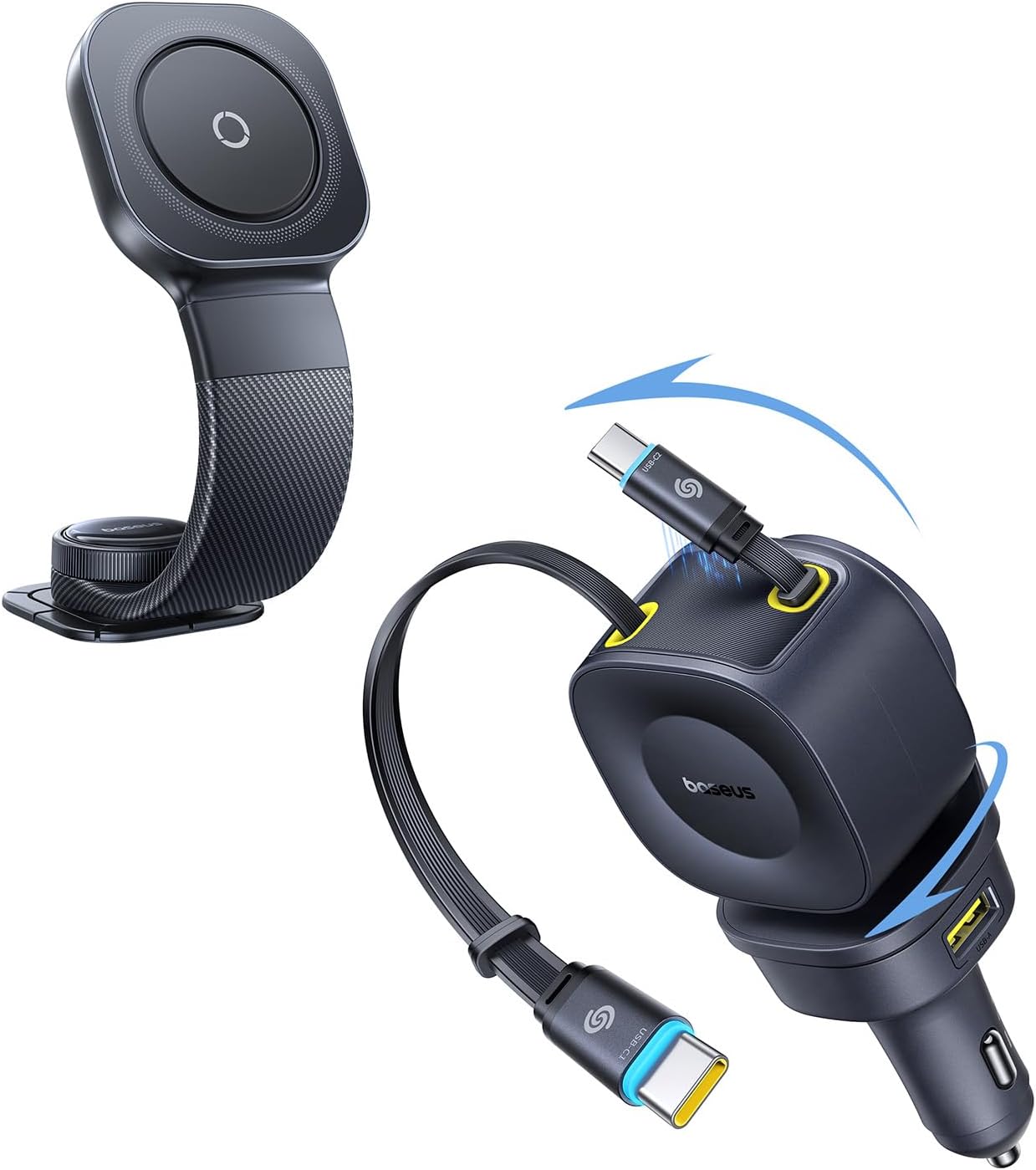
Image: The Baseus Bendable Memory Titanium Alloy Car Mount and the 163W Retractable Car Charger PrimeTrip VR2 Max, showcasing both components together.
2. Package Contents
Please verify that all items are present in your package:
- Baseus 163W Retractable Car Charger PrimeTrip VR2 Max
- Baseus Bendable Memory Titanium Alloy Car Mount (C03)
- User Manual (this document)
3. Setup & Installation
3.1. Installing the 163W Retractable Car Charger
- Locate your vehicle's cigarette lighter socket (12V power outlet).
- Insert the Baseus 163W Retractable Car Charger firmly into the socket until it is securely seated.
- The charger is now ready for use.
3.2. Installing the Bendable Car Mount
The car mount can be installed on various surfaces such as the dashboard, windshield, center console, or air vent, thanks to its upgraded 3M adhesive.
- Choose a Location: Select a flat, clean, and smooth surface in your vehicle that does not obstruct your view or interfere with driving controls.
- Clean the Surface: Thoroughly clean the chosen installation area with an alcohol wipe and let it dry completely. This ensures optimal adhesion.
- Apply the Mount: Peel off the protective film from the 3M adhesive base of the car mount. Carefully position the mount on the cleaned surface and press down firmly for at least 30 seconds to ensure strong adhesion.
- Allow Adhesion Time: For best results, allow the adhesive to cure for at least 24 hours before attaching your phone or applying significant force. This ensures maximum bond strength, especially in varying temperatures.

Image: Close-up of the upgraded 3M adhesive base of the car mount, highlighting its strong adhesion for various road conditions.

Image: Examples of the car mount installed in different vehicle locations, including air vent, center console, screen, and dashboard.
4. Operating Instructions
4.1. Using the 163W Retractable Car Charger
- Charging Devices: Once the charger is plugged into the car's 12V socket, gently pull the integrated USB-C1 or USB-C2 cables to extend them. Connect the appropriate cable to your device.
- Retracting Cables: After charging, gently pull the cable again slightly, and it will automatically retract into the charger for tidy storage.
- Using USB Ports: For additional devices, use the USB-C3 port or USB-A port located on the charger body.
- Adjusting Angle: The charger features 180° vertical rotation and 270° horizontal rotation, allowing you to adjust its position for optimal access and visibility from any seat.

Image: The 163W Retractable Car Charger demonstrating its 450° dual-axis rotation, including 180° vertical and 270° horizontal adjustments.

Image: The car charger showcasing its auto-retraction feature for tidy cable management and magnetic storage.
4.2. Using the Bendable Car Mount
- Attaching Your Phone: Place your MagSafe-compatible phone or phone with a MagSafe-compatible case onto the magnetic head of the mount. The magnets will securely hold your device.
- Adjusting Magnetic Force: The mount features an innovative magnetic adjustment knob. Twist the knob on the magnetic head to fine-tune the holding power from 15N to 25N, ensuring a perfect grip for your specific phone size and weight.
- Adjusting Viewing Angle: The flexible aluminum arm allows you to bend and shape the mount to your desired viewing angle. The 360° swivel base and reversible magnetic head provide limitless orientation options.

Image: A user adjusting the magnetic force knob on the car mount, illustrating the 15-25N customizable attachment strength.
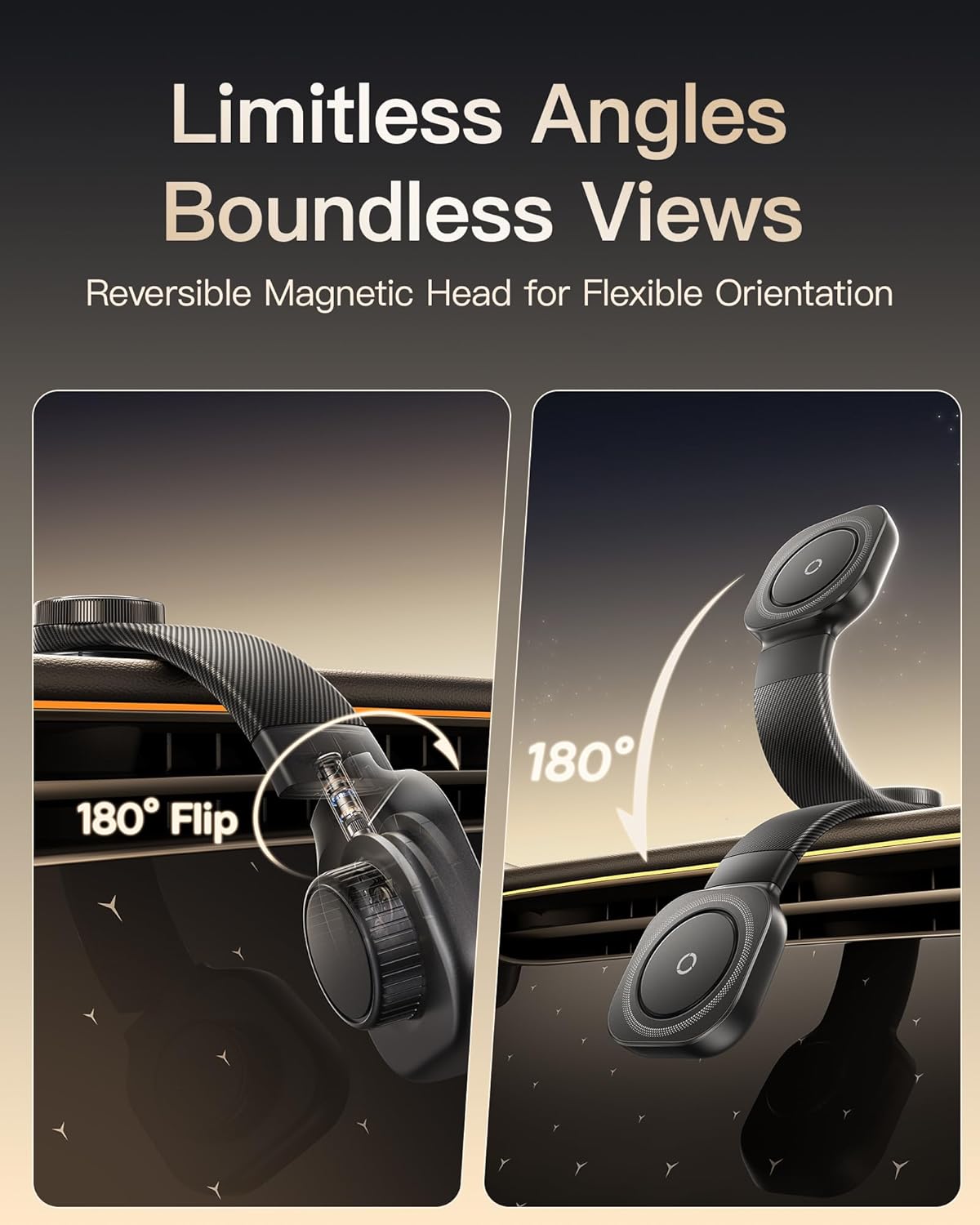
Image: The car mount demonstrating its flexible arm and reversible magnetic head, allowing for 180° flips and various viewing angles.
5. Key Features
5.1. 163W Retractable Car Charger PrimeTrip VR2 Max
- High-Power Output: Delivers a total of 163W, supporting fast charging for laptops, tablets, and smartphones.
- Multiple Outputs: Includes a 67W USB-C1 cable, a 33W USB-C2 cable, a 33W USB-C3 port, and a 30W USB-A port.
- 450° Multi-Directional Adjustment: Features 180° vertical and 270° horizontal rotation for flexible positioning.
- Auto Retraction & Magnetic Storage: Cables automatically retract for a tidy and neat car interior.
- Universal Compatibility: Supports a wide range of devices including iPhone, Galaxy, Google Pixel, Motorola series, Tablets, Earbuds, Smartwatches, Drones, and Cameras.

Image: Visual representation of the 163W total output of the car charger, highlighting fast charging capabilities for iPhone and Mac.

Image: A chart illustrating the universal compatibility of the car charger with various devices, including smartphones, tablets, earbuds, smartwatches, drones, and cameras.
5.2. Bendable Memory Titanium Alloy Car Mount (C03)
- 15-25N Customizable Magnetic Force: An innovative adjustment knob allows fine-tuning of the magnetic holding power for various phone sizes and weights.
- Bend & Rotate Freely: Features a 360° swivel base, a reversible magnetic head, and a flexible aluminum arm for limitless viewing angles.
- Mount Anywhere: Compact base and bendable design allow installation on dashboards, windshields, center consoles, or air vents.
- Upgraded 3M Adhesive: Provides strong, heat-resistant, and long-lasting adhesion, ensuring stability even on rough roads.
6. Technical Specifications
| Feature | Specification |
|---|---|
| Product Name | Baseus Bendable Memory Titanium Alloy Car Mount & 163W Retractable Car Charger PrimeTrip VR2 Max |
| Brand | Baseus |
| Car Charger Model | PrimeTrip VR2 Max |
| Car Mount Model | C03 |
| Total Charger Output | 163W Max |
| Charger Cable Output 1 | USB-C1: 67W |
| Charger Cable Output 2 | USB-C2: 33W |
| Charger Port Output 1 | USB-C3: 33W |
| Charger Port Output 2 | USB-A: 30W |
| Car Charger Adjustment | 180° Vertical, 270° Horizontal (450° total) |
| Car Mount Magnetic Force | 15-25N (Adjustable) |
| Car Mount Adhesion | Upgraded 3M Adhesive |
| ASIN | B0FGXQT915 |
| Date First Available | May 16, 2025 |
7. Troubleshooting
If you encounter issues, please refer to the following common problems and solutions:
| Problem | Possible Cause | Solution |
|---|---|---|
| Car Charger not powering on/charging. | Loose connection in socket; vehicle's 12V socket is not active; vehicle's fuse blown. | Ensure charger is firmly inserted. Check if vehicle's ignition is on. Test with another 12V device or consult vehicle manual for fuse box. |
| Cables not retracting smoothly. | Cable twisted or obstructed; internal mechanism issue. | Gently pull the cable out fully and then release it to allow for proper retraction. Ensure no debris is obstructing the cable path. |
| Car Mount not sticking firmly. | Surface not clean or smooth; insufficient curing time; extreme temperatures. | Ensure installation surface is thoroughly cleaned and dry. Allow 24 hours for adhesive to cure before use. Avoid extreme hot/cold temperatures during initial installation. |
| Phone not holding securely on mount. | Magnetic force set too low; phone not MagSafe compatible; thick non-MagSafe case. | Twist the adjustment knob on the mount to increase the magnetic force (towards MAX). Ensure your phone or case is MagSafe compatible. Remove non-MagSafe cases if necessary. |
8. Care and Maintenance
- Clean the product surfaces with a soft, dry cloth. Do not use abrasive cleaners or solvents.
- Keep the charger's ports and cables free from dust and debris.
- Avoid exposing the products to extreme temperatures, direct sunlight for prolonged periods, or excessive moisture.
- Do not attempt to disassemble or repair the products yourself.
9. Safety Precautions
- Do not operate the product if it has been damaged in any way.
- Keep out of reach of children.
- Ensure the car mount does not obstruct your view of the road or interfere with the operation of airbags or other safety features.
- Do not use the charger in wet conditions or near flammable materials.
- Always ensure cables are not tangled or obstructing driving controls.
- Unplug the car charger from the socket when not in use for extended periods.
10. Warranty and Customer Support
Baseus products are designed and manufactured to the highest quality standards. For warranty information or customer support, please contact the Baseus Brand Store where you purchased the product or visit the official Baseus website. Please have your purchase receipt and product model information ready when contacting support.
Baseus Brand Store: Visit Baseus Store on Amazon


