
1. Product Overview
The POXURIO 2450-Watt Portable Inverter Generator is designed to provide reliable power for various applications, including home backup, camping, and outdoor activities. This gas-powered unit features advanced sound reduction technology for quiet operation and a lightweight design for easy portability.
Key Features:
- Strong Power: 2450W starting power to meet daily electrical needs.
- Low Noise: Operates at only 59 decibels, significantly quieter than traditional generators.
- Gas Powered: Utilizes gasoline for convenient and affordable fuel access.
- Large Capacity Fuel Tank: 6L fuel tank provides up to 14 hours of runtime at 25% load.
- Lightweight Design: Weighs only 43 pounds for easy carrying and storage.
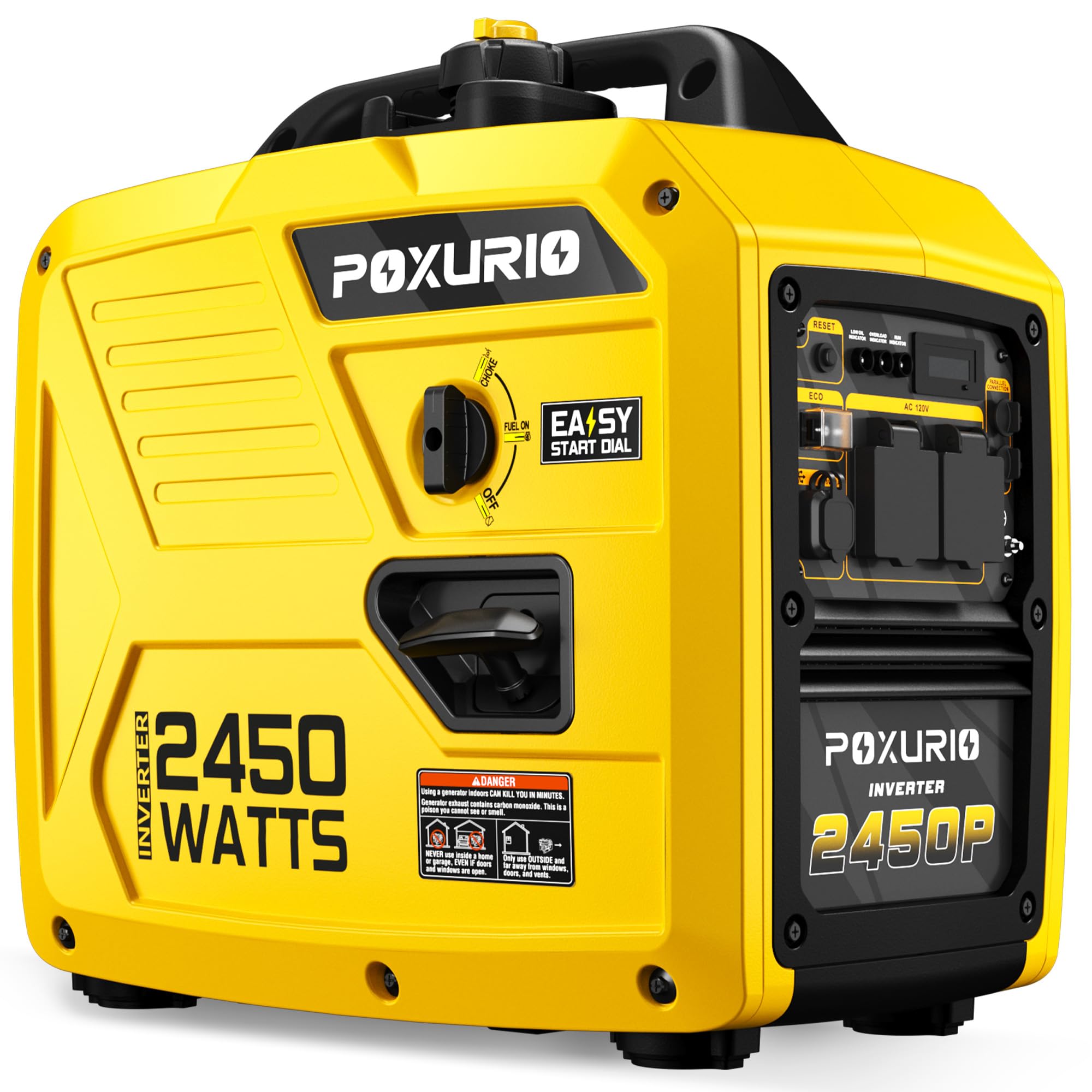
Figure 1: POXURIO 2450-Watt Portable Inverter Generator, Yellow model.

Figure 2: Generator dimensions: 19.3 inches (L) x 11.8 inches (W) x 19.3 inches (H), weighing 21 lbs (note: product specifications state 43 lbs).
2. Safety Information
WARNING: Read and understand all safety precautions before operating this generator. Failure to follow these instructions may result in serious injury or death.
- Carbon Monoxide Hazard: Generators produce carbon monoxide, a colorless, odorless, poisonous gas. Operate generators outdoors only, far away from windows, doors, and vents.
- Fire Hazard: Gasoline is highly flammable. Refuel in a well-ventilated area with the engine off and cool. Do not smoke while refueling.
- Electrical Shock Hazard: Do not operate the generator in wet conditions. Ensure all connections are dry and secure. Use ground fault circuit interrupters (GFCIs) when operating in damp locations.
- Hot Surfaces: The generator's engine and muffler become very hot during operation and remain hot for some time after shutdown. Avoid contact with hot surfaces.
- Children and Pets: Keep children and pets away from the generator at all times.
- Proper Grounding: Always ensure the generator is properly grounded before use.
3. Setup Instructions
Before first use, the generator requires initial setup, including adding engine oil and fuel.
3.1 Add Engine Oil
- Place the generator on a level surface.
- Locate the oil fill cap/dipstick.
- Remove the oil fill cap/dipstick.
- Carefully pour the recommended engine oil (SAE 10W/30) into the oil fill opening until it reaches the upper mark on the dipstick. The oil capacity is 0.35 Liters.
- Replace the oil fill cap/dipstick securely.
Video 1: Detailed setup and operation of the 2450W Inverter Generator, including adding oil and fuel.
3.2 Add Fuel
- Ensure the generator is off and cool.
- Locate the fuel tank cap on top of the generator.
- Unscrew and remove the fuel tank cap.
- Slowly add fresh, unleaded gasoline (minimum 87 octane) to the fuel tank. Do not overfill. The fuel tank capacity is 6 Liters.
- Securely replace the fuel tank cap.

Figure 3: The generator features a 6-liter fuel tank, providing extended operation.
4. Operating Instructions
Follow these steps to safely start and operate your POXURIO inverter generator.
4.1 Control Panel Overview
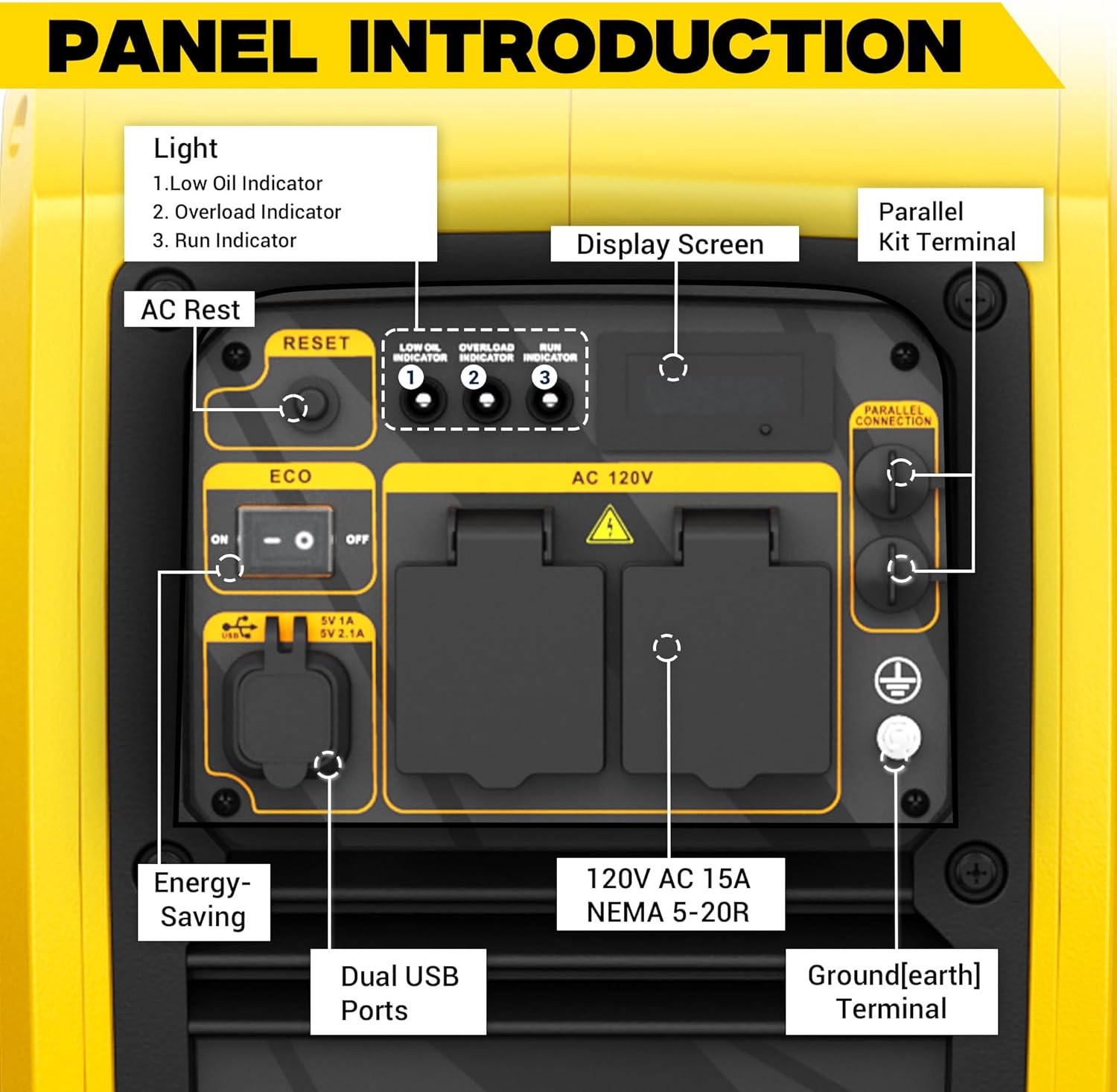
Figure 4: The control panel includes a display screen, AC outlets, USB ports, ECO mode switch, and indicator lights for low oil, overload, and run status.
4.2 Starting the Generator
- Ensure the generator is on a level surface and away from any obstructions.
- Turn the fuel valve to the ON position.
- Set the engine switch to the START position.
- Pull the recoil starter handle firmly until the engine starts.
- Once the engine starts, slowly move the engine switch to the RUN position.

Figure 5: Illustration of the recoil start method for the generator.
4.3 Connecting Electrical Devices
- Once the generator is running stably, plug in your electrical devices to the 120V AC outlets or USB ports.
- Do not exceed the generator's rated running wattage of 1800W or starting wattage of 2450W.
- Monitor the overload indicator light. If it illuminates, reduce the load immediately.

Figure 6: Examples of appliances the generator can power, including a refrigerator, rice cooker, coffee maker, and TV.
4.4 ECO Mode Operation
The ECO mode switch allows the generator to automatically adjust engine speed to match the load, improving fuel efficiency and reducing noise levels.
- To activate ECO mode: Flip the ECO switch to the ON position. The engine speed will decrease when the load is light.
- To deactivate ECO mode: Flip the ECO switch to the OFF position. The engine will run at a constant speed, providing full power.
4.5 Stopping the Generator
- Disconnect all electrical devices from the generator.
- Turn the engine switch to the OFF position.
- Turn the fuel valve to the OFF position.
Video 2: Overview of the POXURIO Inverter Generator's features and applications.
5. Maintenance
Regular maintenance ensures optimal performance and extends the lifespan of your generator.
5.1 Engine Oil Change
Change the engine oil after the first 20 hours of operation, and then every 50-100 hours or annually, whichever comes first. Refer to the engine oil section for proper oil type and capacity.
5.2 Air Filter Cleaning
Inspect and clean the air filter regularly, especially when operating in dusty conditions. A dirty air filter can reduce engine performance and increase fuel consumption.
5.3 Spark Plug Inspection
Inspect the spark plug periodically. Clean or replace it as needed to ensure proper engine ignition.
5.4 Fuel System Maintenance
If you do not plan to use the generator for an extended period, it is recommended to drain the fuel tank and run the engine until it stops from lack of fuel. This prevents fuel degradation and carburetor issues.
6. Troubleshooting
This section provides solutions to common operational issues.
6.1 Engine Does Not Start
- No Fuel: Check fuel level and add fresh gasoline if necessary.
- Low Oil: Check engine oil level. The generator has a low oil indicator and will not start if oil is insufficient.
- Engine Switch: Ensure the engine switch is in the START or RUN position.
- Spark Plug: Inspect the spark plug for fouling or damage.
6.2 No Power Output
- Overload: If the overload indicator is on, disconnect some devices to reduce the load. Press the reset button if available.
- Circuit Breaker: Check if any circuit breakers have tripped. Reset them if needed.
- Connections: Ensure all power cords are securely connected.
6.3 Engine Runs Poorly
- Stale Fuel: Use fresh gasoline. Old fuel can cause poor engine performance.
- Air Filter: Clean or replace the air filter if it is dirty.
- Spark Plug: Inspect and clean or replace the spark plug.
7. Specifications
| Feature | Specification |
|---|---|
| Brand | POXURIO |
| Model Name | KF100337-03 |
| Wattage (Starting) | 2450 Watts |
| Wattage (Running) | 1800 Watts |
| Fuel Type | Gasoline |
| Power Source | Fuel Powered |
| Voltage | 120 Volts |
| Item Weight | 43 Pounds |
| Tank Volume (Fuel) | 6 Liters |
| Runtime (at 25% load) | 14 hours |
| Engine Type | Gasoline |
| Ignition System Type | Recoil Start |
| Special Feature | Super Quiet |
| Noise Level | 59 dB (at 25% load) |
| Item Dimensions (L x W x H) | 19.3" x 11.8" x 19.3" |
| Material Type | ABS |
| UPC | 720141061783 |
8. Warranty and Support
For warranty information or technical support, please refer to the documentation included with your product or contact POXURIO customer service. Keep your purchase receipt for warranty claims.