
1. Introduction
This instruction manual provides essential information for the safe and effective use of your Generic SC-G15 VR Headset. Please read this manual thoroughly before using the device and retain it for future reference. This VR headset is designed to provide an immersive virtual reality experience using your compatible smartphone.
2. Product Overview
The SC-G15 VR Headset is a virtual reality device that transforms your smartphone into an immersive 3D viewer. It features integrated stereo headphones for a complete audio-visual experience.
2.1 Key Features
- Immersive VR Experience: Enjoy 360-degree videos, games, and virtual environments.
- Wide Smartphone Compatibility: Supports smartphones with screen sizes from 4.7 to 6.8 inches, including various iOS and Android models.
- Integrated Stereo Headphones: Provides high-fidelity, surround sound audio for an enhanced experience.
- Adjustable Design: Features a detachable and adjustable headband, retractable headphones, and pupil/focus distance adjustments for comfort and clear vision.
- Comfortable Wear: Lightweight design with a soft nose piece and breathable holes to reduce pressure and improve ventilation.
2.2 Components
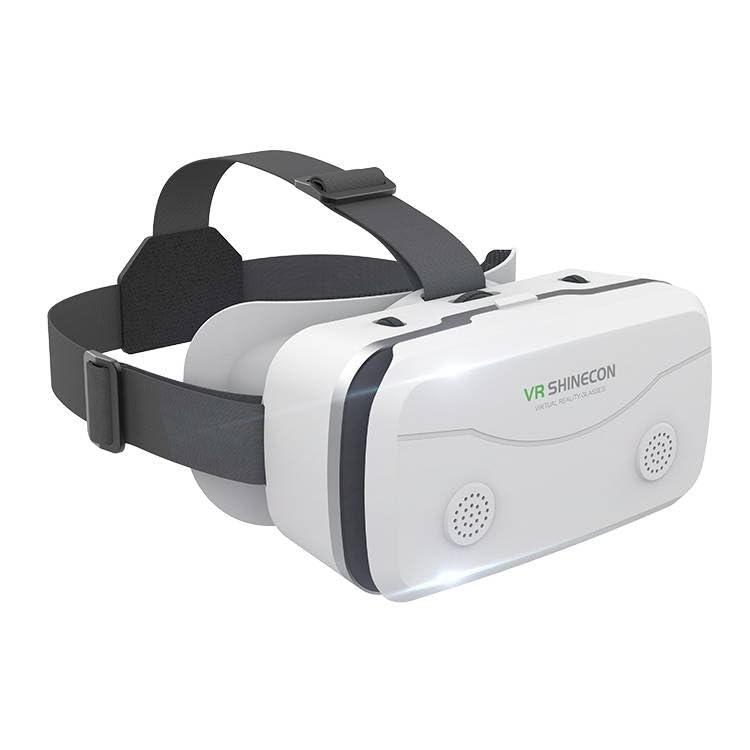
Image: Front view of the Generic SC-G15 VR Headset.

Image: Diagram illustrating key components of the VR headset, including the detachable headband, breathable holes, HD eye protection lenses, and non-slip silicone pad.
- Detachable Headband: For secure and comfortable fitting.
- HD Eye Protection Lens: Optical lenses designed for clear viewing and eye comfort.
- Breathable Holes: To prevent fogging and improve ventilation.
- Non-slip Silicone Pad: Provides a secure grip for your smartphone.
- Retractable Headphones: Adjustable for different head types and sound immersion.

Image: Side view of the VR headset highlighting the freely adjustable and ergonomically designed headphones.

Image: Close-up of the retractable headphones, demonstrating their adjustability for various head sizes.
3. Setup Instructions
Follow these steps to set up your SC-G15 VR Headset for the first time.

Image: Visual guide for the four-step setup process of the VR headset.
- Prepare Your Smartphone: Ensure your smartphone (4.7-6.8 inches) is charged and has a 3D VR compatible application or video ready. Open the desired 3D VR movie or application on your phone.
- Insert Smartphone: Open the front cover of the VR headset. Align your smartphone with the mid-line of the headset and place it horizontally into the designated slot. Ensure it is securely held by the non-slip silicone pad.
- Adjust Headband: Place the headset on your head. Adjust the detachable headband using the buckles on both sides until it fits snugly and comfortably, reducing pressure around your face.
- Adjust Pupil and Focus Distance: Use the adjustment knobs on the headset to fine-tune the pupil distance (IPD) and focus distance until the image is clear and comfortable for your eyes.
4. Operating Instructions
Once set up, you can begin enjoying your VR experience.
- Wearing the Headset: Ensure the headset is positioned correctly on your head, with the lenses aligned with your eyes. The soft nose piece should rest comfortably.
- Headphone Usage: Extend the retractable headphones and position them over your ears. Connect the 3.5mm audio jack from the headset to your smartphone's headphone port (if applicable, or use Bluetooth if your phone requires it). Adjust the volume using your smartphone's controls.
- Viewing Adjustment: If the image appears blurry or uncomfortable during use, re-adjust the pupil and focus distance knobs until clarity is achieved.
- Eye Protection: To maximize eye protection, it is recommended to take a break every half hour while using the VR headset.
5. Maintenance
Proper care and maintenance will prolong the life of your VR headset.
- Cleaning Lenses: Use a soft, dry microfiber cloth specifically designed for optical lenses to gently wipe the VR lenses. Do not use liquid cleaners or abrasive materials.
- Cleaning Headset Body: Wipe the exterior of the headset with a soft, slightly damp cloth. Avoid getting moisture into any openings.
- Storage: Store the headset in a cool, dry place away from direct sunlight and extreme temperatures. Keep it free from dust.
- Headband and Pads: The detachable headband can be gently hand-washed if necessary. Ensure it is completely dry before reattaching. The silicone pad can be wiped clean.
6. Troubleshooting
If you encounter issues with your SC-G15 VR Headset, refer to the following common solutions.
- Blurry Image:
- Ensure your smartphone is centered correctly within the headset.
- Adjust the pupil distance and focus distance knobs until the image is clear.
- Check if the VR lenses are clean and free from smudges.
- Discomfort During Use:
- Adjust the headband for a more comfortable fit, ensuring it is not too tight or too loose.
- Take regular breaks to rest your eyes and face.
- No Sound from Headphones:
- Ensure the 3.5mm audio jack is fully inserted into your smartphone's headphone port.
- Check your smartphone's volume settings.
- If your phone lacks a 3.5mm jack, ensure you are using a compatible adapter or Bluetooth connection if the headset supports it (this model uses a 3.5mm interface).
- Smartphone Not Fitting:
- Verify your smartphone's screen size is within the supported range of 4.7-6.8 inches.
- Remove any bulky phone cases that might prevent proper fitting.
7. Specifications
| Model Number | SC-G15 |
| Brand | Generic |
| Compatible Devices | Smartphones (iOS and Android) |
| Supported Screen Size | 4.7 - 6.8 inches |
| Specific Uses | Gaming, 360-degree video viewing, virtual concerts, exploration, education |
| VR Operating Platform | Smartphone VR |
| Included Components | VR Headset, Manual |
| Weight | Approximately 10.2 oz (289 grams) |
8. Warranty and Support
8.1 Warranty Information
This Generic SC-G15 VR Headset comes with a 6-month warranty from the date of purchase. This warranty covers manufacturing defects under normal use. It does not cover damage caused by misuse, accidents, unauthorized modifications, or normal wear and tear. Please retain your proof of purchase for warranty claims.
8.2 Customer Support
For any questions, technical assistance, or warranty claims, please contact the retailer or the manufacturer's customer support channel where you purchased the product. Provide your model number (SC-G15) and a detailed description of the issue to facilitate support.


