
TAGRY A18
TAGRY A18 Hybrid Active Noise Cancelling Headphones
User Manual
Introduction
Thank you for choosing the TAGRY A18 Hybrid Active Noise Cancelling Headphones. These headphones are designed to provide an immersive audio experience with advanced noise cancellation, crystal-clear calls, and extended battery life. This manual will guide you through the setup, operation, and maintenance of your new headphones.

Figure 1: TAGRY A18 Hybrid Active Noise Cancelling Headphones
What's in the Box
- TAGRY A18 Noise Canceling Headphones
- 3.5mm AUX Audio Cable
- USB-C Charging Cable
- Punch Bag (Carrying Pouch)
- User Manual
Product Overview
Familiarize yourself with the various components and controls of your TAGRY A18 headphones.

Figure 2: Headphone Controls Layout
The headphones feature intuitive button controls for power, volume, playback, call management, and mode switching. The ANC button is located on the left earcup for easy access.
Setup
1. Charging the Headphones
Before first use, fully charge your headphones. A full charge provides up to 120 hours of playtime.
- Connect the included USB-C charging cable to the charging port on the headphones.
- Connect the other end of the cable to a USB power adapter (not included) or a computer's USB port.
- The LED indicator will show charging status (e.g., red for charging, blue for fully charged).

Figure 3: Extended Battery Life
2. Bluetooth Pairing
The TAGRY A18 headphones use Bluetooth 5.4 for fast and stable connections.
- Ensure the headphones are powered off.
- Press and hold the Power button until the LED indicator flashes blue and red, indicating pairing mode.
- On your device (smartphone, tablet, PC), enable Bluetooth and search for available devices.
- Select "TAGRY A18" from the list of devices.
- Once connected, the LED indicator will turn solid blue.

Figure 4: One-Step Bluetooth Pairing
Operating Instructions
Power On/Off
- Power On: Press and hold the Power button for 3 seconds.
- Power Off: Press and hold the Power button for 5 seconds.
Music Playback
- Play/Pause: Press the Multi-function button once.
- Next Track: Press and hold the Volume Up button.
- Previous Track: Press and hold the Volume Down button.
- Volume Up: Short press the Volume Up button.
- Volume Down: Short press the Volume Down button.
Call Management
- Answer/End Call: Press the Multi-function button once.
- Reject Call: Press and hold the Multi-function button for 2 seconds.
- Activate Voice Assistant: Double-press the Multi-function button.
Noise Control Modes
The A18 headphones offer multiple modes for different listening environments.
- Active Noise Cancellation (ANC): Reduces external noise by up to 35dB. Press the ANC button once to activate. Ideal for noisy environments like airplanes or busy offices.
- Transparency Mode: Allows ambient sounds to pass through, keeping you aware of your surroundings. Press the ANC button again to switch to Transparency Mode. Useful for walking in urban areas or listening for announcements.
- Normal Mode: ANC and Transparency modes are off. Press the ANC button a third time to return to Normal Mode.
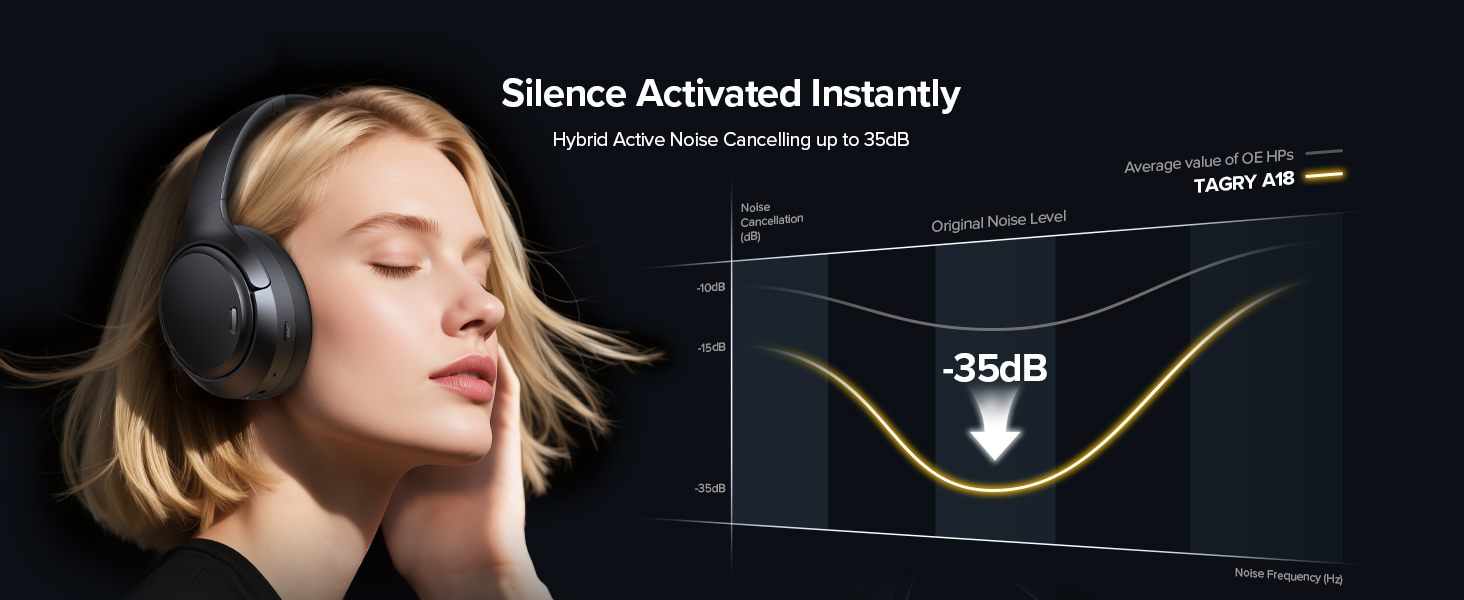
Figure 5: Hybrid Active Noise Cancellation

Figure 6: Transparency Mode in use
Special Modes
- Game Mode: Reduces audio latency for a smoother experience during mobile gaming and video streaming. Activate via specific button combination (refer to button controls diagram for details).
- AUX Wired Mode: Use the included 3.5mm AUX cable to connect the headphones directly to an audio source. This mode works even when the battery is low or depleted.

Figure 7: Low-Latency Game Mode

Figure 8: AUX Wired Mode
Maintenance
Cleaning
- Wipe the headphones with a soft, dry cloth.
- Do not use abrasive cleaners or solvents.
- Clean the earcups gently with a slightly damp cloth if necessary, ensuring no moisture enters the speaker grilles.
Storage
- Store the headphones in the included punch bag (carrying pouch) to protect them from dust and scratches.
- Avoid storing in extreme temperatures or high humidity.
- When storing for extended periods, charge the headphones every few months to maintain battery health.

Figure 9: Exquisite Design for All-Day Comfort
Troubleshooting
| Problem | Possible Cause | Solution |
|---|---|---|
| Headphones won't power on. | Low battery. | Charge the headphones fully. |
| Cannot pair with device. | Headphones not in pairing mode; Bluetooth off on device; too many paired devices. | Ensure headphones are in pairing mode (flashing blue/red). Turn Bluetooth on/off on device. Clear old Bluetooth connections on your device. |
| No sound or low volume. | Volume too low; incorrect audio output selected; headphones not connected. | Increase volume on both headphones and device. Check device's audio output settings. Reconnect headphones. |
| ANC not effective. | ANC not activated; improper fit. | Press the ANC button to activate. Adjust headphones for a snug fit over your ears. |
| Poor call quality. | Environmental noise; microphone obstruction. | Ensure ENC is active. Move to a quieter environment. Check for any obstructions near the microphones. |
Specifications
| Feature | Detail |
|---|---|
| Model Name | A18 |
| Noise Control | Hybrid Active Noise Cancellation (ANC) |
| Microphones | 6 (with ENC for clear calls) |
| Drivers | 40mm Dynamic Drivers |
| Battery Life | Up to 120 Hours |
| Connectivity | Bluetooth 5.4, 3.5mm AUX |
| Bluetooth Range | 10 Meters |
| Frequency Response | 20Hz - 20000Hz |
| Impedance | 32 Ohm |
| Weight | 0.24 Kilograms (8.4 ounces) |
| Dimensions | 7.48 x 6.77 x 3.11 inches |
| Water Resistance | Waterproof |

Figure 10: Product Dimensions
Warranty and Support
TAGRY products are designed with quality and reliability in mind. For any product-related inquiries, technical support, or warranty claims, please contact the seller directly through your purchase platform. Keep your proof of purchase for warranty validation.
Additional protection plans may be available for purchase to extend coverage beyond the standard warranty period. Please refer to your purchase details for more information on available protection plans.
Related documentsA18


Ask a question about this manual
Ask about setup, troubleshooting, compatibility, parts, safety, or missing instructions. Manuals+ will review the question and use this page’s manual context to help answer it.