
Introduction
Welcome to the Jugeman P131 Smartwatch GPS user manual. This guide provides detailed instructions on how to set up, operate, and maintain your new smartwatch. The Jugeman P131 features a 2.06" AMOLED display, 5ATM water resistance, integrated GPS, and comprehensive health and fitness tracking capabilities. Please read this manual thoroughly to ensure optimal performance and longevity of your device.

Image: Jugeman P131 Smartwatch highlighting its key features: 2.06" AMOLED screen, 5ATM waterproof, and GPS positioning.
What's in the Box
Upon opening the package, please ensure all components are present:
- Jugeman P131 Smartwatch (with strap)
- Charging Cable
- User Manual

Image: Contents of the Jugeman P131 Smartwatch package, including the watch, charging cable, and user manual.
Setup
1. Charging the Smartwatch
Before initial use, fully charge your Jugeman P131 Smartwatch.
- Connect the magnetic charging cable to the charging contacts on the back of the smartwatch.
- Plug the USB end of the cable into a standard USB power adapter (not included) or a computer's USB port.
- The watch display will indicate charging status. A full charge typically takes approximately 2.5 hours.

Image: The smartwatch connected to its charging cable, illustrating the charging process and battery life information. Typical usage is 7 days, standby time up to 30 days, and charging time is 2.5 hours.
2. App Installation and Pairing
To unlock the full potential of your smartwatch, download and install the companion app on your smartphone.
- Enable Bluetooth: On your smartphone, navigate to settings and ensure Bluetooth is enabled.
- Download App: Scan the QR code provided in the manual or search for "GloryfitPro" in your smartphone's app store (Google Play Store for Android, Apple App Store for iOS).
- Open App: Launch the "GloryfitPro" app and follow the on-screen instructions to create an account or log in.
- Add Device: Within the app, select "Add Device" or a similar option. The app will search for nearby devices.
- Select Smartwatch: Locate and select "P131" from the list of available devices.
- Confirm Pairing: A pairing request will appear on your smartphone. Confirm the pairing.
- Grant Permissions: Allow the smartwatch to display notifications by granting necessary permissions in your phone's settings when prompted by the app.
- Bluetooth Calls: After successful connection, you can use the watch to answer or make calls.

Image: Visual guide for connecting the smartwatch to your phone, showing Bluetooth activation, app download, device selection, pairing confirmation, and notification permissions.
Operating Instructions
Basic Navigation
- Touchscreen: Swipe left, right, up, or down to navigate through menus and features. Tap to select.
- Side Button: Press the side button to return to the home screen or to wake the device.
Customizing the Display
- Watch Faces: The P131 offers over 200 customizable watch faces. Long-press the home screen to change the watch face or use the companion app for more options.
- Always-On Display: Enable the Always-On Display feature in the watch settings to quickly check time and date without activating the full screen.

Image: Examples of customizable watch faces on the P131 smartwatch, showcasing the high-resolution 2.06-inch display.

Image: The Always-On Display feature of the P131, demonstrating how to access and customize it in the settings.
Calls and Notifications
- Bluetooth Calls: Once paired, you can make and receive calls directly from your smartwatch. The watch features a microphone and speaker.
- Message Notifications: Receive real-time notifications for calls, emails, and text messages from various apps (e.g., WhatsApp, Facebook, Instagram) directly on your wrist.

Image: The smartwatch showing an incoming call and notifications from social media apps, illustrating its communication capabilities.
Sports Modes and GPS Tracking
The P131 offers over 110 sports modes to track your physical activities.
- Activity Tracking: Monitor steps, distance, calories burned, and active minutes throughout the day.
- GPS Tracking: Utilize the advanced GPS system for precise tracking of outdoor activities like running, cycling, and hiking. View your trajectory, distance, and speed in real-time.
- Outdoor Adventures: Features like compass, altimeter, and barometric pressure monitoring are available for outdoor enthusiasts.

Image: The smartwatch and a smartphone app showing precise GPS tracking of a route, distance, duration, calories, and average pace.

Image: A visual representation of the 110+ integrated sports modes, including tracking for steps, distance, and calories.
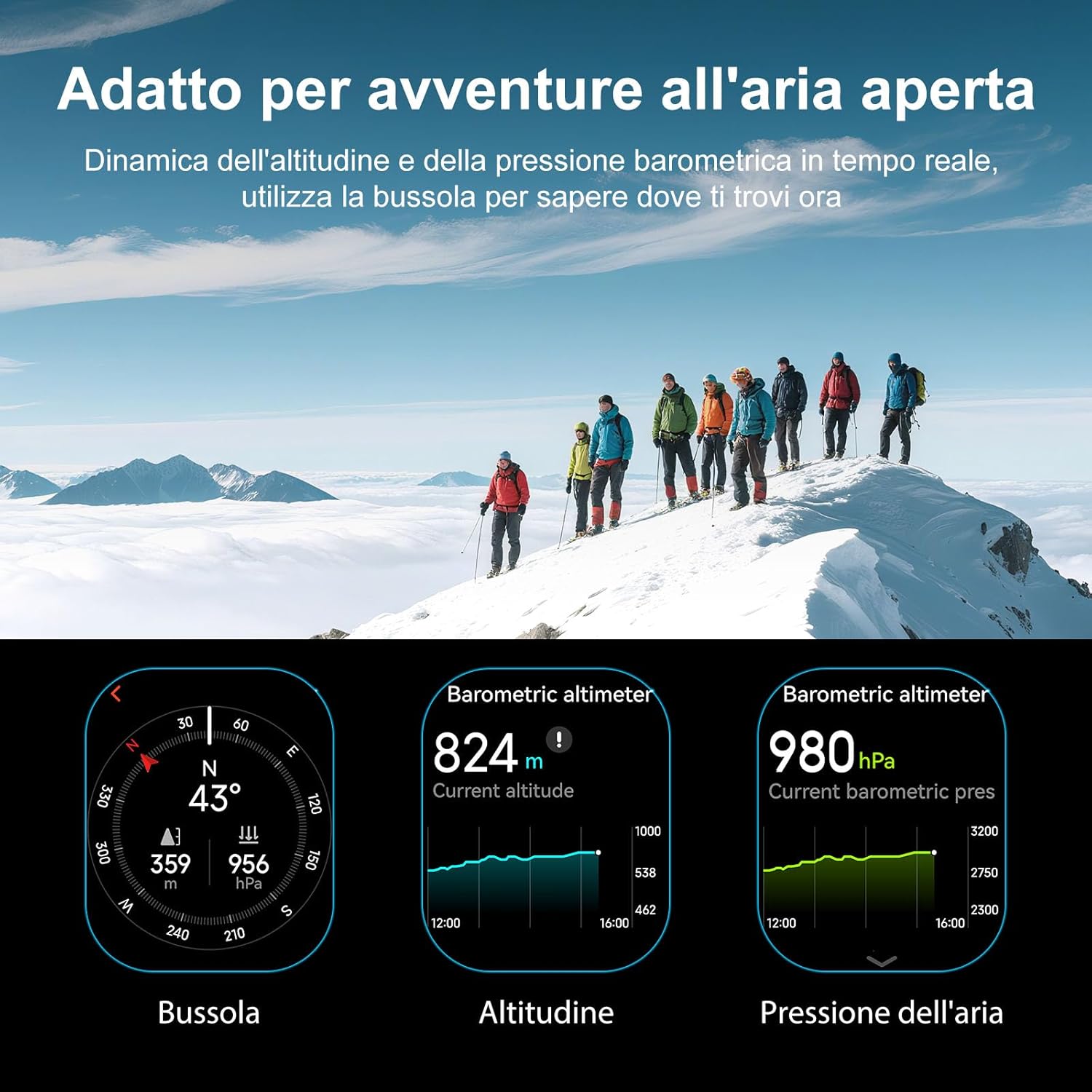
Image: The smartwatch showing outdoor adventure features: compass, current altitude (barometric altimeter), and barometric pressure.
Health Monitoring
The Jugeman P131 provides continuous 24/7 health monitoring.
- Heart Rate Monitoring: Advanced sensors continuously monitor your heart rate, providing real-time data and alerts for abnormal readings.
- Blood Oxygen (SpO2) Monitoring: Track your blood oxygen levels to understand your body's oxygen saturation.
- Sleep Tracking: Monitor your sleep patterns, including deep sleep, light sleep, and awake times, to help improve sleep quality.
- Stress Level Monitoring: Assess your stress levels throughout the day.
- Breathing Exercises: Guided breathing exercises are available to help manage stress and improve relaxation.
- Women's Health: Track menstrual cycles and predict fertile windows.

Image: The smartwatch showing sleep stages (deep, light, awake) and a user monitoring their heart rate, indicating continuous health tracking.

Image: The smartwatch displaying real-time heart rate monitoring, including current beats per minute (bpm) and a historical graph.

Image: Detailed sleep monitoring data from the smartwatch, showing duration of deep sleep, light sleep, and awake periods.

Image: The smartwatch's advanced health features: stress level monitoring, blood oxygen (SpO2) monitoring, emotional tests, and breathing exercises.

Image: The smartwatch showing women's health tracking (menstrual cycle) and current weather forecast.
Additional Features
- Voice Assistant: Access your smartphone's voice assistant directly from the watch.
- Music Control: Control music playback on your connected smartphone.
- Camera Control: Use the watch as a remote shutter for your smartphone camera.
- Find Phone: Locate your misplaced smartphone by triggering an alarm from your watch.
- Alarms & Timers: Set alarms, use a stopwatch, or set timers.
- Weather Forecast: Get real-time weather updates.
- Sedentary Reminder: Receive alerts to move if you've been inactive for too long.
- SOS Button: For emergency situations, the watch may feature an SOS function (refer to app settings for configuration).
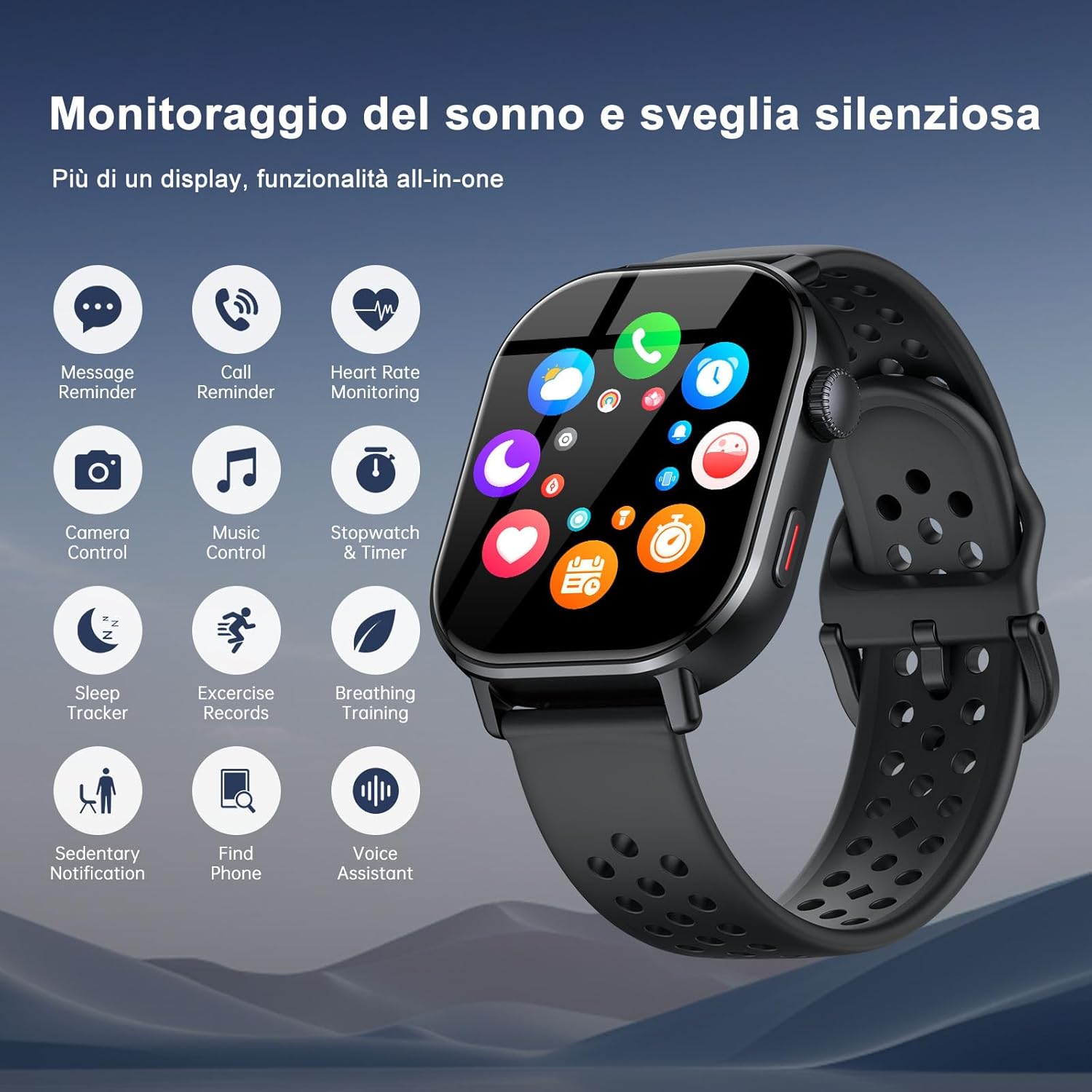
Image: An overview of the P131's multi-functional capabilities, including activity tracking, alarms, flashlight, camera control, music control, stopwatch, find phone, sleep tracking, workout records, women's health, and weather forecast.
Maintenance
Water Resistance (5ATM)
The Jugeman P131 Smartwatch has a 5ATM water resistance rating, meaning it can withstand pressures equivalent to a depth of 50 meters.
- It is suitable for showering, swimming in shallow water, and exposure to rain.
- Avoid using the watch in hot water, saunas, or steam rooms, as steam can penetrate the seals.
- Do not press buttons underwater.
- After exposure to saltwater, rinse the watch with fresh water and dry it thoroughly.

Image: The smartwatch being splashed with water, demonstrating its 5ATM waterproof rating for activities like rain, swimming, and hand washing.
Cleaning and Care
- Regularly clean the watch and strap with a soft, damp cloth.
- Avoid using harsh chemicals or abrasive materials.
- Ensure the charging contacts are clean and dry before charging.
Troubleshooting
- Watch not turning on: Ensure the watch is fully charged. Connect it to the charger for at least 30 minutes.
- Cannot pair with phone:
- Ensure Bluetooth is enabled on your phone.
- Make sure the watch is within range of your phone.
- Restart both the watch and your phone.
- Try unpairing and re-pairing the device through the app.
- Check if the "GloryfitPro" app has all necessary permissions.
- Notifications not appearing:
- Verify that notification permissions are granted for the "GloryfitPro" app in your phone's settings.
- Ensure the app is running in the background.
- Check notification settings within the "GloryfitPro" app for specific applications.
- Inaccurate heart rate/SpO2 readings:
- Ensure the watch is worn snugly on your wrist, not too tight or too loose.
- Clean the sensor on the back of the watch.
- Remain still during measurements.
- GPS not tracking:
- Ensure you are in an open outdoor area with a clear view of the sky.
- Verify that GPS is enabled on the watch (if applicable) and in the companion app.
Specifications
| Feature | Detail |
|---|---|
| Model | P131 |
| Display Size | 2.06 inches |
| Display Type | AMOLED, Digital |
| Water Resistance | 5ATM |
| GPS | Integrated GPS |
| Connectivity | Bluetooth |
| Battery Capacity | 350 mAh (Lithium Polymer) |
| Typical Battery Life | Up to 7 days |
| Standby Battery Life | Up to 30 days |
| Charging Time | Approx. 2.5 hours |
| Compatible Devices | Smartphones, Tablets, Laptops (iOS & Android compatible) |
| Operating System | Wear OS 2.0 |
| Digital Memory Capacity | 1 GB |
| Additional Features | Always On Display, Weather Forecast, Sedentary Reminder, SOS Button, Microphone, Touchscreen |
| Weight | 160 grams |
Image: Detailed dimensions of the smartwatch (50.5mm x 44.5mm), strap length (230mm, adjustable to 160mm), and included accessories.
Warranty and Support
For warranty information and customer support, please refer to the documentation included with your purchase or contact Jugeman customer service through their official website or the retailer where you purchased the product.
The product includes a user manual. For further assistance, please consult the "GloryfitPro" app's help section.

