
Important Safety Instructions
WARNING: To reduce the risk of fire, electrical shock, or injury when using your air conditioner, follow these basic precautions:
- Read all instructions before using the appliance.
- Connect to a properly grounded outlet only.
- Do not operate any appliance with a damaged cord or plug.
- Do not block air openings.
- Do not use in wet areas like bathrooms.
- Keep flammable materials away from the unit.
- Always unplug the unit before cleaning or servicing.
- Ensure the unit is placed on a flat, stable surface.
- Do not allow children to operate the unit unsupervised.
This appliance uses R-32 refrigerant. Refer to local regulations for proper disposal.
Product Overview
Components
- Portable AC Unit
- Exhaust Hose
- Window Sealing Kit (Window Slider Kit)
- Remote Control
- Drain Hose
- User Manual
Features
- 4-in-1 Functionality: Cool, Dehumidifier (Dry), Fan, Sleep Mode.
- Cooling Capacity: 12000 BTU, suitable for rooms up to 550 sq.ft.
- Low Noise Operation: As low as 46 dB in Sleep mode.
- Automatic Drainage System: Condensate water is automatically channeled out.
- Control Options: Unit control panel and remote control.
- Timer Function: Programmable on/off timer.
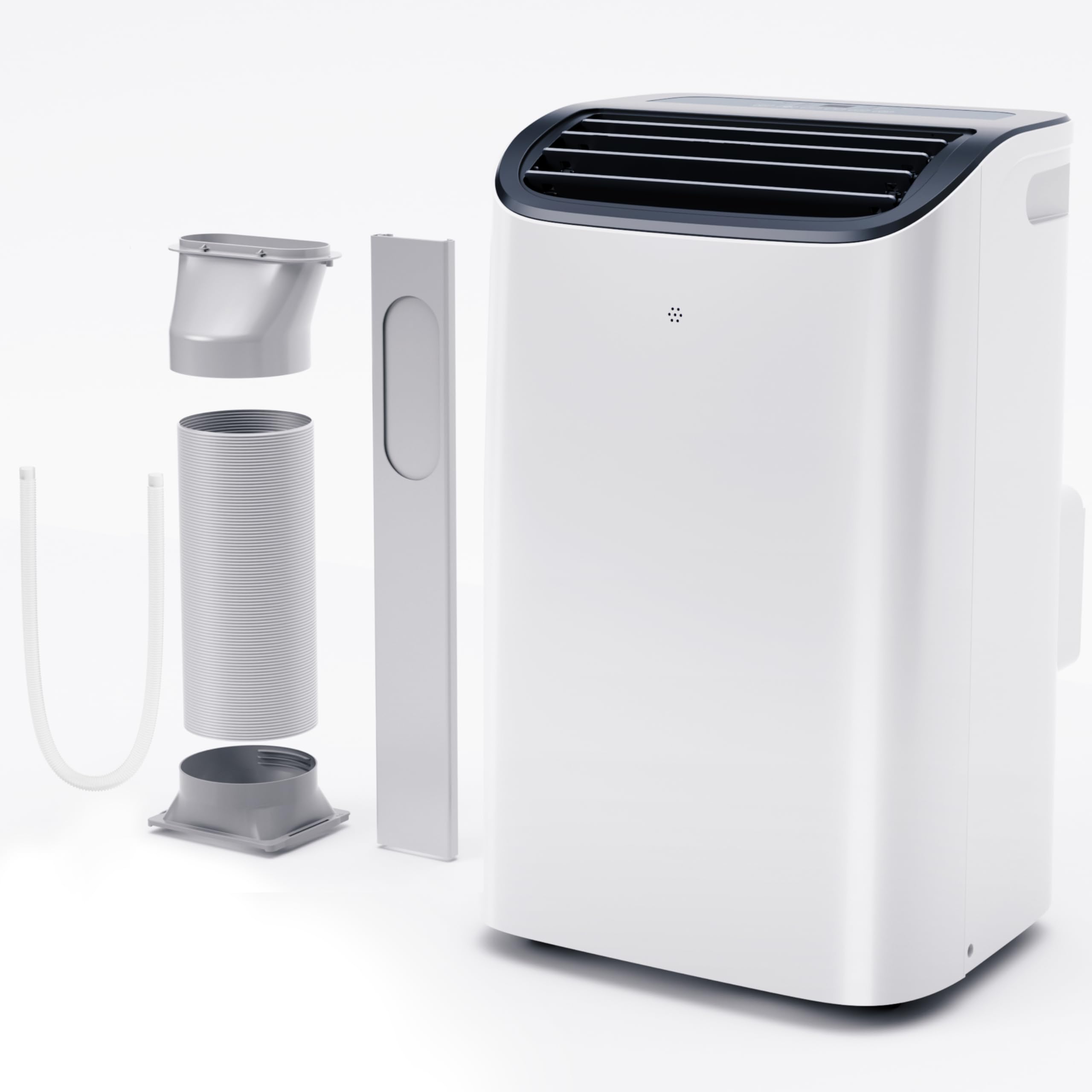
Image: The EUHOMY 12000 BTU Portable AC unit, showing its compact design and included accessories like the exhaust hose and window sealing kit.
Setup and Installation
Unpacking
- Carefully remove the air conditioner and all accessories from the packaging.
- Inspect the unit for any shipping damage. Contact customer support if damage is found.
- Retain the original packaging for future storage or transport.
Placement
- Place the unit on a firm, level surface.
- Ensure there is at least 20 inches (50 cm) of space around the unit for proper airflow.
- Avoid placing the unit in direct sunlight or near heat sources.
Window Kit Installation
- Assemble the window slider kit to fit your window opening. The kit is adjustable.
- Insert the exhaust hose into the back of the AC unit.
- Attach the other end of the exhaust hose to the window slider kit.
- Ensure all connections are secure to prevent air leakage.
Image: Illustration of the exhaust hose connected to the portable AC unit and extended to the window sealing kit for proper ventilation.
Operating Instructions
Control Panel
The control panel on top of the unit allows you to manage all functions. A remote control is also provided for convenience.
Modes of Operation
- Cool Mode: For cooling the room. Adjust temperature using the up/down arrows.
- Dehumidifier (Dry) Mode: Removes moisture from the air. Fan speed is fixed in this mode.
- Fan Mode: Circulates air without cooling. Select desired fan speed (Low, Medium, High).
- Sleep Mode: Reduces noise level to 46 dB. The temperature will gradually increase by 1°F (0.5°C) after 30 minutes, and again after another 30 minutes, then maintain this temperature for 7 hours before returning to the original setting.
Timer Function
Press the "Timer" button to set the desired operating time (1-24 hours) for automatic power on or off.
Child Lock
Activate Child Lock to prevent accidental changes to settings. Refer to the remote control or unit panel for specific activation steps.
Maintenance and Cleaning
Filter Cleaning
- Unplug the unit before cleaning.
- Remove the air filter from the back or side of the unit.
- Wash the filter with warm, soapy water. Rinse thoroughly.
- Allow the filter to air dry completely before reinstalling.
- Clean the filter every two weeks or more frequently if used in dusty environments.
Unit Exterior Cleaning
- Wipe the exterior with a soft, damp cloth.
- Do not use harsh chemicals, abrasives, or solvents.
Storage
- Before storing, run the unit in Fan mode for a few hours to dry the internal components.
- Drain any remaining water from the drainage port.
- Clean the air filter.
- Store the unit in a cool, dry place, preferably in its original packaging.
Troubleshooting
| Problem | Possible Cause | Solution |
|---|---|---|
| Unit does not turn on | No power; Plug not fully inserted; Circuit breaker tripped. | Check power cord; Ensure plug is secure; Reset circuit breaker. |
| Insufficient cooling | Air filter dirty; Exhaust hose blocked or disconnected; Room too large; Doors/windows open. | Clean air filter; Check exhaust hose connection; Ensure room size is within capacity; Close doors/windows. |
| Water leakage | Drain hose blocked or improperly connected; Unit not level. | Check drain hose for blockages and secure connection; Ensure unit is on a level surface. |
| Unusual noise | Unit not level; Obstruction in fan. | Place unit on a level surface; Check for and remove any obstructions. |
If problems persist after attempting these solutions, please contact EUHOMY customer support.
Specifications
- Model: PAC004-12KWG-USZX
- Cooling Capacity: 12000 BTU
- Coverage Area: Up to 550 sq.ft.
- Airflow: 400m³/h
- Noise Level: 46 dB (Sleep Mode)
- Voltage: 115 Volts
- Wattage: 1060 Watts
- Refrigerant: R-32
- Product Dimensions: 14"D x 16.5"W x 27"H
- Item Weight: 56 pounds
- Included Components: Installation Kit
Warranty and Support
EUHOMY products are designed for reliability and performance. For specific warranty details, please refer to the warranty card included with your product or visit the official EUHOMY website.
For technical assistance, troubleshooting, or to inquire about replacement parts, please contact EUHOMY Customer Support:
- Website: EUHOMY Official Store (for general information and contact options)
- Please have your model number (PAC004-12KWG-USZX) and purchase date ready when contacting support.


