
1. Product Overview
The GOODaaa PN-W47 Portable Charger System provides a versatile charging solution for multiple devices. It includes a central charging dock and three 10000mAh portable power banks, each equipped with built-in USB-C and iOS charging cables. This system is designed for convenient charging at home, in the office, or while traveling.
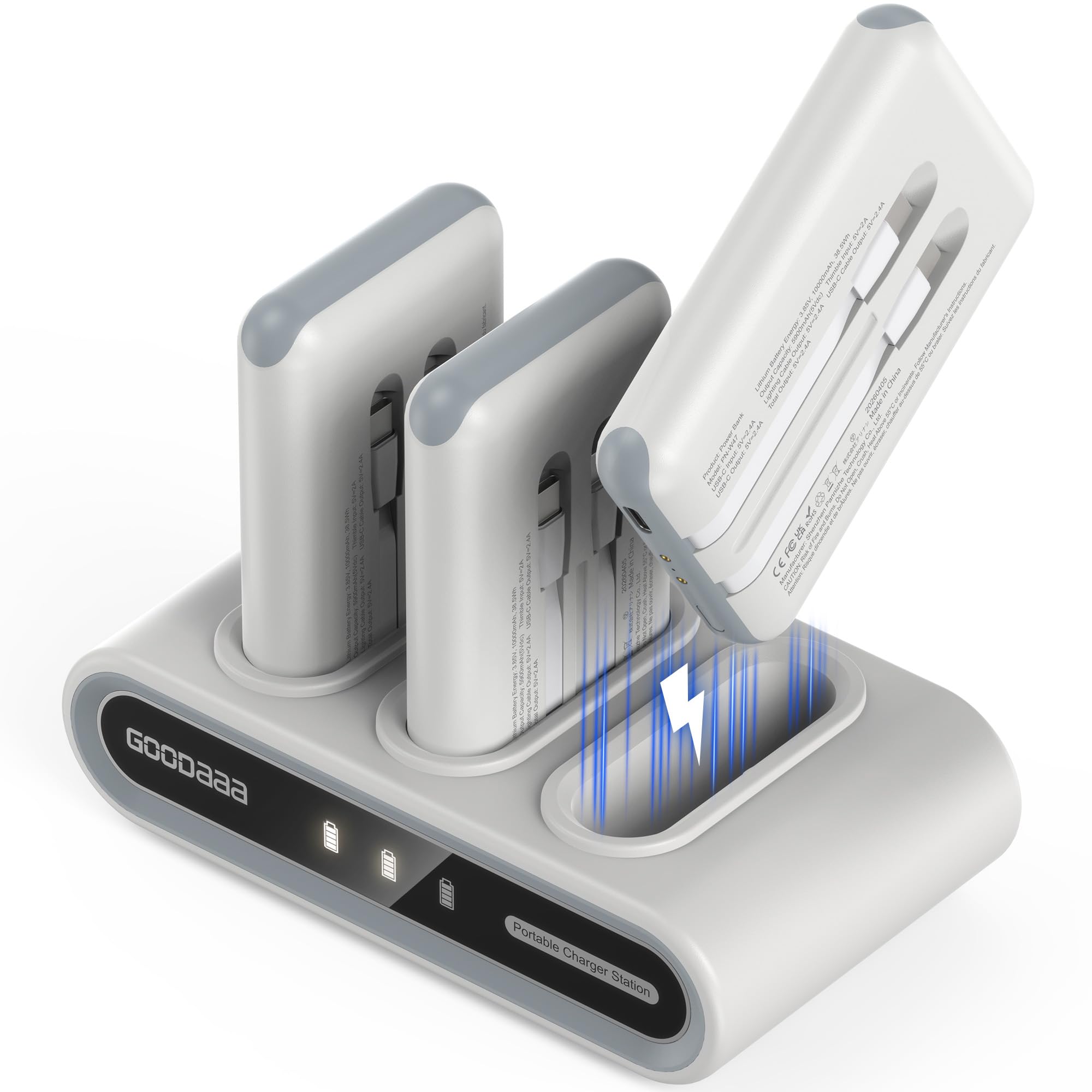
Image 1.1: The GOODaaa Portable Charger System, featuring the charging dock and three individual power banks.
2. Package Contents
Verify that all items are present in the package:
- 3 x 10000mAh Portable Power Banks (with built-in cables)
- 1 x Charging Dock
- 1 x USB-A Adapter
- 1 x USB-A to USB-C Cable
- 1 x User Manual (this document)
- 7 x Theme-based Sticker Sheets (140 patterns)

Image 2.1: Visual representation of all items included in the product package.
3. Product Components
Familiarize yourself with the main components of the charging system:

Image 3.1: Detailed diagram highlighting the USB-C input/output port, power indicator, power ON/OFF switch, thimble input charging, and power bank charging indicators on both the power bank and the charging dock.
3.1. Portable Power Bank
- Built-in Cables: Each power bank features integrated USB-C and iOS charging cables.
- USB-C Input/Output Port: For charging the power bank or charging other devices.
- Power ON/OFF Switch: Activates or deactivates the power bank.
- Power Indicator: Displays the current battery level using a 4-color LED system.
- Thimble Input Charging: Connects to the charging dock for recharging.
3.2. Charging Dock
- Charging Slots: Three dedicated slots for recharging the portable power banks.
- USB-C Input Port: For connecting the dock to a power source using the provided USB-A to USB-C cable and adapter.
- Power Indicators: Displays the charging status of each docked power bank.
4. Setup Instructions
Follow these steps to set up your GOODaaa Portable Charger System:
- Unpack Components: Remove all items from the packaging and ensure everything listed in Section 2 is present.
- Connect the Charging Dock:
- Insert the USB-C end of the provided USB-A to USB-C cable into the USB-C input port on the back of the charging dock.
- Connect the USB-A end of the cable to the provided USB-A adapter.
- Plug the USB-A adapter into a standard wall outlet.
- Place Power Banks in Dock: Insert each portable power bank into an available slot on the charging dock. Ensure the thimble contacts on the power bank align with the contacts in the dock. The dock's indicator lights will illuminate to show charging status.

Image 4.1: The charging dock with power banks inserted, indicating the 'grab-and-go' readiness.
5. Operating Instructions
5.1. Charging Portable Power Banks
When a power bank is placed into the charging dock, the dock's indicator light for that slot will glow dimly, indicating that the power bank is charging. Once fully charged, the indicator light will stay steady.

Image 5.1: The charging dock with power banks, illustrating the indicator lights for charging status.
5.2. Charging Your Devices
Each portable power bank can charge up to three devices simultaneously using its built-in cables and USB-C port.
- Activate Power Bank: Press the power ON/OFF switch on the side of the power bank to activate it. The power indicator will light up.
- Connect Device:
- For iOS devices, use the built-in iOS cable.
- For USB-C devices, use the built-in USB-C cable.
- For other devices, connect your own USB-C cable to the power bank's USB-C input/output port.
- Charging Indication: Your device should begin charging automatically. The power bank's indicator lights will show its remaining battery level.

Image 5.2: A single power bank demonstrating the use of its built-in USB-C and iOS cables to charge devices.
5.3. Power Bank Indicator Lights
The power bank's LED indicator changes color to show the battery level:
- Red: Battery level below 25%
- Green: Battery level at 50%
- Blue: Battery level at 75%
- Cyan: Battery level fully charged (100%)

Image 5.3: Visual guide to the power bank's 4-color LED indicator system for battery level.
5.4. Customizing Your Power Banks
The kit includes 7 sheets of themed stickers to personalize the blank side of your power banks.

Image 5.4: Example of personalizing power banks with the provided sticker sheets.
6. Maintenance and Care
- Keep the device away from water, fire, and high temperatures.
- Do not disassemble or attempt to repair the device yourself.
- Clean the device with a dry, soft cloth. Avoid using harsh chemicals or abrasive materials.
- Store the power banks and dock in a cool, dry place when not in use.
- For optimal battery life, fully charge the power banks at least once every three months if not used regularly.
7. Troubleshooting
7.1. Power Bank Not Charging
- Check Dock Connection: Ensure the charging dock is properly plugged into a working wall outlet.
- Verify Power Bank Placement: Make sure the power bank is correctly seated in the dock slot, with thimble contacts aligned.
- Inspect Cables: Check the USB-A to USB-C cable and adapter for any damage.
7.2. Device Not Charging from Power Bank
- Activate Power Bank: Press the power ON/OFF switch on the power bank.
- Check Cable Connection: Ensure the built-in cable or your own USB-C cable is securely connected to both the power bank and your device.
- Power Bank Battery Level: Check the power bank's indicator lights. If red, the battery is low and may not be able to charge your device. Recharge the power bank.
- Device Compatibility: Confirm your device is compatible with the power bank's output specifications.
7.3. Overheating
The device is designed to operate safely below 45°C (113°F). A slight warmth during charging is normal. If the device becomes excessively hot, disconnect it immediately and contact customer support.
8. Specifications
| Feature | Specification |
|---|---|
| Brand | GOODaaa |
| Model Name | PN-W47 |
| Model Number | PN-W47 |
| Battery Capacity (each power bank) | 10000 mAh |
| Battery Cell Type | Lithium Polymer |
| Connector Type | USB Type C (built-in), iOS (built-in) |
| Output Current | 2.4 A |
| Voltage | 5 V |
| Power Source | Corded Electric |
| Number of Ports | 3 (on each power bank: 2 built-in cables + 1 USB-C port) |
| Compatible Devices | Smartphones (iPhone 12-17, Android), Tablets, Headphones, Cameras |
| Item Dimensions (each power bank) | 4.3 x 2.6 x 0.7 inches |
| Battery Weight (each power bank) | 135 g |
| Charging Dock Dimensions | 6.69 x 3.82 x 5.28 inches |
9. Warranty and Support
Every GOODaaa product is provided with Lifetime technical support. For any questions or assistance, please contact GOODaaa customer service. The product also comes with a Limited Warranty.
Contact Information: Refer to the product packaging or the official GOODaaa website for the most current customer support contact details.


