
FUHONGYUAN CR01 White
FUHONGYUAN Dual Alarm Clock Radio User Manual
Model: CR01 White
1. Introduction
Thank you for choosing the FUHONGYUAN Dual Alarm Clock Radio. This device combines a clear 4.17-inch dimmable LED display with a versatile AM/FM radio, dual alarms, and convenient features like snooze and a sleep timer. Designed for ease of use and reliability, it is an ideal addition to any bedroom, living room, kitchen, or office. This manual provides detailed instructions to help you set up and operate your new clock radio.

Figure 1: Front view of the Dual Alarm Clock Radio.
2. Setup
2.1 Package Contents
- FUHONGYUAN Dual Alarm Clock Radio
- Power Adapter
- User Manual
2.2 Power Connection
Connect the provided power adapter to the DC IN port on the back of the clock radio and plug it into a standard wall outlet. The display will illuminate.
For battery backup, insert 3 AA batteries (not included) into the battery compartment on the bottom of the unit. This ensures timekeeping and alarm functionality during power outages. The display will auto-dim after 20 seconds if no operation occurs when running on battery backup.

Figure 2: Power connection and battery backup.
2.3 Setting the Time
- Press and hold the SET CLOCK button until the hour digits flash.
- Use the + or - buttons to adjust the hour. Pay attention to the AM/PM indicator.
- Press SET CLOCK again to confirm the hour and move to minute setting.
- Use the + or - buttons to adjust the minutes.
- Press SET CLOCK again to confirm the minutes and move to day setting.
- Use the + or - buttons to adjust the day of the week.
- Press SET CLOCK one last time to save the settings and exit time setting mode.
3. Operating Instructions
3.1 Display Brightness
The 4.17-inch LED display features adjustable brightness. Rotate the dimmer knob located on the top of the unit to cycle through various brightness levels, from 0% (off) to 100% (brightest), to suit your preference and environment.

Figure 3: Dimmable LED display.
3.2 Radio Operation (AM/FM)
Your clock radio supports both AM and FM bands. Ensure the wire antenna is extended for optimal reception.
- Tuning: Press the AM/FM button to switch between bands. Use the + or - buttons to manually tune to your desired frequency.
- Auto-Scan: Press the QTM button to automatically scan and save available stations to presets.
- Setting Presets: To manually save a station, tune to the desired frequency, then press and hold one of the P1-P6 buttons for 1 second until the display flashes. This saves the current station to that preset number. You can save up to 6 AM and 6 FM stations.
- Recalling Presets: Briefly press the corresponding P1-P6 button to recall a saved station.

Figure 4: AM/FM radio with presets.

Figure 5: Easy preset setting.
3.3 Alarm Functions
The clock radio features dual alarms (Alarm 1 and Alarm 2) with customizable settings.
- Setting Alarms:
- Press and hold the ALARM 1 or ALARM 2 button until the hour digits flash.
- Use the + or - buttons to adjust the alarm hour.
- Press the ALARM button again to confirm the hour and move to minute setting.
- Use the + or - buttons to adjust the alarm minutes.
- Press the ALARM button again to select the alarm sound: Beep-beep, Melody, or Radio.
- Press the ALARM button again to adjust the alarm volume (for Melody/Radio).
- Press the ALARM button one last time to save settings and exit.
- Alarm Modes: Use the slide switches on the back of the unit to select the alarm mode for each alarm: Weekday (Mon-Fri), Weekend (Sat-Sun), or Everyday (Mon-Sun).
- Activating/Deactivating Alarms: Briefly press the ALARM 1 or ALARM 2 button to toggle the alarm on or off. An alarm icon will appear on the display when active.

Figure 6: Dual alarm settings with weekday/weekend options.
3.4 Snooze Function
When an alarm sounds, press the large SNOOZE button to temporarily silence the alarm for 9 minutes. The alarm will sound again after the snooze period ends.
Figure 7: Snooze button location.
3.5 Sleep Timer
The sleep timer allows you to fall asleep to the radio, which will automatically turn off after a set duration (10-90 minutes).
- Press the SLEEP button repeatedly to cycle through the sleep timer options (10, 20, 30, 40, 50, 60, 70, 80, 90 minutes, or OFF).
- The radio will play for the selected duration and then automatically turn off.
4. Maintenance
To ensure the longevity and optimal performance of your clock radio, follow these simple maintenance guidelines:
- Cleaning: Wipe the unit with a soft, dry cloth. Do not use abrasive cleaners, waxes, or solvents as they may damage the finish.
- Placement: Place the unit on a stable, flat surface away from direct sunlight, heat sources, and excessive moisture.
- Ventilation: Ensure adequate airflow around the unit to prevent overheating. Do not block ventilation openings.
- Power Cord: Regularly inspect the power cord for any damage. If damaged, discontinue use and contact customer support.
5. Troubleshooting
If you encounter issues with your clock radio, please refer to the following common problems and solutions:
| Problem | Possible Cause | Solution |
|---|---|---|
| No power/Display off | Power adapter not connected; Power outage; Batteries drained or not inserted. | Ensure power adapter is securely plugged in. Check household power. Replace or insert fresh AA batteries. |
| Alarm not sounding | Alarm not activated; Alarm volume too low; Incorrect alarm time/mode. | Verify alarm icon is displayed. Increase alarm volume. Check alarm time and weekday/weekend settings. |
| Poor radio reception | Antenna not extended; Interference; Weak signal. | Fully extend the wire antenna. Move the unit away from other electronic devices. Try repositioning the unit. |
| Buttons unresponsive | Temporary software glitch. | Unplug the unit from power for 1 minute, then plug it back in. |
If the problem persists after trying these solutions, please contact customer support.
6. Specifications
| Feature | Description |
|---|---|
| Brand | FUHONGYUAN |
| Model | CR01 White |
| Display Type | LED |
| Display Size | 4.17 inches (diagonal) |
| Radio Bands | AM/FM |
| Alarms | Dual Alarms (Weekday/Weekend/Everyday settings) |
| Alarm Sounds | Beep-beep, Melody, Radio |
| Power Source | Corded Electric (AC110-120V 50Hz) |
| Battery Backup | 3 x AA batteries (not included) |
| Product Dimensions | Approx. 4.72"W x 2.4"H (based on provided image, actual dimensions are 4.72"W x 4.3"D x 2.44"H) |
| Material | Acrylonitrile Butadiene Styrene (ABS) |
| Item Weight | 0.49 Kilograms (1.08 pounds) |
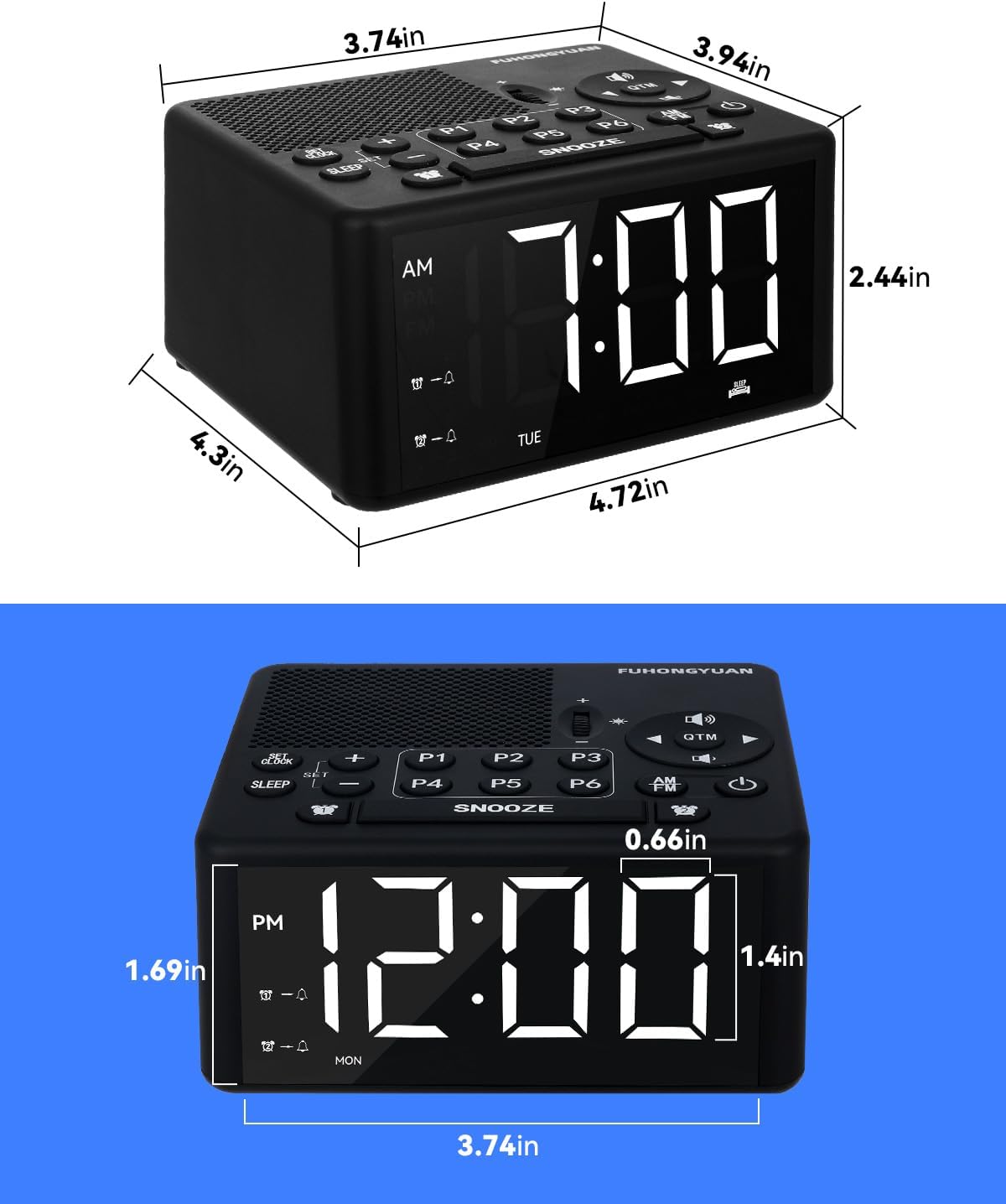
Figure 8: Product dimensions.
7. Warranty and Support
Your FUHONGYUAN Dual Alarm Clock Radio is designed for reliable performance. For information regarding warranty coverage, technical support, or service inquiries, please refer to the warranty card included in your product packaging or visit the official FUHONGYUAN website. Please retain your proof of purchase for warranty claims.
Related documentsCR01 White


Ask a question about this manual
Ask about setup, troubleshooting, compatibility, parts, safety, or missing instructions. Manuals+ will review the question and use this page’s manual context to help answer it.