
Nokia N156DL
Nokia C110 N156DL User Manual
Model: N156DL
Introduction
This manual provides essential information for using your Nokia C110 N156DL smartphone. It covers initial setup, basic operations, maintenance tips, troubleshooting common issues, and detailed product specifications. Please read this manual carefully to ensure proper use and to maximize the performance of your device.
What's in the Box
Verify that all items are present in your product package:
- Nokia C110 N156DL Phone
- USB-C Cable
- SIM Ejector Tool
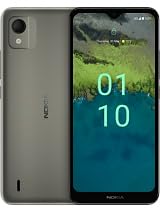
An image of the Nokia C110 N156DL smartphone, showcasing its sleek design and display, similar to what you would find in the box.
Setup
1. Insert SIM Card
- Locate the SIM card tray on the side of your phone.
- Insert the SIM ejector tool into the small hole next to the tray and push gently until the tray pops out.
- Place your Straight Talk Nano-SIM card into the tray with the gold contacts facing down. Ensure it is correctly seated.
- Carefully push the tray back into the phone until it clicks into place.
Note: This device is locked to Straight Talk. Ensure you are using a compatible Straight Talk SIM card.
2. Charge the Battery
- Connect the USB-C cable to the charging port at the bottom of your phone.
- Connect the other end of the cable to a power adapter (sold separately) and plug it into a wall outlet.
- Allow the phone to charge until the battery indicator shows a full charge before initial use.
3. Power On and Initial Setup
- Press and hold the Power button (located on the side) until the Nokia logo appears.
- Follow the on-screen prompts to select your language, connect to a Wi-Fi network, and set up your Google account.
- Complete the setup wizard to personalize your device settings.
Operating Your Device
Navigation
- Touchscreen: Tap to select, swipe to scroll, pinch to zoom.
- Home Screen: Access apps, widgets, and notifications.
- Navigation Bar: Use the Back, Home, and Recent Apps buttons at the bottom of the screen.
Making Calls and Sending Messages
- Calls: Open the Phone app, enter a number or select a contact, then tap the call icon.
- Messages: Open the Messages app, tap 'Start chat', enter a recipient, and type your message.
Camera Usage
- Open the Camera app from your home screen or app drawer.
- Tap the shutter button to take a photo.
- Switch between photo and video modes as needed.
- Adjust settings like flash, timer, and filters from the camera interface.
Internet Connectivity
- Wi-Fi: Go to Settings > Network & internet > Wi-Fi to connect to available networks.
- Mobile Data (4G): Ensure mobile data is enabled in Settings > Network & internet > Mobile network.
Applications
- Your Nokia C110 runs on Android 12, providing access to a wide range of applications via the Google Play Store.
- To download apps, open the Play Store, search for the desired app, and tap 'Install'.
Maintenance
Cleaning Your Device
- Use a soft, lint-free cloth to clean the screen and body of your phone.
- Avoid using harsh chemicals or abrasive materials.
- Keep charging ports and speaker grilles free of dust and debris.
Software Updates
- Regularly check for and install software updates to ensure optimal performance and security.
- Go to Settings > System > System update to check for available updates.
Battery Care
- To prolong battery life, avoid extreme temperatures.
- Do not leave the phone charging for extended periods after it reaches 100%.
- For best results, use the original USB-C cable provided.
Storage Management
- Your device has 32GB of internal storage. You can expand this using a microSD card (sold separately).
- Regularly clear unnecessary files and uninstall unused apps to free up space.
- Go to Settings > Storage to view storage usage and manage files.
Troubleshooting
Phone Not Turning On
- Ensure the battery is charged. Connect the phone to a charger for at least 30 minutes.
- Press and hold the Power button for 10-15 seconds to perform a forced restart.
Network Issues
- Check if the SIM card is correctly inserted.
- Restart your phone.
- Go to Settings > Network & internet > Mobile network and ensure mobile data is enabled.
- Verify that your Straight Talk account is active and has sufficient balance/data.
Apps Crashing or Freezing
- Close and reopen the app.
- Clear the app's cache and data (Settings > Apps > [App Name] > Storage & cache).
- Update the app to the latest version from the Google Play Store.
- If the issue persists, uninstall and reinstall the app.
Factory Reset (Last Resort)
If other troubleshooting steps fail, you may need to perform a factory reset. This will erase all data on your phone. Back up important data before proceeding.
- Go to Settings > System > Reset options > Erase all data (factory reset).
- Follow the on-screen instructions to confirm the reset.
Specifications
| Feature | Specification |
|---|---|
| Model Name | Nokia C110 |
| Model Number | N156DL |
| Operating System | Android 12.0 |
| Display Size | 6.3 Inches HD+ |
| RAM | 3 GB |
| Internal Storage | 32 GB (expandable) |
| Rear Camera | 13 MP |
| Battery Capacity | 3000 mAh (Nonstandard Battery) |
| Wireless Carrier | Straight Talk (Locked) |
| Cellular Technology | 4G |
| Color | Space Gray |
| CPU Model | Mediatek Dimensity 810 |
| CPU Speed | 1.8 GHz |
Warranty and Support
Your Nokia C110 N156DL device comes with a limited manufacturer's warranty. For specific warranty terms and conditions, please refer to the warranty card included in your product packaging or visit the official Nokia support website.
For technical support, service, or further assistance, please contact Straight Talk customer service or visit their official support channels. You can typically find contact information on their website or in your service agreement.
- Nokia Support: Visit Nokia's official support page
- Straight Talk Support: Visit Straight Talk's official support page
Related documentsN156DL


Ask a question about this manual
Ask about setup, troubleshooting, compatibility, parts, safety, or missing instructions. Manuals+ will review the question and use this page’s manual context to help answer it.