
Introduction
Thank you for choosing a Citizen Eco-Drive watch. This manual provides essential instructions for the proper setup, operation, maintenance, and care of your Citizen Eco-Drive Odyn watch, Model BM7630-80L. Please read this manual thoroughly to ensure optimal performance and longevity of your timepiece.
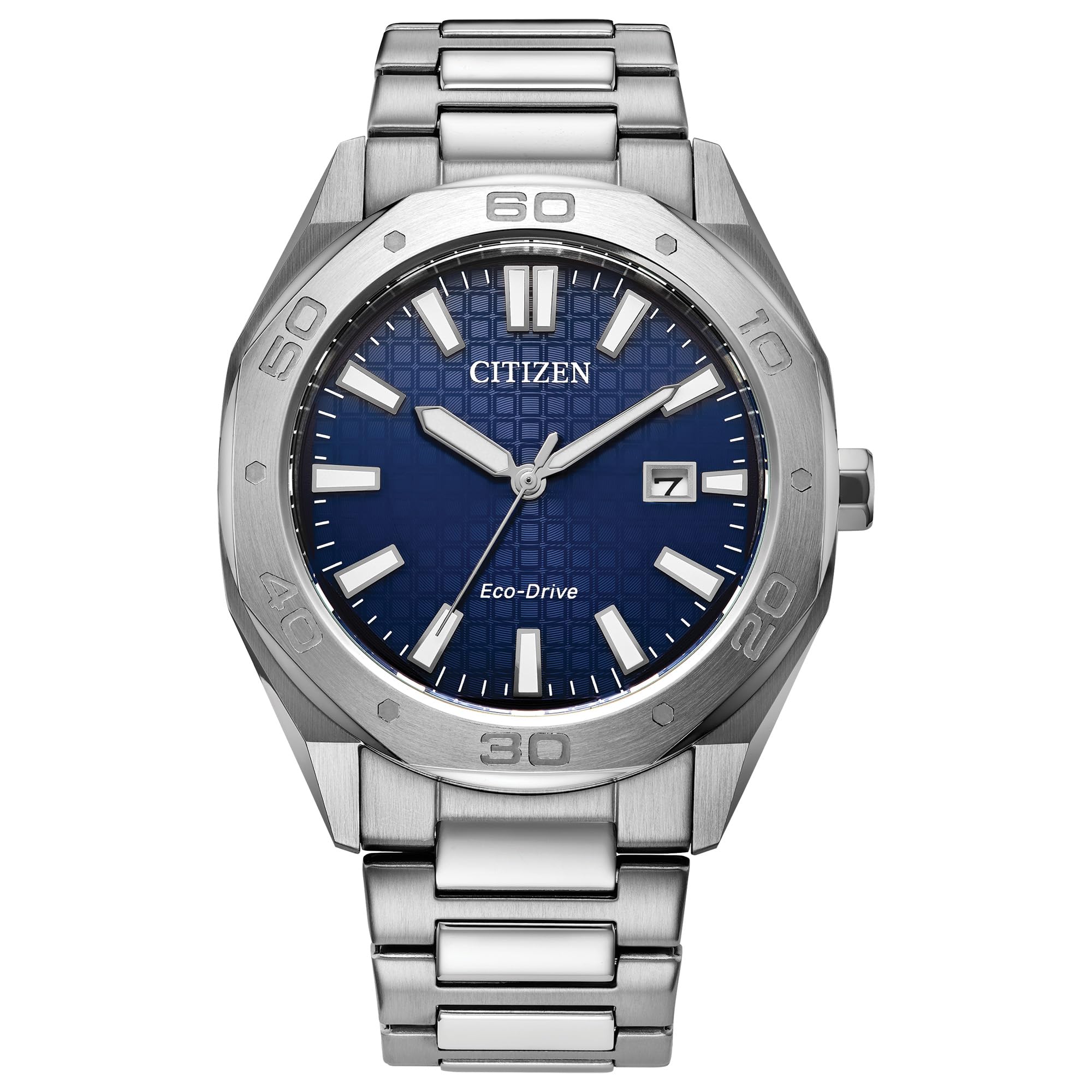
Front view of the Citizen Eco-Drive Odyn Watch (Model BM7630-80L) featuring a blue dial and silver-tone stainless steel bracelet.
Setup
1. Initial Charging (Eco-Drive)
Your Citizen Eco-Drive watch is powered by light and does not require battery replacement. For initial setup or after prolonged storage in darkness, the watch requires sufficient light exposure to charge. Place the watch face-up under direct sunlight or bright artificial light for several hours. The second hand will begin to move normally once sufficient charge is accumulated.
Note: Avoid placing the watch on surfaces that may become excessively hot, such as a car dashboard in direct sunlight, as this can damage the watch.
2. Setting the Time and Date
- Pull the Crown: Gently pull the crown (the knob on the side of the watch) out to the first click position to set the date, or to the second click position to set the time.
- Set the Date: If setting the date, rotate the crown to adjust the date display. Adjust the date to the day before the current date.
- Set the Time: Pull the crown out to the second click position. Rotate the crown to advance the hands clockwise. Continue rotating past 12 o'clock until the date changes to the current date. This indicates it is 12 AM. Continue rotating to set the correct time, paying attention to AM/PM.
- Push the Crown Back: Once the time and date are set, push the crown back into its normal position against the watch case. The second hand will resume movement.

Side view of the watch, highlighting the crown used for setting time and date.
3. Adjusting the Bracelet
The stainless steel bracelet on your watch may require adjustment for a comfortable fit. It is recommended to have this adjustment performed by a qualified jeweler or watch technician to prevent damage to the bracelet or watch case.
Operating Your Watch
Timekeeping
Your watch features a 3-hand analog display (hour, minute, second hands) for precise timekeeping.
Date Display
The date window is located at the 3 o'clock position and automatically advances once every 24 hours. Remember to manually adjust the date at the end of months with fewer than 31 days (February, April, June, September, November).
Eco-Drive Power Generation
The Eco-Drive movement converts any light source (natural or artificial) into electrical energy, which is stored in a power cell. This ensures continuous operation without the need for battery replacement. Regular exposure to light is crucial for maintaining a full charge.
Video demonstrating the Citizen Eco-Drive watch, showcasing its design and features.
Maintenance
Cleaning Your Watch
Wipe the watch case and bracelet periodically with a soft, dry cloth to remove dirt and perspiration. For stainless steel, a slightly damp cloth can be used, followed by a dry cloth. Avoid using harsh chemicals or abrasive materials.
Water Resistance (100 Meters)
Your watch is water resistant to 100 meters (10 ATM). This means it is suitable for swimming, showering, and snorkeling. It is not suitable for scuba diving or high-impact water sports. Always ensure the crown is fully pushed in before any contact with water.
Maintaining Charge
To ensure continuous operation, expose your watch to light regularly. Avoid storing the watch in dark places for extended periods, as this can deplete the power reserve. If the watch stops, recharge it by exposing it to bright light.
Storage
When not wearing your watch, store it in a location where it can receive some light, or at least in a place where it won't be in complete darkness for months. This helps maintain the power reserve.

Rear view of the watch, displaying the Eco-Drive engraving and water resistance rating on the case back.
Troubleshooting
- Watch has stopped: This usually indicates insufficient charge. Expose the watch to bright light for several hours to recharge.
- Second hand moves in 2-second intervals: This is a low power indicator. The watch needs to be recharged immediately.
- Date does not change at midnight: Ensure the time is set correctly for AM/PM. If the watch is fully charged, reset the time and date as per the 'Setting the Time and Date' section.
- Condensation or water inside the crystal: This indicates a potential breach in the watch's water resistance. Stop using the watch immediately and seek professional service. Do not attempt to open the watch yourself.
Video exploring various aspects and features of a Citizen Eco-Drive watch.
Specifications
| Feature | Detail |
|---|---|
| Model Name | Odyn |
| Model Number | BM7630-80L |
| Movement Type | Eco-Drive (Light Powered) |
| Case Material | Stainless Steel |
| Band Material | Stainless Steel |
| Dial Color | Blue |
| Band Color | Silver-Tone |
| Case Diameter | 41 millimeters |
| Case Thickness | 9.7 millimeters |
| Band Width | 22 millimeters |
| Crystal | Mineral Crystal |
| Water Resistance Depth | 100 meters (10 ATM) |
| Additional Features | 3 Hand, Date |
| Clasp Type | Foldover Clasp With Push Button |
| UPC | 013205166419 |
Warranty Information
Your Citizen Eco-Drive watch comes with a limited warranty. Please refer to the warranty card included with your purchase for specific terms, conditions, and duration of coverage. Keep your proof of purchase for warranty claims.
Support
For further assistance, service, or inquiries regarding your Citizen watch, please contact Citizen customer service. You can find contact information on the official Citizen website or on your warranty documentation.
Online Resources: Visit the official Citizen Watch website for FAQs, additional manuals, and service center locations.