
Vieta Pro MiniThunder 2 (VM-BS100TB)
Vieta Pro MiniThunder 2 Bluetooth Speaker User Manual
Model: MiniThunder 2 (VM-BS100TB)
Introduction
Thank you for choosing the Vieta Pro MiniThunder 2. This powerful and versatile portable Bluetooth speaker is designed to deliver exceptional audio quality with its 100W output, robust IPX6 water resistance, and long-lasting 15-hour battery. Featuring True Wireless Stereo (TWS) capability and dynamic RGB LED lights, the MiniThunder 2 is perfect for any occasion, indoors or outdoors. This manual provides essential information for setting up, operating, and maintaining your speaker.

The Vieta Pro MiniThunder 2 speaker, showcasing its sleek black design and vibrant RGB LED lights on the ends.
What's in the Box
- Vieta Pro MiniThunder 2 Speaker
- Power Cable
- Warranty Card
- Quick Start Guide
Setup
1. Charging the Speaker
Before first use, fully charge your MiniThunder 2 speaker. Connect the included USB-C cable to the speaker's USB-C port and the other end to a compatible USB power adapter (not included). The LED indicator will show charging status and turn off when fully charged. A full charge provides up to 15 hours of playback.

The MiniThunder 2 offers up to 15 hours of continuous playback on a single charge, ideal for extended use.
2. Powering On/Off
Press and hold the Power button located on the top panel of the speaker for approximately 2 seconds to turn it on or off. A sound indicator will confirm the action.
3. Bluetooth Pairing
- Turn on the MiniThunder 2 speaker. It will automatically enter Bluetooth pairing mode, indicated by a flashing LED light.
- On your device (smartphone, tablet, etc.), enable Bluetooth and search for available devices.
- Select "Vieta Pro MiniThunder 2" from the list.
- Once connected, the LED indicator will become solid, and you will hear a confirmation sound.
4. True Wireless Stereo (TWS) Pairing
To achieve a true stereo sound experience, you can pair two MiniThunder 2 speakers together:
- Ensure both MiniThunder 2 speakers are powered on and not connected to any other Bluetooth device.
- On one of the speakers, press the TWS button (usually indicated by two interlocking circles). The speaker will enter TWS pairing mode.
- The two speakers will automatically search for and connect to each other. A confirmation sound will indicate successful TWS pairing.
- Once paired in TWS mode, connect your device to one of the speakers via Bluetooth as described in step 3. Both speakers will now play audio in stereo.
Operating Your Speaker
Controls Overview
The MiniThunder 2 features intuitive controls on its top panel:
- Power Button: Press and hold to turn on/off.
- Volume Buttons (+/-): Press to adjust volume.
- Play/Pause Button: Press to play or pause audio.
- Bluetooth Button: Press to enter pairing mode or disconnect.
- TWS Button: Press to initiate True Wireless Stereo pairing.
- Light Mode Button: Press to cycle through different RGB LED light modes.

Visual representation of the speaker's key features and connectivity options.
Audio Playback
- Bluetooth: Once paired, audio from your connected device will play through the speaker.
- USB Playback: Insert a USB flash drive into the USB port. The speaker will automatically detect and play compatible audio files.
- AUX-in: Connect an audio device using a 3.5mm audio cable (not included) to the AUX-in port. The speaker will switch to AUX mode.
RGB LED Lights
The MiniThunder 2 features integrated RGB LED lights that enhance your listening experience. Press the Light Mode button to cycle through various lighting effects and patterns. You can also turn the lights off if preferred.

Dynamic RGB LED lights illuminate the speaker, creating an immersive visual experience.
Hands-Free Calling
With its built-in microphone, the MiniThunder 2 allows for hands-free calling when connected to your smartphone. Press the Play/Pause button to answer or end a call.
Vieta Pro Audio App
Enhance your experience by downloading the official Vieta Pro Audio App. The app provides additional control over your speaker, including EQ adjustments, light mode customization, and TWS management.
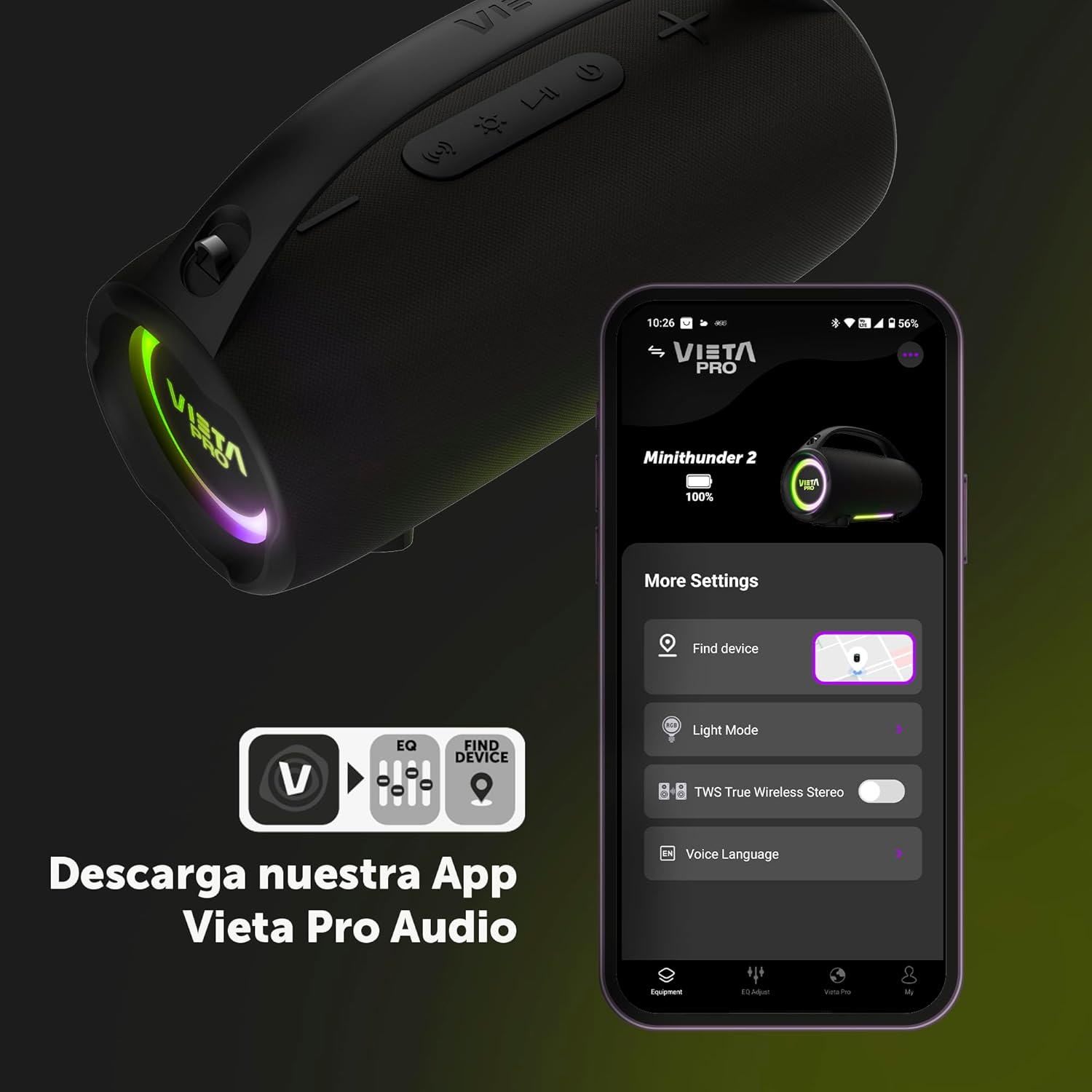
Manage your speaker settings and features conveniently through the Vieta Pro Audio App.
Maintenance
- Cleaning: Wipe the speaker with a soft, damp cloth. Do not use abrasive cleaners or solvents.
- Water Resistance: While IPX6 rated, avoid submerging the speaker in water for extended periods. Ensure the port covers are securely closed before exposure to water.
- Storage: Store the speaker in a cool, dry place away from direct sunlight and extreme temperatures.
- Battery Care: To prolong battery life, avoid fully discharging the battery frequently. Charge it regularly, even if not in use for long periods.

The speaker's IPX6 water resistance makes it suitable for outdoor use, but proper care is still recommended.
Troubleshooting
| Problem | Possible Solution |
|---|---|
| Speaker does not turn on. | Ensure the battery is charged. Connect the speaker to a power source and try again. |
| No sound from the speaker. | Check the volume level on both the speaker and your connected device. Ensure the speaker is correctly paired via Bluetooth or connected via AUX/USB. |
| Bluetooth pairing fails. | Make sure the speaker is in pairing mode. Turn off and on Bluetooth on your device. Move the speaker closer to your device. Clear previous Bluetooth connections on your device. |
| TWS pairing fails. | Ensure both speakers are MiniThunder 2 models and are not connected to any other Bluetooth device. Try resetting both speakers and re-initiating TWS pairing. |
| Sound distortion. | Reduce the volume on both the speaker and your device. Ensure there are no obstructions between the speaker and the Bluetooth source. |
Specifications
| Feature | Detail |
|---|---|
| Model Name | MiniThunder 2 |
| Model Number | VM-BS100TB |
| Maximum Speaker Output Power | 100 Watts |
| Connectivity Technology | Bluetooth 5.3, USB, 3.5mm Minijack (AUX) |
| Battery Life | Up to 15 hours |
| Water Resistance | IPX6 |
| Special Features | Shockproof, Powerful Speaker, Built-in Microphone, For Parties, USB Port, RGB LED Lights, True Wireless Stereo (TWS) |
| Product Dimensions | 13 x 31 x 19 cm |
| Product Weight | 2.45 kg |
| Audio Output Mode | Stereo |
| Frequency Response | 20 KHz |
Warranty and Support
The Vieta Pro MiniThunder 2 comes with a standard manufacturer's warranty. Please refer to the included Warranty Card for detailed terms and conditions. For technical support, troubleshooting assistance, or warranty claims, please contact Vieta Pro customer service through their official website or the contact information provided in your product packaging.
You can also visit the Vieta Pro Store on Amazon for more information and product updates.
Related Documents - MiniThunder 2 (VM-BS100TB)
 |
Vieta Pro MiniThunder VM-BS88BK Quick Start Guide A quick start guide for the Vieta Pro MiniThunder VM-BS88BK speaker, covering unboxing, connections, power on/off, and Bluetooth and TWS modes. Includes technical specifications and care instructions. |
 |
Vieta Pro Party 2 QuickStart Guide A quick start guide for the Vieta Pro Party 2 speaker, covering what's in the box, charging, button functions, Bluetooth mode, TWS pairing, and technical specifications. |
 |
Vieta VM-HP1000 Headphones Quickstart Guide A concise guide to setting up and using your Vieta VM-HP1000 headphones, including charging, Bluetooth pairing, and basic controls. |
 |
Vieta Pro Party 110 VM-HW355BK Quick Start Guide Quick start guide for the Vieta Pro Party 110 VM-HW355BK Bluetooth speaker, detailing setup, basic and professional usage, remote control functions, and Auracast features. |
 |
Vieta Pro Party 1 Speaker VM-HW265 User Manual Comprehensive user manual for the Vieta Pro Party 1 speaker (VM-HW265), covering safety, operation, specifications, TWS function, remote control, and connectivity modes like Bluetooth, USB, FM radio, and Line IN. |
 |
Vieta Pro Goody 2 Bluetooth Speaker User Manual Comprehensive user manual for the Vieta Pro Goody 2 outdoor Bluetooth speaker (Model VM-BS46), covering features, technical specifications, operation, and troubleshooting. |