
Important Safety Information
- Assembly may require two people for safe handling.
- Always unplug electrical components before assembly, disassembly, or maintenance.
- Exercise caution due to sharp edges and the heavy weight of components during handling.
- Do not use electrical components if they are damaged or wet.
- Always follow all provided instructions for safe use and proper maintenance.
Product Overview
The COMHOMA Vanity Desk with Lighted Mirror and Power Outlet (Model B1004) is a modern dressing table designed for functionality and style. It features integrated lighting, ample storage, and convenient charging capabilities.
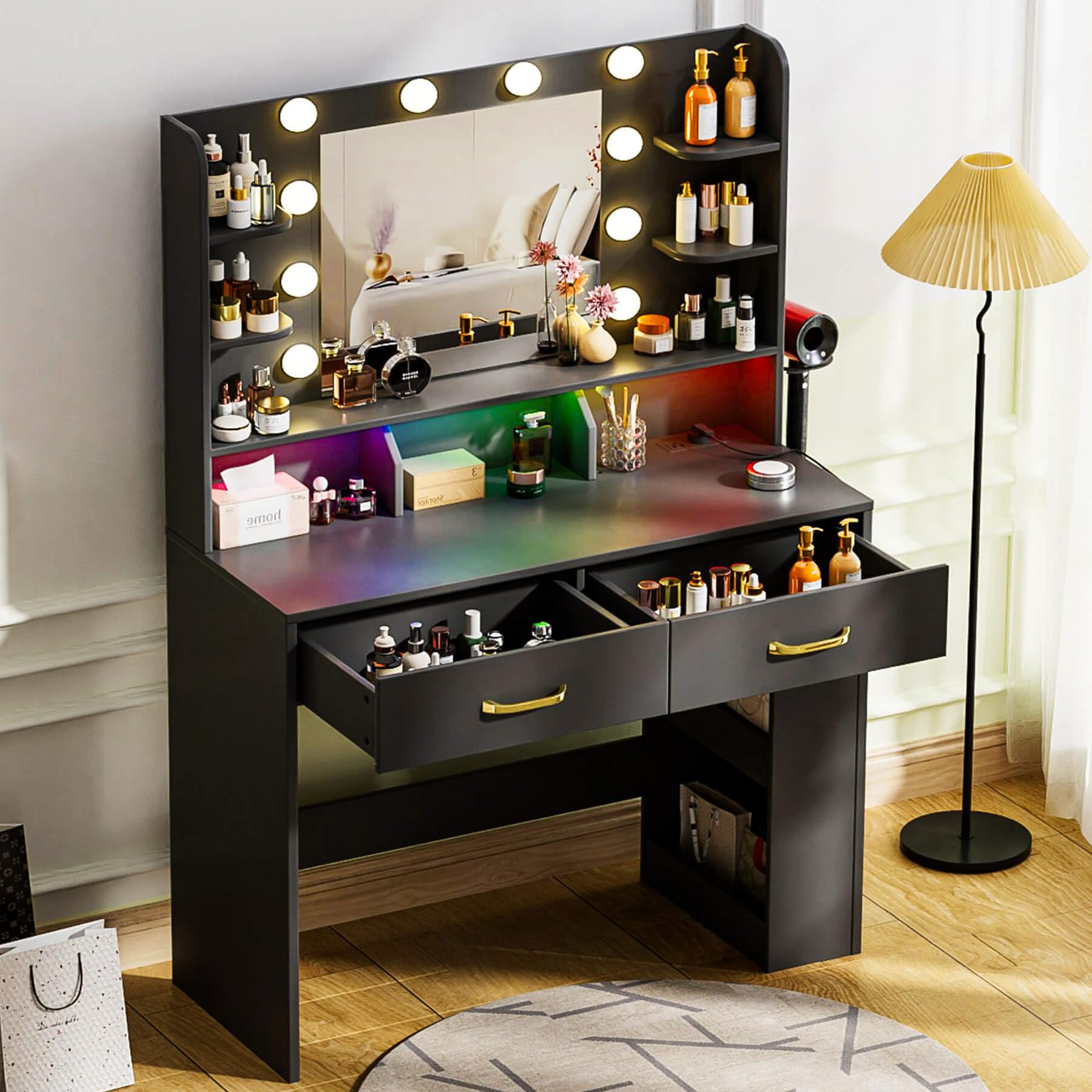
Figure 1: The COMHOMA Vanity Desk in Luxury Black, showcasing its lighted mirror and overall design.
Specifications
| Feature | Detail |
|---|---|
| Model Number | B1004 |
| Color | Luxury Black |
| Frame Material | Wood |
| Product Dimensions (D x W x H) | 15.74" x 31.5" x 54.72" |
| Item Weight | 58 pounds |
| Assembly Required | Yes |
| Mirror Lighting | 10 LED bulbs, 3 color modes (cool white, natural light, warm yellow), adjustable brightness |
| Tabletop Lighting | Built-in RGB LED light, multiple colors |
| Charging Station | 2 Standard Plug Sockets, 2 USB Ports |
| Storage Capacity | Undertable side cabinet, 2 drawers, 4 open shelves, 3 cubbies |

Figure 2: Detailed product dimensions for planning your space.
Setup and Assembly
The COMHOMA Vanity Desk is designed for straightforward assembly. All components are clearly labeled, and comprehensive step-by-step instructions are provided. It is recommended to have two people for assembly.
Assembly Video Guide
Video 1: A detailed assembly and setup video for the COMHOMA Vanity Desk, demonstrating each step of the construction process.
Key Assembly Steps:
- Unpack and Identify Components: Carefully unpack all parts and hardware. Refer to the included manual for a complete list and identification of each piece.
- Assemble Base Structure: Follow the diagrams to connect the main base panels using the provided screws and fasteners. Ensure all connections are secure.
- Install Shelving Units: Attach the open shelves and cubbies to the main structure. Pay attention to orientation for proper fit.
- Prepare Drawers: Assemble the drawer boxes and install the drawer slides according to the instructions.
- Mount Mirror and Lighting: Secure the mirror panel to the top section. Install the LED bulbs around the mirror and the RGB LED strip in the tabletop recess. Connect all wiring as indicated in the wiring diagram.
- Install Charging Station: Integrate the power outlet and USB ports into the designated area.
- Attach Hair Dryer Holder: Secure the hair dryer holder to the side of the desk.
- Insert Drawers: Slide the assembled drawers into their respective tracks.
Operating Instructions
Mirror Lighting
The vanity mirror features 10 LED bulbs with three adjustable color modes and brightness levels.
- Power On/Off: Locate the touch sensor on the mirror surface to turn the lights on or off.
- Change Color Mode: Tap the touch sensor to cycle through the three color modes: Cool White, Natural Light, and Warm Yellow.
- Adjust Brightness: Press and hold the touch sensor to adjust the brightness within the selected color mode. Release when the desired brightness is achieved.

Figure 3: The mirror's 3 color modes (Warm Yellow, Warm White, Cool White) and brightness adjustment feature.
Tabletop RGB LED Lights
The built-in RGB LED strip under the tabletop provides ambient lighting with multiple color options.
- Control: Use the provided remote control to manage the RGB LED lights.
- Color Selection: Select from various colors to create different ambiances.
- Brightness Adjustment: Adjust the brightness of the RGB lights using the remote.
- Style Modes: The remote may offer different lighting styles or effects (e.g., fade, flash).

Figure 4: The tabletop features RGB LED lights, controllable via an app or remote for various colors and styles.
Charging Station
The integrated charging station includes 2 standard plug sockets and 2 USB ports.
- Power Devices: Plug in hair dryers, curling irons, or other small appliances into the standard sockets.
- Charge Electronics: Use the USB ports to charge mobile phones, tablets, or other electronic devices.
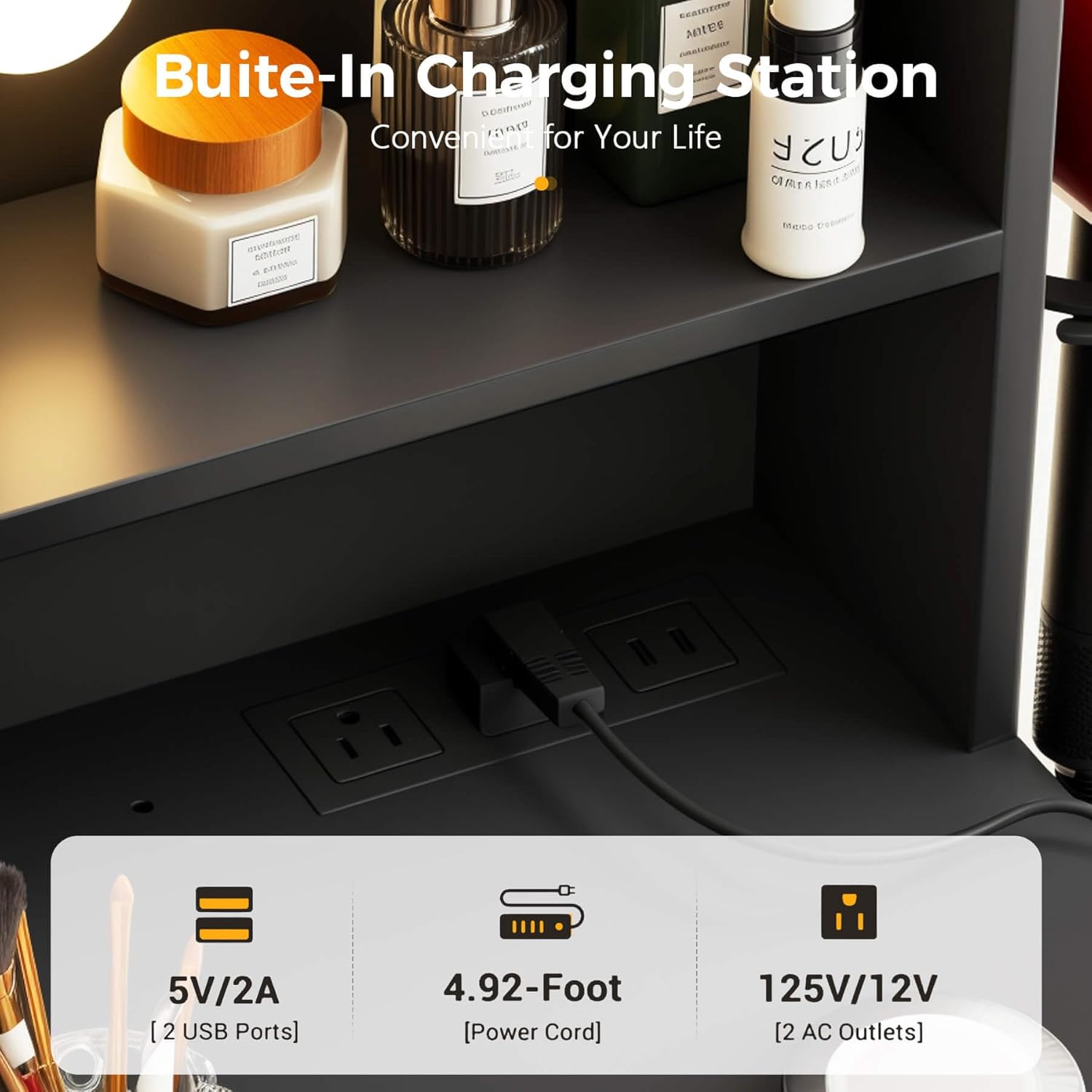
Figure 5: Close-up of the built-in charging station, featuring 2 USB ports and 2 AC outlets.
Storage Features
The vanity desk offers extensive storage options to keep your beauty essentials organized.
- Undertable Side Cabinet: A spacious cabinet located under the table provides concealed storage.
- Drawers: Two smooth-slide drawers are available for storing smaller items like makeup, skincare products, and accessories.
- Open Shelves: Four open shelves on the mirror frame allow for easy access and display of frequently used items.
- Cubby Storage: Three cubbies are integrated into the tabletop design for additional organized storage.
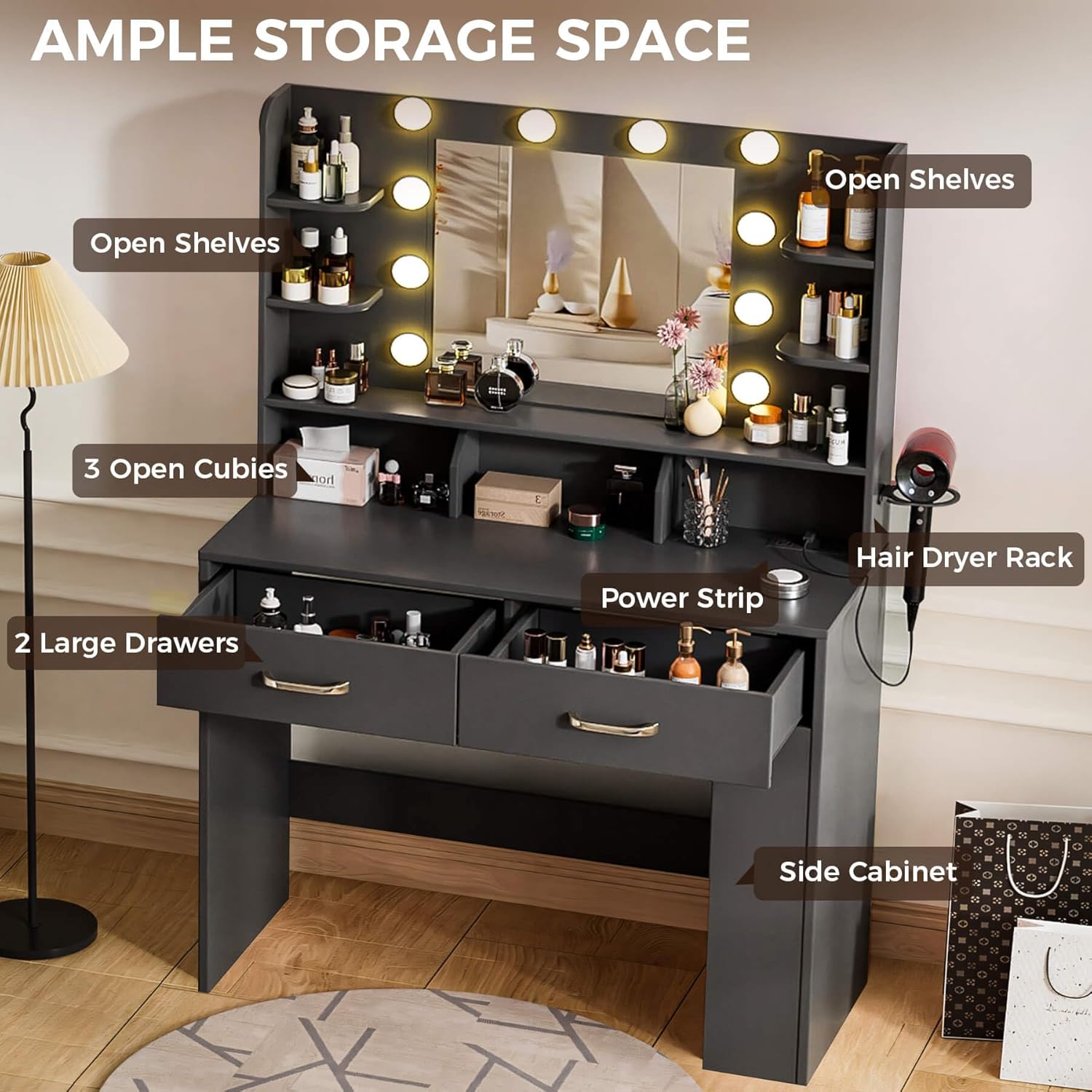
Figure 6: Overview of the vanity desk's ample storage, highlighting open shelves, cubbies, and drawers.

Figure 7: Detailed view of partitioned storage, smooth-slide drawers, and under-table expansion for optimal organization.
Care and Maintenance
- Cleaning: Wipe surfaces with a soft, damp cloth. Avoid harsh chemicals that may damage the finish.
- Electrical Components: Ensure all electrical components are unplugged before cleaning. Do not use water directly on electrical parts.
- Mirror Care: Clean the mirror with a glass cleaner and a lint-free cloth.
- Tighten Fasteners: Periodically check and tighten all screws and fasteners to maintain stability.
Troubleshooting
Lights Not Working
- Check Power Connection: Ensure the vanity desk is properly plugged into a working power outlet.
- Verify Switch/Sensor: For mirror lights, ensure the touch sensor is activated. For RGB lights, check the remote control battery and line of sight.
- Inspect Wiring: Confirm all light bulb and LED strip connections are secure as per the assembly instructions.
Drawers Not Sliding Smoothly
- Check Alignment: Ensure drawer slides are correctly aligned and installed on both the drawer and the cabinet.
- Clear Obstructions: Remove any items that may be blocking the drawer's path.
- Lubricate Slides: Apply a small amount of silicone lubricant to the drawer slides if friction persists.
Desk Instability
- Tighten Screws: Re-check and tighten all assembly screws and fasteners.
- Level Surface: Ensure the desk is placed on a flat, level surface.
Warranty and Support
For warranty information or technical support, please refer to the contact details provided with your purchase documentation or visit the official COMHOMA website. Keep your purchase receipt for warranty claims.
Manufacturer: COMHOMA
Customer Service: Visit the COMHOMA Store on Amazon
