
Gizoon 71 inch H Storage Cabinet
Gizoon 71" H Storage Cabinet with Strip Light - Instruction Manual
Model: 71" H Storage Cabinet (Tabletop-retro)
1. Product Overview
This manual provides detailed instructions for the assembly, operation, and maintenance of your Gizoon 71" H Storage Cabinet. This versatile cabinet features a smart charging hub, LED strip lighting, adjustable shelves, and a multi-functional design suitable for various rooms.
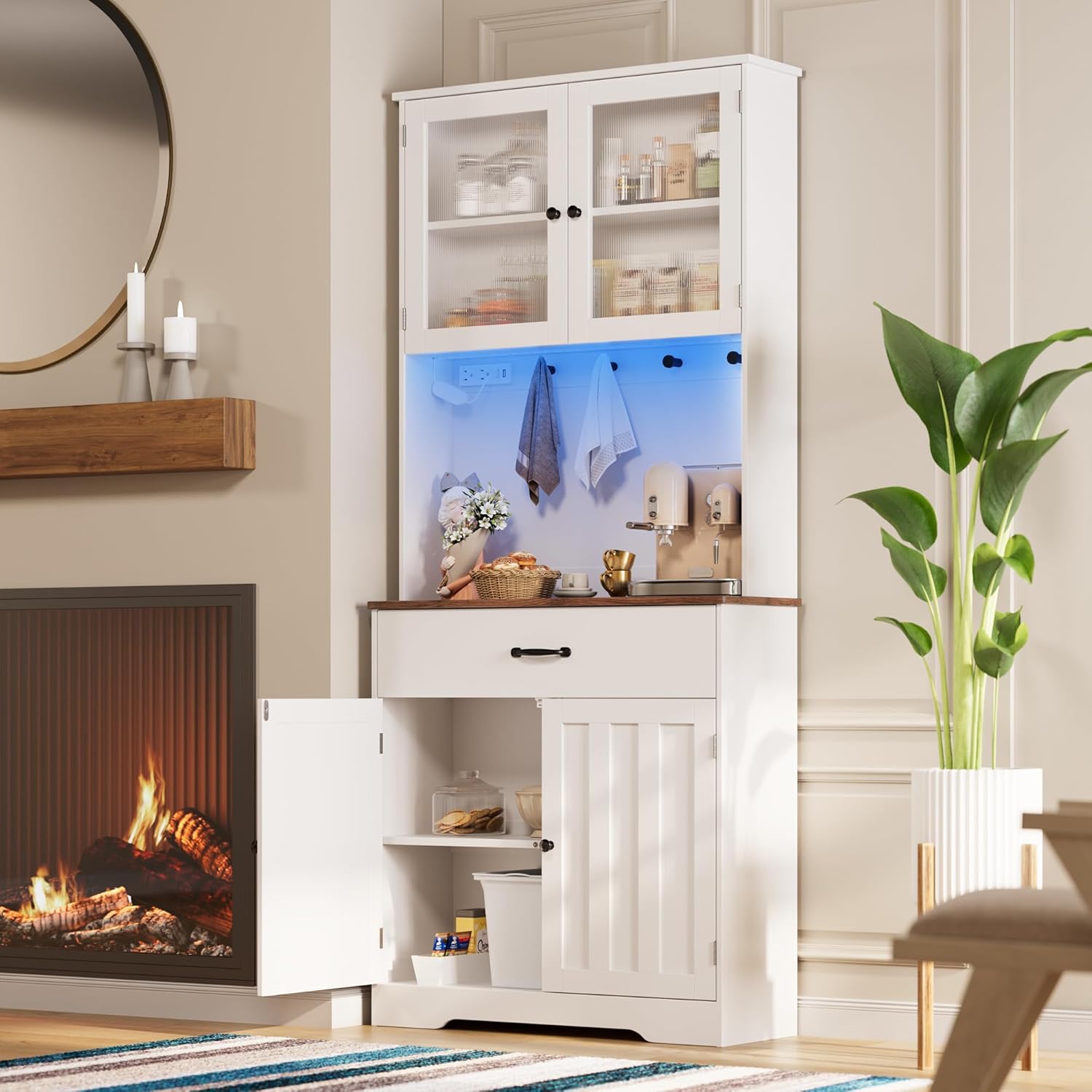
Image 1.1: The Gizoon 71" H Storage Cabinet in a dining room, showcasing its use as a coffee bar.

Image 1.2: The Gizoon 71" H Storage Cabinet functioning as a kitchen pantry.
2. Safety Information
- Always assemble the cabinet according to the provided instructions to prevent tipping.
- Keep the cabinet away from heat sources and hot appliances.
- Never insert objects into the power outlets or USB ports while they are in use.
- Always unplug the cabinet when not in use or when cleaning.
- Ensure the anti-tip hardware is properly installed to secure the cabinet to the wall.
3. Package Contents
Verify that all components are present before beginning assembly:
- 1 x Pantry Cabinet (unassembled parts)
- 1 x Hardware Pack (screws, dowels, connectors, etc.)
- 1 x Instruction Manual
- Anti-tip hardware
4. Setup and Assembly
The assembly process is designed to be straightforward. Follow the numbered parts and clear instructions provided in the included instruction manual. It is recommended to assemble the cabinet on a soft, clean surface to prevent scratches.
4.1. Dimensions Overview

Image 4.1: Detailed dimensions of the storage cabinet.
4.2. Anti-Tipping Device Installation
For safety, install the anti-tipping device as instructed in the assembly manual. This device secures the cabinet to the wall, preventing accidental tipping.

Image 4.2: Example of anti-tipping hardware.
5. Operating Instructions
5.1. Smart Charging Hub
The cabinet is equipped with a smart charging hub located in the open shelf area. This hub includes power outlets, USB ports, and Type-C ports for convenient charging of various devices and powering small appliances.

Image 5.1: The integrated charging station.
5.2. LED Strip Lighting
The integrated LED strip lighting offers 7 color modes and 2 strobe states to enhance the ambiance of your space. Use the control switch to cycle through the different lighting options.

Image 5.2: LED lighting design with multiple color options.
Video 5.1: Demonstration of the LED lighting features and cabinet functionality.
5.3. Adjustable Shelves and Storage
The cabinet features removable and adjustable shelves, allowing you to customize the storage space to accommodate items of various heights, such as cereal boxes or small appliances. The panel with 4 hooks provides additional hanging storage.

Image 5.3: Overview of ample storage space and adjustable features.

Image 5.4: Adjustable shelf mechanism.

Image 5.5: Round hooks for hanging items.
6. Maintenance
To ensure the longevity and appearance of your Gizoon storage cabinet, follow these maintenance guidelines:
- Cleaning: The product surface is designed to be easy to scrub. Use a soft, damp cloth with a mild cleaner to wipe down surfaces. Avoid abrasive cleaners or harsh chemicals that may damage the finish.
- Spills: Wipe up spills immediately to prevent staining or damage to the wood.
- General Care: Periodically check all hardware and tighten if necessary to maintain stability.

Image 6.1: Easy-to-clean surface and rounded corner design.
7. Troubleshooting
If you encounter any issues with your Gizoon 71" H Storage Cabinet, please refer to the following common solutions:
| Problem | Possible Cause | Solution |
|---|---|---|
| LED lights not working | Power cable not connected; LED strip damaged; switch malfunction. | Ensure power cable is securely plugged into an outlet. Check the LED strip for visible damage. Contact customer support if the issue persists. |
| Charging ports not functioning | Power hub not connected; device cable faulty; power surge. | Verify the power hub is connected to a live outlet. Try a different charging cable or device. If the issue continues, contact customer support. |
| Cabinet feels unstable | Loose assembly hardware; anti-tip device not installed or improperly secured. | Retighten all screws and connections. Ensure the anti-tip hardware is correctly installed and anchored to a wall stud. |
8. Specifications
| Feature | Detail |
|---|---|
| Brand | Gizoon |
| Model | 71" H Storage Cabinet |
| Color | Tabletop-retro |
| Material | Engineered Wood |
| Product Dimensions (D x W x H) | 13.6"D x 31.5"W x 70.9"H |
| Item Weight | 69.7 Pounds |
| Number of Drawers | 1 |
| Number of Shelves | 3 (adjustable) |
| Number of Doors | 4 (2 upper acrylic, 2 lower barn-style) |
| Additional Features | LED Lights (7 color modes, 2 strobe states), Smart Charging Hub (AC outlets, USB, Type-C ports), 4 Hooks |
| Installation Type | Freestanding |
| Assembly Required | Yes |
9. Warranty and Support
Gizoon is committed to providing quality products and customer satisfaction. If you have any questions during assembly, operation, or encounter any issues with your product, please do not hesitate to contact our customer support team. We aim to provide answers and assistance within 24 hours.
For support, please refer to the contact information provided in your purchase documentation or visit the official Gizoon website.
Ask a question about this manual
Ask about setup, troubleshooting, compatibility, parts, safety, or missing instructions. Manuals+ will review the question and use this page’s manual context to help answer it.