
Introduction
Thank you for choosing the Flrrtenv 50-Inch Computer Desk. This manual provides detailed instructions for assembly, operation, maintenance, and troubleshooting to ensure optimal use and longevity of your desk. Please read all instructions carefully before beginning assembly and retain this manual for future reference.
Safety Information
- Always assemble the desk on a soft, clean surface to prevent scratches.
- Ensure all screws and fasteners are securely tightened before use. Periodically check and re-tighten as necessary.
- Do not overload the desk or shelves beyond their stated weight capacity.
- Keep small parts away from children during assembly to avoid choking hazards.
- Use caution when handling electrical components (power outlets, USB ports) and ensure they are properly connected to a grounded power source.
Parts List
Please verify that all components are present and undamaged before beginning assembly. If any parts are missing or damaged, please contact customer support.
Note: Specific part labels (e.g., Part #G, Screw #5) are referenced in the assembly video for clarity.

Figure 1: Product Dimensions Diagram. This image illustrates the overall dimensions of the desk and its various components, including the monitor stand, main desktop, and storage units. Dimensions are provided in inches.
Setup and Assembly
Follow these steps to assemble your Flrrtenv 50-Inch Computer Desk. It is recommended to have a second person assist with certain steps.
Assembly Overview Video
Video 1: Assembly and Presentation of the Desk. This video provides a visual guide to the assembly process, demonstrating how to connect the various frame components and attach the wooden panels. It also showcases the completed desk.
Detailed Assembly Steps
- Assemble the Side Frames: Attach the metal frame parts using the provided screws. Ensure the holes for drawer slides face inwards as shown in the video. Install the adjustable feet.
- Attach Wooden Boards to Side Frames: Secure the wooden base boards to the assembled side frames using the designated screws.
- Connect the Main Desktop: Carefully align and attach the main desktop panel to the assembled side frames. Ensure all connection points are secure.
- Install Crossrods: Attach the crossrods to the back of the desk frame for added stability.
- Install Drawer Slides: Install the drawer slides on both the left and right sides of the desk frame. Ensure they are oriented correctly for smooth drawer operation.
- Assemble Monitor Stand: Attach the monitor stand components to the main desktop. Ensure the LED strip is installed correctly before securing the top panel.
- Install Power Outlet Strip: Secure the built-in power outlet strip to the designated area on the monitor stand.
- Insert Fabric Drawers: Place the fabric drawers into their respective compartments.

Figure 2: Functional Computer Desk Features. This image highlights the multi-functionality, spacious storage, ergonomic design, and sturdy construction of the desk.

Figure 3: Reversible Computer Desk Configuration. This image demonstrates that the drawer cabinet can be installed on either the left or right side of the desk to suit user preference and space requirements.
Operating Instructions
Power Outlets and USB Ports
The desk is equipped with a built-in power strip featuring 3 standard AC outlets, 1 USB port, and 1 Type-C port. Connect the desk's power cord to a wall outlet to activate these charging options.

Figure 4: Power Outlets for Charging. This image shows the integrated power strip with AC outlets, USB, and Type-C ports, allowing convenient charging of electronic devices directly from the desk.
Monitor Stand
The elevated monitor stand helps raise your screen to an ergonomic height, promoting better posture and reducing neck strain during extended use.

Figure 5: Monitor Stand. This image illustrates the monitor stand, designed to elevate your display for an ergonomic viewing height, which can help alleviate neck and back discomfort.
Fabric Drawers and Printer Cabinet
The desk includes 6 fabric drawers and a dedicated printer cabinet. The fabric drawers provide versatile storage for office supplies, documents, and personal items. The printer cabinet is designed to accommodate standard printers or scanners, keeping them within easy reach while freeing up desktop space.
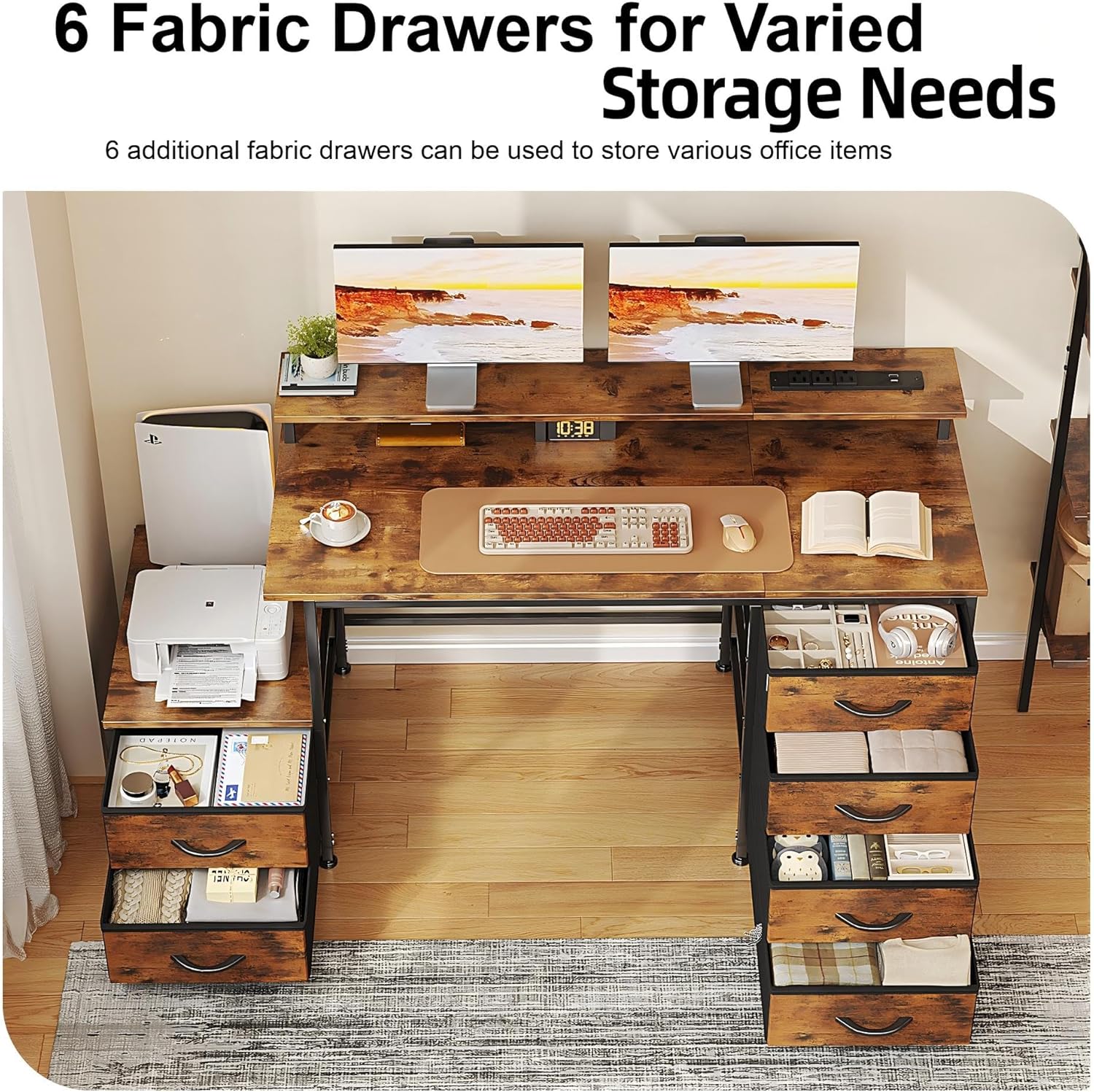
Figure 6: 6 Fabric Drawers for Varied Storage Needs. This image displays the six fabric drawers, highlighting their capacity for organizing various office items and personal belongings.

Figure 7: Printer Stand. This image shows the integrated printer stand, providing a convenient and accessible location for your printer or other office machines.
Maintenance
- Cleaning: Wipe the desk surfaces with a soft, damp cloth. Avoid harsh chemicals or abrasive cleaners that may damage the finish.
- Fabric Drawers: The fabric drawers can be spot cleaned with a mild detergent and water. Allow to air dry completely.
- Hardware: Periodically check all screws and fasteners to ensure they remain tight. Re-tighten as needed to maintain stability.
- Adjustable Feet: Adjust the feet as necessary to ensure the desk remains level on uneven surfaces.
Troubleshooting
- Desk Wobbles: Check that all screws are tightened. Adjust the leveling feet on the bottom of the desk to stabilize it on uneven floors.
- Drawers Stick: Ensure the drawer slides are correctly installed and free of obstructions. Check that the fabric drawers are properly inserted and not overloaded.
- Power Outlets Not Working: Verify that the desk's main power cord is securely plugged into a functional wall outlet. Check for any tripped circuit breakers.
- Difficulty Assembling: Refer to the assembly video and detailed steps. Ensure all parts are correctly oriented as indicated in the instructions. If issues persist, contact customer support.
Specifications
| Feature | Detail |
|---|---|
| Brand | Flrrtenv |
| Model Number | F-DNZ-3906-RB-CA |
| Color | Vintage Brown |
| Product Dimensions | 50 x 127.5 x 86.9 cm (19.7"D x 50.2"W x 34.2"H) |
| Material | Engineered Wood |
| Item Weight | 18 kg |
| Special Features | Adjustable Height (feet), Ergonomic (monitor stand), Keyboard Tray Included (implied by images/features), Power Outlets (3 AC, 1 USB, 1 Type-C) |
| Desk Design | Computer Desk |
Warranty and Support
For any questions, concerns, or assistance with your Flrrtenv computer desk, please refer to the contact information provided at the point of purchase. Our customer support team is available to help with assembly, missing parts, or any other product-related inquiries.