
Introduction
This manual provides essential information for the safe and efficient use of your DazzlingStage Charging Case. This custom-made charging and transport case is specifically designed for 6 par lights, compatible with models ZQ01528 and ZQ01529. It features a built-in power strip for convenient charging and robust construction for secure transportation.
Product Overview & Key Features
- Capacity: Holds up to 6 par lights.
- Integrated Charging: Features a built-in power strip with 6 individual charging outlets.
- Durability: Constructed with an aluminum frame and plywood, featuring high-density shockproof foam for fixture protection during transport.
- Portability: Equipped with carry handles and stackable design for easy transport and storage.
- Power Indicator: Includes a power switch with a charging light indicator.
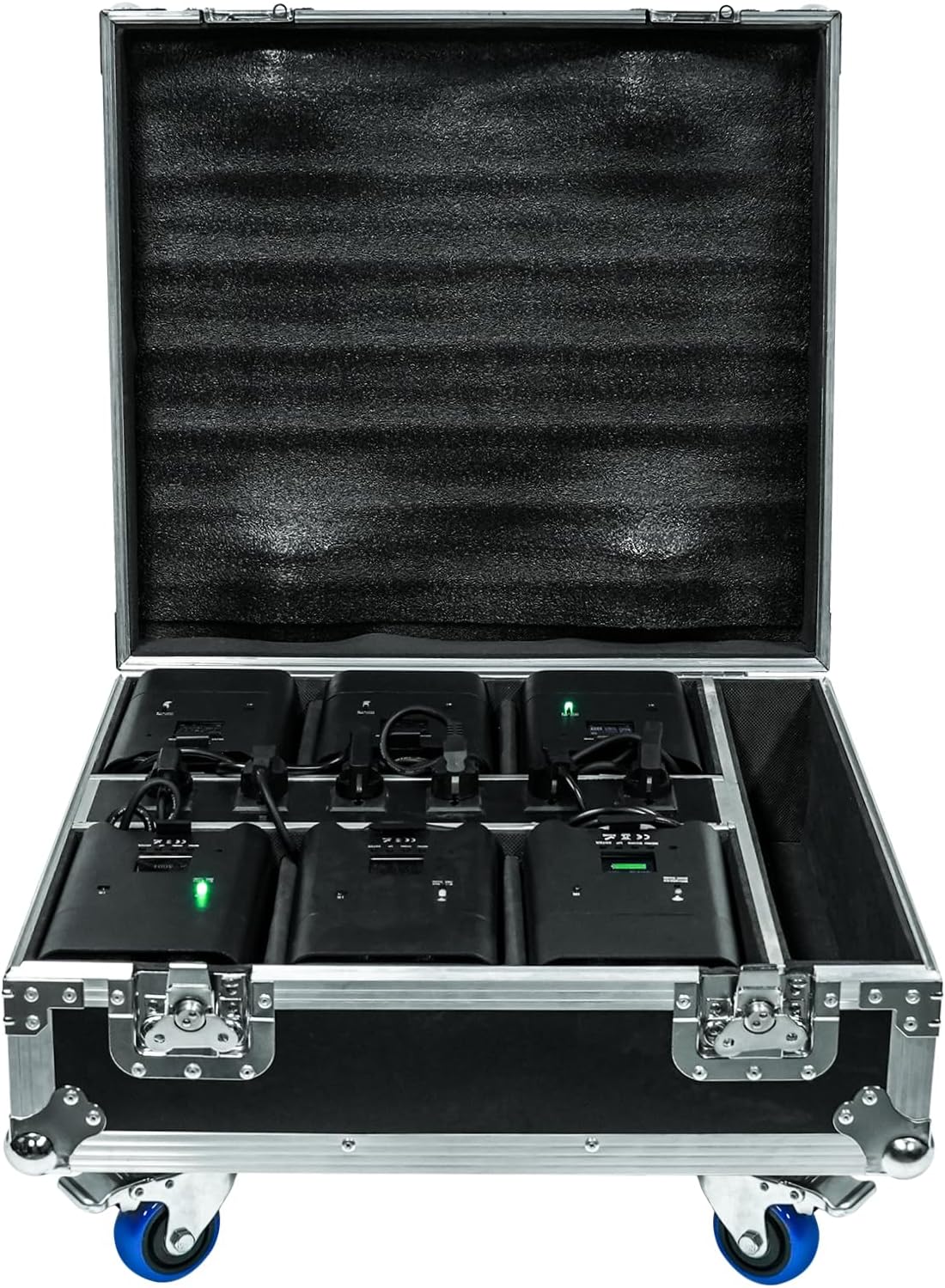
The case is designed to protect your fixtures during transportation with foam padding, ensuring your equipment remains secure and functional.
Specifications
| Feature | Detail |
|---|---|
| Brand | DazzlingStage |
| Model Number | ZQ15013 |
| Outer Case Dimensions (L x W x H) | 23.42" x 21.65" x 5.7" (without lights inside) |
| Material Type | Aluminum frame, Plywood, High-density shockproof foam |
| Closure Type | Hook & Loop |
| Built-in Power Strip | Yes, for 8 lights (6 individual charging outlets for uplights) |
| Stackable | Yes |

Setup Instructions
- Unpack the Case: Carefully remove the charging case from its packaging.
- Open the Case: Unlock the butterfly latches on the front of the case and lift the lid.
- Place Uplights: Insert up to 6 compatible uplights (e.g., ZQ01528, ZQ01529) into the individual foam-padded slots. Ensure each light fits snugly.
- Connect Uplights to Power Strip: Plug each uplight's power cable into one of the individual charging outlets on the built-in power strip located in the center of the case.
- Connect Case to Wall Power: Plug the included power cable into the designated power input on the side of the charging case, then plug the other end into a standard wall outlet.

Operating Instructions (Charging)
- Ensure Proper Setup: Verify that all uplights are correctly placed in their slots and plugged into the internal power strip, and the case is connected to a wall outlet as per the Setup Instructions.
- Open Case Lid: IMPORTANT: You must keep the case lid open when charging. Closing the lid during charging can lead to overheating and potential damage to the uplights.
- Activate Charging: Flip the power switch on the side of the charging case to the 'ON' position. The charging light indicators on the case and/or uplights should illuminate, indicating that charging has begun.
- Monitor Charging: Allow approximately 5 hours for completely drained uplights to fully charge. The charging indicators on the uplights will typically change color or turn off once charging is complete.
- Disconnect After Charging: Once charging is complete, flip the power switch to 'OFF' and disconnect the case from the wall outlet.

Video Demonstration: Charging Case Operation
Maintenance
- Cleaning: Wipe the exterior of the case with a soft, dry cloth. Do not use abrasive cleaners or solvents.
- Storage: Store the case in a cool, dry place away from direct sunlight and extreme temperatures.
- Inspection: Periodically inspect the power cable, internal power strip, and foam padding for any signs of wear or damage. Replace damaged components immediately.
Troubleshooting
- Lights Not Charging:
- Ensure the case's power switch is ON.
- Check that the case's power cable is securely plugged into both the case and a working wall outlet.
- Verify that each uplight's power cable is securely plugged into the internal power strip.
- Confirm the case lid is open during charging to prevent overheating.
- Case Overheating:
- Always keep the case lid open during charging to allow for proper ventilation.
- Ensure the case is not placed in an enclosed space or covered while charging.
Warranty & Support
This DazzlingStage product comes with a 6-month manufacturer's warranty. For technical support, troubleshooting assistance, or warranty claims, please contact DazzlingStage customer service through your retailer or the official brand website.