Introduction
The Blackstar Beam Solo is a compact and versatile headphone amplifier designed for electric, acoustic, and bass guitars. It provides a premium sound experience with extensive tone customization options through its dedicated mobile application. This manual provides essential information for setting up, operating, maintaining, and troubleshooting your Beam Solo device.
Package Contents
- Blackstar Beam Solo Headphone Amplifier
- USB-C Charging Cable
- Instruction Manual (this document)
Setup
1. Charging the Device
Before initial use, ensure your Beam Solo is fully charged. Connect the device to a power source using a standard USB-C cable. The interactive light beam will indicate charging status.

Image: Side view of the Beam Solo, highlighting the USB-C port for charging and the ON/OFF switch.
2. Connecting to Your Instrument
The Beam Solo features an integrated adjustable 1/4" jack plug. Insert this plug into your guitar's output jack. The adjustable design ensures compatibility with various guitar body styles.
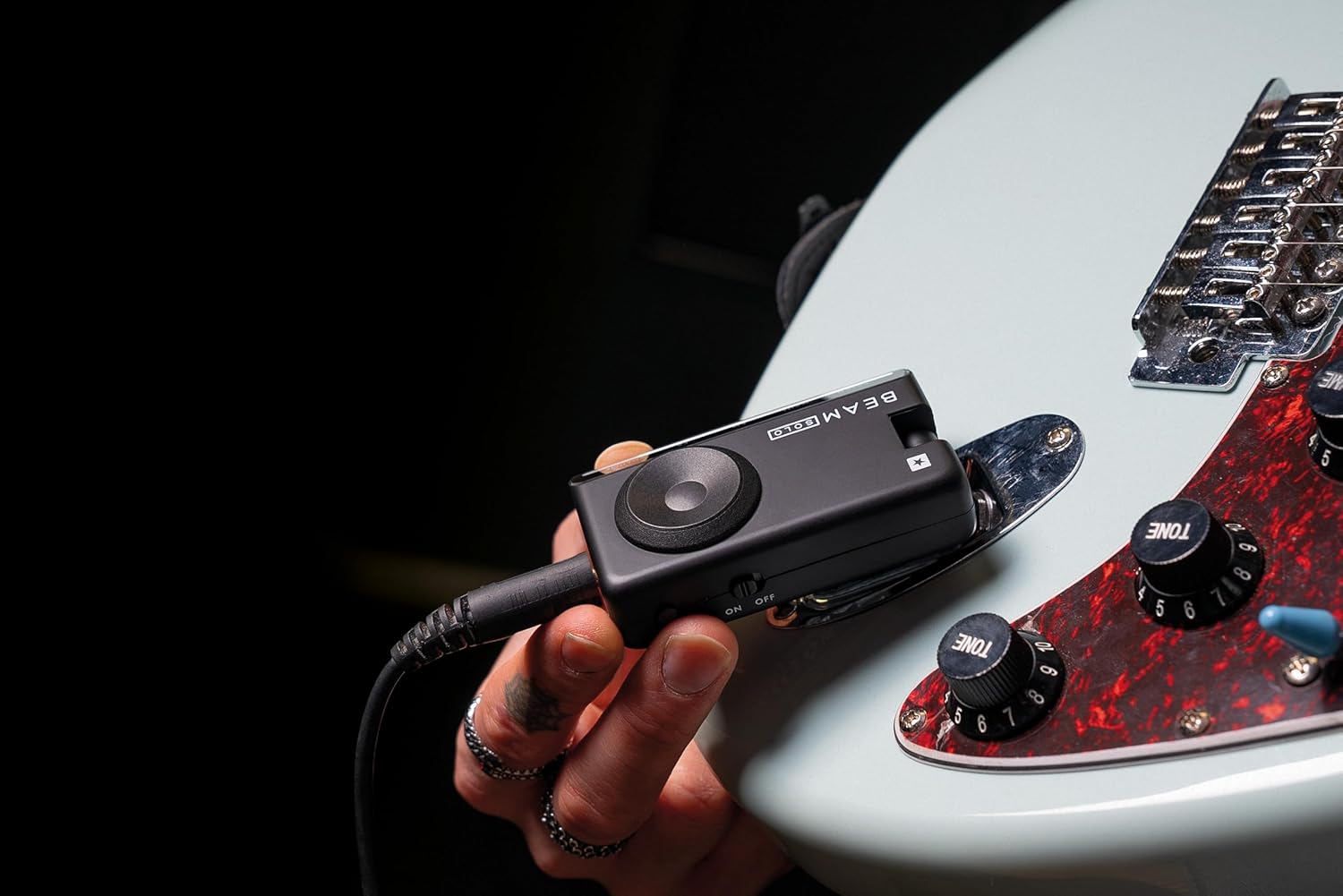
Image: The Blackstar Beam Solo plugged into the output jack of an electric guitar.

Image: An angled view of the Beam Solo, illustrating the adjustable 1/4" jack plug for flexible connection to instruments.
3. Connecting Headphones
Plug your headphones into the 3.5mm TRRS headphone jack on the Beam Solo. This ensures crystal-clear monitoring of your instrument's sound.

Image: Top view of the Blackstar Beam Solo, showing the headphone socket and SpeedDial control.
4. Powering On
Locate the ON/OFF switch on the side of the device and slide it to the 'ON' position. The device is now ready for use.
5. Initial App Connection (Optional)
For advanced tone customization and features, download the Blackstar BEAM App from your device's app store. Enable Bluetooth on your mobile device and pair it with the Beam Solo. The app provides real-time control over various settings.
Operation
Onboard Controls
The Beam Solo features intuitive onboard controls for quick adjustments:
- Patch: Selects different sound presets. Hold to save current settings.
- Gain: Adjusts the input sensitivity and drive level.
- EQ: Modifies the tonal characteristics (bass, mid, treble).
- FX: Controls the effects parameters. Tap to set tempo for time-based effects.
- Volume: Adjusts the overall output volume. Hold to activate the built-in tuner.
- SpeedDial: A rotary control for quick navigation and parameter adjustment.

Image: Diagram illustrating the various controls and ports on the Blackstar Beam Solo, including Patch, Gain, EQ, FX, Volume, SpeedDial, Headphone Socket, USB-C, and Bluetooth Audio.
Using the Blackstar BEAM App
The Blackstar BEAM App unlocks the full potential of your Beam Solo, offering comprehensive control over your tone. Connect via Bluetooth to access:
- Amp Types: Choose from over 8 different amplifier models.
- Effects: Access over 35 effects, including pre-FX (gate, filter/comp, drive/fuzz) and post-FX (modulation, delay, reverb).
- Cabinets & Microphones: Select from over 24 cabinet and microphone combinations.
- Room Environments: Customize your sound with over 9 room environment combinations.
- Patches: Create, save, and share custom patches. Explore artist-created patches and a community library.
- Integrated Tools: Utilize the built-in tuner and metronome.
- Backing Tracks: Access integrated lessons and backing tracks for practice.

Image: A visual representation of the Blackstar BEAM App interface on a smartphone, demonstrating its capabilities for tone customization.
Recording Vocals
The Beam Solo can be used as a high-quality audio interface via its USB-C port. When connected to a computer, you can record your instrument and vocals simultaneously using a compatible headset microphone.
Video: An official product video demonstrating the Blackstar Beam Solo's features, including recording vocals with a headset microphone.
Maintenance
- Cleaning: Wipe the device with a soft, dry cloth. Avoid using abrasive cleaners or solvents.
- Storage: Store the Beam Solo in a cool, dry place away from direct sunlight and extreme temperatures.
- Battery Care: To prolong battery life, avoid fully discharging the device frequently. Charge it regularly, especially if storing for extended periods.
- Firmware Updates: Periodically check the Blackstar BEAM App for available firmware updates to ensure optimal performance and access to new features.
Troubleshooting
| Problem | Possible Cause | Solution |
|---|---|---|
| No sound from headphones. | Device is off, headphones not connected, volume too low, or guitar not connected properly. | Ensure the device is ON, headphones are fully plugged in, volume is adjusted, and the guitar jack is securely inserted. |
| Bluetooth connectivity issues with app. | Bluetooth not enabled, device not paired, or app glitch. | Ensure Bluetooth is enabled on your mobile device. Try unpairing and re-pairing the Beam Solo. Restart the app and/or the Beam Solo. Check for app updates. |
| Low output volume. | Volume control set too low on device or within the app. | Increase the volume using the SpeedDial on the device or the volume control within the Blackstar BEAM App. Check headphone volume. |
| App is glitchy or inconsistent. | Software bug or temporary issue. | Restart the app. Ensure your app and device firmware are up to date. If issues persist, contact Blackstar support. |
Specifications
| Feature | Detail |
|---|---|
| Model Number | BA206010 |
| Product Dimensions | 1.8"D x 4.33"W x 3.75"H (4.57 x 10.99 x 9.52 cm) |
| Item Weight | 6 ounces (170 grams) |
| Material | Plastic |
| Color | Black |
| Compatible Devices | Electric Guitar, Acoustic Guitar, Bass Guitar |
| Connectivity | 1/4" Instrument Input, 3.5mm TRRS Headphone Output, USB-C (for charging and audio interface), Bluetooth |
| Battery Life | Approximately 5 hours+ (charged via USB-C) |
| Amplifier Models | 8+ (via BEAM App) |
| Effects | 35+ (via BEAM App) |
| Cabinet & Mic Combos | 24+ (via BEAM App) |
| Room Environments | 9+ (via BEAM App) |

Image: A summary of key specifications and features of the Blackstar Beam Solo, including battery life, number of amplifiers, effects, and cabinet/microphone combinations available through the app.
Warranty Information
For detailed warranty information regarding your Blackstar Beam Solo Headphone Amplifier, please refer to the warranty card included with your product or visit the official Blackstar Amplification website. Warranty terms and conditions may vary by region.
Customer Support
Should you require technical assistance, have questions about your product, or need to report an issue, please visit the official Blackstar Amplification support page or contact their customer service directly. Contact details can typically be found on the manufacturer's website or in the product packaging.
Blackstar Amplification Website: www.blackstaramps.com


