
1. Introduction and Overview
Thank you for choosing the GRECELL 1000W Portable Power Station EB1000. This device is a versatile and reliable power solution designed for various applications, including outdoor camping, travel, emergency backup, and powering electronic devices. With its 999Wh capacity and 1000W (2000W peak) pure sine wave AC output, it provides stable and safe power for a wide range of appliances and gadgets.
This manual provides essential information on how to safely operate, maintain, and troubleshoot your power station. Please read it thoroughly before use and retain it for future reference.
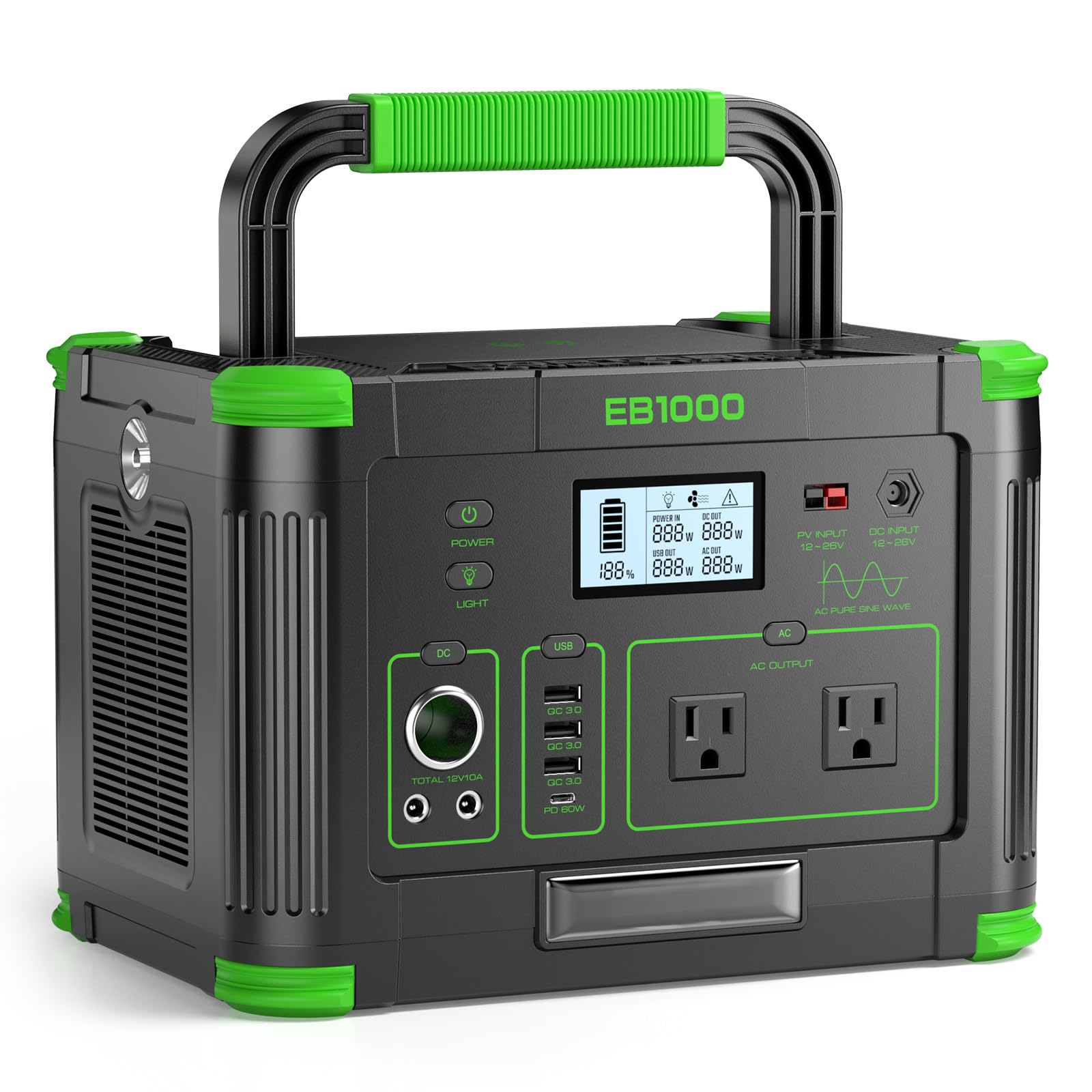
Image: The GRECELL 1000W Portable Power Station EB1000, a compact and robust power solution.
2. Product Features
The GRECELL EB1000 is equipped with advanced features to ensure optimal performance and user convenience:
- High Capacity & Output: 999Wh battery capacity with 1000W continuous (2000W peak) pure sine wave AC output.
- Multiple Output Ports: Includes 2 AC outlets, 3 USB QC ports, 1 USB-C PD port (60W), 2 DC 12V ports, 1 12V cigarette lighter port, and 1 wireless charging pad.
- Advanced Battery Management System (BMS): Provides comprehensive protection against over-load, over-charge, short-circuit, over-voltage, over-current, over-heated, and over-discharge conditions.
- Efficient Cooling: Dual quiet cooling fans maintain a safe operating temperature.
- Versatile Recharging: Supports recharging via 110V AC wall adapter, 12V car charger, or compatible 200W solar panels (sold separately).
- Integrated LED Lighting: Features a built-in LED light with Constant Light, Strobe, and SOS emergency modes.
- Portable Design: Weighs 17.86 pounds with a non-slip rubber handle for easy transport. Includes a cable management bag.

Image: Illustration of the 999Wh super large capacity, demonstrating its ability to power various devices for extended periods.

Image: Diagram showing the various output ports, including AC, DC, USB-A, USB-C PD, Car, and Wireless Charger, highlighting the ability to power 10 devices simultaneously.
3. Setup
3.1 Unboxing and Initial Inspection
Upon receiving your GRECELL EB1000, carefully remove it from its packaging. Inspect the unit for any signs of damage during transit. Ensure all included accessories are present: 1000W Portable Power Station, User Manual, 7909 Solar Charging Cable, AC Charging Cable, and Car Charging Cable.
3.2 First Use and Charging
For optimal battery health, it is recommended to fully charge the power station before its first use. Connect the provided AC charging cable to a standard 110V wall outlet and to the AC input port on the power station. The LCD display will indicate charging status. Allow 7-8 hours for a full charge.
4. Operating Instructions
4.1 Powering On/Off
To power on the unit, press and hold the main power button for a few seconds until the LCD screen illuminates. To power off, press and hold the main power button again until the screen turns off.
4.2 Using AC Outlets
Press the AC output button to activate the 110V AC outlets. The AC indicator on the LCD screen will light up. Plug your AC-powered devices into the outlets. Ensure the total wattage of connected devices does not exceed 1000W (or 2000W surge). Press the AC output button again to turn off the AC outlets when not in use.
4.3 Using DC and USB Ports
The DC 12V ports, 12V cigarette lighter port, USB QC ports, and USB-C PD port are typically active once the unit is powered on. Simply plug in your compatible devices. The USB-C PD port supports 60W fast charging for devices like laptops and smartphones.
4.4 Wireless Charging
Place your Qi-compatible device on the wireless charging pad located on top of the unit. Ensure the device is centered for optimal charging. The wireless charging indicator on the LCD screen will confirm activation.
4.5 LCD Display Information
The LCD display provides real-time information:
- Battery level indicator.
- Input power (W).
- Output power (W) for AC, DC, and USB.
- Estimated remaining runtime or charging time.
- Status indicators for AC, DC, USB, and wireless charging.
4.6 LED Light Operation
Press the LED light button to cycle through its modes:
- First Press: Constant Light Mode (for illumination).
- Second Press: Strobe Mode (for signaling).
- Third Press: SOS Mode (for emergency signaling).
- Fourth Press: Turns off the LED light.

Image: The power station with its built-in LED light active, illustrating its use for illumination in Constant, Strobe, and SOS modes.
5. Charging Methods
The GRECELL EB1000 offers flexible charging options:
- AC Wall Adapter: Connect the provided AC charging cable to a standard 110V wall outlet. Full charge typically takes 7-8 hours.
- 12V Car Charger: Use the provided car charging cable to charge from your vehicle's 12V cigarette lighter port. Charging time is approximately 9-10 hours with the vehicle running.
- Solar Panels: Connect compatible 200W solar panels (not included) using the 7909 solar charging cable. Charging time varies based on sunlight intensity, typically 6-8 hours for a full charge under optimal conditions.
5.1 Pass-Through Charging
The power station supports pass-through charging, allowing you to recharge the unit while simultaneously powering other devices. This provides stable energy without interruption.

Image: Visual representation of the three charging methods: solar panel, AC wall adapter, and car charger, with estimated charging times.

Image: The power station connected to a solar panel while simultaneously powering devices, demonstrating uninterrupted pass-through charging.
6. Safety Information
Adhere to the following safety guidelines to prevent injury or damage to the unit:
- Do not expose the unit to water, rain, or high humidity.
- Avoid operating the unit in direct sunlight or in environments with high temperatures.
- Ensure adequate ventilation around the power station during use and charging.
- Do not disassemble, repair, or modify the unit. Contact customer support for service.
- Keep out of reach of children and pets.
- Avoid dropping or subjecting the unit to strong impacts.
- Use only approved accessories and charging cables.
6.1 Battery Management System (BMS) Protections
The integrated BMS provides multiple layers of protection:
- Short Circuit Protection
- Over Current Protection
- Over Voltage Protection
- Over Heating Protection
- Over Charge Protection
- Over Discharge Protection

Image: Internal view of the power station highlighting the BMS battery system and cooling fans, along with icons for various protection features.
7. Maintenance
7.1 Storage
When storing the power station for extended periods, ensure it is charged to approximately 50-80% capacity. Store it in a cool, dry place away from direct sunlight and extreme temperatures. Recharge the unit every 3-6 months to maintain battery health.
7.2 Cleaning
Use a soft, dry cloth to clean the exterior of the power station. Do not use abrasive cleaners or solvents. Ensure all ports are free of dust and debris.
7.3 Battery Lifespan
The GRECELL EB1000 utilizes a durable battery designed for over 3000 charge cycles, providing a long lifespan of approximately 10 years under proper care.

Image: Graphic illustrating the upgraded battery with 3000+ cycles and a 10-year lifespan, emphasizing long-lasting power.
8. Troubleshooting
If you encounter issues with your power station, refer to the following common troubleshooting steps:
- Unit Not Turning On: Ensure the battery is not completely depleted. Try connecting to an AC wall charger for at least 30 minutes.
- No Output from Ports: Verify that the specific output (AC, DC, USB) is activated by pressing its respective button. Check if the connected device is functioning correctly and its power draw is within the power station's limits.
- Slow Charging: Ensure you are using the correct charging cable and adapter. For solar charging, confirm panels are correctly positioned and receiving adequate sunlight.
- Overload Protection: If the unit shuts down or displays an overload warning, disconnect some devices to reduce the total power draw. Restart the unit.
- Error Codes: If an error code appears on the LCD screen, refer to the specific code in the full user manual (if available) or contact customer support for assistance.
For persistent issues or advanced troubleshooting, please contact GRECELL customer support.
9. Specifications
| Feature | Specification |
|---|---|
| Brand | GRECELL |
| Model Name | EB1000 |
| Capacity | 999Wh |
| AC Output | 1000W (2000W Peak) Pure Sine Wave, 110V |
| USB-C PD Output | 60W |
| USB-A QC Output | 3 ports |
| DC Output | 2 x 12V ports, 1 x 12V Car Cigarette Lighter Port |
| Wireless Charging | Yes |
| AC Charging Time | 7-8 hours (110V wall adapter) |
| Car Charging Time | 9-10 hours (12V car charger) |
| Solar Charging Time | 6-8 hours (with 200W solar panels, not included) |
| Battery Type | Lithium Battery (LiFePO4 for long lifespan) |
| Dimensions (L x W x H) | 11.6" x 7.9" x 7.9" |
| Weight | 17.86 pounds |
| Included Components | Power Station, User Manual, Solar Charging Cable, AC Charging Cable, Car Charging Cable |
10. Warranty and Support
10.1 Warranty Information
The GRECELL 1000W Portable Power Station EB1000 comes with a 24-month (2-year) limited warranty from the date of purchase. This warranty covers manufacturing defects and workmanship under normal use. It does not cover damage caused by misuse, accidents, unauthorized modifications, or natural disasters.
10.2 Customer Support
For technical support, warranty claims, or any questions regarding your GRECELL EB1000, please contact GRECELL customer service. Refer to the contact information provided on the product packaging or the official GRECELL website.


