
1. Introduction
This manual provides detailed instructions for the safe and efficient operation of your LOOP GEAR SK05 PRO Mao and SK03 EDC Flashlights. Please read this manual thoroughly before use and retain it for future reference.
Key Features
- SK05 PRO Mao: 4360 Lumens, 8000mAh rechargeable battery, power bank function, SFT25 Spot LED, SST25 Flood LEDs, 8-color RGB side lights, Type-C fast charging.
- SK03: 1000 Lumens, AA rechargeable battery powered, 145° floodlight angle, 10 lighting modes.
2. Safety Information
WARNING: Do not use other branded batteries, or you may risk causing serious consequences. Be aware of the heat on the head during prolonged high-output use.
- Keep out of reach of children.
- Do not shine the light directly into eyes.
- Avoid disassembling the flashlight, as this may void the warranty and cause damage.
- Ensure proper battery polarity when installing.
- Charge only with compatible chargers and cables.
3. Package Contents
- 1x LOOP GEAR SK05 PRO Mao EDC Flashlight
- 1x LOOP GEAR SK03 EDC Flashlight
- 2x 18650 Lithium-Ion Batteries (for SK05 PRO)
- 1x AA Rechargeable Battery (for SK03)
- 1x USB Type-C Charging Cable
- User Manual
4. Product Overview
SK05 PRO Mao

Image: The LOOP GEAR SK05 PRO Mao and SK03 flashlights side-by-side, showcasing their distinct designs and sizes.
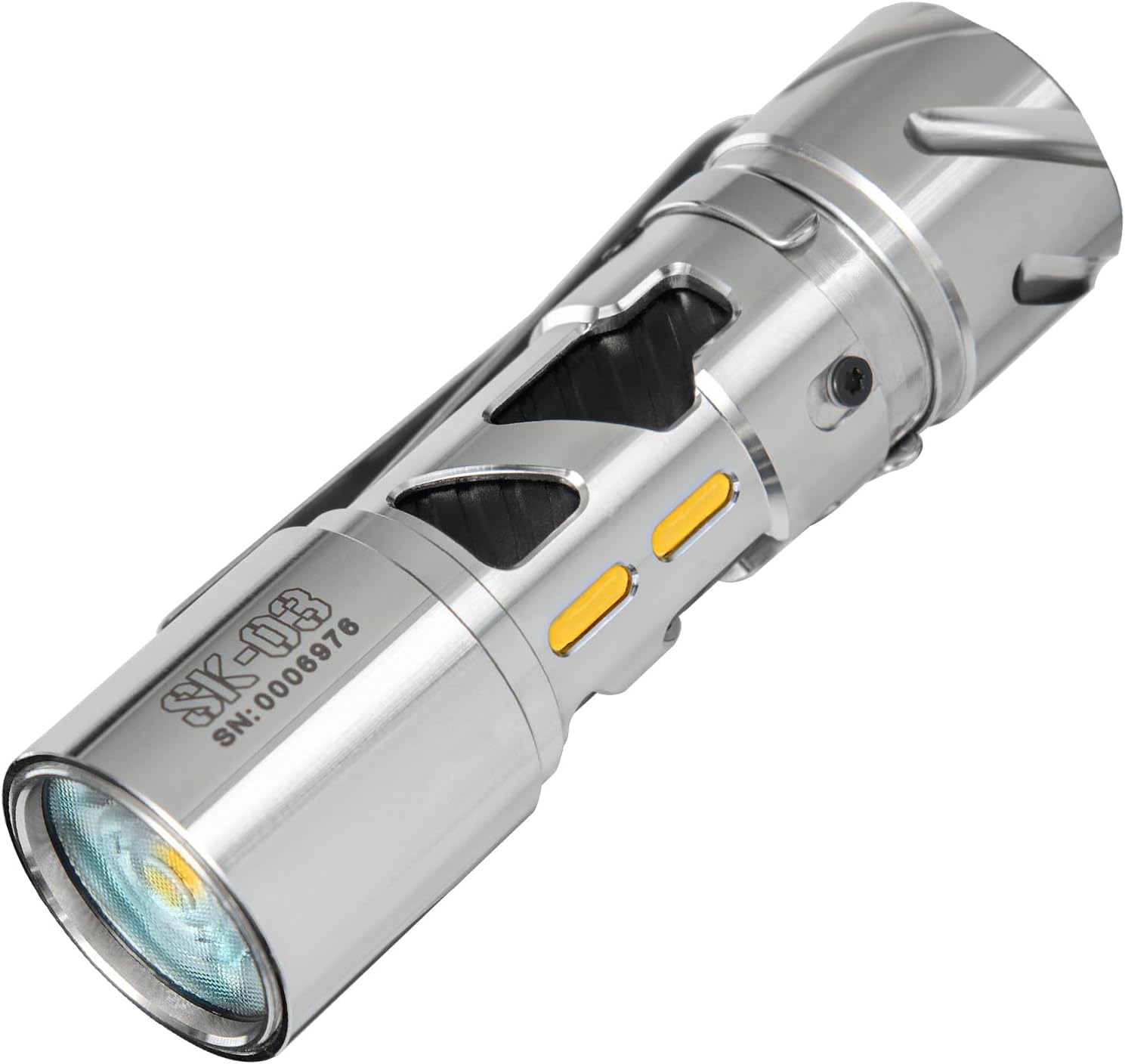
Image: A close-up view of the SK05 PRO Mao flashlight, highlighting its dual light sources (spot and flood), rotary switch, and side RGB light strip.
- Dual Light Sources: Features a dedicated SFT25 Spot LED and three SST25 Flood LEDs for versatile lighting.
- Rotary Switch: Controls main light modes and brightness levels.
- RGB Side Light: Multi-color ambient light strip for various uses.
- Battery Compartment: Houses two replaceable 18650 batteries.
- USB-C Port: For charging and power bank functionality.
- Pocket Clip: For secure carrying.
SK03

Image: A close-up view of the compact SK03 EDC flashlight, showing its single main LED and side light indicators.
- Main LED: Provides up to 1000 lumens with a wide floodlight angle.
- Single Button Control: Manages all 10 lighting modes.
- AA Battery Powered: Utilizes a single rechargeable AA battery.
- Compact Design: Ideal for everyday carry.
5. Setup
5.1. Battery Installation (SK05 PRO)
- Locate the battery compartment release mechanism on the side of the SK05 PRO.
- Press the release button and slide open the compartment.
- Insert the two provided 18650 Lithium-Ion batteries, ensuring the positive (+) and negative (-) terminals match the indicators inside the compartment.
- Close the battery compartment securely until it clicks into place.
5.2. Initial Charging
It is recommended to fully charge both flashlights before first use.
- SK05 PRO: Connect the USB Type-C cable to the flashlight's charging port and to a compatible USB power adapter (not included). The side light strip will indicate charging status.
- SK03: Connect the USB Type-C cable to the flashlight's charging port and to a compatible USB power adapter. The indicator light will show charging status.
6. Operating Instructions
6.1. SK05 PRO Mao Operation

Image: A close-up of the SK05 PRO Mao's rotary switch, showing the different mode icons for flood, spot, and lock.
- Power On/Off: Rotate the main switch to the desired mode (Flood, Spot, or RGB) to turn on. Rotate to the 'Off' position to turn off.
- Main Light Modes (Flood/Spot):
- Rotate the switch to the 'Flood' or 'Spot' icon.
- Press the main button to cycle through brightness levels (Low, Mid, High, Turbo).
- Double-press for Strobe, triple-press for SOS.
- RGB Side Lights:
- Rotate the switch to the 'RGB' icon.
- Press the main button to cycle through different colors and modes (e.g., solid colors, warning, party modes).
- Power Bank Function: Connect your device to the USB-C port on the SK05 PRO using a compatible cable to charge your device.
- Auto-Lock Feature: The flashlight will automatically lock after one minute of inactivity to prevent accidental activation. To unlock, rotate the switch or press the main button. This feature can be disabled if preferred (refer to advanced settings in the full manual).
6.2. SK03 Operation

Image: An illustration demonstrating the various main and side light modes of the SK03 flashlight, including Turbo, High, Mid, Low, Strobe, SOS, Beacon, and Micro.
- Power On/Off: Press and hold the single control button for 1 second to turn on/off.
- Cycle Modes: With the light on, short press the button to cycle through the 10 available lighting modes (e.g., Turbo, High, Mid, Low, Strobe, SOS, Beacon, Micro, and side light options).
7. Charging
7.1. SK05 PRO Charging

Image: The SK05 PRO Mao flashlight connected via USB-C cable to a smartphone, demonstrating its power bank functionality and charging capability.
- The SK05 PRO supports 20W PD fast charging. A full charge typically takes 3-5 hours.
- Connect the provided USB-C cable to the flashlight's charging port and a USB power source.
- The side light strip will display charging status (e.g., pulsing while charging, solid when fully charged).
7.2. SK03 Charging
- Connect the USB-C cable to the SK03's charging port and a USB power source.
- An indicator light on the flashlight will show charging status (e.g., red for charging, green for fully charged).
8. Maintenance
- Cleaning: Wipe the flashlight body with a soft, damp cloth. Do not use harsh chemicals or abrasive materials.
- Battery Care: For optimal battery life, avoid fully discharging the batteries frequently. If storing for extended periods, charge the batteries to approximately 50% every few months.
- Storage: Store the flashlights in a cool, dry place away from direct sunlight and extreme temperatures.
9. Troubleshooting
- Flashlight not turning on: Check battery installation and ensure batteries are charged. For SK05 PRO, ensure the auto-lock feature is not active.
- Charging issues: Verify the USB-C cable is properly connected and the power source is functional. Try a different cable or adapter.
- Reduced brightness/runtime: Batteries may need recharging or replacement. Ensure the flashlight is not in a low-power mode.
10. Specifications
| Feature | SK05 PRO Mao | SK03 |
|---|---|---|
| Max Lumens | 4360 Lumens | 1000 Lumens |
| Battery Capacity | 8000mAh (2x 18650) | AA Rechargeable |
| Charging | USB Type-C, 20W PD Fast Charging | USB Type-C |
| Material | Stainless Steel | Stainless Steel |
| Special Features | Spotlight, Floodlight, 8-Color RGB Side Lights, Power Bank, Auto-Lock | 145° Floodlight, 10 Lighting Modes |
| Water Resistance | Not Water Resistant | Not Water Resistant |
11. Warranty and Support
LOOP GEAR products are manufactured to high-quality standards. For warranty information, technical support, or service inquiries, please refer to the official LOOP GEAR website or contact your retailer. Keep your proof of purchase for warranty claims.
