
Important Safety Information
Assembly may require tools and safety precautions. Always unplug electrical components before handling. Keep electrical cords away from heat sources and liquids. Do not overload outlets. Always follow manufacturer's instructions for safe assembly and use.
- Ensure all parts are securely fastened before use.
- Do not stand on the vanity table or stool.
- Keep small children and pets away during assembly.
- Avoid exposing the vanity to extreme temperatures or humidity.
Package Contents
Verify all components are present and undamaged before beginning assembly. If any parts are missing or damaged, please contact customer support.
- Vanity Tabletop and Frame Components
- LED Illuminated Mirror Unit
- Padded Stool with Storage
- 4 Drawers (1 large, 3 small)
- Power Outlet Unit (2 AC, 2 USB)
- Hardware Kit (screws, connectors, tools)
- Instruction Manual

Assembly Instructions
Follow these steps carefully for proper assembly. It is recommended to have a second person assist with certain stages to ensure stability and ease of construction.
- Unpack and Organize: Lay out all components on a clean, soft surface. Verify against the parts list in the hardware kit.
- Assemble Main Table Frame: Connect the side panels and support beams using the provided screws and fasteners. Ensure all connections are tight.
- Install Drawers: Insert the drawer slides into the pre-drilled holes on the table frame. Assemble each drawer and slide them into place.
- Attach LED Mirror Unit: Secure the LED mirror unit to the designated area on the tabletop using the provided hardware.
- Assemble Padded Stool: Connect the stool legs to the seat base. Attach the padded top, ensuring the hidden storage compartment opens and closes smoothly.
- Connect Power: Plug the power outlet unit into the vanity. Connect the LED mirror's power cable to the power outlet unit. Finally, plug the vanity's main power cord into a wall outlet.

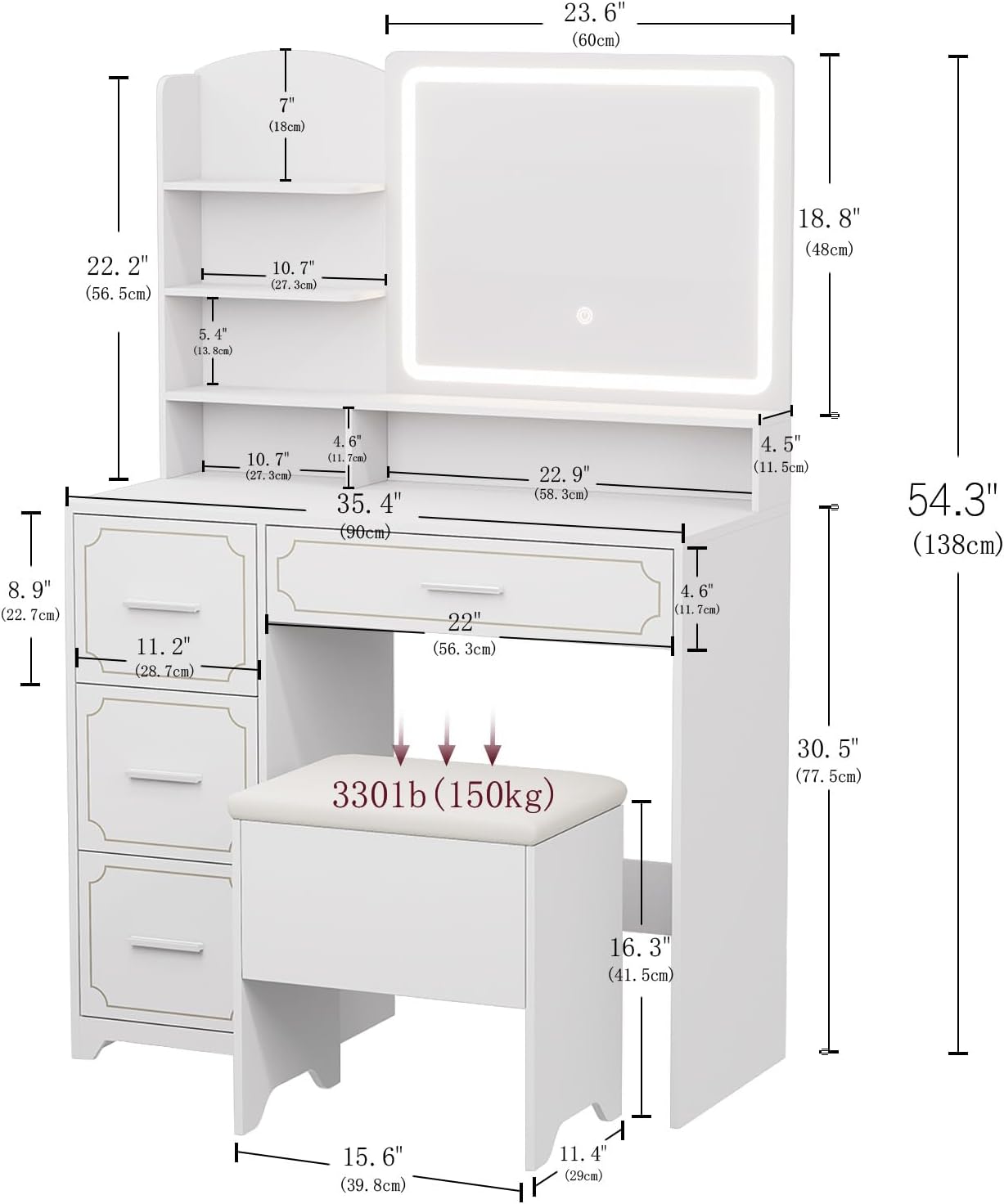
Product Features
LED Illuminated Mirror
The integrated LED mirror offers adjustable lighting for optimal visibility during your beauty routine.
- 3 Color Hues: Easily switch between Cool Light (6000K), Natural Light (4000K), and Warm Light (3000K) to match different environments or makeup needs.
- Dimmable Brightness: Adjust the light intensity by pressing and holding the touch control on the mirror surface.

Video demonstrating the touch controls for the LED mirror, showcasing the three color modes and dimming functionality.
Integrated Power Outlet
Conveniently located power outlets and USB ports allow for easy charging of electronic devices and use of hair styling tools.
- 2 Standard AC Outlets: (120V/12A) for hair dryers, straighteners, etc.
- 2 USB Ports: (5V/2A) for charging smartphones, tablets, and other USB-powered devices.

Ample Storage Solutions
The vanity is designed with multiple storage options to keep all your beauty essentials organized and easily accessible.
- 5 Open Shelves: Ideal for displaying perfumes, lotions, and frequently used items.
- 4 Drawers: Includes one large drawer under the tabletop and three smaller, deep drawers on the side for concealed storage of makeup, brushes, and accessories.
- Padded Stool with Hidden Storage: Offers comfortable seating and an additional discreet compartment for larger items or personal belongings.

Operating Instructions
Using the LED Mirror
- To Turn On/Off: Lightly tap the circular touch sensor located on the mirror surface.
- To Change Light Color: Tap the touch sensor repeatedly to cycle through the three available light modes: Cool, Natural, and Warm.
- To Adjust Brightness: Press and hold the touch sensor to gradually dim or brighten the selected light mode. Release your finger when the desired brightness is achieved.
Note: Ensure the vanity is plugged into a power source for the LED mirror to function.
Using the Power Outlet
- Connect Main Power: Plug the vanity's main power cord into a functional wall outlet.
- AC Devices: Connect hair styling tools (e.g., hair dryer, straightener) or other AC-powered devices to the two standard AC outlets.
- USB Devices: Connect USB-powered devices (e.g., smartphones, tablets) to the two USB ports for charging.
Caution: Do not overload the power outlets. Refer to the specifications section for maximum wattage and current ratings.
Maintenance
Cleaning
Regular cleaning will help maintain the aesthetic appeal and longevity of your vanity table.
- Surfaces: Wipe all wooden and laminate surfaces with a soft, damp cloth. Avoid using abrasive cleaners, harsh chemicals, or solvents, as these can damage the finish.
- Mirror: For the LED mirror, use a glass cleaner specifically designed for mirrors and a clean microfiber cloth. Do not spray cleaner directly onto the mirror surface; apply it to the cloth first.
- Stool Upholstery: Spot clean the upholstered seat of the stool with a mild soap solution and a damp cloth. Blot dry immediately.
Care
- Heat Protection: Avoid placing hot items (e.g., curling irons, hot coffee mugs) directly on the tabletop. Use coasters or protective pads.
- Environmental Factors: Keep the vanity away from direct sunlight, excessive heat, and high humidity to prevent warping, fading, or discoloration.
- Stability Check: Periodically check and tighten all screws and fasteners to ensure the vanity and stool remain stable and secure.
Troubleshooting
LED Mirror Not Lighting Up
- Power Connection: Ensure the vanity's main power cord is securely plugged into a working wall outlet.
- Mirror Connection: Verify that the LED mirror's power cable is properly connected to the power outlet unit on the vanity.
- Activate Sensor: Gently tap the circular touch sensor on the mirror surface to activate the light.
Power Outlets Not Working
- Main Power: Confirm the vanity's main power cord is plugged into a live wall outlet.
- Wall Outlet Check: Test the wall outlet by plugging in another known working device to ensure it is supplying power.
- Device Connection: Ensure your devices are properly and fully plugged into the vanity's AC outlets or USB ports.
Drawers Sticking or Not Sliding Smoothly
- Overload: Ensure the drawers are not overloaded with items, which can cause them to stick.
- Obstructions: Check for any foreign objects or debris in the drawer slides that might be impeding movement.
- Lubrication: If necessary, apply a small amount of silicone-based lubricant to the drawer slides to improve smoothness.
Specifications
| Feature | Detail |
|---|---|
| Frame Material | Wood |
| Item Depth | 20 inches |
| UPC | 029082712199 |
| Manufacturer | Hogxp |
| Product Dimensions (Table) | 20"D x 20"W x 20"H |
| Item Weight | 89.8 pounds |
| Item Model Number | A-1 |
| Color | White |
| Power Outlet | 2 AC (120V/12A), 2 USB (5V/2A) |
| LED Mirror | 3 Color Modes, Dimmable Touch Control |
| Storage | 5 Open Shelves, 4 Drawers (1 large, 3 small), Stool with Hidden Storage |
Warranty and Support
For warranty information or technical support regarding your Hogxp Vanity Table, please refer to the documentation included with your purchase or visit the official Hogxp website. Customer service contact details are typically provided in your purchase receipt or on the product packaging.
Online resources, including frequently asked questions (FAQs) and additional troubleshooting guides, may also be available to assist you.