
1. Introduction
The WALKINGPAD R3 Hybrid is a versatile 2-in-1 foldable walking pad and treadmill designed for home and office use. It features an adjustable handrail allowing seamless transition between an under-desk walking pad mode (up to 4mph) and a full treadmill mode (up to 7.5mph). Constructed with a durable aluminum alloy frame, it ensures stability and supports users up to 265 lbs. The R3 Hybrid incorporates an interactive LED light strip for dynamic user feedback and a signature double-folding design for effortless storage in compact spaces. It comes fully assembled, ready for immediate use, with a clear LED display tracking essential metrics like steps, speed, time, and distance.

Image: WALKINGPAD R3 Hybrid Treadmill in its running configuration with a user.
2. Setup Guide
The WALKINGPAD R3 Hybrid is designed for quick and easy setup, requiring no assembly tools. Follow these steps to get started:
- Unpack: Carefully remove the treadmill from its packaging.
- Unfold: Place the folded treadmill on a flat, stable surface. Gently unfold the unit until it locks into place. Ensure all locking mechanisms are securely engaged.
- Adjust Handrail: If using in treadmill mode, raise the handrail to the desired height and secure it using the locking levers. For walking pad mode, ensure the handrail is lowered and stowed.
- Connect Power: Plug the power cord into the treadmill and then into a grounded electrical outlet.
- Initial Power On: Press the power button on the treadmill or remote control to turn on the unit. The LED display will illuminate.

Image: The WALKINGPAD R3 Hybrid demonstrating its easy folding and upright storage capabilities.
3. Operating Instructions
The R3 Hybrid offers two distinct workout modes and multiple control options for a tailored experience:
Workout Modes:
- Walking Pad Mode: With the handrail lowered, the treadmill operates as an under-desk walking pad, with a maximum speed limited to 4 mph (6 km/h). This mode is ideal for light activity while working.
- Treadmill Mode: With the handrail raised and secured, the treadmill unlocks speeds up to 7.5 mph (12 km/h), suitable for brisk walking or running.
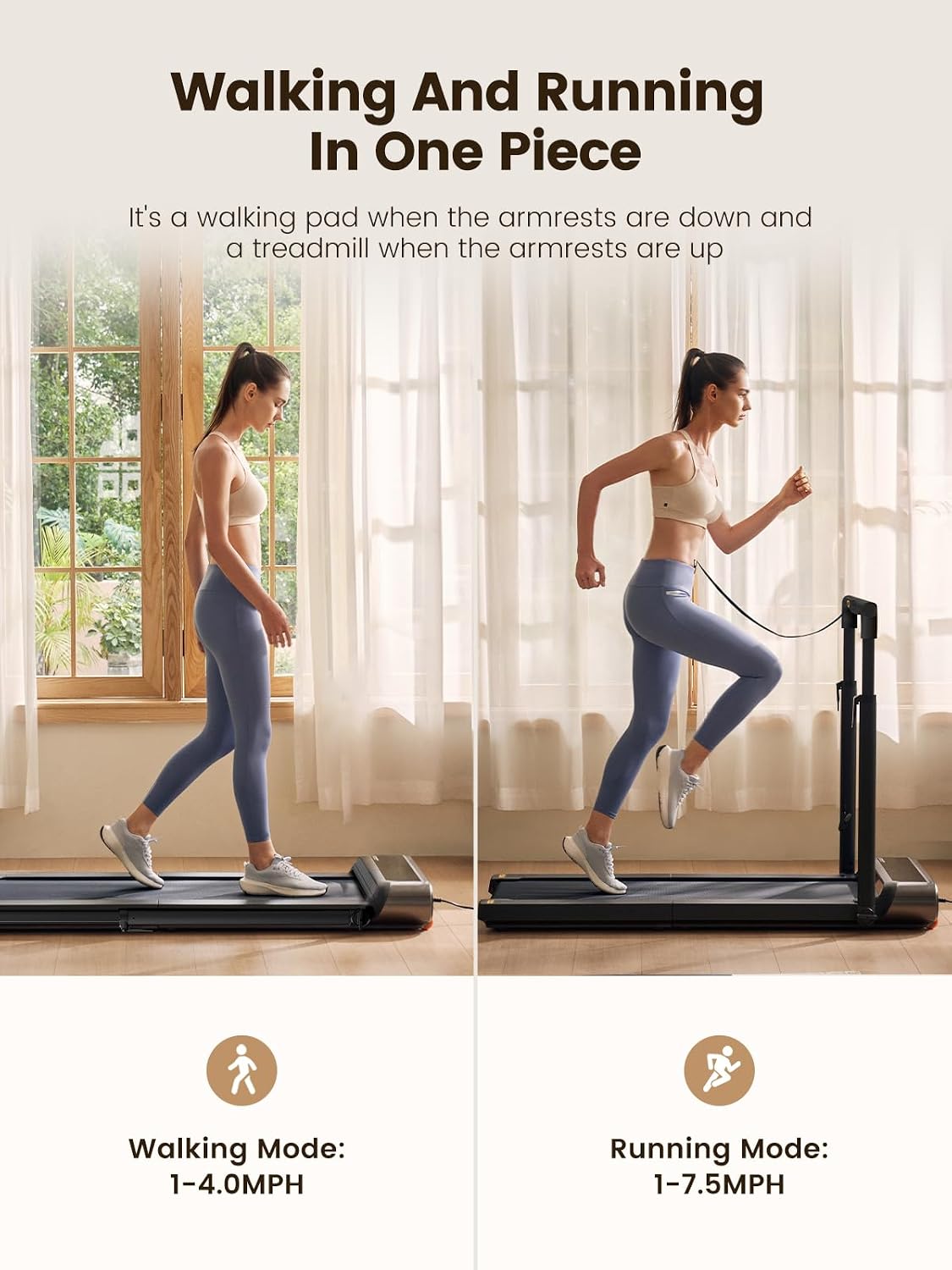
Image: Visual representation of the Walking Mode (handrail down) and Running Mode (handrail up).
Control Options:
- Remote Control: Use the included remote to start/stop, adjust speed, and switch modes.
- Foot Speed Control: The treadmill features intelligent foot-sensing technology that adjusts speed based on your position on the belt. Step towards the front to increase speed, stay in the middle for constant speed, and move towards the back to decrease speed.
- KS Fit App Control: Connect the treadmill to the KS Fit mobile application for advanced control, workout tracking, and personalized programs.

Image: Diagram illustrating the three control methods: Foot speed control, Remote control, and KS Fit App control.
LED Display & Interactive Lights:
The clear LED display tracks your steps, speed, time, and distance. An interactive LED light strip provides real-time feedback, changing colors or patterns based on your actions (e.g., starting, pausing, speed adjustments).

Image: Close-up of the WALKINGPAD R3 Hybrid's extra-large display for clear data visibility.
Official Product Video:
Video: An official video showcasing the WALKINGPAD R3 Hybrid 2-in-1 walking pad treadmill in various usage scenarios, highlighting its features and ease of use.
4. Maintenance
Regular maintenance ensures the longevity and optimal performance of your WALKINGPAD R3 Hybrid. Always unplug the treadmill before performing any maintenance.
- Cleaning: Wipe down the treadmill surface and running belt with a damp cloth after each use to remove sweat and dust. Avoid using abrasive cleaners.
- Belt Lubrication: The running belt requires periodic lubrication to reduce friction and wear. Refer to the included user manual for specific instructions and recommended lubrication frequency (typically every 3-6 months depending on usage).
- Belt Tension and Alignment: Periodically check the running belt for proper tension and alignment. Adjust as needed according to the detailed instructions in the full user manual.
- General Inspection: Regularly inspect all screws and bolts to ensure they are tight. Check the power cord for any signs of damage.

Image: Detailed view of the WALKINGPAD R3 Hybrid's 8-layer running belt, designed for comfort and injury reduction.
5. Troubleshooting
If you encounter any issues with your WALKINGPAD R3 Hybrid, refer to the following common troubleshooting steps:
| Problem | Possible Cause | Solution |
|---|---|---|
| Treadmill does not power on. | Power cord not connected; Power switch off; Circuit breaker tripped. | Ensure power cord is securely plugged in; Turn on the power switch; Reset the circuit breaker. |
| Running belt stops or slips. | Belt too loose; Insufficient lubrication. | Adjust belt tension (refer to manual); Lubricate the running belt. |
| Unusual noise during operation. | Loose components; Foreign object under belt; Motor issue. | Check and tighten all visible screws; Inspect under the belt for obstructions; Contact customer support if noise persists. |
| Remote control not responding. | Dead battery; Not paired. | Replace remote control battery; Re-pair the remote control with the treadmill (refer to manual). |
For more detailed troubleshooting or issues not listed here, please consult the complete user manual or contact WALKINGPAD customer support.
6. Specifications
| Feature | Detail |
|---|---|
| Brand | WALKINGPAD |
| Model Name | WALKINGPAD R3 Hybrid |
| Color | black |
| Product Dimensions (LxWxH) | 57.8"D x 29.9"W x 32.9"H |
| Folded Size (LxWxH) | 40.3" x 29.9" x 7.7" |
| Item Weight | 84.9 Pounds |
| Material | Aluminum |
| Maximum Speed | 7.5 Miles per Hour |
| Minimum Speed | 1 Miles per Hour |
| Maximum Horsepower | 2 Horsepower |
| Maximum Weight Recommendation | 265 Pounds |
| Deck Length | 47.2 Inches |
| Deck Width | 17.3 Inches |
| Power Source | Corded Electric |
| Included Components | Power Cord, Remote Control, Safety Key, Tool Kit, User Manual |
| Metrics Measured | Calories Burned, Distance, Speed, Time |
| Assembly Required | No |
7. Warranty and Support
Your WALKINGPAD R3 Hybrid Treadmill comes with a manufacturer's warranty to ensure your peace of mind.
- Warranty: The product includes a 1-Year Manufacturer Warranty. Please retain your proof of purchase for warranty claims.
- Customer Support: For any questions, technical assistance, or warranty inquiries, please contact WALKINGPAD customer support. Refer to the contact information provided in your product packaging or visit the official WALKINGPAD website.


