
1. Introduction
Thank you for purchasing the WLIVE Dresser with 4 Drawers and Modern TV Stand. This product combines a versatile storage dresser with a stylish entertainment center, designed to enhance your living space. This manual provides detailed instructions for assembly, operation, maintenance, and troubleshooting to ensure safe and optimal use of your new furniture.
Please read this manual thoroughly before assembly and retain it for future reference.
2. Safety Information
- Read all instructions: Ensure you understand all assembly steps and safety warnings before beginning.
- Keep children away: Small parts can be a choking hazard. Keep children and pets away during assembly.
- Use on a level surface: Assemble the unit on a clean, flat, and stable surface to prevent damage or injury.
- Do not overtighten screws: Overtightening can strip screws or damage components.
- Weight limits: Do not exceed the specified weight limits for the dresser drawers or the TV stand top surface.
- Tip-over prevention: For the dresser, consider using anti-tip hardware (if included) to secure it to a wall, especially in homes with children.
- Proper placement: Place the TV stand on a stable, level surface. Ensure adequate ventilation around electronic devices.
3. Package Contents
Before assembly, verify that all parts listed below are present and undamaged. If any parts are missing or damaged, please contact customer support.
3.1 Dresser Components
- Steel Frame (various pieces)
- Wood Top Panel
- Fabric Drawers (4 units)
- Drawer Handles
- Adjustable Feet/Levelers
- Assembly Hardware (screws, Allen wrench)
- Anti-tip Kit (optional, for wall mounting)
3.2 TV Stand Components
- Main Top Panel
- Side Panels (2 units)
- Bottom Panel
- Middle Shelf
- Cabinet Doors (2 units)
- Metal Legs (4 units)
- Adjustable Feet/Levelers
- Assembly Hardware (screws, dowels, hinges, magnetic catches)
4. Assembly Instructions
Two adults are recommended for assembly. Please follow the steps carefully.
4.1 Dresser Assembly
- Unpack and Identify Parts: Lay out all dresser components on a soft, clean surface to prevent scratches. Refer to the package contents list.
- Assemble the Steel Frame: Connect the vertical and horizontal steel bars using the provided screws and Allen wrench. Ensure all connections are secure but do not overtighten initially.
- Attach the Wood Top: Place the wood top panel onto the assembled steel frame and secure it with the designated screws.
- Install Adjustable Feet: Screw the adjustable feet into the bottom of the steel frame. Adjust them later to level the dresser.
- Prepare Fabric Drawers: Insert the bottom panel into each fabric drawer and attach the handles to the front of each drawer.
- Insert Drawers: Slide the assembled fabric drawers into the designated slots in the steel frame.
- Final Tightening and Leveling: Once fully assembled, gently tighten all screws. Adjust the feet to ensure the dresser is stable and level.

Image 1: Assembled dresser with drawers open, demonstrating storage space.

Image 2: Detailed view of the fabric drawers and handles.
4.2 TV Stand Assembly
- Unpack and Identify Parts: Lay out all TV stand components on a soft, clean surface.
- Assemble the Main Frame: Connect the top, bottom, and side panels using the provided screws and dowels. Ensure the structure is stable.
- Install Middle Shelf: Insert the middle shelf into its designated position within the main frame.
- Attach Metal Legs: Secure the four metal legs to the bottom panel of the TV stand using the provided screws.
- Install Adjustable Feet: Screw the adjustable feet into the bottom of each metal leg.
- Attach Cabinet Doors: Mount the cabinet doors using the hinges. Ensure they open and close smoothly. Install the magnetic catches to keep the doors closed.
- Final Tightening and Leveling: Gently tighten all screws. Adjust the feet to ensure the TV stand is stable and level.

Image 3: Assembled TV stand with a television, showcasing its function.

Image 4: Detailed view of the TV stand's cable management holes, magnetic cabinet closure, and adjustable feet.
5. Operating Instructions
5.1 Dresser Usage
- Drawer Operation: Gently pull the handles to open the fabric drawers. Push them back in until fully closed. Avoid forcing drawers.
- Weight Distribution: Distribute items evenly within the drawers. Avoid placing excessively heavy items in a single drawer.
- Top Surface: The wood top can be used for displaying lamps, clocks, books, or other decorative items. Ensure items do not exceed the weight capacity.
5.2 TV Stand Usage
- TV Placement: Carefully place your television on the top surface of the TV stand. Ensure the TV's base is fully supported and centered. Refer to the specifications for maximum TV size and weight.
- Cable Management: Utilize the integrated cable holes at the back of the TV stand to route and organize power cords and AV cables, maintaining a tidy appearance and preventing tangles.
- Storage Cabinets: Use the side cabinets and open shelf for storing media devices, remote controls, books, or other accessories. The magnetic catches ensure doors remain closed.
6. Maintenance
- Cleaning: Wipe surfaces with a soft, damp cloth. Avoid harsh chemicals or abrasive cleaners, which can damage the finish.
- Fabric Drawers: The non-woven fabric drawers can be spot cleaned with a mild detergent and a damp cloth. Allow to air dry completely. Do not machine wash.
- Regular Checks: Periodically check all screws and connections to ensure they remain tight. Retighten if necessary.
- Avoid Moisture: Keep the furniture away from excessive moisture or direct sunlight to prevent warping or fading.
7. Troubleshooting
| Problem | Possible Cause | Solution |
|---|---|---|
| Unit is wobbly/unstable | Uneven floor; loose screws; adjustable feet not properly set. | Ensure all screws are tightened. Adjust the leveling feet until the unit is stable. Move to a level surface. |
| Drawers do not slide smoothly | Drawer bottom not fully inserted; drawer overloaded; frame misalignment. | Ensure the drawer bottom is fully pushed down. Reduce drawer contents. Check frame assembly for proper alignment. |
| Cabinet doors do not close properly | Hinges misaligned; magnetic catch not installed correctly. | Adjust hinges as needed. Ensure magnetic catches are securely installed and aligned with the door. |
| Missing parts or damaged components | Packaging error; shipping damage. | Do not proceed with assembly. Contact WLIVE customer support immediately for replacement parts. |
8. Specifications
8.1 Dresser Specifications
- Overall Dimensions: Approximately 15.7" L x 11.8" W x 38.7" H (Refer to Image 5 for detailed dimensions)
- Drawer Dimensions: Approximately 15" L x 11.8" W x 8.3" H (internal)
- Weight Capacity (Top): 5.5 lbs
- Weight Capacity (Each Drawer): 66 lbs
- Material: Steel frame, wood top, non-woven fabric drawers
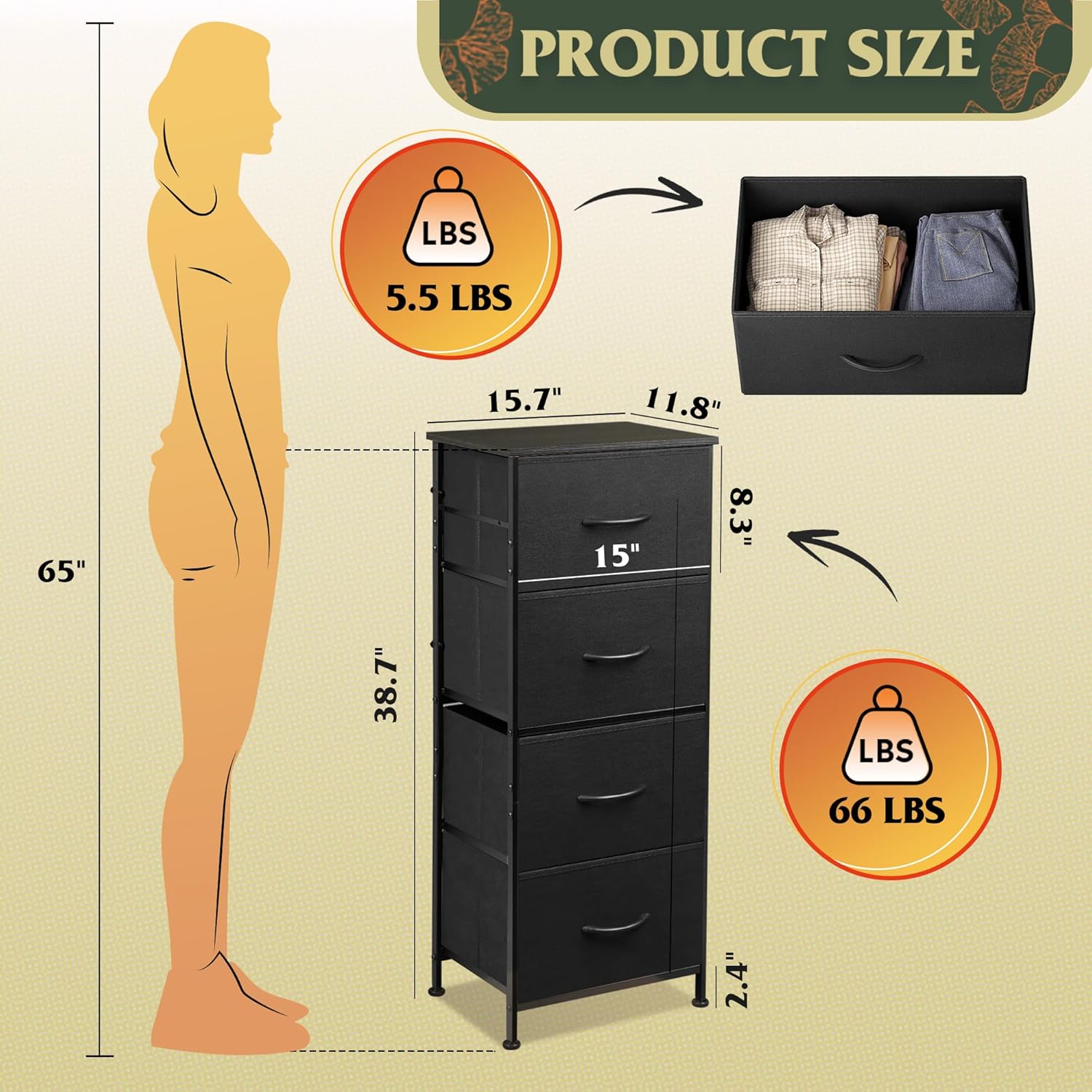
Image 5: Detailed dimensions and weight capacities for the dresser.
8.2 TV Stand Specifications
- Overall Dimensions: 57.9" L x 14.6" W x 17.7" H (Refer to Image 6 for detailed dimensions)
- Maximum TV Size: Up to 65 inches
- Total Board Capacity: 110 lbs
- Material: Wood panels, metal legs
- Features: 3 Cable Holes, Magnetic Cabinet, Adjustable Feet

Image 6: Detailed dimensions and weight capacities for the TV stand.
9. Warranty and Customer Support
WLIVE products are designed for quality and durability. For specific warranty information, please refer to the documentation included with your purchase or visit the official WLIVE website.
If you encounter any issues during assembly or use, or if you have questions about your product, please contact WLIVE customer support. Have your model number (B0FGD4YMP3) and purchase date ready when contacting support.
Thank you for choosing WLIVE.