
1. Product Overview
This manual provides instructions for the GHB ABM600 Version D Baby Monitor Camera. This product is an add-on camera designed to expand your existing GHB ABM600 Version D baby monitor system. It allows for additional viewing angles or monitoring of multiple rooms. Please note that this package includes only the camera unit and does not come with a monitor screen.
Package Contents
- 1 x GHB ABM600 Version D Camera Unit
- 1 x Power Adapter for Camera
- 1 x User Manual (this document)
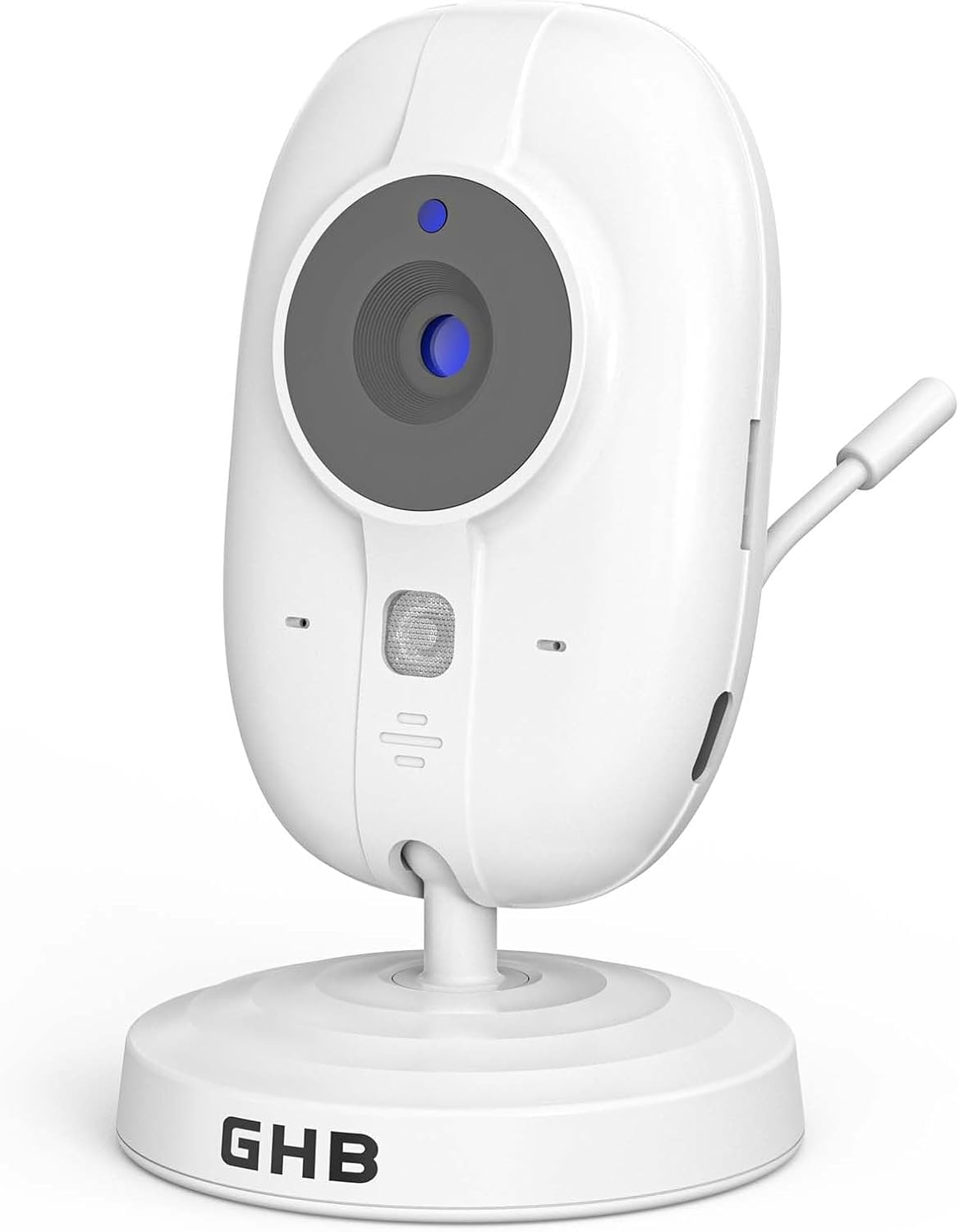
Image 1.1: GHB ABM600 Version D Baby Monitor Camera. This image shows the compact camera unit, typically white or light-colored, with a lens at the front and an antenna. It is designed for indoor use and can be wall-mounted.
2. Compatibility Information
Important: This camera is ONLY compatible with the GHB ABM600 Baby Monitor System, Version D. It will not function with other versions of the ABM600 or any other baby monitor models.
How to Determine Your Monitor Version:
To ensure compatibility, please check the serial number (S/N) located on the back of your existing monitor screen or at the bottom of your current camera unit. If the serial number ends with H or I (e.g., S/N:250102H or S/N:250402I), then you have Version D, and this camera will be compatible.
If you are unsure about your monitor's version, please contact GHB customer support before attempting to set up this camera.
3. Safety Information
- Choking Hazard: Keep all small parts, packaging materials, and power cords out of reach of children.
- Strangulation Hazard: Never place the camera or its power cord within 3 feet (1 meter) of the crib or playpen. Secure the cord to a wall or furniture using cable clips to prevent entanglement.
- Power Source: Use only the provided power adapter. Using unauthorized adapters may damage the device and void the warranty.
- Water and Moisture: Do not expose the camera to water, moisture, or extreme temperatures. This device is for indoor use only.
- Heat Sources: Keep the camera away from heat sources such as radiators, heat registers, stoves, or other heat-producing appliances.
- Ventilation: Ensure proper ventilation around the camera. Do not cover the camera or block its ventilation openings.
- Cleaning: Unplug the camera before cleaning. Use a dry, soft cloth. Do not use liquid or aerosol cleaners.
- Servicing: Do not attempt to open or repair the camera yourself. Refer all servicing to qualified service personnel.
4. Setup
4.1 Camera Placement
Place the camera on a flat surface or mount it to a wall using appropriate hardware (not included). Ensure the camera has a clear, unobstructed view of the area you wish to monitor. For optimal performance, place the camera within 3-6 feet (1-2 meters) of the baby's crib or play area, but always at a safe distance to prevent cord entanglement.
4.2 Powering On the Camera
- Connect the small end of the power adapter to the DC input port on the back of the camera.
- Plug the other end of the power adapter into a standard electrical outlet.
- The camera does not have an internal battery and must remain plugged in to operate.
- A power indicator light (usually blue or green) on the camera will illuminate, indicating it is powered on.
4.3 Pairing the Camera with Your Monitor
To add this new camera to your existing GHB ABM600 Version D monitor, follow these steps:
- Ensure your monitor unit is turned on and fully charged or plugged in.
- Turn on the new camera by plugging it into a power outlet as described in Section 4.2.
- On your monitor unit, navigate to the "Camera Settings" or "Add Camera" menu. Refer to your original ABM600 Version D monitor manual for specific menu navigation.
- Select the option to "Add Camera" or "Pair Camera."
- The monitor will typically display a message like "Press PAIR button on camera."
- Locate the PAIR button on the back or side of the new camera unit. Press and hold this button for approximately 3-5 seconds.
- The monitor should then display a confirmation message indicating successful pairing. The camera's video feed should appear on the monitor screen.
- If pairing fails, ensure both units are within range and try the process again. If issues persist, consult the Troubleshooting section.
5. Operating Instructions
Once the camera is successfully paired with your GHB ABM600 Version D monitor, its operation is controlled primarily through the monitor unit. This camera provides a 720p video feed and supports two-way audio communication.
5.1 Viewing Camera Feed
The video feed from the camera will automatically display on your monitor screen. If you have multiple cameras paired, you can switch between them using the monitor's controls (refer to your monitor manual).
5.2 Two-Way Audio
The camera features a built-in microphone and speaker, enabling two-way audio communication. To speak through the camera to your baby, press and hold the "Talk" button on your monitor unit. Release the button to hear audio from the camera's location.
5.3 Other Features
For information on other features such as night vision, zoom, temperature monitoring, or lullabies, please refer to the comprehensive user manual provided with your GHB ABM600 Version D monitor unit. This camera unit functions as an extension of that system.
6. Maintenance
6.1 Cleaning the Camera
To clean the camera, first unplug it from the power outlet. Use a soft, dry, lint-free cloth to gently wipe the camera body and lens. Do not use abrasive cleaners, solvents, or chemical cleaning agents, as these can damage the plastic components or the lens coating.
6.2 Storage
If you need to store the camera for an extended period, unplug it, clean it as described above, and store it in a cool, dry place away from direct sunlight and extreme temperatures.
7. Troubleshooting
| Problem | Possible Cause | Solution |
|---|---|---|
| Camera not powering on | Power adapter not connected or faulty outlet. | Ensure the power adapter is securely plugged into both the camera and a working electrical outlet. Try a different outlet. |
| Camera not pairing with monitor | Incorrect pairing procedure; camera or monitor out of range; compatibility issue. |
|
| No video/audio on monitor | Camera not powered; camera out of range; interference. |
|
| Poor video quality | Low light conditions; camera lens dirty; poor signal. |
|
8. Specifications
- Model: GHB ABM600 (Version D Camera)
- Connectivity Technology: 2.4 GHz FHSS
- Video Resolution: 720p
- Special Features: Two-Way Audio
- Usage: Indoor
- Mounting Type: Wall Mount (hardware not included)
- Power Source: AC Power Adapter (no built-in battery)
- Dimensions (L x W x H): Approximately 18 x 13 x 5.6 cm
- Weight: Approximately 210 grams
- Components Included: 1 Camera Unit
9. Warranty and Customer Support
For warranty information, please refer to the documentation included with your original GHB ABM600 Version D baby monitor system or visit the official GHB website. If you encounter any issues not covered in this manual or require further assistance, please contact GHB customer support. Have your product model number (ABM600) and serial number ready when contacting support.
Contact Information: Please refer to your product packaging or the official GHB website for the most up-to-date customer service contact details.


