
1. Introduction
Thank you for choosing the Cecotec Conga Y50 Robot Vacuum and Mop. This device is designed to provide efficient and autonomous cleaning for your home, combining powerful vacuuming with effective mopping. Featuring advanced laser navigation and a convenient self-draining base, the Conga Y50 simplifies your cleaning routine. Please read this manual thoroughly before operating the robot to ensure proper use, maintenance, and optimal performance.
2. Safety Instructions
To reduce the risk of injury or damage, always observe basic safety precautions when operating your robot vacuum cleaner. Keep this manual for future reference.
- This appliance can be used by children aged 8 years and above and persons with reduced physical, sensory or mental capabilities or lack of experience and knowledge if they have been given supervision or instruction concerning use of the appliance in a safe way and understand the hazards involved.
- Children should be supervised to ensure that they do not play with the appliance.
- Cleaning and user maintenance shall not be made by children without supervision.
- Ensure the robot is placed on a stable, level surface.
- Do not expose the robot or its base to water or other liquids.
- Keep hair, loose clothing, fingers, and all parts of the body away from openings and moving parts.
- Do not operate the robot in areas with open flames or explosive materials.
- Only use the original power adapter and charging base provided by the manufacturer.
- Remove any loose cables, small objects, or fragile items from the floor before cleaning to prevent entanglement or damage.
3. Package Contents
Carefully unpack the box and ensure all components are present and in good condition. If any items are missing or damaged, contact customer support.
- Conga Y50 Robot Vacuum Cleaner
- Mop attachment
- Self-emptying base
- Dust bag (pre-installed in base)
- Power adapter
- Side brushes (spare set)
- Cleaning tool
- Instruction Manual
4. Product Overview
Familiarize yourself with the main components and features of your Conga Y50 robot vacuum.
Robot Components

Figure 4.1: Top view of the Conga Y50 robot, highlighting the power, home, and Wi-Fi indicator buttons.

Figure 4.2: Underside view of the robot, illustrating the main multifunctional brush, side brushes, and driving wheels.
Self-Draining Base

Figure 4.3: The Conga Y50 robot next to its self-draining base, ready for automatic dust collection.
Key Features
- Advanced Laser Navigation: The robot uses advanced laser technology to create an interactive map of your home, ensuring precise and personalized cleaning regardless of ambient light. This system provides fast and accurate tracking, reducing navigation errors and ensuring comprehensive coverage.
- 5000Pa High Suction Power: Equipped with a powerful 5000Pa motor, the robot effectively removes dust, hair, and various types of dirt, leaving surfaces thoroughly clean.
- Self-Draining Base: The self-draining base automatically empties the robot's dustbin into a 3-liter dust bag, providing up to 12 weeks of autonomous cleaning. This feature is ideal for allergy sufferers as it keeps dust and allergens contained.
- Multifunctional Brush: The robot includes an all-round brush with bristles and rubber silicone, making it suitable for cleaning all types of surfaces, including hard floors and carpets.
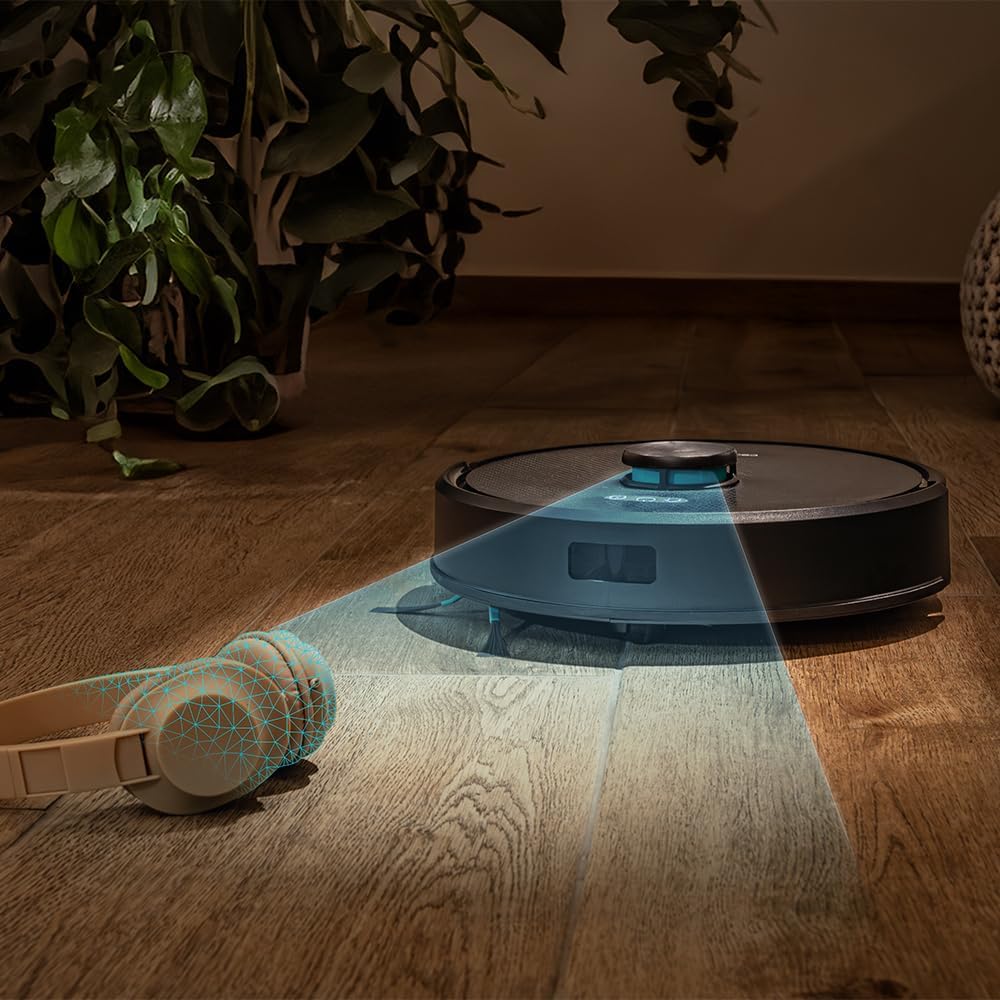
Figure 4.4: The robot's laser navigation system actively mapping its surroundings for efficient cleaning.

Figure 4.5: The robot actively vacuuming a floor, effectively collecting debris.

Figure 4.6: Visual representation of the robot emptying its dustbin into the self-draining base.

Figure 4.7: The robot cleaning a carpet, highlighting the effectiveness of its multifunctional brush.
5. Setup
Follow these steps to prepare your Conga Y50 for its first cleaning session.
5.1 Unpacking and Placement
- Remove all packaging materials and protective films from the robot and the self-draining base.
- Place the self-draining base against a wall in an open area, ensuring there is at least 0.5 meters of clear space on both sides and 1.5 meters in front of the base. Avoid placing it near stairs or obstacles that could block the robot's return path.
- Connect the power adapter to the self-draining base and plug it into a wall outlet. Ensure the power cable is neatly tucked away to prevent entanglement.

Figure 5.1: The robot correctly docked at its self-draining base.
5.2 Initial Charging
- Place the robot onto the charging contacts of the self-draining base. Ensure the charging indicators on the robot illuminate.
- Allow the robot to charge completely before its first use. This typically takes 4-6 hours. The indicator lights will change to show a full charge.
5.3 App Installation and Pairing
The Conga Y50 can be controlled via a smartphone app.
- Download the official Cecotec Conga app from your smartphone's app store (iOS or Android).
- Open the app and create an account or log in.
- Follow the in-app instructions to add your Conga Y50 robot. This usually involves connecting the robot to your home Wi-Fi network.
- Once paired, you can access all smart features, including mapping, scheduling, and cleaning mode selection.

Figure 5.2: Controlling the robot through the dedicated smartphone application.
6. Operating the Robot
Learn how to start, stop, and manage your robot's cleaning tasks.
6.1 Starting a Cleaning Cycle
- Manual Start: Press the Power button on the robot once. The robot will begin cleaning in Auto mode.
- App Start: Open the Cecotec Conga app, select your robot, and tap the 'Start Cleaning' button. You can also choose specific cleaning modes or areas from the app.
6.2 Pausing and Resuming
- To pause cleaning, press the Power button on the robot or the 'Pause' button in the app.
- To resume cleaning, press the Power button again or the 'Resume' button in the app.
6.3 Returning to Base
- Press the Home button on the robot or the 'Return to Base' button in the app. The robot will navigate back to its self-draining base to charge and empty its dustbin.

Figure 6.1: The robot intelligently returning to its charging and self-draining station.
6.4 Cleaning Modes and Scheduling
The app allows for advanced control over cleaning modes (e.g., Auto, Edge, Spot, Restricted Areas) and scheduling cleaning times. Refer to the in-app guide for detailed instructions on these features.

Figure 6.2: The robot following a planned path to clean the floor.

Figure 6.3: The robot demonstrating its versatility across various floor surfaces.
7. Maintenance
Regular maintenance ensures optimal performance and extends the lifespan of your Conga Y50.
7.1 Emptying the Self-Draining Base Dust Bag
The 3-liter dust bag in the self-draining base typically needs replacement every 12 weeks, depending on usage. The app will notify you when it's full.
- Open the lid of the self-draining base.
- Carefully remove the full dust bag and dispose of it.
- Insert a new dust bag, ensuring it is properly seated.
- Close the lid of the self-draining base.
7.2 Cleaning Brushes
The multifunctional brush and side brushes should be cleaned regularly to prevent hair and debris buildup.
- Main Brush: Turn the robot over. Remove the main brush cover and lift out the brush. Use the provided cleaning tool to cut and remove tangled hair. Reinstall the brush and cover.
- Side Brushes: Gently pull the side brushes off. Remove any hair or debris. If damaged, replace with new ones. Push them back into place.
7.3 Cleaning Sensors and Charging Contacts
Wipe the anti-drop sensors, wall sensors, and charging contacts on both the robot and the base with a clean, dry cloth. This prevents navigation errors and ensures proper charging.
7.4 Mop Maintenance
If using the mopping function, remove the mop cloth after each use, wash it, and allow it to air dry. Replace mop cloths periodically for best results.
8. Troubleshooting
If you encounter issues with your Conga Y50, refer to the following common problems and solutions.
| Problem | Possible Cause | Solution |
|---|---|---|
| Robot does not turn on | Low battery; Power button not pressed correctly | Place robot on charging base; Press and hold power button for 3 seconds |
| Robot cannot find charging base | Base obstructed; Robot too far from base | Ensure base has clear space; Manually place robot closer to base |
| Poor cleaning performance | Brushes tangled; Dust bag full; Filters clogged | Clean main and side brushes; Replace dust bag; Clean or replace filters |
| Robot gets stuck frequently | Obstacles on floor; Sensors dirty | Clear floor of clutter; Clean all sensors |
| App connection issues | Incorrect Wi-Fi password; Robot out of Wi-Fi range; Router issues | Verify Wi-Fi credentials; Move robot closer to router; Restart router and robot |
For further assistance, consult the FAQ section in the Cecotec Conga app or contact customer support.
9. Specifications
| Feature | Detail |
|---|---|
| Brand | Cecotec |
| Model Name | Conga Y50 |
| Model Number | A01_EU01_114519 |
| Product Dimensions (L x W x H) | 32L x 32W x 10H centimetres |
| Item Weight | 3.81 Kilograms |
| Suction Pressure | 5000 Pa |
| Self-Emptying Base Capacity | 3 Liters (dust bag) |
| Navigation Type | Laser Navigation |
| Battery Type | Lithium Ion |
| Power Source | Battery Powered |
| Control Method | App |
| Compatible Devices | Smartphones |
| Included Components | Robot vacuum cleaner, mop, self-emptying base, dust bag |
| Manufacture Year | 2025 |
10. Warranty and Support
Cecotec products are manufactured to high-quality standards. This product comes with a standard manufacturer's warranty. Please refer to the warranty card included in your package or visit the official Cecotec website for detailed warranty terms and conditions.
For spare parts, Cecotec ensures EU spare part availability for a duration of 10 years from the date of manufacture (2025).
For technical support, troubleshooting assistance, or to inquire about spare parts, please contact Cecotec customer service through their official website or the contact information provided in your product documentation.


