
1. Introduction
Thank you for choosing the Miady 5000mAh Mini Portable Charger. This compact and efficient power bank is designed to provide reliable power on the go for your mobile devices. Please read this manual carefully to ensure proper use and to maximize the lifespan of your product.
2. Product Overview
The Miady Mini Portable Charger features a sleek design with dual output ports (USB-A and USB-C) for versatile charging. Its compact size and lightweight construction make it an ideal travel companion.
What's in the Box:
- Miady 5000mAh Mini Portable Charger (Cream Blue + Pink) x 2
- USB-C Cable (for recharging the power bank) x 2
- User Manual x 1

Image: Two Miady 5000mAh Mini Portable Chargers (Cream Blue and Pink).
3. Specifications
| Feature | Description |
|---|---|
| Model Number | HYD009 |
| Battery Capacity | 5000mAh / 18.5Wh |
| USB-A Output | 5V/2.4A (Max) |
| USB-C Input/Output | 5V/2.4A (Max) |
| Product Dimensions | 3.6 x 2.4 x 0.5 inches |
| Item Weight | 4.2 ounces |
| Special Features | Auto Shut-Off, LED Indicator Lights, Pocket Size, Short Circuit Protection, Slim Design |
| Airline Approved | Yes (Capacity under 27027mAh / 100Wh) |

Image: The Miady portable charger is ultra-small, slim, and lightweight.
4. Setup & Initial Use
4.1 Initial Charging of the Power Bank
Before first use, fully charge your Miady portable charger. This ensures optimal battery performance.
- Connect the provided USB-C cable to the USB-C input/output port on the power bank.
- Plug the other end of the USB-C cable into a compatible USB wall adapter (not included).
- The LED indicator lights on the power bank will illuminate to show the charging progress. All lights will be solid when fully charged.
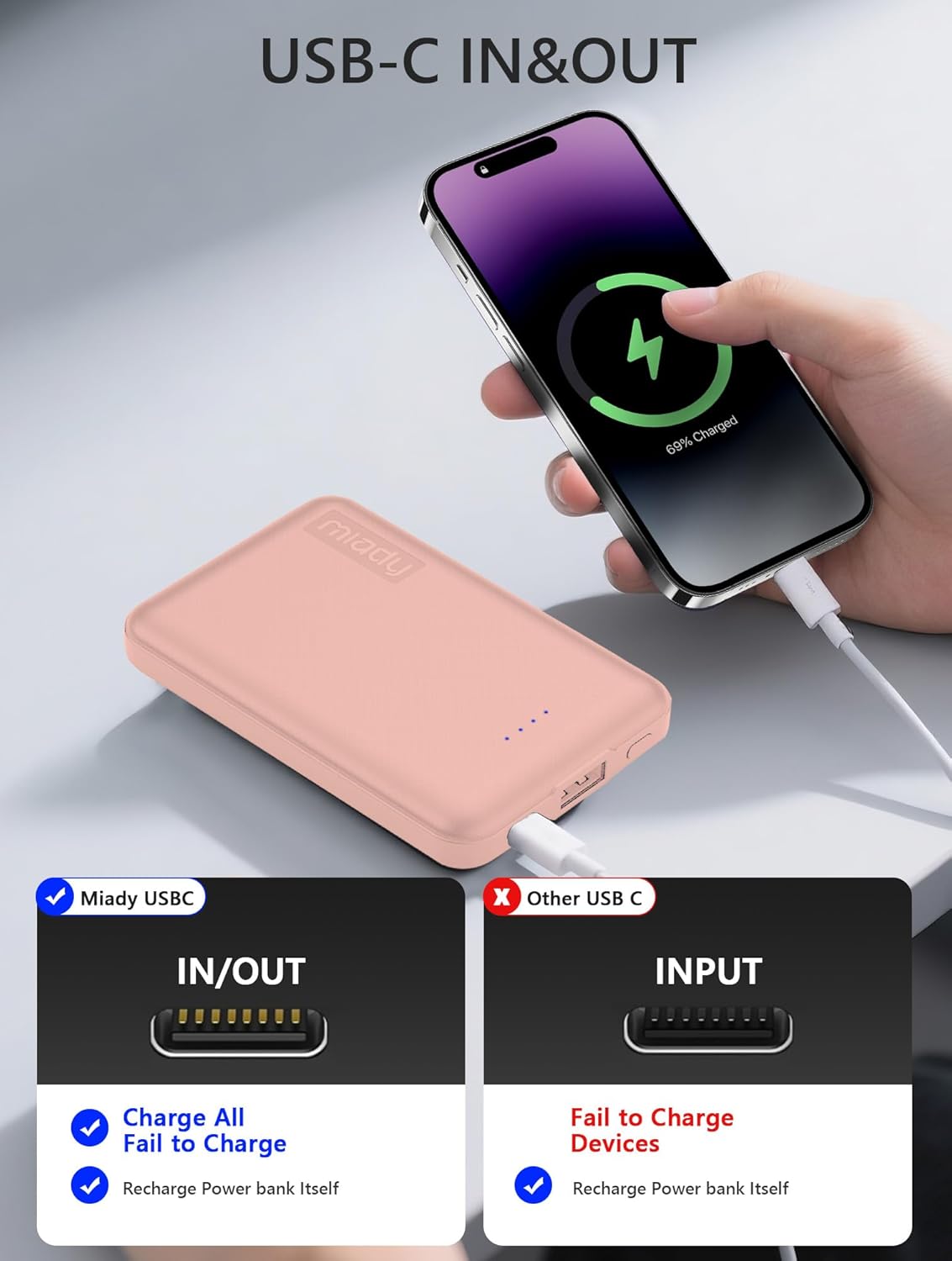
Image: The USB-C port supports both input (recharging the power bank) and output (charging devices).
5. Operating Instructions
5.1 Charging Your Devices
The Miady portable charger is equipped with both USB-A and USB-C output ports, allowing you to charge two devices simultaneously.
- Connect your device's charging cable to either the USB-A or USB-C output port on the power bank.
- Connect the other end of the cable to your device.
- The power bank will automatically begin charging your device. The LED indicator lights will show the remaining battery level of the power bank.
- To stop charging, simply disconnect your device from the power bank. The power bank features an auto shut-off function to conserve energy.

Image: Fast charging a smartphone with 12W output.

Image: Dual output ports for charging multiple devices.
Video: A brief demonstration of the Miady 2-Pack Small Portable Charger, highlighting its compact size and charging capabilities.
6. Safety Precautions
- Do not expose the power bank to extreme temperatures (above 60°C/140°F) or direct sunlight.
- Do not disassemble, crush, or puncture the power bank.
- Keep away from water, moisture, and flammable materials.
- Do not use if the power bank is damaged, swollen, or leaking.
- Keep out of reach of children.
- The power bank features multiple intelligent protection systems, including overcharge, overdischarge, short circuit, and temperature control, to ensure safe charging.
- This device is airline approved for carry-on luggage, as its capacity (5000mAh / 18.5Wh) is below the 27027mAh / 100Wh limit.

Image: The Miady portable charger is safe for air travel.
7. Troubleshooting
7.1 Power Bank Not Charging / Not Charging Devices
- Ensure all cables are securely connected to both the power bank and the device/power source.
- Verify that the wall adapter or USB port used for recharging the power bank is functional.
- Check if the charging cable is damaged. Try using a different cable.
- For charging devices, ensure your device is compatible with 5V/2.4A output.
7.2 How to Know When the Power Bank is Fully Charged?
- During charging, the LED indicator lights will show the current battery level. When all LED lights are solid (not blinking), the power bank is fully charged.
8. Maintenance
- Clean the power bank with a soft, dry cloth. Do not use harsh chemicals or abrasive materials.
- Store the power bank in a cool, dry place when not in use.
- Avoid dropping or subjecting the power bank to strong impacts.
9. Warranty and Support
Miady offers a 180-day after-sales service for this product. If you encounter any issues or have questions, please contact Miady's customer support. Our team is available 24/7 to provide a satisfying solution.
For support, please visit the Miady Store on Amazon.