
1. Introduction
The ANRAN AR-W688 is a state-of-the-art outdoor wireless security camera designed to provide comprehensive surveillance and peace of mind. Featuring 5-megapixel ultra-high definition resolution, 2.4/5GHz Wi-Fi compatibility, and 24-hour continuous recording, this camera ensures detailed monitoring day and night. Its advanced functionalities include automatic tracking with auto-return, wide-angle 360° pan and tilt capabilities, motion detection with instant alerts, night color shooting, two-way audio communication, and sound/light deterrence. The AR-W688 is built for outdoor use with an IP66 dustproof and waterproof rating, making it a reliable solution for home and property security.

Figure 1.1: The ANRAN AR-W688 outdoor security camera shown alongside a smartphone displaying its live feed, highlighting its 5MP resolution capability.
2. Safety Information
Please read and understand all safety instructions before installing and operating the camera. Failure to follow these guidelines may result in electric shock, fire, or other hazards.
- Power Connection: This camera is a wired device and requires a continuous power supply. Use only the included power adapter. Do not attempt to charge it with a solar panel or other incompatible power sources.
- Installation Location: While the camera is IP66 dustproof and waterproof, it is recommended to install it under a roof or in a sheltered area to avoid direct exposure to heavy rain, which can prolong its lifespan.
- Water Intrusion Prevention: Ensure the cover at the bottom of the camera is securely attached to prevent rainwater intrusion.
- Optimal Motion Detection: For best performance of the motion detection function, install the camera at a height of 2.5 to 3 meters (approximately 8 to 10 feet). Note that the PIR sensor's sensitivity may vary depending on environmental conditions.
- Electrical Safety: The power adapter and electrical components of this camera have obtained PSE certification in accordance with Japanese electrical safety laws, ensuring safe operation.
3. Package Contents
Verify that all items are present in the package before proceeding with installation.
- ANRAN AR-W688 Security Camera
- Power Adapter
- Mounting Screws and Anchors
- User Manual (this document)
4. Setup Guide
4.1 Initial Setup
- Power Connection: Connect the provided power adapter to the camera and plug it into a power outlet. The camera will power on and initiate its startup sequence.
- App Download: Download the official ANRAN mobile application from your smartphone's app store (available for Android and iPhone).
- Account Registration: Open the app and register a new user account, or log in if you already have one.
- Add Device: Follow the in-app instructions to add your new ANRAN AR-W688 camera. This typically involves scanning a QR code on the camera or manually entering its ID.
- Wi-Fi Configuration: Connect the camera to your 2.4GHz or 5GHz Wi-Fi network as prompted by the app. Ensure your Wi-Fi signal is strong at the installation location.
4.2 Physical Installation
The ANRAN AR-W688 is designed for wall mounting. Choose a location that provides optimal surveillance coverage and is within reach of a power outlet.
- Select Location: Identify a suitable outdoor location, preferably under an overhang or roof, at a height of 2.5-3 meters for optimal motion detection.
- Mark Drilling Points: Use the mounting bracket as a template to mark the drilling points on the wall.
- Drill Holes: Drill holes at the marked points and insert the provided wall anchors if necessary.
- Mount Camera: Secure the camera's mounting bracket to the wall using the screws. Attach the camera to the bracket.
- Adjust Angle: Once mounted, you can fine-tune the camera's angle using the app's PTZ controls.

Figure 4.2.1: Illustrates the 360° pan and tilt capabilities of the camera, controllable via the smartphone application.

Figure 4.2.2: A side view of the camera, demonstrating its design suitable for wall mounting.
5. Operating Instructions
5.1 Live View and PTZ Control
Access the live video feed through the ANRAN app. Use the on-screen controls to pan horizontally 355° and tilt vertically 90° to adjust the viewing angle as needed. This allows for 360-degree all-directional surveillance.
5.2 Recording and Storage
The camera supports 24-hour continuous recording due to its permanent power supply. It can store footage on a Micro/SD card (not included) or via cloud storage (subscription may be required). The camera features an automatic overwrite function, ensuring new recordings are saved by deleting the oldest data when the storage is full.

Figure 5.2.1: Close-up view of the camera's underside, indicating the reset button and the TF (MicroSD) card slot.

Figure 5.2.2: Illustrates the camera's support for MicroSD card storage, with a cloud icon suggesting cloud storage options.
5.3 Motion Detection and Auto-Tracking
The camera is equipped with advanced motion detection and an auto-tracking function. When movement of people or objects is detected within the surveillance area, the camera will automatically track the subject, recording the entire incident. Once the object is no longer detected, the camera will return to its default monitoring position. This auto-tracking feature is not enabled by default and must be activated in the app settings if desired.

Figure 5.3.1: Depicts the camera's auto-tracking capability, showing it following a person's movement and sending app notifications.
5.4 Night Vision and Color Night Shooting
The camera provides clear monochrome night vision. When human or object motion is detected, its 4 high-brightness LEDs activate, enabling full-color night shooting to capture clear images of intruders' faces. Simultaneously, a push notification with a photo is sent to your mobile phone.

Figure 5.4.1: Shows the difference between daytime and nighttime surveillance, illustrating the camera's night vision capabilities.

Figure 5.4.2: Highlights the PIR human motion sensor and high-brightness LED lights, showing how they illuminate and deter an intruder.
5.5 Two-Way Audio and Deterrence
With a built-in microphone and speaker, the camera supports two-way audio communication. You can listen to the environment and speak through the camera via the mobile app, allowing interaction with visitors or deterring intruders. When motion is detected, the camera can also emit light and sound an alarm to scare off unwanted visitors.

Figure 5.5.1: An example of the two-way talk feature, showing the camera communicating with an intruder.

Figure 5.5.2: An illustration of the camera's light deterrence feature, illuminating an intruder at night.
5.6 Family Sharing and Alexa Compatibility
The camera supports family sharing, allowing multiple users to view live feeds and recordings simultaneously. As the camera administrator, you can grant viewing and operation permissions to family members or friends. The camera is also compatible with Alexa, enabling voice commands for convenient monitoring.

Figure 5.6.1: The camera's live feed being displayed on an Alexa-compatible smart display, demonstrating voice control integration.
6. Maintenance
Regular maintenance helps ensure the optimal performance and longevity of your ANRAN AR-W688 camera.
- Lens Cleaning: Periodically clean the camera lens with a soft, damp cloth to remove dust, dirt, or water spots that may obstruct the view.
- Firmware Updates: Check the ANRAN app regularly for firmware updates. Keeping the camera's firmware up-to-date ensures access to the latest features and security enhancements.
- Power Connection Check: Ensure the power cable remains securely connected and free from damage.
- Physical Inspection: Occasionally inspect the camera's mounting and housing for any signs of wear, damage, or loose connections.
- SD Card Management: If using an SD card, ensure it is functioning correctly. While the camera has an auto-overwrite function, it's good practice to periodically back up important footage.

Figure 6.1: The camera's IP66 dustproof and waterproof rating, indicating its resilience to outdoor elements.
7. Troubleshooting
If you encounter issues with your ANRAN AR-W688 camera, refer to the following common troubleshooting steps:
- No Power/Offline:
- Check if the power adapter is securely connected to both the camera and the power outlet.
- Ensure the power outlet is functional.
- Verify your Wi-Fi network is active and the camera is within range. Try restarting your router.
- Poor Video Quality:
- Clean the camera lens.
- Ensure a stable Wi-Fi connection. Weak signals can affect video streaming quality.
- Check if the camera's resolution settings in the app are set to 5MP.
- Motion Detection Not Working:
- Ensure motion detection is enabled in the app settings.
- Adjust the sensitivity settings in the app.
- Verify the camera is installed at the recommended height (2.5-3m) and that there are no obstructions.
- Auto-Tracking Not Functioning:
- Ensure the auto-tracking feature is enabled in the app settings, as it is off by default.
- Check for sufficient lighting conditions, especially at night.
- Two-Way Audio Issues:
- Check microphone and speaker volume settings in the app.
- Ensure there is no physical obstruction blocking the microphone or speaker on the camera.
- SD Card Not Recording:
- Ensure the SD card is correctly inserted into the slot.
- Format the SD card through the app.
- Check if the SD card is full (though auto-overwrite should handle this).
- Resetting the Camera: If issues persist, locate the reset button (refer to Figure 5.2.1) and press and hold it for several seconds until the camera resets. You may need to reconfigure the camera after a reset.
8. Specifications
| Feature | Specification |
|---|---|
| Brand | ANRAN |
| Model Number | AR-W688 |
| Video Capture Resolution | 5 Megapixels (5MP) |
| Wireless Communication Technology | Wi-Fi (2.4GHz/5GHz compatible) |
| Field of View | 360 degrees (Pan 355°, Tilt 90°) |
| Night Vision Range | 15 meters |
| Voltage | 5 Volts |
| Water Resistance Level | IP66 (Dustproof & Waterproof) |
| Power Source | Corded Electric (USB Type) |
| Mounting Type | Wall Mount |
| Color | White |
| Product Dimensions (LxWxH) | 19 x 13 x 15 cm |
| Item Weight | 630 g |
| Included Components | Camera |
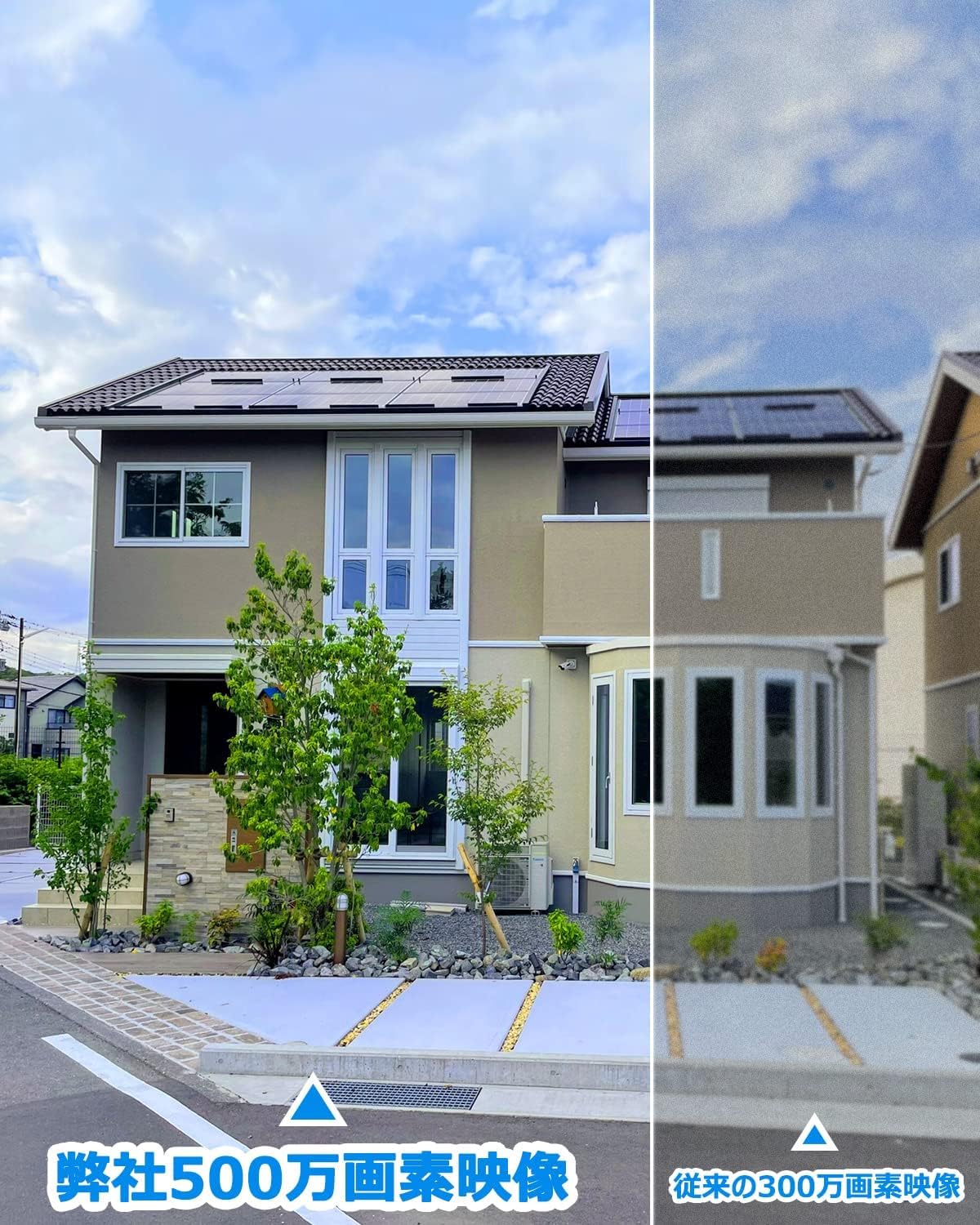
Figure 8.1: A visual comparison demonstrating the superior clarity of the ANRAN 5MP resolution compared to a 3MP camera.
9. Warranty and Support
ANRAN is committed to providing reliable products and excellent customer service.
- Warranty: This device comes with a 1-year warranty from the date of product arrival.
- Customer Support: If you have any questions or encounter issues during use, please do not hesitate to contact ANRAN customer support.
- Contact Information:
- Email: support@anran-cctv.com (24-hour support)
- Phone Support Hours: Monday - Friday, 10:00 - 13:00 and 14:30 - 19:30 (Japan Standard Time)


