
Introduction
Thank you for choosing the COOPERS Portable Bluetooth Speaker. This manual provides essential information for setting up, operating, and maintaining your speaker to ensure optimal performance and longevity. Please read it thoroughly before use.
What's in the Box
- COOPERS Portable Bluetooth Speaker (Model WP-05B)
- Power Cable
- User Manual
Product Overview
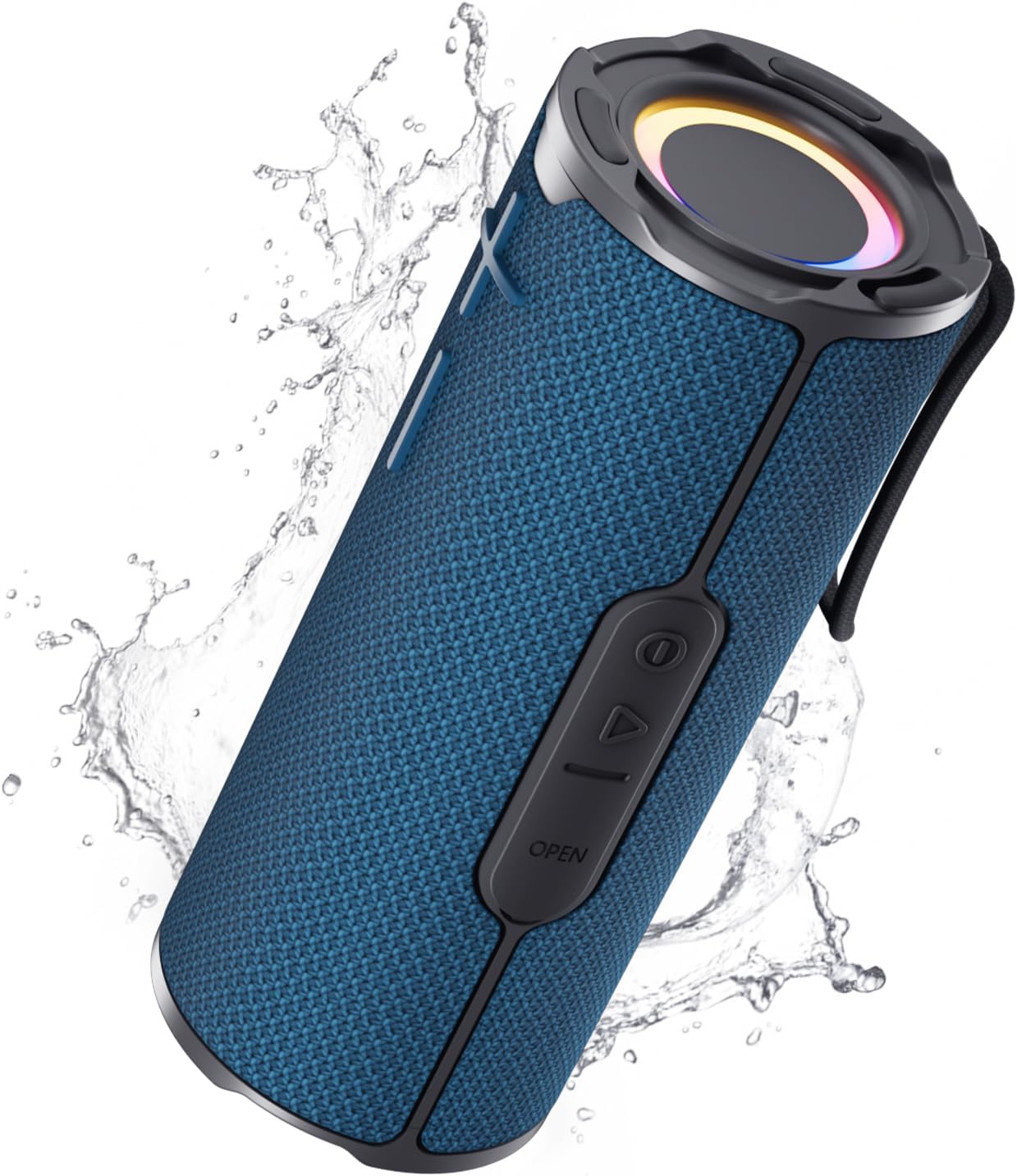
The COOPERS Portable Bluetooth Speaker is designed for high-quality audio and versatile use, featuring RGB lighting and IPX5 water resistance. Familiarize yourself with its components:
Speaker Components
- Volume Buttons (+/-): Located on the speaker's fabric body for easy volume adjustment.
- Control Panel (Side): Includes Power, Play/Pause, and 'OPEN' button for port access.
- RGB Light Rings: Located on both ends of the speaker, providing dynamic lighting effects.
- Lanyard: Integrated for convenient portability.
Ports
The charging and auxiliary ports are protected by a waterproof flap. Press the 'OPEN' button on the side panel to access them.
- USB-C Charging Port: For charging the speaker's internal battery.
- AUX-in Port: For wired audio connection.

Key Features
- HD Stereo Sound: Advanced audio technology for clear music and deep bass.
- RGB Colorful Light Show: Dynamic, color-changing lights that pulse with your music.
- IPX5 Waterproof: Protection against splashes, rain, and spills.
- Bluetooth 5.3: Stable and fast wireless connection with lower power consumption.
- Long Playtime: Equipped with a 4000mAh battery for extended use.
- TWS Pairing: Connect two speakers for immersive 360° stereo sound.
Setup
1. Charging the Speaker
- Open the waterproof flap on the side panel to expose the USB-C charging port.
- Connect the provided power cable to the speaker's USB-C port and a compatible USB power adapter (not included).
- The LED indicator will show charging status. A full charge provides long playback time thanks to the 4000mAh battery.
- Once fully charged, close the waterproof flap securely to maintain IPX5 rating.
2. Bluetooth Pairing
- Press and hold the Power button on the side panel to turn on the speaker. The RGB lights will illuminate, and the speaker will enter Bluetooth pairing mode.
- On your device (smartphone, tablet, etc.), enable Bluetooth and search for available devices.
- Select "COOPERS WP-05B" from the list.
- Once connected, the speaker will emit an audible confirmation, and the RGB lights may change to indicate a successful connection.
3. TWS (True Wireless Stereo) Pairing (Optional)
To achieve immersive 360° stereo sound, you can pair two COOPERS WP-05B speakers together:
- Ensure both speakers are powered on and not connected to any other Bluetooth device.
- On one speaker (this will be the primary speaker), press the Play/Pause button twice rapidly. The speaker will enter TWS pairing mode.
- The two speakers will automatically search for and connect to each other. Once connected, you will hear an audible confirmation.
- Now, connect your device to the primary speaker via Bluetooth as described in step 2. Audio will play through both speakers in stereo.

Operating Instructions
Basic Controls
- Power On/Off: Press and hold the Power button.
- Play/Pause: Press the Play/Pause button once.
- Volume Up: Press the "+" button.
- Volume Down: Press the "-" button.
- Next Track: Press and hold the "+" button.
- Previous Track: Press and hold the "-" button.
- Answer/End Call: Press the Play/Pause button once.
- Reject Call: Press and hold the Play/Pause button.
RGB Light Modes
The speaker features multiple RGB light modes. To cycle through the modes or turn off the lights, press the Power button once while the speaker is on.

FM Radio Function
The speaker supports FM radio. To activate and use the FM radio:
- Ensure no Bluetooth device is connected.
- Press the Play/Pause button twice rapidly to switch to FM radio mode.
- Press the Play/Pause button once to auto-scan and save available FM stations.
- Use the "+" and "-" buttons to navigate between saved stations.
Maintenance
Water Resistance (IPX5)
The speaker has an IPX5 water resistance rating, meaning it is protected against low-pressure water jets from any direction. This makes it suitable for use in environments with splashes, rain, or spills.
- Important: Ensure the waterproof flap covering the charging and AUX ports is securely closed before exposing the speaker to water.
- Do not submerge the speaker in water.
- After exposure to water, wipe the speaker dry with a soft cloth.

Cleaning
To clean your speaker, use a soft, damp cloth. Avoid using harsh chemicals or abrasive cleaners, as these may damage the speaker's finish or components.
Troubleshooting
| Problem | Possible Cause | Solution |
|---|---|---|
| Speaker does not power on. | Low battery. | Charge the speaker using the provided USB-C cable. |
| No sound. | Volume too low; not connected via Bluetooth; incorrect input source. | Increase volume on speaker and device. Ensure Bluetooth is connected. Check AUX cable if using wired connection. |
| Cannot pair via Bluetooth. | Speaker not in pairing mode; device too far; previous connection interference. | Ensure speaker is in pairing mode (blinking RGB lights). Move device closer. Forget previous Bluetooth connections on your device and try again. |
| TWS pairing fails. | Speakers already connected to other devices; incorrect pairing sequence. | Ensure both speakers are disconnected from other devices. Follow TWS pairing steps precisely. |
Specifications
| Feature | Detail |
|---|---|
| Brand | COOPERS |
| Model Number | WP-05B |
| Speaker Maximum Output Power | 20 Watts |
| Frequency Response | 20 Hz - 20 kHz |
| Connectivity Technology | Bluetooth 5.3 |
| Audio Output Mode | Stereo |
| Mounting Type | Tabletop Mount |
| Enclosure Material | Rubber |
| Speaker Type | Portable Speaker |
| Waterproof Rating | IPX5 |
| Control Method | Touch |
| Item Dimensions (D x W x H) | 7.67"D x 3.07"W x 3.07"H |
| Item Weight | 15 Ounces |
| Compatible Devices | Laptop, Smartphone, Tablet, Television |
| Battery Capacity | 4000 Milliamp Hours |
| Number of Batteries | 1 Nonstandard Battery (included) |
| Audio Driver Type | Dynamic Driver |
Official Product Video
Warranty and Support
The COOPERS Portable Bluetooth Speaker (Model WP-05B) comes with a 1 Year Manufacturer Warranty. For warranty claims, technical support, or any inquiries, please contact COOPERS customer service directly.
