
1. Introduction
Welcome to the Gwenland Smart Ring SY01 user manual. This guide provides essential information for setting up, operating, and maintaining your smart ring. The Gwenland Smart Ring is designed to monitor various health and fitness metrics, offering convenient access to data and smart controls directly from your finger.
2. Important: Sizing Guide
Before purchasing or using your Gwenland Smart Ring, it is crucial to ensure you have the correct size for accurate data collection and comfort. The ring uses unique sizing. We highly recommend consulting the size chart and measuring both your knuckle and finger circumference.

Image: Two methods for determining your Gwenland Smart Ring size: using a paper strip to measure circumference and using a physical sizing kit.
How to Measure Your Finger:
- Method One (Paper Strip):
- Take a non-elastic string or strip of paper.
- Wrap it around your index finger (or preferred finger), marking the point where the ends overlap.
- Measure the distance between the two marks to find the circumference.
- Method Two (Sizing Kit):
- Purchase a Gwenland Ring Sizing Kit. This kit contains individual rings sized to help you find your precise fit.
Tip: Wearing the ring on the index, middle, or ring finger is recommended. A fit that is too loose or too tight may affect data collection accuracy.
Size Chart:
| Size | Inner Diameter (mm/inch) | Perimeter (mm/inch) |
|---|---|---|
| 8 | 18.2 / 0.72 | 57.1 / 2.25 |
| 9 | 19.0 / 0.75 | 59.6 / 2.35 |
| 10 | 19.9 / 0.78 | 62.4 / 2.46 |
| 11 | 20.7 / 0.82 | 64.9 / 2.56 |
| 12 | 21.5 / 0.85 | 67.5 / 2.66 |
| 13 | 22.3 / 0.88 | 70.0 / 2.76 |
| 14 | 23.0 / 0.91 | 72.5 / 2.85 |
| 15 | 23.8 / 0.94 | 74.7 / 2.94 |
3. Product Overview
The Gwenland Smart Ring SY01 is a lightweight and comfortable health and fitness tracker designed for continuous monitoring. It features an LED screen and touch control for quick data access, and connects to your smartphone via Bluetooth for detailed insights through the RWFit app.
Key Features:
- LED Screen & Touch Control: View essential data directly on the ring.
- Comprehensive Health Monitoring: Tracks heart rate, heart rate variability (HRV), blood oxygen saturation (SpO2), sleep quality (duration and phases), and stress levels.
- Activity Tracking: Monitors steps, distance, and calories burned.
- IP68 Waterproof: Suitable for swimming, showering, and hand washing.
- Gesture Control: Remotely control media playback, scroll through apps, and take photos.
- Long Battery Life: Up to 5-7 days of active use, extended to 20-30 days with the portable charging case.
- RWFit App: Free application for iOS (10.0+) and Android (5.0+) to view and analyze your data.
- Lightweight Design: Weighs only 3.2g with a 2.5mm thickness for comfortable wear.
4. Setup and Pairing
Follow these steps to set up your Gwenland Smart Ring and pair it with the RWFit application.

Image: Visual guide for downloading the RWFit app, pairing the ring via Bluetooth, and accessing health data.
- Download the RWFit App: Search for "RWFit" in your smartphone's app store (iOS 10.0+ or Android 5.0+) or scan the QR code provided in the product packaging to download and install the application.
- Register/Log In: Open the app and create an account or log in. Grant necessary permissions for Bluetooth access.
- Enable Bluetooth: Ensure Bluetooth is enabled on your smartphone.
- Pair the Ring: In the RWFit app, tap on "Add device" or "Search for device." Select "SY01" from the list of available devices to initiate pairing. Confirm the pairing request on your phone.
- Synchronize Data: Once paired, the app will display your ring's status. You can then select the health monitoring functions you wish to track.
Wearing Instructions:

Image: Proper wearing of the smart ring, indicating sensor placement against the fingertip for precise measurements.
For precise measurements, position the ring so that the sensors are against the fleshy part of your index or middle finger. Ensure a snug but comfortable fit.
5. Operating Instructions
Quick Data Access (LED Screen & Touch Control):
The Gwenland Smart Ring features an LED screen and intuitive touch control, allowing you to quickly view essential data without needing your phone. Tap the ring to cycle through different information displays.
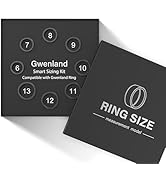
Image: The smart ring's LED screen displaying various metrics like time, steps, heart rate, blood oxygen, sleep, and battery level, controlled by a touch button.
Information accessible via the LED screen includes:
- Time
- Step Count
- Heart Rate
- Blood Oxygen Saturation (SpO2)
- Sleep Status
- Battery Level
The touch button also functions as a power on/off switch and for interface switching.
Gesture Control:
The smart ring supports innovative gesture controls, allowing you to interact with your smartphone remotely.

Image: Demonstrates using the smart ring for gesture control, such as scrolling through TikTok, controlling music, or flipping e-book pages.
With a simple wave of your finger, you can:
- Scroll through TikTok videos.
- Control music playback (play, pause, skip tracks).
- Flip pages in e-books.
Remote Photo Capture:
The smart ring offers a remote photo capture experience. Activate the photo function in the RWFit app, then simply tap the ring's touch screen or shake your finger to trigger your phone's camera shutter.

Image: Illustrates using the smart ring to remotely capture photos, ideal for group shots or selfies.
6. Health Monitoring Features
The Gwenland Smart Ring provides comprehensive 24-hour real-time health data monitoring, helping you understand your body's trends.

Image: An overview of the RWFit app interface, displaying various health metrics tracked by the smart ring over time.
Sleep Tracking:
The ring automatically tracks your sleep quality, including duration and different sleep phases (light, deep, REM, wake time). Detailed analyses in the RWFit app help you improve your sleep habits and overall rest quality.

Image: The RWFit app displaying comprehensive sleep data, including total sleep time, sleep stages, and a graphical representation of sleep patterns.
Heart Rate & HRV Monitoring:
The smart ring continuously monitors your heart rate 24/7 and measures Heart Rate Variability (HRV). This data helps you stay informed about your cardiovascular health and detect trends over time.

Image: The RWFit app showing detailed heart rate and HRV graphs, providing insights into cardiovascular health.
Blood Oxygen (SpO2) Measurement:
Visualize your blood oxygen levels at rest or during activity. The ring helps you maintain optimal oxygen saturation by providing continuous measurements.

Image: The RWFit app showing blood oxygen saturation (SpO2) data, including daily trends and optimal ranges.
Activity Tracking:
The smart ring recognizes multi-sport activities, accurately recording each session to help you optimize your performance. It tracks steps, distance, and calories burned.

Image: The RWFit app displaying activity tracking metrics such as steps, distance, and calories, with multi-sport recognition.
Stress Monitoring:
Continuous and precise monitoring detects hidden tensions, helping you preserve your long-term health. The app provides minimum, average, and maximum stress levels.

Image: The RWFit app displaying stress level monitoring, showing daily fluctuations and overall trends.
Female Health Tracking (Menstrual Cycles):
The Gwenland ring can accurately predict your periods and ovulation dates based on your cyclical data, providing valuable insights for female health management.

Image: The RWFit app's female health tracking feature, showing cycle settings and a calendar with predicted menstrual and ovulation dates.
7. Battery and Charging
The Gwenland Smart Ring is equipped with a long-lasting battery and comes with a portable charging case.

Image: The smart ring charging wirelessly in its portable case, highlighting quick charging and extended battery life.
- Charging Case Capacity: 200mAh.
- Charging Time: Approximately 1 hour for a full charge.
- Ring Battery Life: Up to 5-7 days of full use.
- Extended Battery Life: The portable charging case can fully recharge the ring at least five times, extending usage up to 20-30 days without frequent recharges.
- Power Saving: To conserve energy, you can put the smart ring into sleep mode when not in use.
8. Waterproofing (IP68)
The Gwenland Smart Ring is certified IP68 waterproof, making it suitable for various water-related activities.
Image: The smart ring being worn underwater, demonstrating its IP68 waterproof capabilities for activities like swimming and showering.
The robust construction ensures exceptional performance even during intensive activities. It resists sweat, rain, and splashes.
- Swimming
- Showering
- Hand Washing
- Exposure to Rain
9. Maintenance
To ensure the longevity and optimal performance of your Gwenland Smart Ring, follow these maintenance guidelines:
- Cleaning: Regularly wipe the ring with a soft, dry cloth to remove dirt and oils. For stubborn grime, use a slightly damp cloth and dry thoroughly.
- Avoid Harsh Chemicals: Do not expose the ring to strong chemicals, solvents, or abrasive cleaners, as these can damage the finish and internal components.
- Storage: When not in use for extended periods, store the ring in its charging case or a cool, dry place away from direct sunlight and extreme temperatures.
- Charging Contacts: Keep the charging contacts on the ring and case clean and free of debris to ensure efficient charging.
10. Troubleshooting
If you encounter issues with your Gwenland Smart Ring, refer to the following common troubleshooting steps:
- Connection Issues (Bluetooth):
- If the Bluetooth connection cannot be established, go to your phone's Bluetooth settings, find "SY01," and select "Forget" or "Ignore" this device.
- Then, re-establish the connection through the RWFit application as described in the Setup section.
- Ensure the RWFit app is always updated to the latest version.
- Display Not Working:
- Ensure the ring is charged. Place it on the charging case to confirm it's receiving power.
- Try tapping the touch button on the ring to activate the display.
- If the issue persists, restart the ring by placing it on the charger and then removing it, or consult the app for a restart option if available.
- Inaccurate Data Readings:
- Verify that the ring is worn correctly, with sensors making good contact with your skin.
- Ensure the ring is the correct size for your finger. A loose fit can lead to inaccurate data.
- Keep the sensors clean from dirt or sweat.
- App Not Syncing:
- Check your phone's internet connection.
- Ensure the RWFit app has all necessary permissions enabled (e.g., Bluetooth, location).
- Close and reopen the RWFit app.
- Restart your smartphone.
11. Specifications
| Feature | Detail |
|---|---|
| Brand | Gwenland |
| Model Name | SY01 |
| Operating System Compatibility | iOS 10.0+ and Android 5.0+ |
| Connectivity | Bluetooth |
| Water Resistance | IP68 |
| Battery Composition | Lithium-polymer |
| Rechargeable Battery | Yes |
| Charging Case Capacity | 200mAh |
| Typical Battery Life | 5-7 days (up to 30 days with charging case) |
| Special Features | SpO2, Heart Rate, HRV, Sleep, Stress, Fitness Tracking, LED Screen, Touch Control, Gesture Control, Remote Photo, Wireless Charging |
| Compatible Devices | Smartphone |
| GPS | Via smartphone |
| Weight | 3.2g |
| Thickness | 2.5mm |
| Country of Origin | China |
12. Warranty and Support
Your Gwenland Smart Ring SY01 comes with a manufacturer's warranty.
- Manufacturer Warranty: 2 years.
- Customer Support: For technical assistance, warranty claims, or further inquiries, please refer to the contact information provided in your product packaging or visit the official Gwenland website.


