
1. Product Overview
The EGQINR H52 Smart Watch is a versatile wearable device designed to enhance your daily life with advanced health monitoring, comprehensive fitness tracking, and seamless communication features. It boasts a vibrant 1.75-inch HD touch screen, AI voice command capabilities, and robust IP68 waterproofing.

Figure 1: EGQINR H52 Smart Watch in Black.
Video 1: An overview of the EGQINR H52 Smartwatch, highlighting its health and fitness features.
2. Setup Guide
2.1 Initial Activation & Charging
Before first use, charge the watch for at least two hours to activate it. Use the provided magnetic charging cable.

Figure 2: Charging the EGQINR H52 Smart Watch.
2.2 App Download and Pairing
- Download the DaFit app from your smartphone's app store (compatible with iOS 9.0+ and Android 4.4+).
- Ensure your phone's Bluetooth is turned on.
- Open the DaFit app and follow the on-screen instructions to add your device. Select "H52" from the list to connect.
- Confirm successful binding within the DaFit app.
2.3 Bluetooth Call Setup
To enable Bluetooth calling functionality:
- After successful binding with the DaFit app, go to your phone's Bluetooth settings.
- Find "H52" in the list of available devices and click to bind.
- Once connected, you can use the watch for making and receiving calls.
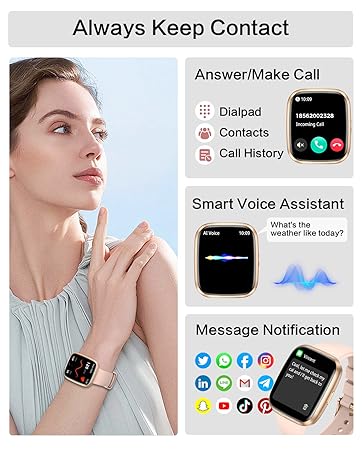
Figure 3: Step-by-step guide for app download and Bluetooth connection.
3. Operating the Smart Watch
3.1 Navigation and Display
The H52 Smart Watch features a 1.75-inch HD colorful touch screen for intuitive navigation. Swipe across the screen to access different functions and menus.
- Swipe Up/Down: Scroll through notifications or menu options.
- Swipe Left/Right: Access quick functions or different widgets.
- Tap: Select an item or confirm an action.

Figure 4: Sensitive touch screen navigation.
3.2 Customizing Watch Faces
Personalize your watch by choosing from over 100+ free watch faces available in the DaFit app, or upload your own photos to create a unique display.
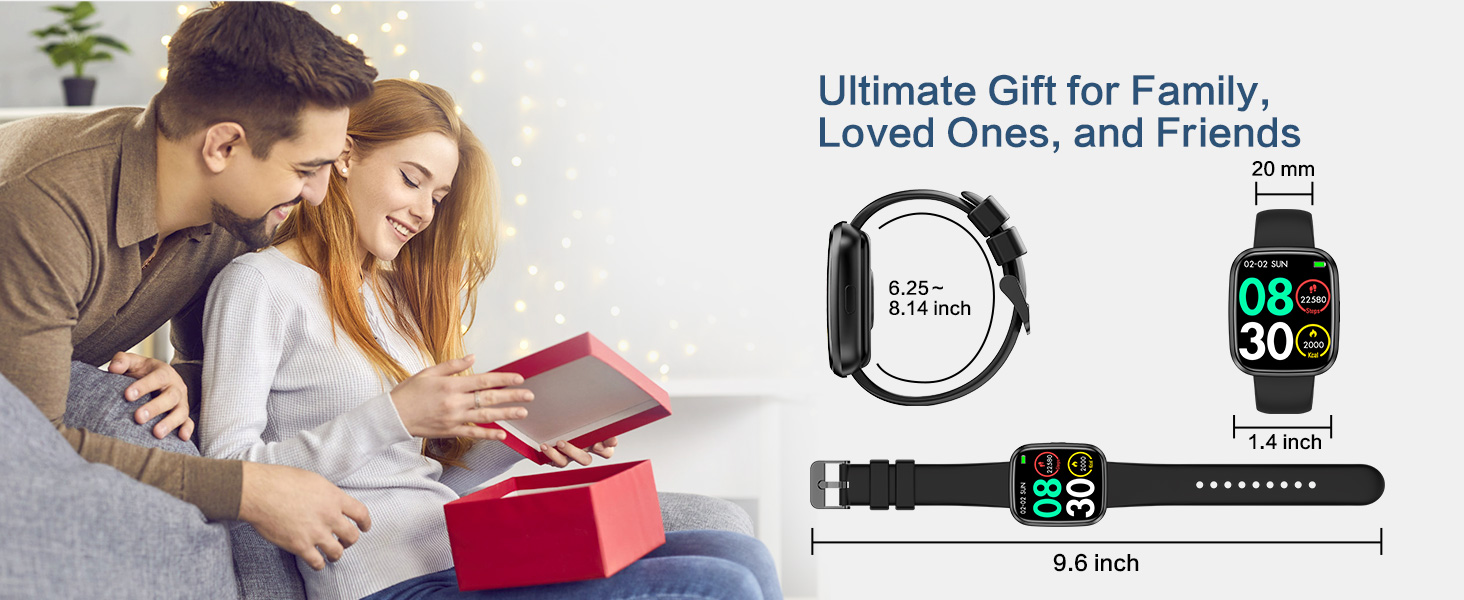
Figure 5: Customizable watch faces.
3.3 Communication Features
- Bluetooth Calls: Answer or make calls directly from your wrist. Access dial pad, contacts, and call history.
- Message Notifications: Receive real-time alerts for SMS, Facebook, WhatsApp, Twitter, and other app notifications. (Note: Reply functionality is not supported).
- AI Voice Command: Activate your phone's AI voice assistant (e.g., Siri) to execute commands hands-free.

Figure 6: Communication features on the smart watch.
Video 2: Demonstrating various features of the EGQINR H52 Smart Watch, including communication and health tracking.
3.4 Other Useful Tools
The watch includes additional functions for convenience:
- Weather forecast
- Music control
- Camera control
- Clock, Stopwatch, Timer
- Find phone
- Calculator
- Water/Sedentary reminder
- Dynamic Island feature

Figure 7: Additional smart watch functions.
4. Health Monitoring
The H52 Smart Watch is equipped with advanced sensors for comprehensive health tracking. Note: This product is not a medical device. All health data are for reference only and should not be used as an absolute standard for judging health.
- Heart Rate Monitor: 24/7 monitoring with high heart rate warnings.
- Blood Pressure Monitor: Track your blood pressure levels.
- Blood Oxygen (SpO2) Monitor: Measure your blood oxygen saturation.
- Sleep Tracker: Monitors sleep quality, including awake time, REM, light, and deep sleep stages.
- Breath Training: Guided breathing exercises to help you relax.
- Female Cycle Tracker: Track menstruation, safe/ovulation periods, and ovulation day.
Figure 8: Health monitoring features.
Video 3: Showcasing the EGQINR H52 Smartwatch as a fitness and lifestyle partner, including health tracking.
5. Fitness Tracking
The H52 Smart Watch serves as a dedicated fitness tracker, automatically recording daily steps and calories burned.
- 100+ Sports Modes: Supports a wide range of activities including running, cycling, basketball, yoga, and more.
- Personalized Goals: Set custom goals for time, calories, and distance for each workout.
- Exercise Data: Captures real-time exercise data and generates detailed reports for scientific training.
- IP68 Waterproof: Suitable for hand washing, face washing, and sweaty activities. Not recommended for sauna or diving.
Figure 9: 100+ sports modes and IP68 waterproof rating.
6. Battery Life and Charging
The H52 Smart Watch is equipped with a 250 mAh battery and a high-performance chip for extended use.
- Charging Time: Approximately 2 hours for a full charge.
- Typical Use: 5-7 days of battery life.
- Standby Time: Up to 25 days.
Figure 10: Battery and charging information.
7. Specifications
| Feature | Detail |
|---|---|
| Brand | EGQINR |
| Model Number | H52 |
| Screen Size | 1.75 Inches |
| Operating System | Android & iOS (Android 4.4+, iOS 9.0+) |
| Connectivity Technology | Bluetooth |
| Battery Capacity | 250 Milliamp Hours |
| Battery Charge Time | 2 Hours |
| Waterproof Rating | IP68 |
| Case Material | Aluminum |
| Band Material | Silicone |
| Metrics Measured | Heart Rate, Blood Pressure, Blood Oxygen, Sleep Duration |
| Special Features | Bluetooth Call, Text Notification, AI Voice Assistant, 100+ Sports Modes, Dynamic Island, Weather Forecast, Music Control, Camera Control, Alarm Clock, Calculator |
| What's in the Box | EGQINR H52 Smart Watch, Silicone Watch Straps, Magnetic Charging Cable, Instruction Manual |
8. Troubleshooting
8.1 Watch Not Working Properly
If your watch is not functioning as expected, try the following steps:
- Charge the Watch: Connect the watch to a power source and charge it for at least two hours to ensure it is fully activated.
- Reset and Reconnect: Reset the watch to its factory settings and then reconnect it to the DaFit mobile app.
- Update Software: Ensure both the watch firmware and the DaFit mobile app are updated to their latest versions.
8.2 Inaccurate Health Measurements
For more accurate health measurements:
- Personal Information: Verify that your personal information (age, height, weight) in the "DaFit" app is filled in correctly.
- Wearing Position: Ensure the watch is worn correctly – not too tight or too loose. Avoid excessive arm swinging or making a fist during measurements.
- Skin Contact: Individual differences such as skin color, hair, tattoos, or scars can affect blood circulation and measurement signals. Ensure good skin contact.
- Elevated Measurement: You can turn on the elevated measurement function in the "DaFit" app if available.
9. Warranty and Support
EGQINR offers the following for your H52 Smart Watch:
- Return Policy: 30-day free return policy.
- Warranty: 1-Year limited warranty.
- Technical Support: 24/7 lifetime technical support for any assistance you may need.