
1. Introduction
Thank you for choosing the Hyper Tough 20V Cordless Brushless Impact Driver. This tool is designed for driving and removing fasteners in various materials. Its brushless motor provides increased efficiency and longer tool life. This manual provides important information regarding the safe operation, setup, maintenance, and troubleshooting of your impact driver. Please read this manual thoroughly before operating the tool and keep it for future reference.
Note: This product is a bare tool. Battery and charger are sold separately and are required for operation.
2. Important Safety Information
Always follow basic safety precautions when using power tools to reduce the risk of fire, electric shock, and personal injury. Read all instructions.
General Power Tool Safety Warnings:
- Work Area Safety: Keep your work area clean and well-lit. Cluttered or dark areas invite accidents. Do not operate power tools in explosive atmospheres, such as in the presence of flammable liquids, gases, or dust.
- Electrical Safety: Avoid body contact with earthed or grounded surfaces such as pipes, radiators, ranges, and refrigerators. There is an increased risk of electric shock if your body is earthed or grounded.
- Personal Safety: Always wear eye protection. Use safety glasses or goggles. Wear hearing protection when operating the tool for extended periods. Dress properly. Do not wear loose clothing or jewelry. Keep your hair, clothing, and gloves away from moving parts.
- Tool Use and Care: Do not force the power tool. Use the correct power tool for your application. The correct power tool will do the job better and safer at the rate for which it was designed. Disconnect the battery pack from the power tool before making any adjustments, changing accessories, or storing power tools.
- Service: Have your power tool serviced by a qualified repair person using only identical replacement parts. This will ensure that the safety of the power tool is maintained.
3. Setup
3.1 Unpacking
Carefully remove the impact driver from its packaging. Inspect the tool for any signs of damage that may have occurred during shipping. If any damage is found, do not operate the tool and contact customer support.
3.2 Battery and Charger (Not Included)
This Hyper Tough impact driver operates on a 20V lithium-ion battery. Ensure you use a compatible Hyper Tough 20V battery and charger (sold separately). Refer to the battery and charger manuals for specific charging and installation instructions.
- Insert the charged battery pack into the tool handle until it clicks securely into place.
- To remove the battery, press the release button on the battery pack and pull it out of the tool handle.
3.3 Installing and Removing Bits
The impact driver features a 1/4-inch hex chuck for quick bit changes.
- To Install a Bit: Pull the chuck collar forward away from the tool body. Insert the 1/4-inch hex shank bit fully into the chuck. Release the chuck collar to lock the bit in place. Tug on the bit to ensure it is securely seated.
- To Remove a Bit: Pull the chuck collar forward away from the tool body. The bit will release. Remove the bit.
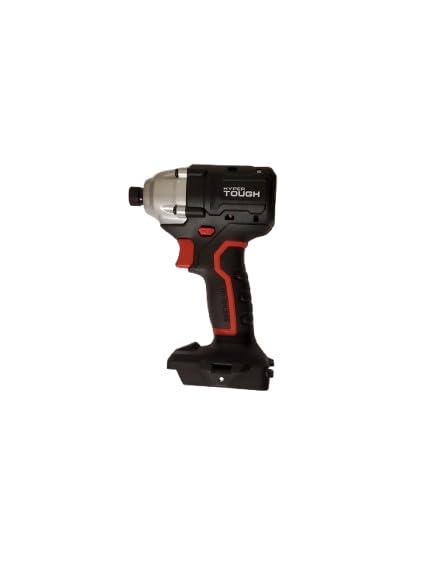
Image: The Hyper Tough 20V Cordless Brushless Impact Driver, showing the tool's compact design and the chuck for bit insertion.
4. Operating Instructions
4.1 Powering On/Off
The tool is activated by pressing the variable speed trigger switch. The further the trigger is pressed, the faster the tool operates. Release the trigger to turn the tool off.
4.2 Forward/Reverse Rotation
A forward/reverse selector switch is located above the trigger. Push the switch to the left for forward rotation (for driving fasteners) and to the right for reverse rotation (for removing fasteners). The center position locks the trigger, preventing accidental startup.
4.3 Driving Fasteners
Select the appropriate bit for your fastener. Hold the tool firmly with both hands. Position the bit on the fastener head. Press the trigger to start driving. Apply steady, even pressure. The impact mechanism will engage automatically when resistance is met, providing additional torque to drive the fastener.
5. Maintenance
Regular maintenance ensures optimal performance and extends the life of your tool. Always disconnect the battery pack before performing any maintenance.
5.1 Cleaning
Keep the tool's air vents clean and free of debris to prevent overheating. Use a soft, damp cloth to clean the exterior of the tool. Do not use harsh chemicals or abrasive cleaners. Never immerse the tool in liquid.
5.2 Storage
Store the impact driver in a clean, dry place, out of reach of children. Remove the battery pack before storing for extended periods. Avoid storing in direct sunlight or areas with extreme temperatures.
5.3 Inspection
Periodically inspect the tool for loose screws, damaged cords (if applicable), or worn parts. If any damage is observed, have the tool repaired by a qualified service technician before further use.
6. Troubleshooting
Before attempting any repairs, always disconnect the battery pack.
| Problem | Possible Cause | Solution |
|---|---|---|
| Tool does not start. | Battery not inserted correctly. Battery is discharged. Forward/reverse selector is in the center (locked) position. | Ensure battery is fully seated. Charge the battery. Move the selector switch to forward or reverse. |
| Reduced power or performance. | Battery is low. Incorrect bit for the application. Overheating. | Recharge the battery. Use the correct bit. Allow the tool to cool down. |
| Bit falls out of chuck. | Bit not fully inserted. Chuck collar not fully released. | Ensure bit is fully inserted and chuck collar is released and locked. |
7. Specifications
| Feature | Specification |
|---|---|
| Model Number | 22006.2 |
| Voltage | 20V (Max) |
| Power Source | Battery Powered (Battery and Charger Sold Separately) |
| Drill Type | Impact Driver |
| Maximum Chuck Size | 0.5 inches (1/4-inch Hex) |
| Item Dimensions (L x W x H) | 8"L x 6"W x 12"H |
| Manufacturer | Hyper Tough |
8. Warranty and Support
For warranty information, please refer to the warranty card included with your product or visit the Hyper Tough official website. Keep your purchase receipt as proof of purchase.
If you have any questions, require technical assistance, or need to order replacement parts, please contact Hyper Tough customer support. Contact details can typically be found on the product packaging or the official Hyper Tough website.
