
1. Introduction
Thank you for purchasing the Targa TG-370B Media Player. This device is designed to enhance your in-vehicle audio experience with its versatile connectivity options, including Bluetooth wireless technology and dual USB ports. This manual provides essential information for the proper installation, operation, and maintenance of your media player.
2. Safety Information
- Installation: Ensure professional installation to prevent damage to the unit or vehicle. Incorrect wiring can cause malfunctions or electrical hazards.
- Power Supply: Connect the unit only to a 12V DC power supply with a negative ground.
- Volume Control: Avoid operating the unit at excessively high volumes for prolonged periods to prevent hearing damage.
- Driving Safety: Do not operate the unit in a manner that distracts you from driving. Always prioritize road safety.
- Moisture: Keep the unit away from water and excessive moisture to prevent electric shock or fire.
3. Package Contents
Verify that all items are present in the package:
- Targa TG-370B Media Player Unit
- Wiring Harness
- Mounting Hardware (if applicable)
- User Manual (this document)
4. Product Overview
The Targa TG-370B features a sleek design with touch controls and an LCD display for intuitive operation. It includes dual USB ports for media playback and device charging, along with Bluetooth connectivity for wireless audio streaming.
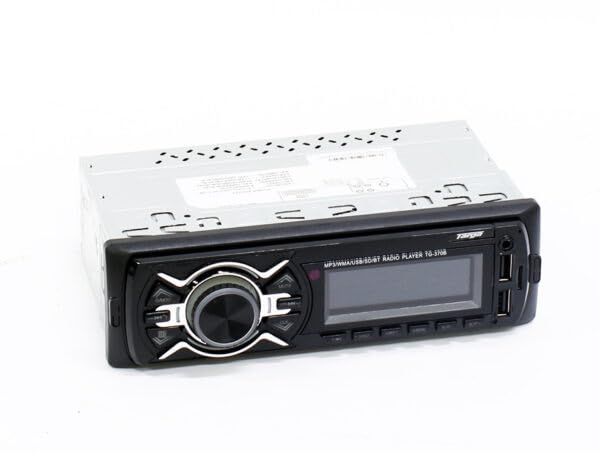
Figure 1: Front view of the Targa TG-370B Media Player, showing the display and touch controls.
Key Features:
- Bluetooth Wireless Technology
- Dual USB Ports
- Touch Control Panel
- LCD Display
- 240-watt Stereo Sound (2.0 channel configuration)
- Compact Design (18.0 cm W x 15.0 cm D x 5.0 cm H)
5. Setup and Installation
The Targa TG-370B is designed for standard vehicle dashboard installation. Due to the complexity of vehicle electrical systems, professional installation is highly recommended.
General Installation Steps:
- Disconnect Battery: Before starting, disconnect the vehicle's negative battery terminal to prevent electrical shorts.
- Remove Existing Unit: Carefully remove the existing car stereo or blanking plate from the dashboard.
- Connect Wiring: Connect the provided wiring harness to the vehicle's wiring. Ensure correct connections for power (constant 12V, ignition 12V, ground), speaker outputs, and antenna. Refer to your vehicle's wiring diagram if necessary.
- Mount Unit: Slide the TG-370B into the dashboard opening and secure it using the provided mounting hardware.
- Reconnect Battery: Reconnect the vehicle's negative battery terminal.
- Test Functionality: Turn on the vehicle and test the media player's functions.
6. Operating Instructions
6.1. Power On/Off
- Power On: Press the POWER button (usually marked with symbol) on the front panel.
- Power Off: Press and hold the POWER button for a few seconds.
6.2. Volume Control
Adjust the volume using the dedicated touch controls, typically marked with + and - symbols.
6.3. Source Selection
Press the MODE or SOURCE button to cycle through available audio sources (e.g., Bluetooth, USB).
6.4. Bluetooth Pairing
- Ensure the media player is powered on and in Bluetooth mode. The display will typically show "BT" or a Bluetooth icon.
- On your mobile device, enable Bluetooth and search for available devices.
- Select "TG-370B" (or similar name) from the list of found devices.
- If prompted, enter the pairing code (usually "0000").
- Once paired, the unit will confirm the connection, and you can stream audio from your device.
6.5. USB Playback
- Insert a USB flash drive containing compatible audio files into one of the USB ports.
- The unit should automatically switch to USB mode and begin playback. If not, press the MODE button to select USB.
- Use the NEXT/PREVIOUS track buttons to navigate through files.
7. Maintenance
- Cleaning: Use a soft, dry cloth to clean the unit's surface. Do not use abrasive cleaners or solvents.
- Dust: Regularly remove dust from the unit to ensure proper ventilation and operation.
- Temperature: Avoid exposing the unit to extreme temperatures or direct sunlight for extended periods.
8. Troubleshooting
| Problem | Possible Cause | Solution |
|---|---|---|
| No power | Incorrect wiring; Blown fuse; Vehicle battery low | Check wiring connections; Replace fuse; Charge/check vehicle battery |
| No sound | Volume too low; Mute activated; Speaker wires disconnected | Increase volume; Deactivate mute; Check speaker connections |
| Bluetooth not pairing | Device too far; Bluetooth not enabled on device; Incorrect pairing mode | Move device closer; Enable Bluetooth; Ensure unit is in pairing mode |
| USB not playing | Incompatible file format; USB drive corrupted; Unit not in USB mode | Check file formats; Try another USB drive; Select USB source |
9. Specifications
- Model: TG-370B
- Brand: Targa
- Connectivity: Bluetooth, Dual USB Ports
- Audio Output: 240-watt Stereo (2.0 channel)
- Control Method: Touch
- Compatible Devices: USB Devices
- Dimensions (W x D x H): 18.0 cm x 15.0 cm x 5.0 cm
- Item Weight: 1200 Grams
- Color: Black
10. Warranty and Support
The Targa TG-370B Media Player comes with a 6-month warranty from the date of purchase. This warranty covers manufacturing defects under normal use.
For warranty claims, technical support, or service inquiries, please contact your retailer or the manufacturer directly. Keep your proof of purchase for warranty validation.