
1. Introduction
Thank you for choosing the Portronics Power Shutter 20000mAh Magnetic Wireless Powerbank. This device is designed to provide convenient and efficient charging for your mobile devices, featuring both wired and wireless fast charging capabilities, along with built-in cables for enhanced portability. Please read this manual carefully before use to ensure optimal performance and safety.
2. What's in the Box
- Powerbank (1N)
- Documentation (1N)
- Charging Cable (1N)
3. Product Overview
The Portronics Power Shutter 20000mAh is a high-capacity power bank with a unique design and multiple charging options. It features a 15W magnetic wireless charging surface, 22.5W wired fast charging via dual output ports (USB and Type-C), and convenient in-built Type-C and 8-Pin cables. A digital LED display provides real-time battery status.
Key Features:
- 20000mAh Capacity: Provides multiple charges for smartphones, tablets, and earbuds.
- 15W Magnetic Wireless Charging: Effortlessly charge Qi-enabled devices by simply placing them on the power bank.
- 22.5W Wired Fast Charging: Dual output ports (USB and Type-C) for rapid charging of various devices.
- In-Built Cables: Includes integrated Type-C and 8-Pin cables for convenience.
- Digital LED Display: Shows exact battery percentage and charging status.
- Bidirectional Type-C Port: Functions as both input and output.
- Multi-layer Circuit Protection: Ensures safe charging against overcurrent, overheating, and overcharging.
Product Components:
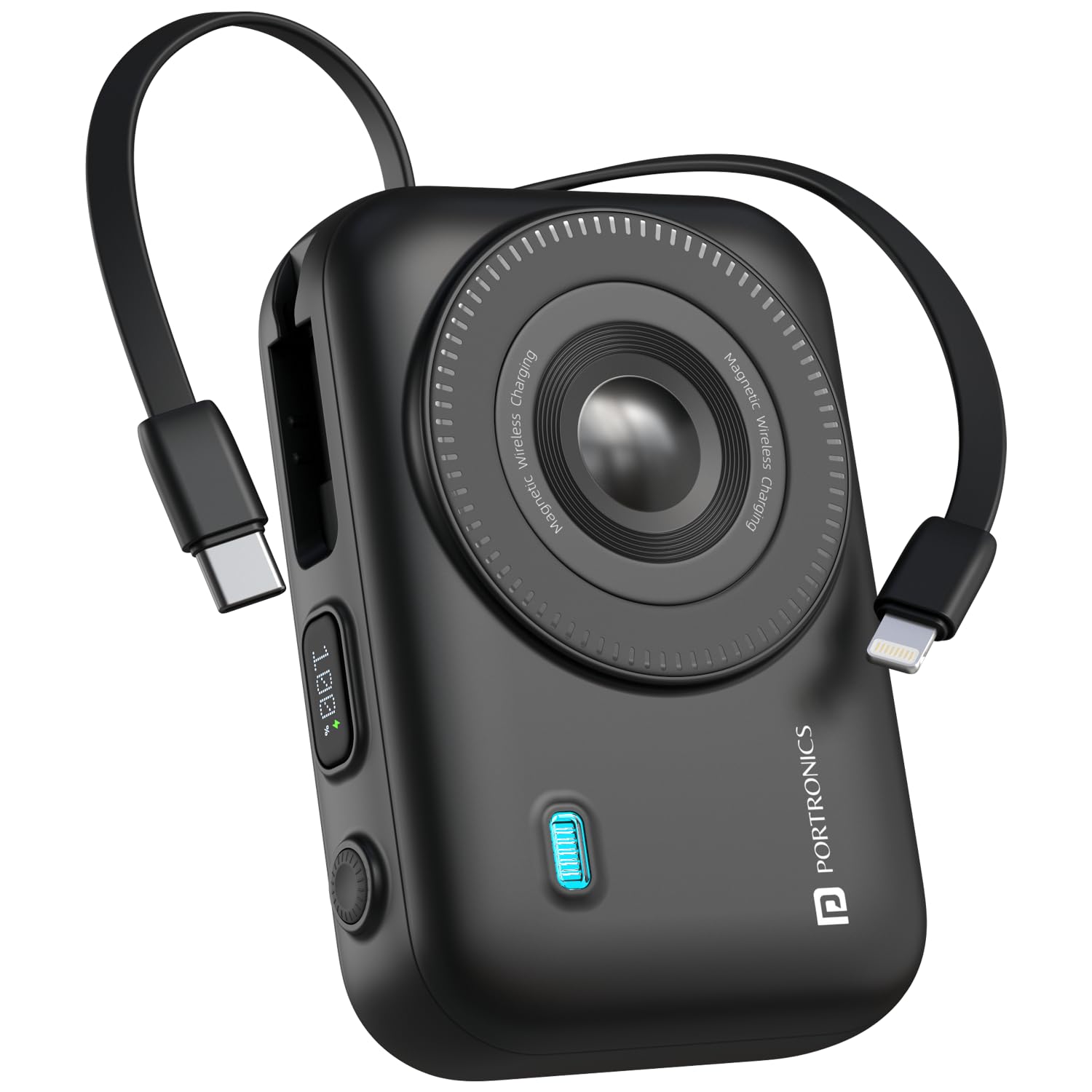
The Power Shutter 20000mAh power bank with a phone attached, demonstrating 15W magnetic wireless charging. Features like strong magnetic suction and auto-hibernation are highlighted.

Two Portronics Power Shutter 20000mAh power banks, one with a phone magnetically attached, illustrating its compact, pocket-sized design.

A close-up view of the power bank's side, highlighting the LED digital display showing battery percentage and the bidirectional Type-C port for input/output.
Product Videos:
This video demonstrates the unboxing and various charging functionalities of the Portronics Power Shutter Pro, including the use of built-in cables and the digital display. While a 'Pro' model, the core features are similar.
This video showcases the 15W Magsafe wireless charging feature of the Portronics Revvo power bank, demonstrating how devices magnetically attach and charge. This feature is also present in your Power Shutter model.
4. Setup
4.1 Initial Charging of the Powerbank
- Before first use, fully charge your Portronics Power Shutter power bank.
- Connect the provided USB Type-C charging cable to the bidirectional Type-C port on the power bank.
- Connect the other end of the cable to a compatible USB wall adapter (not included) or a computer's USB port.
- The LED digital display will show the charging progress. The power bank is fully charged when the display shows 100%.
5. Operating Instructions
5.1 Charging Devices Wirelessly (15W Magnetic)
- Ensure your device is Qi-enabled and supports magnetic wireless charging.
- Align your device with the magnetic charging surface on the power bank. The magnets will help snap your device into place.
- The power bank will automatically begin wireless charging. The LED display may indicate wireless charging activity.
5.2 Charging Devices with Built-in Cables (22.5W)
- Identify the appropriate built-in cable for your device: Type-C or 8-Pin.
- Gently pull out the required cable from its storage slot on the power bank.
- Connect the cable to your device's charging port.
- The power bank will automatically detect your device and begin charging. The LED display will show the power bank's remaining charge.
5.3 Charging Devices with External Cables (22.5W)
- Use your own USB-A to Type-C/Lightning cable or a Type-C to Type-C cable.
- Connect one end of your cable to the USB-A output port or the bidirectional Type-C port on the power bank.
- Connect the other end of the cable to your device's charging port.
- The power bank will automatically detect your device and begin charging.
6. Safety Information
- Do not expose the power bank to extreme temperatures, direct sunlight, or fire.
- Avoid dropping, disassembling, or modifying the device.
- Keep away from water and other liquids.
- Do not use if the power bank is damaged or swollen.
- Keep out of reach of children.
- Use only compatible charging cables and adapters.
- Do not place metal objects on the wireless charging surface.
7. Maintenance
- Clean the power bank with a soft, dry cloth. Do not use harsh chemicals or abrasive materials.
- Store the power bank in a cool, dry place when not in use.
- If storing for an extended period, charge the power bank to approximately 50% every three months to maintain battery health.
8. Troubleshooting
8.1 Power bank not charging:
- Ensure the charging cable is securely connected to both the power bank and the power source.
- Try a different charging cable or wall adapter.
- Verify the power source is active.
8.2 Device not charging from power bank:
- Check if the power bank has sufficient charge (refer to the LED display).
- Ensure the device is properly connected via wired or wirelessly.
- For wireless charging, ensure your device is Qi-enabled and correctly aligned on the magnetic surface.
- Try a different cable or port on the power bank.
- Some phone cases may interfere with wireless charging; try removing the case.
8.3 Slow charging:
- Ensure you are using a fast-charging compatible cable and adapter for the power bank itself.
- For device charging, ensure your device supports fast charging and the cable used is appropriate.
- High temperatures can affect charging speed; ensure the device is in a well-ventilated area.
9. Specifications
| Feature | Detail |
|---|---|
| Model Number | POR-3016 |
| Battery Capacity | 20000 mAh |
| Wireless Charging Output | 15W Magnetic |
| Wired Output (Type-C PD) | 22.5W |
| Wired Output (USB) | 22.5W |
| In-Built Cables | Type-C & 8-Pin |
| Bidirectional Port | Type-C (Input & Output) |
| Display | LED Digital Display |
| Dimensions | 16.2 x 10.9 x 3.9 cm |
| Item Weight | 370 g |
| Safety Features | Overcurrent, Overheating, Overcharging Protection |
10. Warranty and Support
This Portronics Power Shutter 20000mAh Magnetic Wireless Powerbank comes with a standard brand warranty. For any support, queries, or warranty claims, please contact Portronics Digital Pvt. Ltd. at:
- Email: help@portronics.com
- Phone: +91 9555-245-245
- Address: First Floor Property No D 8 Upper Basement Sector 8 Noida Uttar Pradesh 201301, India