
anyloop B0FG2LL8GL
anyloop Smart Watch for Kids
Model: B0FG2LL8GL - Instruction Manual
Introduction
This manual provides detailed instructions for setting up, operating, and maintaining your anyloop Smart Watch for Kids, Model B0FG2LL8GL. This device is designed to be a comprehensive health and activity tracker for children aged 4-16, featuring heart rate and sleep monitoring, activity tracking, educational games, and smart notifications.
The watch is equipped with a 1.5-inch HD color touch screen and an adjustable silicone strap, ensuring comfort for wrist sizes between 4.1 and 7.1 inches. It is IP68 waterproof, making it suitable for daily activities without concern for water damage.

Image: The anyloop Smart Watch for Kids in Peach Pink, showcasing its design and display.
What's in the Box
Please check the package contents upon unboxing:
- Kids Smart Watch (x1)
- Charging Cable (x1)
- User Manual (x1)
Setup Guide
1. Charging the Device
Before initial use, fully charge the smart watch. Connect the magnetic charging cable to the charging port on the back of the watch and plug the USB-A end into a compatible power adapter (not included). A full charge typically takes approximately 2 hours. The watch offers 5-7 days of continuous usage and up to 20 days of standby time.

Image: The smart watch connected to its magnetic charging cable, illustrating the charging process and battery life indicators.
2. App Installation and Pairing
To unlock the full functionality of your anyloop Smart Watch, download the "anyloop APP" from your device's app store. The app is compatible with iOS 9.0+ and Android 5.0+ devices.
- Download and install the "anyloop APP" on your smartphone.
- Open the app and create a family account.
- Enable Bluetooth on your smartphone.
- In the app, navigate to the device section and select "Add Device" to pair your smart watch via Bluetooth. Follow the on-screen prompts to complete the pairing process.
- Once paired, the watch will synchronize time and data with your smartphone.
Video: A demonstration of the anyloop app interface and its various functions, including device pairing and settings.
3. Personal Information and Watch Face Customization
Within the anyloop APP, you can set up personal profiles for your child, including age, gender, height, and weight, to ensure accurate health and activity tracking. You can also customize the watch face from over 200 options or upload a favorite photo as wallpaper to personalize the watch's appearance.
Operating Instructions
Navigation
The smart watch features a 1.5-inch HD color touch screen for intuitive navigation. Swipe left, right, up, or down to access different functions and menus. The side button typically serves as a power button or a back button, depending on the context.
Health Tracking
- Heart Rate Monitoring: The watch provides 24/7 real-time heart rate tracking and can alert for elevated heart rates. View current and historical data in the app.
- Blood Oxygen Tracking: Monitor blood oxygen levels directly from the watch.
- Sleep Monitoring: Automatically tracks sleep quality, including deep, light, and awake stages. Data is available in the app to help establish regular sleep habits.
- Stress Level Measuring: The fitness tracker offers stress level measurement to help monitor overall well-being.

Image: The smart watch screen showing a heart rate reading of 90 BPM, with a child standing on a soccer field.
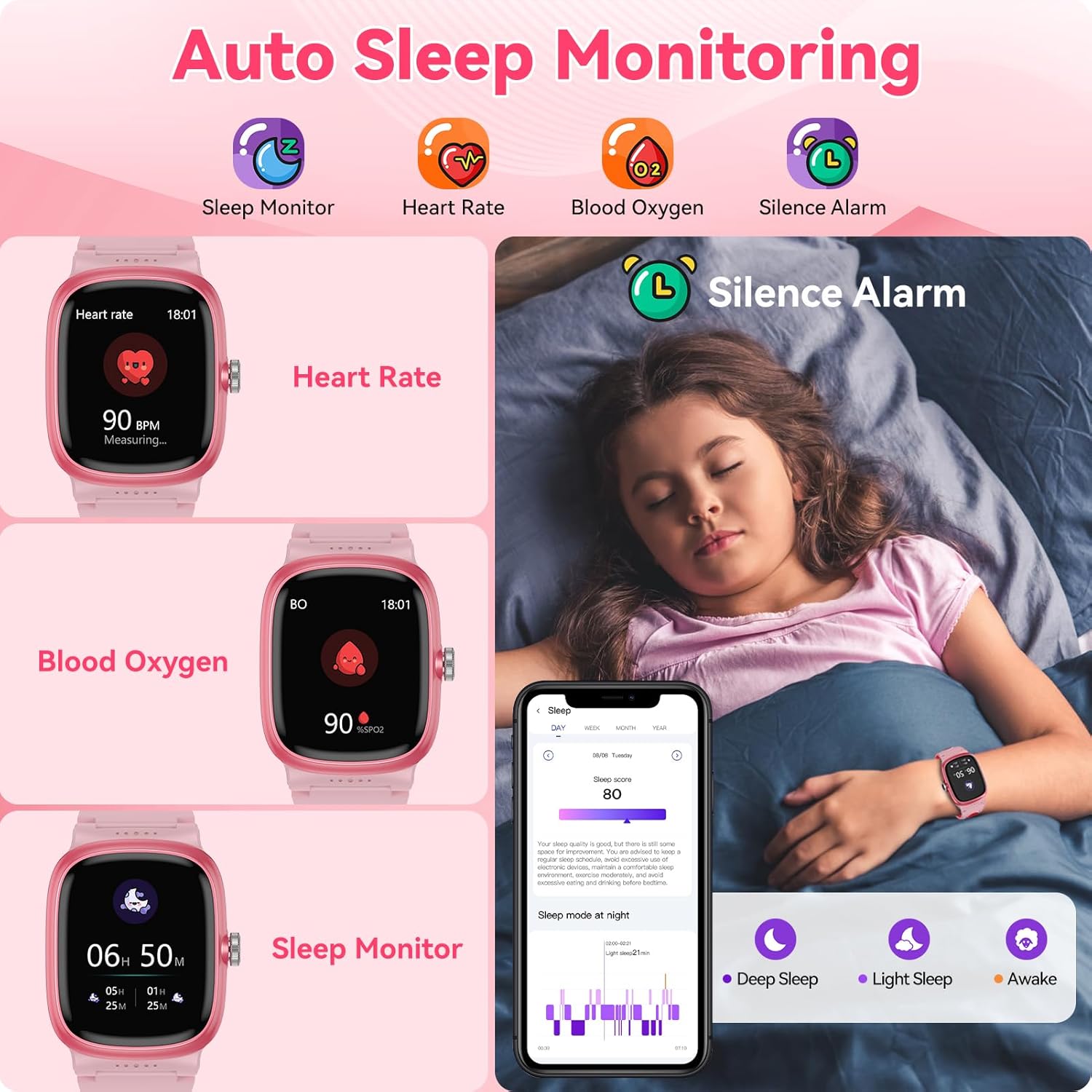
Image: A collage showing the watch interface for heart rate, blood oxygen, and sleep monitoring, alongside a child sleeping and the app's sleep data display.
Activity Tracking
The watch supports over 20 sports modes, including walking, running, cycling, football, basketball, mountain hiking, and more. It records calories burned, steps taken, and distances covered in real-time. Set daily exercise goals through the app to encourage active habits.

Image: Children exercising on a track, with the smart watch displaying steps, calories, and distance tracked.
Video: A short preview video demonstrating a child interacting with the watch's activity tracking features, showing the countdown for starting an exercise.
Smart Features
- Educational Games: Features 8 fun educational games to stimulate creativity and provide entertainment.
- Vibration Alarm Clock: Set alarms that gently wake the child without disturbing others.
- Smart Notifications: Receive notifications for incoming calls and messages (requires phone connection).
- Weather: Displays current weather information (requires app connection).
- Other Tools: Includes flashlight, calculator, timer, calendar, camera control (for phone camera), and a 'Find Phone' function.
- Reminders: Water and sedentary vibration reminders are available.

Image: Children enjoying the educational games on the smart watch, with icons of various games displayed.

Image: The smart watch screen surrounded by icons representing its multi-functional capabilities, such as stopwatch, weather, calculator, games, and heart rate.
Video: A comprehensive overview of the anyloop kids smart watch, highlighting its various features and user interactions.
Family Account Integration
The unique family account design in the anyloop APP allows parents to track their child's detailed heart rate, sleep, and other health data. You can also view exercise data such as steps, distance, and calories burned throughout the day, fostering interaction and ensuring your child's well-being.
Maintenance
Water Resistance (IP68)
The anyloop Smart Watch is IP68 waterproof, meaning it is resistant to dust and can withstand immersion in water up to 1.5 meters for 30 minutes. It is suitable for daily activities such as hand washing, showering, and use in rainy conditions. However, it is not recommended for hot water baths, saunas, or deep-sea diving, as steam and high pressure can compromise the seal.
Cleaning and Care
- Wipe the watch regularly with a soft, dry cloth to remove dirt and sweat.
- If the watch gets wet, dry it thoroughly before charging or using any buttons.
- Avoid exposing the watch to extreme temperatures or harsh chemicals.
Battery Care
- Use only the provided magnetic charging cable.
- Avoid overcharging the battery for extended periods.
- If the watch will not be used for a long time, charge it to about 50% and store it in a cool, dry place.
Troubleshooting
- Watch not turning on: Ensure the watch is fully charged. Connect it to the charger for at least 10 minutes before attempting to power it on.
- Cannot pair with smartphone:
- Ensure Bluetooth is enabled on your smartphone.
- Make sure the watch is within Bluetooth range of your phone.
- Restart both the watch and your smartphone, then try pairing again.
- Confirm you are using the official "anyloop APP".
- Weather feature not updating: The weather function relies on a stable connection to the anyloop APP and your phone's internet access. Ensure the watch is paired and the app has location permissions.
- Inaccurate health data: Ensure the watch is worn snugly on the wrist, not too tight or too loose. Keep the sensor clean. Note that the watch is not a medical device and data is for reference only.
- Charging issues: Verify the magnetic charging cable is correctly aligned with the watch's charging pins. Try a different USB power adapter.
Specifications
| Model Number | B0FG2LL8GL |
| Brand | anyloop |
| Screen Size | 1.5 inches |
| Display Type | TFT (240 x 240 resolution) |
| Battery Capacity | 430 mAh Lithium Polymer |
| Battery Charge Time | Approximately 2 hours |
| Usage Time | 5-7 days (typical use) |
| Standby Time | Up to 20 days |
| Waterproof Rating | IP68 (up to 1.5 meters depth) |
| Connectivity | Bluetooth |
| Compatible Devices | iOS 9.0+ and Android 5.0+ smartphones |
| Band Material | Silicone |
| Metrics Measured | Heart Rate, Sleep Duration, Blood Oxygen |
| Special Features | Sleep Tracker, 24/7 Heart Rate, Blood-Oxygen Tracking, Vibrate Alarm, 8 Puzzle Games, 20+ Sport modes, Pedometer, IP68 Waterproof, Smart Notifications, Incoming Call Reminders, Weather, Do Not Disturb Mode, Power Saving Mode, Flashlight, Time Display, 100+ Customized Dials, Calculator, Find Phone, Drinking Water Reminder, Camera Control |
Warranty Information
The anyloop Smart Watch for Kids (Model B0FG2LL8GL) comes with a 1-Year Warranty from the date of purchase. This warranty covers manufacturing defects and malfunctions under normal use. Please retain your proof of purchase for warranty claims. For detailed warranty terms and conditions, refer to the official anyloop website or contact customer support.
Support
For further assistance, please refer to the following resources:
- anyloop APP: The application provides tutorials, a help center, and frequently asked questions.
- anyloop Store: Visit the official anyloop store on Amazon for product updates and additional information: anyloop Store.
- Customer Service: If you encounter issues not covered in this manual or the app's help section, please contact anyloop customer support through the contact information provided in the product packaging or the official store page.
Related documentsB0FG2LL8GL


Ask a question about this manual
Ask about setup, troubleshooting, compatibility, parts, safety, or missing instructions. Manuals+ will review the question and use this page’s manual context to help answer it.