1. Introduction
This manual provides essential instructions for the safe and efficient operation of your Sihao A4 XP600 UV Flatbed Printer. Please read this manual thoroughly before operating the printer and retain it for future reference.
The Sihao A4 XP600 is a high-precision UV flatbed printer designed for versatile applications, featuring an ESPON XP600 6-color printhead capable of resolutions up to 5760x1440dpi. It incorporates a white ink mixed circulation system and a vacuum adsorption platform to ensure optimal print quality on a wide range of materials.
2. Package Contents
Verify that all items listed below are included in your package. If any items are missing or damaged, please contact customer support.
- 1x UV DTF Printer
- 1x USB User Manual (containing instructions and software)
- 1x Bottle Holder
- 6x Ink Bottles
- 1x Ink Damper
- 1x Syringe
- 1x Software (on USB)
- USB and Power Cable

Image: All components included in the Sihao A4 XP600 UV Flatbed Printer package.
3. Setup
3.1 Unboxing and Placement
Carefully remove the printer from its packaging. Place the printer on a stable, level surface in a well-ventilated area, away from direct sunlight and heat sources. Ensure sufficient space around the printer for operation and maintenance.
3.2 Software Installation
The necessary software and detailed instructions are provided on the included USB drive. Insert the USB drive into your computer and follow the on-screen instructions to install the printer drivers and printing software. If you encounter any issues during installation, please refer to the troubleshooting section or contact customer support.
3.3 Connecting the Printer
Connect the printer to your computer using the provided USB cable. Ensure the power cable is securely connected to the printer and a grounded power outlet. The printer supports Bluetooth connectivity, which may require additional setup depending on your operating system.
3.4 Initial Ink Loading
Refer to the detailed instructions on the USB drive for proper loading of the UV inks into the printer's ink system. It is crucial to follow these steps carefully to prevent air bubbles and ensure optimal ink flow.
4. Operating Instructions
4.1 General Printing Workflow
The typical printing process involves preparing your design on the computer, placing the material on the printer's platform, initiating the print job, and then retrieving the finished product.

Image: A visual representation of the printing workflow, from computer design to finished product.
4.2 Automatic Continuous Print Switch
For automatic continuous printing, locate the 'Automatic Continuous Print Switch' on the printer. Toggle this switch to the '1' position. This enables the printer to automatically manage the print tray movement after a print job is initiated from the computer.
Video: Demonstrates how to activate the automatic continuous print switch for streamlined operation.
4.3 Vacuum Adsorption Platform and Automatic Height Measurement
The printer features a vacuum adsorption platform to securely hold printing media flat and wrinkle-free, enhancing print quality. It also includes an automatic height measurement function to ensure optimal print head distance from the material surface.

Image: Illustrates the suction platform and automatic height measurement sensor.
Video: Shows the automatic height measurement in action, ensuring precise print head positioning.
4.4 Printing on Various Materials
The Sihao A4 XP600 UV Flatbed Printer is capable of printing on a wide array of materials, including phone cases, acrylic, stone, wood, glass, leather, metal, and PVC. It supports both flat printing and specialized effects like varnish and 3D relief printing.

Image: An example of cylinder printing on a bottle.
Video: Demonstrates the process of cylinder printing on a bottle.

Image: Various examples of flat plate printing, including phone cases.
4.5 DTF Sticker Printing
The printer is suitable for creating DTF (Direct to Film) stickers, allowing for vibrant and durable designs on various surfaces.

Image: Examples of colorful DTF stickers.
Video: Shows the process of printing DTF stickers and applying them to a bottle.
4.6 3D Relief Printing
Achieve tactile and visually striking 3D relief effects by layering UV ink. This feature adds depth and texture to your printed designs.
Video: Illustrates the creation of a 3D relief print on a card, highlighting the layered texture.
4.7 Emergency Stop Button
For safety, an emergency stop button is located on the front panel of the printer. Press this button immediately in case of any malfunction or emergency to halt all operations.
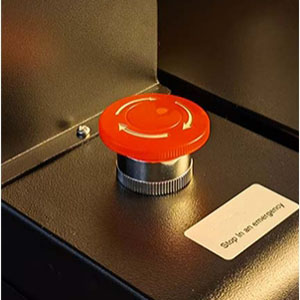
Image: A close-up view of the red emergency stop button.
5. Maintenance
5.1 White Ink Circulation System
The printer is equipped with a white ink mixing and circulation system to prevent clogging and ensure consistent ink distribution, resulting in clearer and more vibrant patterns.
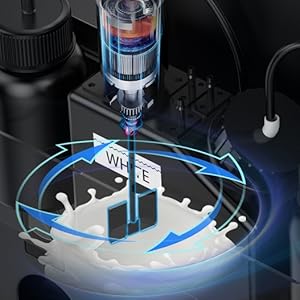
Image: A diagram illustrating the white ink circulation system.
5.2 Automatic Cleaning Function
The printer includes an automatic cleaning function to maintain print head health and prevent ink clogs. Regular use of this feature is recommended to ensure longevity and consistent print quality.
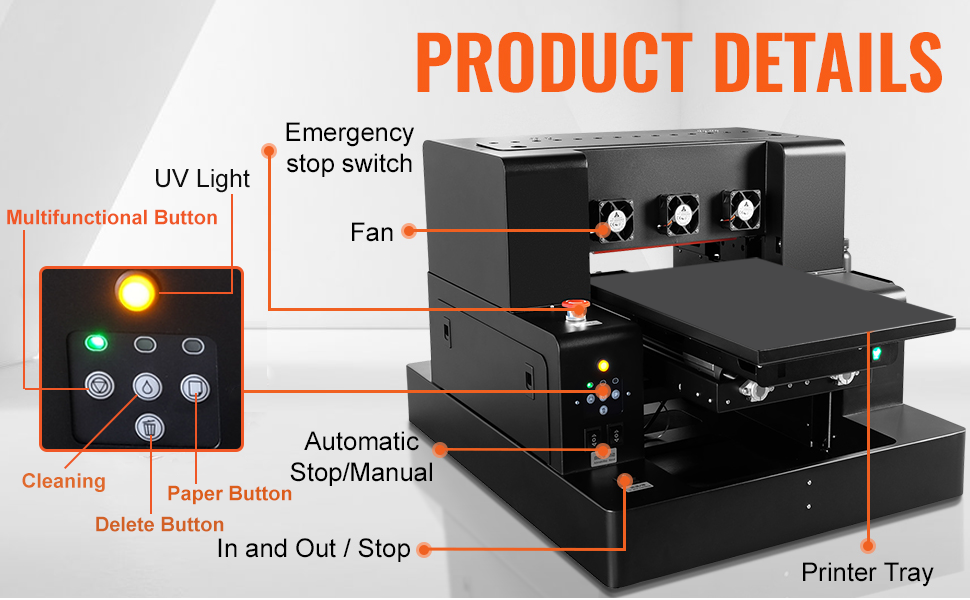
Image: The control panel with the cleaning button highlighted.
5.3 General Cleaning
Periodically wipe down the exterior of the printer with a soft, damp cloth. Ensure no liquids enter the internal components. Clean the print platform and surrounding areas to prevent dust and debris from affecting print quality.
6. Specifications
| Feature | Detail |
|---|---|
| Brand | Sihao |
| Model Name | A4 UV XP600 |
| Printing Technology | Inkjet |
| Printer Output | Color |
| Maximum Print Resolution | 5760 x 1440 dpi |
| Maximum Media Size | 11.7 x 6.7 inches |
| Product Dimensions | 26 x 26 x 20 inches |
| Connectivity Technology | Bluetooth |
| Included Components | Inkjet Cartridges |
7. Troubleshooting
This section addresses common issues you might encounter during the operation of your Sihao A4 XP600 UV Flatbed Printer. For more detailed troubleshooting, please refer to the comprehensive guide on the provided USB drive.
7.1 Common Printing Issues
- Poor Print Quality: Check ink levels, perform a nozzle check and head cleaning cycle. Ensure the print head height is correctly adjusted for the material.
- Printer Not Responding: Verify power connections, USB/Bluetooth connectivity, and ensure the printer is selected in your software. Restart both the printer and computer.
- Ink Clogging: Utilize the automatic cleaning function regularly. If severe, perform a deep cleaning cycle as per the software instructions. Ensure proper storage of ink bottles.
- Material Not Adhering: Ensure the vacuum adsorption platform is active and clean. Verify the material is suitable for UV printing and properly prepared.
8. Warranty and Support
For any issues with software installation, operation, or general inquiries, please do not hesitate to contact our customer support. Our team is ready to assist you.
Please refer to your purchase documentation for specific warranty terms and conditions.


