
1. Important Safety Information
Operating a laser engraver involves potential hazards. Please read and understand all safety instructions before operating the ACMER S2 Laser Engraver.
- Eye Protection: Never look directly at the laser beam. Always wear the provided safety goggles during operation to protect your eyes from laser radiation.
- Ventilation: Ensure adequate ventilation in the work area to dissipate fumes and smoke produced during engraving and cutting.
- Fire Hazard: Some materials can ignite when exposed to a laser. Always supervise the machine during operation and have a fire extinguisher readily available.
- Material Compatibility: Only engrave or cut materials specified as safe for laser processing. Avoid reflective, flammable, or unknown materials.
- Children and Pets: Keep children and pets away from the operating area.
- Emergency Stop: Familiarize yourself with the location and operation of the emergency stop function.
2. Package Contents
Please verify that all components are present in the package. If any items are missing or damaged, contact customer support.
- ACMER S2 Laser Engraver Unit (7000mW Laser Module)
- Power Adapter
- USB Cable
- Safety Goggles
- User Manual (this document)
- Accessory Kit (includes small tools, test materials, etc.)
3. Product Overview
The ACMER S2 Laser Engraver is a versatile tool designed for precise engraving and cutting across a wide range of materials. It features a 7000mW laser output, an ultra-fine 0.08 x 0.08mm laser spot, and a maximum engraving speed of 10000mm/min.

Image 3.1: The ACMER S2 Laser Engraver, showcasing its design and various engraving capabilities on different materials.
Key Features:
- High Precision: Achieves 0.01mm engraving precision with an ultra-fine laser spot.
- Efficient Operation: Engraving speed up to 10000mm/min for faster project completion.
- Large Working Area: A 300x300mm (approximately 11.8 x 11.8 inches) engraving area accommodates various project sizes.
- Material Versatility: Capable of engraving and cutting materials such as wood, acrylic, leather, glass, ceramics, and coated metals.
- Robust Construction: Features POM pulley and dovetail slide for stable and quiet operation (below 45dB).
- Safety Features: Equipped with dual-axis limit switches to prevent movement beyond the working area and an Exact Tick Axis for consistent accuracy.
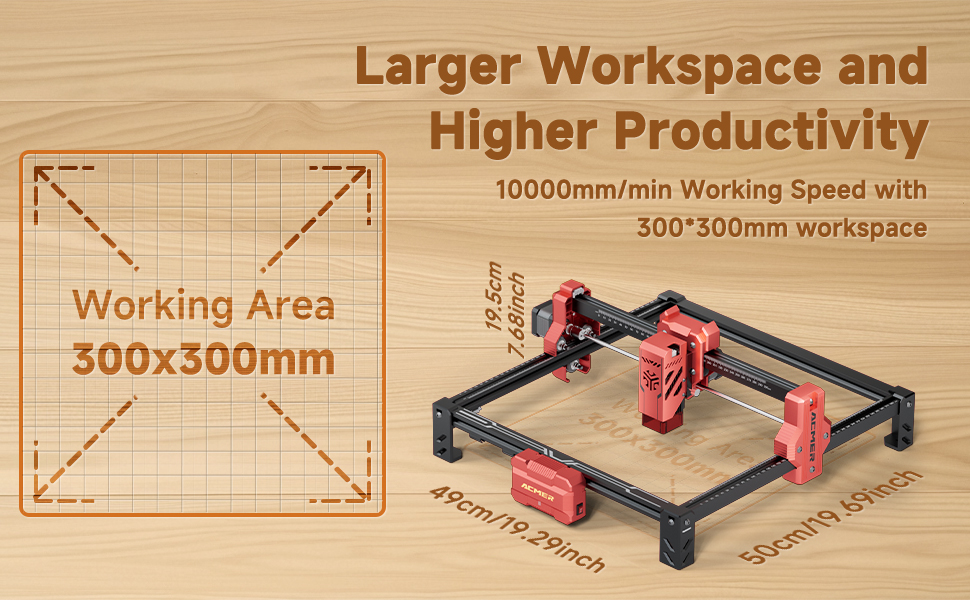
Image 3.2: Illustration of the 300x300mm working area and overall dimensions of the ACMER S2 Laser Engraver.

Image 3.3: Visual comparison demonstrating the high precision and detail achievable with the ACMER S2 7W laser engraver.
4. Assembly and Setup
The ACMER S2 Laser Engraver is designed for straightforward assembly. Follow the detailed instructions provided in the separate assembly guide or video tutorial (if available) to ensure correct setup.
Assembly Steps (General):
- Unpack all components and verify against the package contents list.
- Assemble the frame structure according to the provided diagrams.
- Install the laser module onto the gantry.
- Connect all necessary cables (power, USB, motor cables).
- Ensure all screws are tightened securely.
Initial Setup:
- Place the engraver on a stable, level surface in a well-ventilated area.
- Connect the power adapter to the engraver and then to a power outlet.
- Connect the engraver to your computer using the USB cable.
- Install the required software and drivers on your computer (refer to the software installation guide).
- Perform initial calibration as instructed by the software or assembly guide.
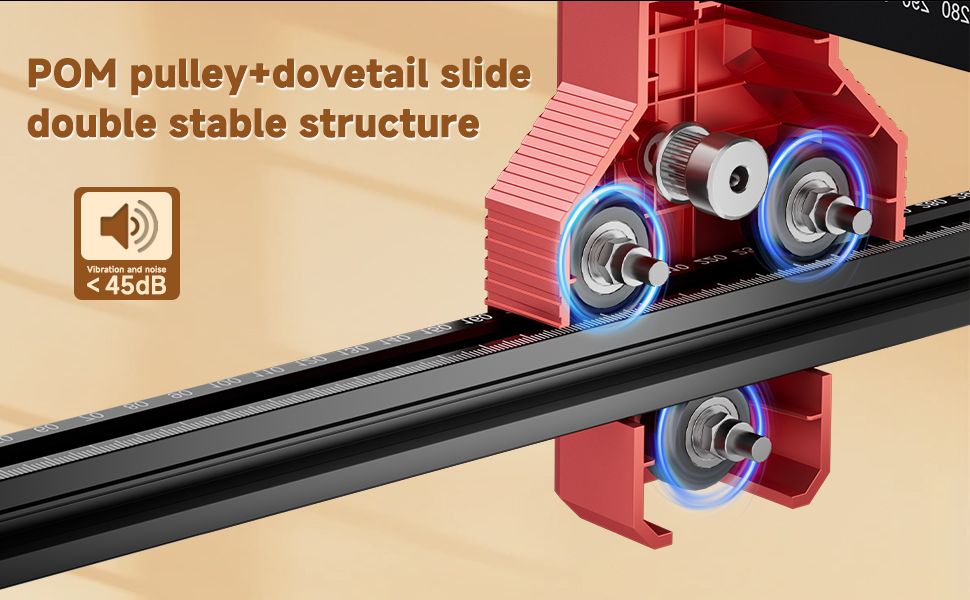
Image 4.1: Detail of the POM pulley and dovetail slide, contributing to stable and quiet operation.

Image 4.2: Illustration of the dual-axis limit switch, ensuring the laser head operates within defined boundaries.
5. Operating Instructions
Once assembled and set up, the ACMER S2 is ready for operation. This section outlines the general steps for engraving and cutting.
Software Usage:
- Launch the engraving software on your computer.
- Import or create your design.
- Adjust parameters such as laser power, speed, and number of passes based on the material and desired effect.
- Preview the engraving path to ensure accuracy.
Engraving and Cutting Process:
- Place the material securely on the engraving bed.
- Adjust the laser focus according to the material thickness (refer to the software or laser module instructions).
- Ensure safety goggles are worn.
- Initiate the engraving or cutting process from the software.
- Monitor the process closely for any issues.
- Once complete, allow the material to cool before handling.

Image 5.1: Examples of cutting penetration on various materials like plywood, acrylic, and wood, showing both single and multiple pass effects.

Image 5.2: Visual comparison highlighting the faster speed and effective results of the ACMER S2 7W engraver compared to other models.
Compatible Materials:
The ACMER S2 can engrave and cut a wide variety of materials, including but not limited to:
- Wood (plywood, MDF, solid wood)
- Acrylic
- Leather
- Paper and Cardboard
- Bamboo
- Certain plastics
- Ceramics (engraving only)
- Coated metals (engraving only)

Image 5.3: A collection of items demonstrating the diverse range of materials and creative possibilities with the ACMER S2 Laser Engraver.
6. Maintenance
Regular maintenance ensures optimal performance and extends the lifespan of your ACMER S2 Laser Engraver.
- Cleaning: Regularly clean the laser lens and the engraving bed to remove dust, debris, and residue. Use a soft, lint-free cloth and appropriate cleaning solutions if necessary.
- Lubrication: Periodically lubricate the guide rails and moving parts as recommended in the detailed maintenance guide (if applicable).
- Cable Inspection: Check all cables for wear, damage, or loose connections.
- Firmware Updates: Keep the engraver's firmware and software updated to the latest versions for improved features and stability.
7. Troubleshooting
This section addresses common issues you might encounter. For more complex problems, please contact customer support.
| Problem | Possible Cause | Solution |
|---|---|---|
| Laser not firing | Loose cable connection, software settings, laser module issue | Check power and USB connections. Verify laser power settings in software. Ensure laser module is correctly installed. |
| Poor engraving quality | Incorrect focus, wrong power/speed settings, dirty lens, material issues | Adjust laser focus. Optimize power and speed settings for the material. Clean the laser lens. Use appropriate materials. |
| Machine not connecting to computer | USB cable issue, driver not installed, software conflict | Try a different USB port or cable. Reinstall drivers. Restart computer and engraver. |
| Machine making unusual noises | Loose components, debris on rails, motor issue | Inspect for loose parts and tighten. Clean guide rails. Contact support if noise persists. |
8. Technical Specifications
| Feature | Specification |
|---|---|
| Brand | ACMER |
| Model | S2 |
| Laser Power | 7000mW (7W) |
| Laser Spot Size | 0.08 x 0.08mm |
| Engraving Precision | 0.01mm |
| Engraving Speed | Up to 10000mm/min |
| Working Area | 300 x 300mm (11.8 x 11.8 inches) |
| Product Dimensions | 19.69 x 19.29 x 7.68 inches (50 x 49 x 19.5 cm) |
| Item Weight | 7.7 pounds (3.5 kg) |
| Material | Metal |
| Power Source | AC/DC |
| Included Components | Engraving Machine, Safety Goggles |
9. Warranty and Customer Support
ACMER is committed to providing high-quality products and excellent customer service. Your ACMER S2 Laser Engraver comes with a standard manufacturer's warranty. Please refer to the warranty card included in your package for specific terms and conditions.
If you encounter any problems during use, require technical assistance, or have questions about your product, please do not hesitate to contact our customer support team. We are dedicated to providing satisfactory solutions.
Contact Information:
- Refer to the contact details provided on your product packaging or the official ACMER website.


