
1. Introduction
Thank you for choosing the Basike FON249 OWS Bluetooth Earphones. These open-ear wireless earphones are designed for comfort and high-quality audio, allowing you to stay aware of your surroundings while enjoying your music or calls. This manual provides detailed instructions for setup, operation, maintenance, and troubleshooting to ensure optimal performance.

Image 1.1: Basike FON249 OWS Bluetooth Earphones and Charging Case. The image displays the black earphones with ear hooks and their matching charging case, open to show the charging contacts.

Image 1.2: A person wearing the Basike FON249 OWS Bluetooth Earphones, illustrating their ergonomic, open-ear design for comfortable, prolonged use.
2. Package Contents
Please check the box for the following items:
- 2x Basike FON249 OWS Earphones (Left and Right)
- 1x Charging Case with Color Screen
- 1x USB-C Charging Cable
- 1x User Manual (this document)
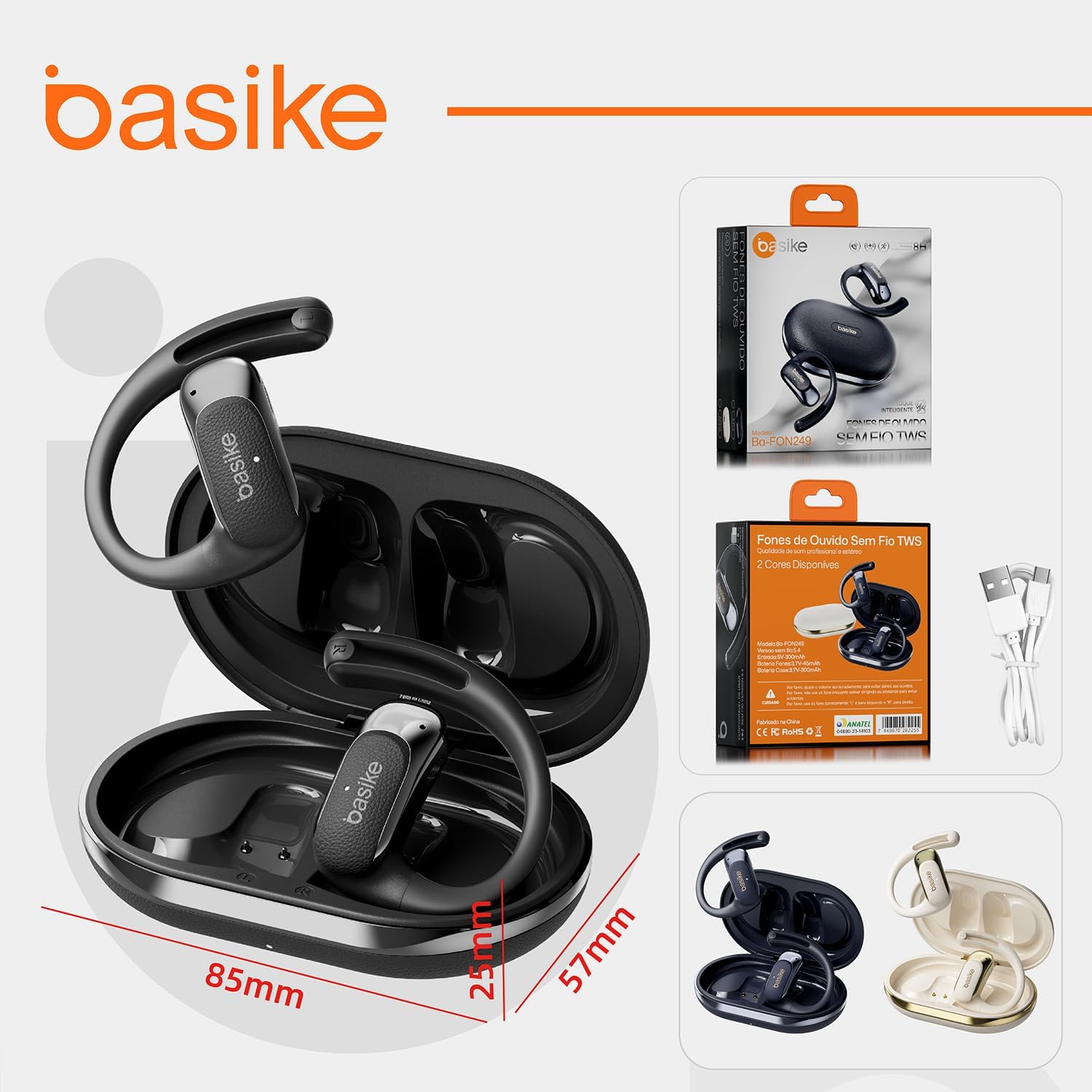
Image 2.1: The Basike FON249 OWS Earphones, charging case, USB-C cable, and packaging, with dimensions indicated.
3. Product Overview
Familiarize yourself with the components of your Basike FON249 earphones and charging case:
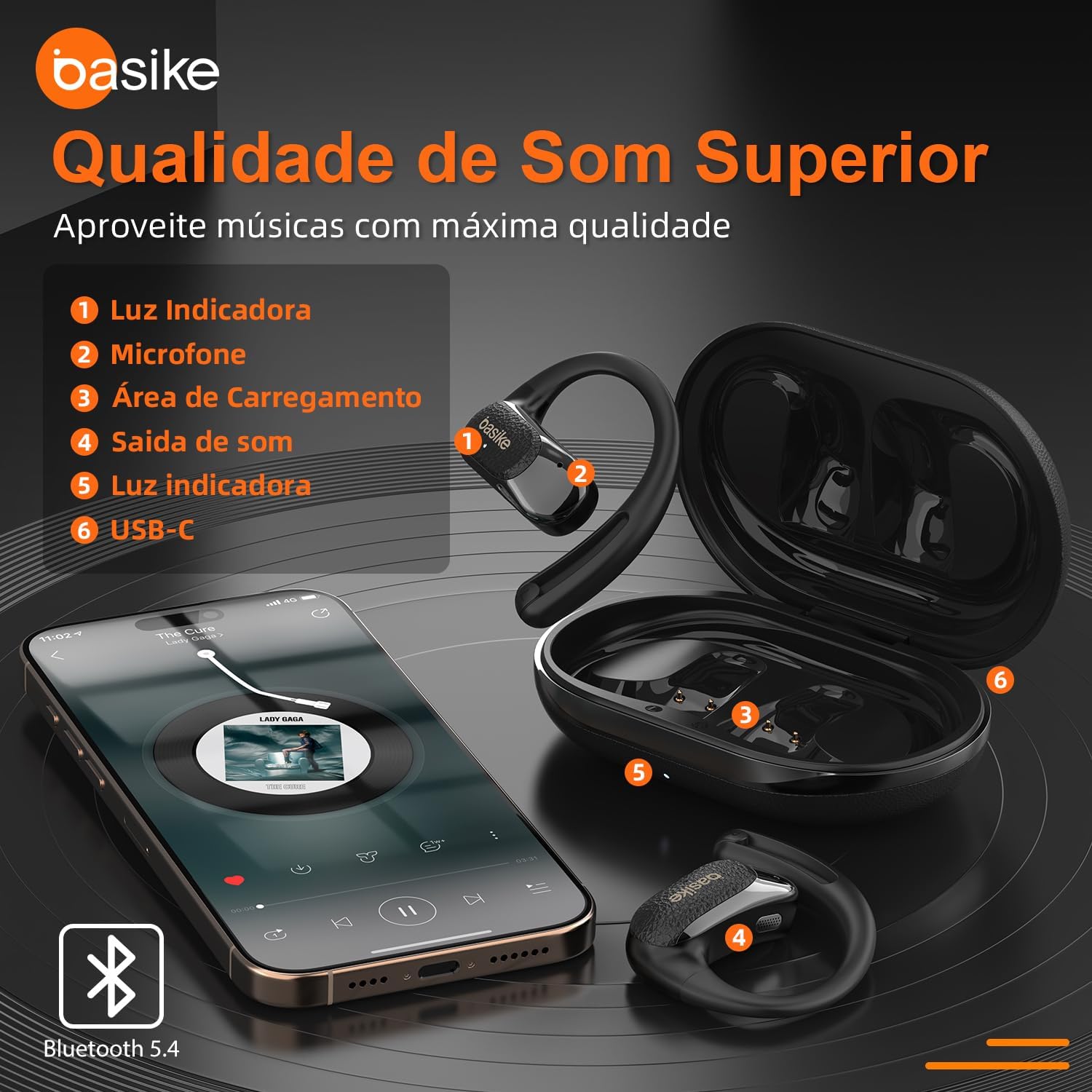
Image 3.1: Diagram highlighting key components of the Basike FON249 OWS Earphones and charging case, including indicator lights, microphone, charging area, sound outlet, and USB-C port.
- Indicator Light: Provides status information (e.g., pairing, charging).
- Microphone: Captures your voice for calls and voice assistant commands.
- Charging Area: Contacts inside the case for earphone charging.
- Sound Outlet: Directs audio towards your ear.
- Indicator Light (Case): Displays charging status or battery level of the case.
- USB-C Port: For charging the earphone case.
4. Setup and Pairing
4.1 Initial Connection
- Open the charging case lid or remove both the left and right earphones from the case.
- The white indicator lights on both earphones will flash slowly. One indicator light will then turn off, and the other will continue to flash, indicating that the left and right earphones have successfully paired with each other automatically.
- On your mobile device, open the Bluetooth settings.
- Search for the Bluetooth device name: "FON249".
- Select "FON249" to connect. The earphone indicator light will turn off once successfully connected.
4.2 Re-pairing / Troubleshooting Connection Issues (e.g., only one earphone has sound)
- Place both the left and right earphones back into the charging case and close the lid.
- On your mobile device, delete or "forget" the previously connected Bluetooth device named "FON249".
- Turn off your phone's Bluetooth switch.
- Ensure your phone screen is off.
- Remove the earphones from the case again and follow the initial connection method (Section 4.1) to re-pair.
5. Operating Instructions
5.1 Touch Controls
The Basike FON249 earphones feature intuitive touch controls:
- 1 Touch: Answer/End Call, Play/Pause Music
- 2 Touches: Next Track (Right earphone), Previous Track (Left earphone)
- 3 Touches: Volume Up (Right earphone), Volume Down (Left earphone)
- 4 Touches: Activate Voice Assistant
5.2 Power Management
- Automatic Shutdown: Earphones will automatically power off after 3 minutes of inactivity or disconnection.
- Low Battery Alert: An alert will sound when the battery level reaches 3.3V.
6. Charging
To charge your Basike FON249 earphones and charging case:
- Connect the provided USB-C cable to the charging port on the case and to a 5V/400mA power source.
- The charging case has a color screen that displays the charging status and battery level.
- A full charge for both the earphones and case takes approximately 1.5 hours.
Battery Life:
- Earphones: Up to 5 hours of continuous use on a single charge (45mAh/3.7V battery).
- Charging Case: Provides an additional 15 hours of battery life (400mAh battery), allowing for multiple earphone recharges.
- Total Autonomy: Up to 24 hours with the charging case.

Image 6.1: Information on USB-C fast charging for the Basike FON249 OWS Earphones, detailing battery capacities and usage times.
7. Maintenance and Care
To ensure the longevity and optimal performance of your Basike FON249 earphones:
- Cleaning: Use a soft, dry cloth to clean the earphones and charging case. Avoid using abrasive materials or harsh chemicals.
- Water Resistance: The earphones are IPX8 water-resistant, making them suitable for use during workouts and in light rain. However, they are not designed for swimming or submersion in water. Ensure the charging port is dry before charging.
- Storage: Store the earphones in their charging case when not in use to protect them and keep them charged.
- Temperature: Operate the earphones within a temperature range of -20°C to 55°C. Avoid extreme temperatures.

Image 7.1: Visual representation of the Basike FON249 OWS Earphones' IPX8 water resistance and shock resistance features.
8. Troubleshooting
If you encounter issues with your earphones, refer to the following common solutions:
- Earphones not pairing with each other or only one earphone has sound: Refer to Section 4.2 for re-pairing instructions.
- Earphones not connecting to device: Ensure Bluetooth is enabled on your device and the earphones are charged. Try forgetting the device on your phone and re-pairing.
- No sound: Check the volume level on both your earphones and your connected device. Ensure the earphones are properly connected.
- Charging issues: Ensure the USB-C cable is securely connected to both the case and the power source. Check if the charging contacts on the earphones and inside the case are clean and free of debris.
- Voice Assistant not responding: Ensure your device's voice assistant is enabled and configured correctly.
If the problem persists, please contact customer support.
9. Specifications
9.1 General Specifications
| Model Name | FON249 |
| Brand | Basike |
| Connectivity Technology | Wireless (Bluetooth 5.4) |
| Wireless Communication Technology | Bluetooth |
| Maximum Operating Distance | 10 Meters |
| Control Method | Touch, Voice |
| Compatible Devices | Mobile Phones, Tablets, Notebooks |
| Material | Metal |
| Color | Black |
| Ear Placement | Open-ear (Circum-aural form factor) |
| Product Weight | 63.8g (earphones), 160g (total package) |
| Package Dimensions | 13.8 x 10.8 x 4.1 cm |
| Operating Temperature | -20°C to 55°C |
9.2 Audio Specifications
| Drivers | 16Ω Dual-layer PU+SWZ |
| Frequency Response | 20Hz-20kHz |
| Microphones | 4 Microphones, -42dB sensitivity (2718mm type) |
| Microphone Range | 20Hz-10kHz |
| SNR (Signal-to-Noise Ratio) | 59dB (for noise reduction) |
| Supported Audio Codecs | AAC/FLAC/APTX/MP3/WMA |
| Noise Control | Active Noise Cancellation |
| Impedance | 15.99 Ohms |

Image 9.1: Illustration of the Basike FON249 OWS Earphones' noise cancellation capabilities and frequency response range.

Image 9.2: Detailed view of the Basike FON249 OWS Earphones' powerful 12mm driver and integrated touch sensor for control.
9.3 Battery and Charging Specifications
| Earphone Battery | 45mAh/3.7V (up to 5 hours use) |
| Charging Case Battery | 400mAh (provides 15 hours extra) |
| Total Battery Autonomy | Up to 24 hours |
| Charging Time | Approx. 1.5 hours (full charge) |
| Charging Input | 5V/400mA (USB-C) |
| Battery Protection | Automatic shutdown at 3.1V, OVP 28-30V |
9.4 Durability Features
| Water Resistance Level | IPX8 |
| Drop Resistance | 1.2m (concrete) |
| ESD Protection | ±8kV (EN61000-4-2) |
| Connector Test Cycles | 3,000 cycles |
| Salinity Test | 24h (5% NaCl) |
| Hinge Test Cycles | 3,000 cycles |
9.5 Certifications
| ANATEL Certification | 04880-23-14103 |
| National Energy Efficiency Label (ENCE) | A+ |
10. Warranty Information
Basike products are manufactured to high-quality standards. For specific warranty terms and conditions, please refer to the warranty card included with your purchase or consult the retailer where the product was purchased. Warranty coverage typically includes defects in materials and workmanship under normal use.
11. Customer Support
If you require further assistance or have questions not covered in this manual, please contact Basike customer support or the retailer from whom you purchased the product. You may find additional resources on the official Basike website.
For more information, visit the Basike Store on Amazon.