
KNKA APH3000
KNKA APH3000 Air Purifier User Manual
Model: APH3000 | Brand: KNKA
This manual provides detailed instructions for the setup, operation, and maintenance of your KNKA APH3000 Air Purifier. Designed for large rooms, this air cleaner features a True HEPA filter, washable pre-filter, AQI display, and Turbo Mode to effectively improve indoor air quality.
1. Product Overview
The KNKA APH3000 Air Purifier is engineered to provide clean and fresh air in large spaces up to 2500 sq. ft. It incorporates an advanced 3-stage filtration system to capture various airborne particles and odors, ensuring a healthier living environment.
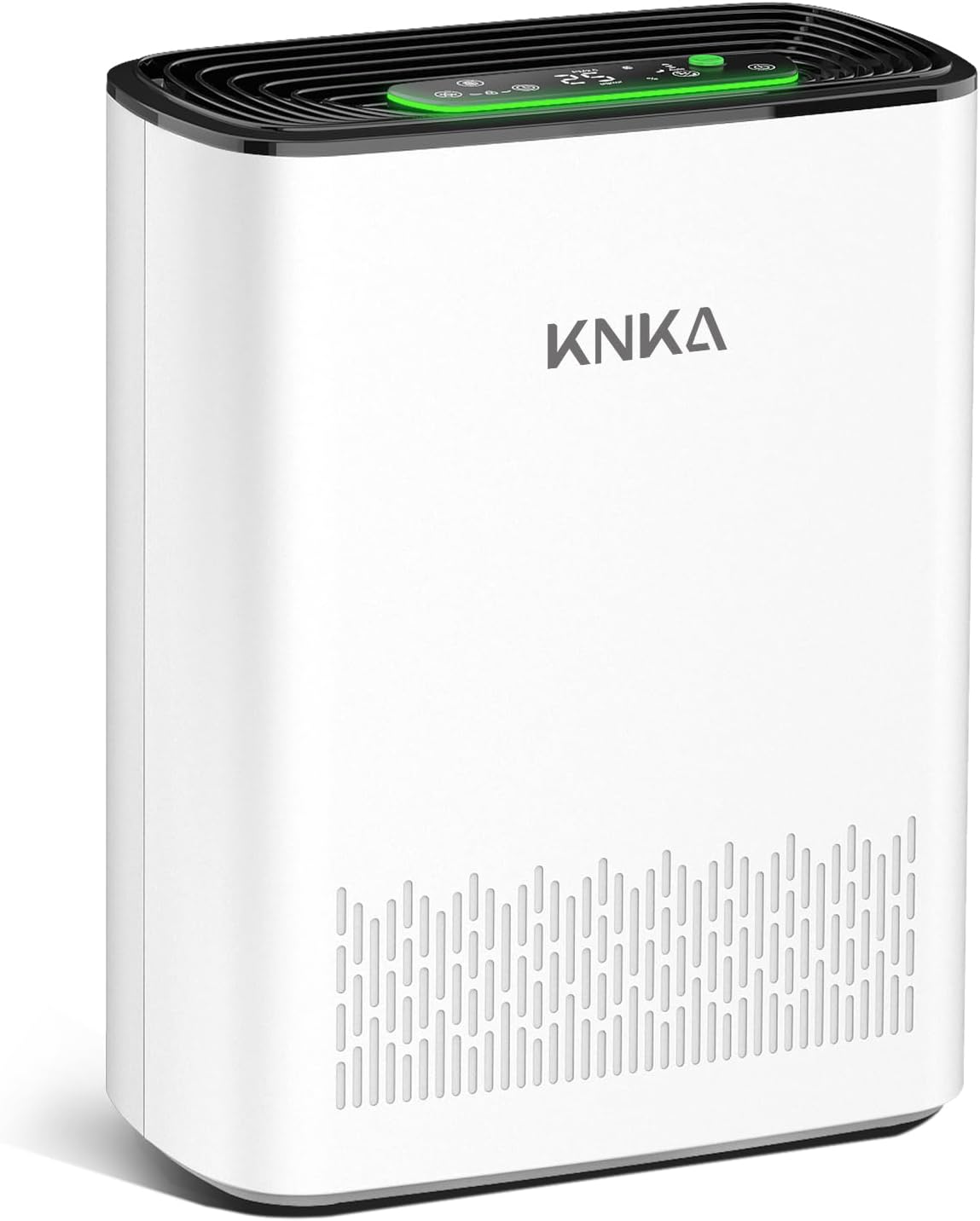
Figure 1: KNKA APH3000 Air Purifier, front view. This image shows the sleek white design of the air purifier with its top control panel and air intake vents.
Key Features:
- Large Coverage Area: Efficiently purifies air in rooms up to 2500 sq. ft.
- 3-Stage Filtration: Includes a washable pre-filter, H13 True HEPA filter, and activated carbon filter.
- AQI Display: Real-time air quality monitoring with color-coded LED indicator.
- Turbo Mode: Provides rapid air purification for quick results.
- Ultra-Quiet Sleep Mode: Operates as low as 24dB with optional night light.
- User-Friendly Controls: Touch operation with child lock, filter alert, and timer functions.
- Aromatherapy Feature: Compartment for essential oils (oils not included).
2. Setup
2.1 Unboxing and Placement
Carefully remove the air purifier from its packaging. Place the unit on a firm, level surface, ensuring there is at least 15 inches (38 cm) of clearance on all sides for optimal airflow. Avoid placing it near heat sources, direct sunlight, or in areas with high humidity.
2.2 Filter Installation
The air purifier comes with filters pre-installed, but they may be wrapped in plastic for shipping. Before first use, remove all packaging from the filters.
- Ensure the air purifier is unplugged from the power outlet.
- Locate the back cover of the unit. Gently pull the cover to remove it.
- Remove the plastic packaging from the pre-installed filters (washable pre-filter, H13 True HEPA filter, and activated carbon filter).
- Insert the filters back into the unit in the correct order: first the activated carbon filter, then the HEPA filter, and finally the washable pre-filter. Ensure they are seated properly.
- Reattach the back cover securely.
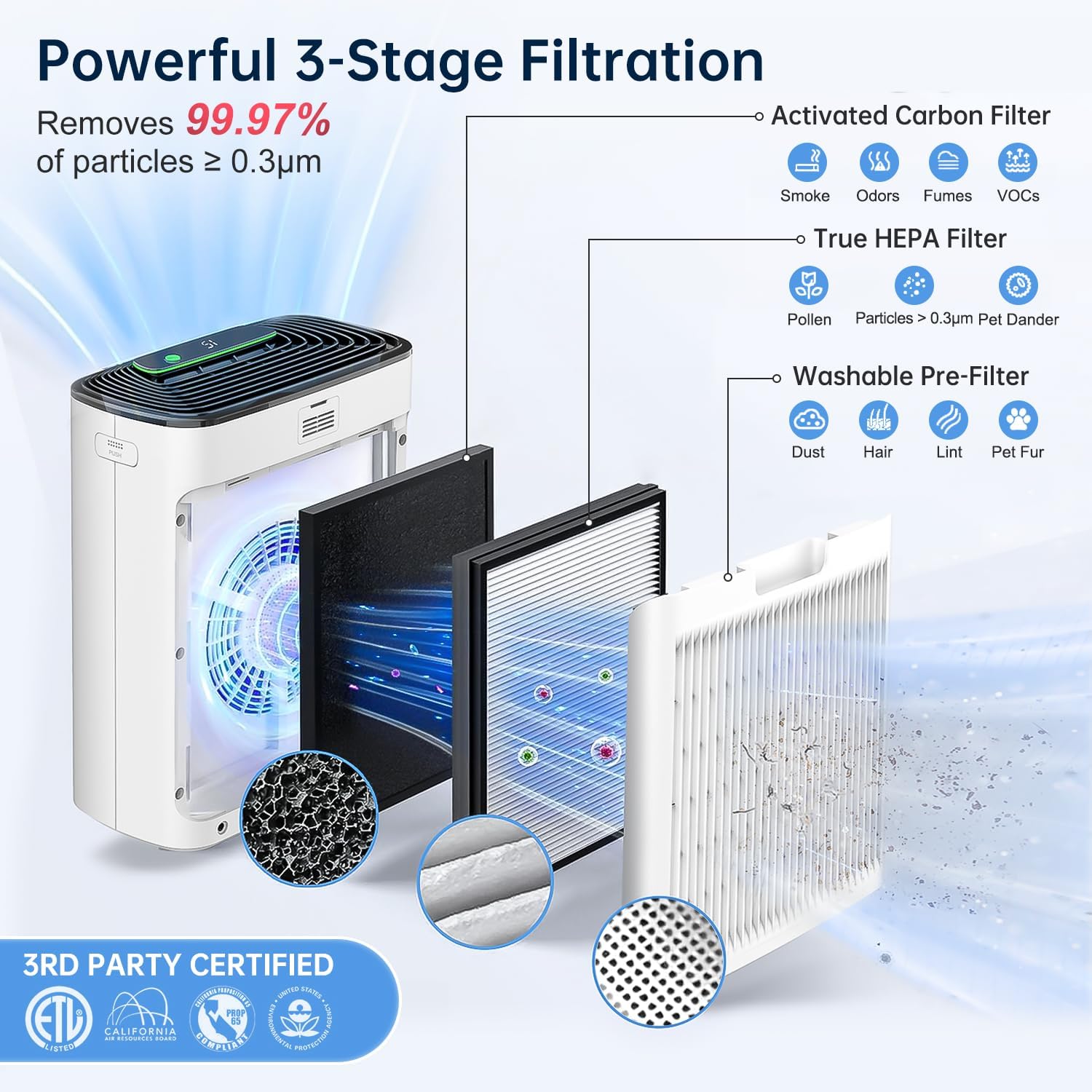
Figure 2: Diagram illustrating the 3-stage filtration system. This shows the Activated Carbon Filter, True HEPA Filter, and Washable Pre-Filter layers inside the air purifier.

Figure 3: Close-up of the washable pre-filter, highlighting its reusable design and ease of cleaning.
2.3 Power Connection
Plug the power cord into a standard electrical outlet. The unit is now ready for operation.
3. Operating Instructions
The control panel is located on the top of the air purifier, featuring touch-sensitive buttons and a digital display.

Figure 4: Detailed view of the air purifier's control panel, showing various touch buttons for different functions and the PM2.5 display.
3.1 Power On/Off
- Press the Power Button (symbol: circle with vertical line) to turn the unit on or off.
3.2 Fan Speed Control & Auto Mode
- Press the Fan Speed Button (symbol: fan blades) repeatedly to cycle through different fan speeds (Low, Medium, High).
- To activate Auto Mode, press the Fan Speed Button until "Auto" is displayed. In Auto Mode, the fan speed adjusts automatically based on the detected air quality.
- Press the Turbo Button (green button with "Turbo" text) for maximum purification speed. This mode is ideal for quickly cleaning the air in a room.
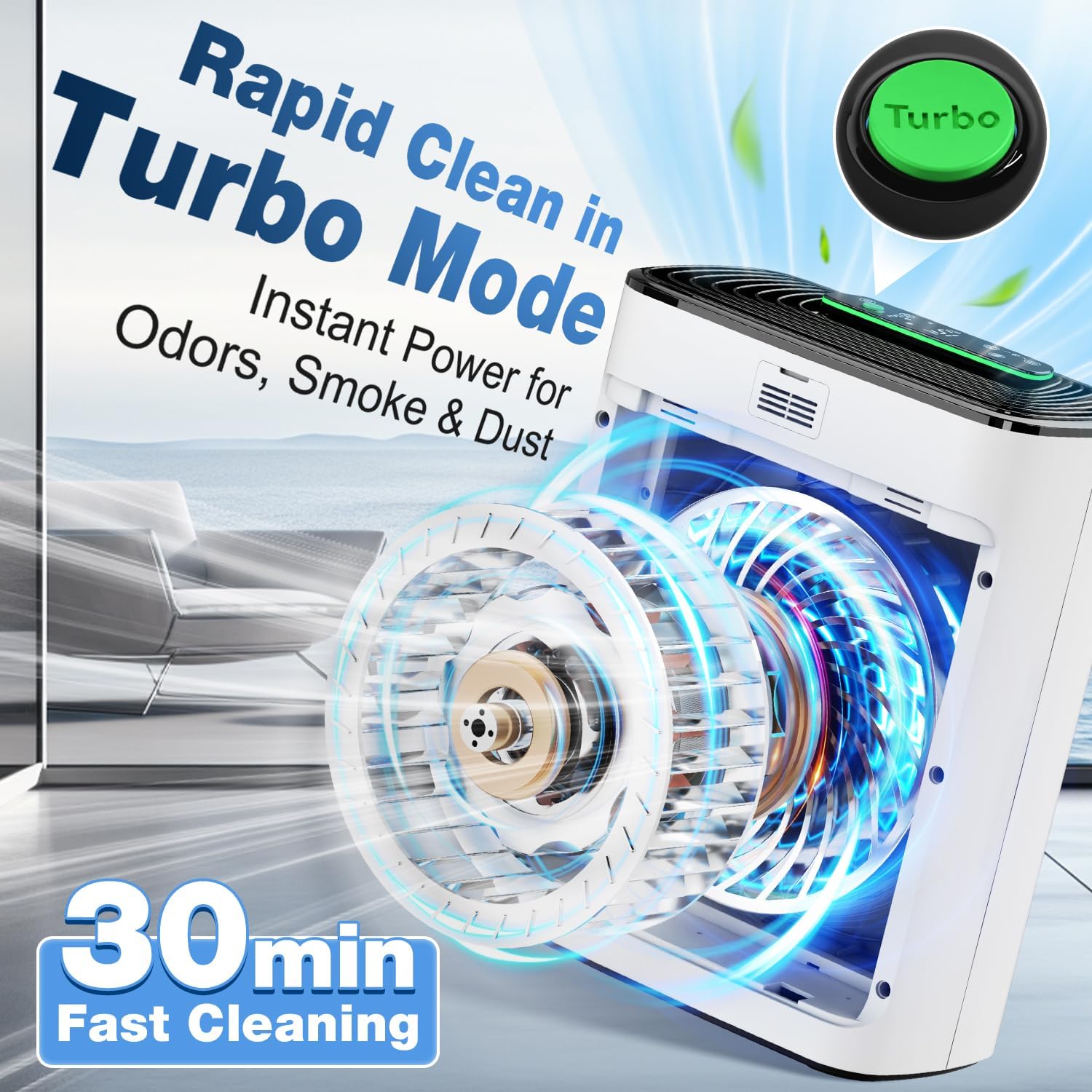
Figure 5: Illustration of the Turbo Mode, showing increased airflow for rapid air purification.
3.3 Real-Time Air Quality Display (AQI)
The built-in air quality sensor monitors the PM2.5 level in your environment and displays it on the LED screen. A color-coded light indicator provides a quick visual reference:
| PM2.5 Level (µg/m³) | Air Quality | Indicator Color |
|---|---|---|
| 0-12 | Excellent | Green |
| 13-35 | Moderate | Blue |
| 16-55 | Poor | Orange |
| 56+ | Unhealthy | Red |

Figure 6: Visual representation of the real-time PM2.5 detection and color-coded air quality indicator.
3.4 Sleep Mode & Night Light
- Press the Sleep Mode Button (symbol: crescent moon) to activate ultra-quiet operation. In this mode, the fan speed is reduced, and the display lights dim or turn off for an undisturbed sleep environment.
- To adjust the night light brightness or turn off the display completely, press the Light Control Button (symbol: sun/lightbulb).

Figure 7: An image depicting the air purifier operating in ultra-quiet sleep mode in a bedroom setting, emphasizing its low noise level (24dB).
3.5 Child Lock
- Press and hold the Child Lock Button (symbol: padlock) for 3 seconds to activate or deactivate the child lock. When activated, the control panel buttons will be unresponsive to prevent accidental changes.
3.6 Timer Function
- Press the Timer Button (symbol: clock) repeatedly to set the desired operating time (1-12 hours). The unit will automatically turn off after the set time.
3.7 Aromatherapy Feature
- Locate the aroma pad compartment on the side of the unit.
- Add a few drops of your preferred essential oil (not included) onto the aroma pad.
- Insert the aroma pad back into the compartment. The air purifier will then diffuse the scent as it operates.
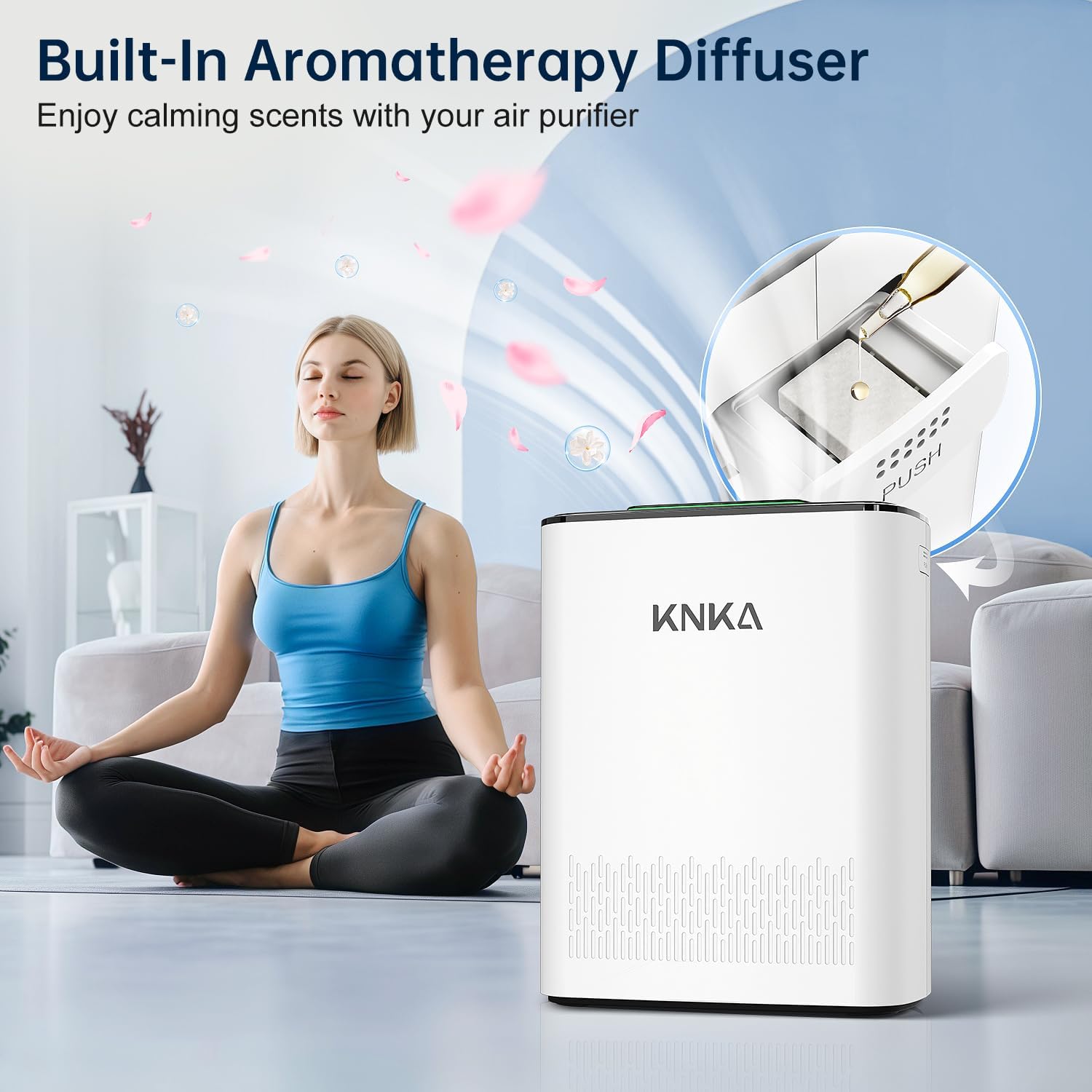
Figure 8: Image showing the built-in aromatherapy diffuser feature, where essential oils can be added to a pad for scent diffusion.
4. Maintenance
Regular maintenance ensures optimal performance and extends the lifespan of your air purifier.
4.1 Filter Replacement Indicator
The unit features a built-in filter indicator (symbol: filter icon) that illuminates when it's time to replace the filter. For best results, replace the filter every 3–6 months, depending on usage and air quality.
- To check filter life: Short press the Filter Alert Button.
- To reset filter life after replacement: Long press the Filter Alert Button for 3 seconds.
4.2 Replacing Filters
When the filter indicator lights up, follow these steps to replace the filter:
- Unplug the air purifier from the power outlet.
- Remove the back cover.
- Remove the old filter assembly.
- Dispose of the old filter responsibly.
- Insert the new filter assembly, ensuring it is properly seated.
- Reattach the back cover.
- Plug in the air purifier and long press the Filter Alert Button for 3 seconds to reset the filter life indicator.
Compatible filter models: B0DDKMTRXK and B0D9PVNF1K (available on Amazon).
4.3 Cleaning the Washable Pre-Filter
The pre-filter is designed to be washable to extend its life and maintain efficiency. Clean it regularly, especially if you notice reduced airflow or increased noise.
- Unplug the air purifier.
- Remove the back cover and carefully take out the washable pre-filter.
- Rinse the pre-filter under running water until clean.
- Allow the pre-filter to air dry completely before reinserting it into the unit. Do not use a dryer or direct heat.
4.4 Cleaning the Air Quality Sensor
For accurate air quality readings, periodically clean the sensor.
- Open the sensor back cover (use a coin or screwdriver if needed).
- Gently wipe the sensor area with a cotton swab or soft cloth. Using cool air from a hair dryer can improve cleaning.
- Reinstall the sensor cover, turn on the device, and check if it's working properly.
5. Troubleshooting
If you encounter any issues with your air purifier, refer to the following common problems and solutions:
| Problem | Possible Cause | Solution |
|---|---|---|
| Unit does not turn on. | Not plugged in; power outage; child lock activated. | Ensure power cord is securely plugged in. Check power supply. Deactivate child lock by pressing and holding the padlock icon for 3 seconds. |
| Reduced airflow or unusual noise. | Clogged filters; obstructed air intake/outlet. | Check and clean the washable pre-filter. Replace the HEPA and activated carbon filters if needed. Ensure no objects are blocking the air vents. |
| Air quality reading seems inaccurate. | Dirty air quality sensor. | Clean the air quality sensor as described in Section 4.4. |
| Filter indicator light remains on after filter replacement. | Filter life not reset. | Long press the Filter Alert Button for 3 seconds to reset the filter life. |
If the problem persists after trying these solutions, please contact KNKA customer support for further assistance.
6. Specifications
| Feature | Detail |
|---|---|
| Brand | KNKA |
| Model Number | APH3000 |
| Product Dimensions | 6.22"D x 11.73"W x 14.92"H |
| Item Weight | 7.9 Pounds |
| Color | White |
| Floor Area Coverage | Up to 2500 Square Feet |
| Filtration System | 3-Stage (Washable Pre-Filter, H13 True HEPA, Activated Carbon) |
| Noise Level (Sleep Mode) | As low as 24dB |
| Certifications | CARB Certified, ENERGY STAR |
7. Warranty and Support
For information regarding product warranty, returns, or technical support, please contact KNKA customer service. You can typically find contact details on the product packaging or on the official KNKA website.
Please retain your purchase receipt as proof of purchase for any warranty claims.
For compatible filter models, refer to Section 4.2 or search for B0DDKMTRXK and B0D9PVNF1K on Amazon.
Related documentsAPH3000

Ask a question about this manual
Ask about setup, troubleshooting, compatibility, parts, safety, or missing instructions. Manuals+ will review the question and use this page’s manual context to help answer it.