
1. Introduction
Thank you for choosing the Keilani Talkease Earbuds Translator. This device is designed to provide seamless communication across language barriers, making international travel, business, and daily interactions more accessible. This manual provides essential information on how to set up, operate, maintain, and troubleshoot your new translator earbuds.

The Keilani Talkease Earbuds Translator, showcasing its sleek design and compact form factor.
2. Package Contents
Please verify that all the following items are included in your package:
- 1 Pair of Keilani Talkease Earbud Translators
- 1 Charging Compartment (Charging Case)
- 1 Charging Cable
- 1 User Manual

The Keilani Talkease earbuds nestled within their charging case, with measurements indicating the compact size of the case (approximately 11 cm x 4.5 cm).
3. Product Overview
3.1 Key Features
- 144 Language Support: Facilitates real-time translation for a wide range of global languages.
- Fast & Stable Wireless Connection: Ensures smooth and reliable communication within a 33-foot (10-meter) range.
- Extended Battery Life: Designed for prolonged use with efficient power management.
- Portable Design: Lightweight and compact, easily fits into a pocket for on-the-go use.
- Hi-Fi Audio & Noise Reduction: Delivers clear sound quality and minimizes environmental interference for better comprehension.
- Comfortable Fit: Designed to sit comfortably without being fully in-ear, reducing discomfort during long periods of use.
3.2 Components
The Keilani Talkease Earbuds Translator consists of two earbuds and a portable charging case. The earbuds feature an ergonomic design for comfortable wear.

A detailed diagram showcasing the design of the earbud, highlighting its non-in-ear placement for comfort during long periods of use.
4. Setup
4.1 Charging the Earbuds and Case
Before first use, fully charge the earbuds and the charging case.
- Place the earbuds into the charging case, ensuring they are correctly seated.
- Connect the charging cable to the charging case and a compatible USB power source (e.g., wall adapter, computer USB port).
- The indicator lights on the charging case will show the charging status. Once fully charged, the lights will indicate completion or turn off.
- A full charge provides approximately 7 hours of earbud use, with the charging case offering multiple recharges.

An illustration detailing the battery specifications: 80mAh for each earbud and 400mAh for the charging case, offering approximately 7 hours of usage time for the earbuds.
4.2 Pairing with Your Device
To use the translation features, the earbuds must be paired with your smartphone via Bluetooth and connected to the companion application.
- Ensure the earbuds are charged and removed from the charging case. They will automatically enter pairing mode.
- On your smartphone, go to Bluetooth settings and enable Bluetooth.
- Search for available devices and select "Keilani Talkease" (or similar name) from the list to pair.
- Once paired, download and install the dedicated Keilani Talkease translation application from your device's app store.
- Open the application and follow the on-screen instructions to connect the earbuds within the app.
5. Operating Instructions
5.1 Wearing the Earbuds
The Keilani Talkease earbuds are designed for a comfortable, non-in-ear fit, allowing for extended use without discomfort.
- Gently place each earbud over your ear, ensuring the speaker portion is positioned near your ear canal for optimal sound.
- Adjust the earbud for a secure and comfortable fit. The design allows for awareness of your surroundings while using the translation function.

A user demonstrating the correct placement of the Keilani Talkease earbud translator in the ear.
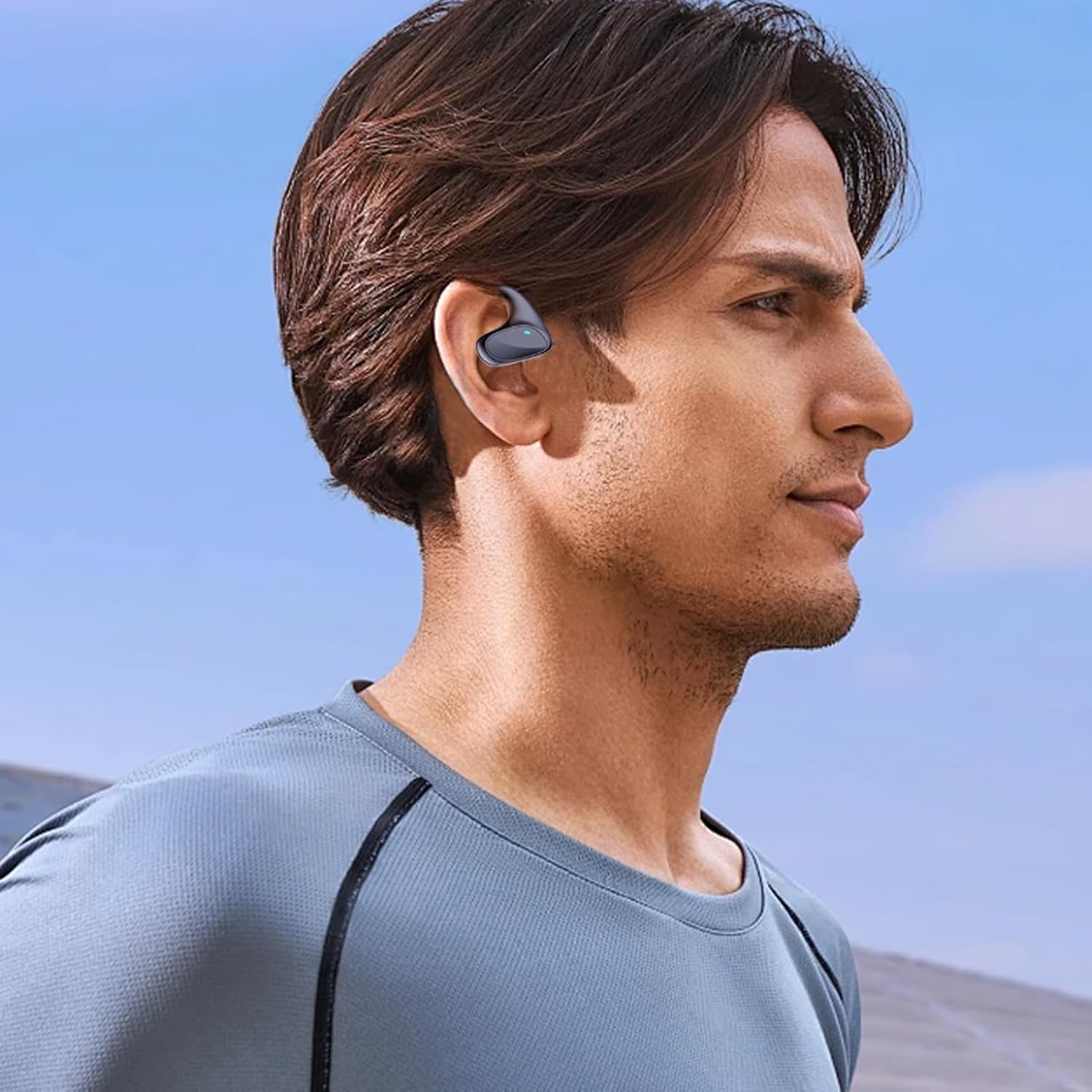
Another view of a user wearing the Keilani Talkease earbud translator, highlighting its ergonomic fit.
5.2 Using the Translation Function
The Keilani Talkease application offers several translation modes to suit different communication scenarios:

A visual representation of the companion application's interface, displaying options for connecting the earbuds and selecting various translation modes.
- Touch Mode: Ideal for two-person conversations. Each participant wears an earbud. Tap or double-tap the earbud to initiate real-time translation. This mode is suitable for acquaintances who are comfortable sharing an earbud.
- Speaker Mode: Designed for interactions with strangers or groups. One person wears an earbud, and the other person speaks into the mobile phone. The translation is played through the phone's speaker or the earbud, depending on settings.
- Free Talk Mode: For continuous, hands-free translation for a single user. Wear an earbud, and the app will continuously translate spoken language in real-time, allowing for fluid communication without manual input.
- Offline Mode: Allows translation without an internet connection for supported languages. This mode is particularly useful for travel in areas with limited connectivity. Supported languages typically include Chinese, English, Japanese, Korean, Russian, German, and French.
5.3 Touch Controls
The earbuds feature touch-sensitive areas for controlling various functions. Specific touch gestures and their corresponding actions (e.g., play/pause, answer call, activate translation) are configured within the Keilani Talkease application. Please refer to the app's settings for detailed customization and usage of touch controls.
6. Maintenance
6.1 Cleaning
- Wipe the earbuds and charging case with a soft, dry, lint-free cloth.
- Do not use abrasive cleaners, alcohol, or chemical solvents.
- Avoid getting moisture in any openings.
6.2 Storage
- Store the earbuds in their charging case when not in use to protect them and keep them charged.
- Keep the device in a cool, dry place, away from extreme temperatures and direct sunlight.
7. Troubleshooting
- Issue: Earbuds do not power on or charge.
- Solution: Ensure the charging cable is securely connected to both the case and the power source. Verify the power source is active. Clean the charging contacts on both the earbuds and the case. Allow sufficient time for charging.
- Issue: Cannot pair earbuds with smartphone.
- Solution: Make sure Bluetooth is enabled on your smartphone. Ensure the earbuds are out of the charging case and in pairing mode. Turn off and on your phone's Bluetooth. Forget the device in your phone's Bluetooth settings and try pairing again. Ensure earbuds are sufficiently charged.
- Issue: Translation is inaccurate or not working.
- Solution: Check your internet connection (unless in Offline Mode). Ensure the correct source and target languages are selected in the app. Speak clearly and at a moderate pace. Update the Keilani Talkease app to the latest version. Ensure the earbuds are properly connected to the app.
- Issue: Poor audio quality or noise interference.
- Solution: Ensure the earbuds are correctly positioned on your ears. Move away from sources of strong electromagnetic interference. Check the volume settings on both your phone and within the app. Clean the earbud speakers if necessary.
8. Specifications
| Feature | Detail |
|---|---|
| Model Number | TRA0WO7I01D3S172WD9 |
| Brand | Generic |
| Color | Black |
| Ear Placement | On-ear (non-in-ear design) |
| Wireless Technology | Bluetooth |
| Bluetooth Range | Up to 10 meters (33 feet) |
| Supported Languages | 144 (via companion app) |
| Frequency | 2.4 GHz |
| Voltage | 5 V/1 A |
| Earbud Battery Capacity | 80 mAh (each) |
| Charging Case Battery Capacity | 400 mAh |
| Product Dimensions (Case) | Approx. 11 cm x 4.5 cm (4.33 in x 1.77 in) |
| Key Features | Noise Reduction, Hi-Fi Sound |
9. Warranty and Support
This product comes with a standard manufacturer's warranty. For specific warranty details, please refer to the documentation provided at the time of purchase or contact your retailer. For technical support, troubleshooting assistance beyond this manual, or inquiries about replacement parts, please contact the customer service provided by your point of purchase.