1. Introduction
This manual provides essential information for the safe and efficient use of your Garvee Vanity Desk with LED Lights and Storage. Please read these instructions thoroughly before assembly and operation, and retain them for future reference.

Image 1: Garvee Vanity Desk with LED lights, mirror, multiple storage drawers and cabinets, and an included stool.
2. Safety Information
Please observe the following safety precautions to prevent injury or damage to the product:
- Read Instructions: Always read and follow the assembly instructions carefully before beginning.
- Stable Surface: Ensure the vanity is positioned on a flat, stable surface to prevent wobbling or tipping.
- Electrical Safety: Keep electrical components (charging station) away from water. Do not overload the charging station.
- Children and Pets: Keep small parts and packaging materials away from children and pets during assembly.
- Weight Limit: Do not place excessively heavy items on the desk surface or in drawers/cabinets.
3. Package Contents
Verify that all components are present before starting assembly. If any parts are missing or damaged, please contact customer support.
- 1 x Vanity Desk (main components)
- 1 x Cushioned Stool
- 1 x Accessory Kit (hardware, tools)
- 1 x Instruction Manual (this document)
4. Setup and Assembly
Assembly is required for this product. Please follow the detailed step-by-step instructions provided in the included accessory kit's manual. It is recommended to have two people for assembly.
- Unpack: Carefully unpack all components and lay them out on a clean, soft surface to prevent scratches.
- Identify Parts: Refer to the parts list in the separate assembly manual to identify each component.
- Follow Steps: Assemble the vanity desk and stool according to the numbered steps in the assembly manual. Pay close attention to diagrams.
- Secure Connections: Ensure all screws and fasteners are tightened securely, but do not overtighten.
- Placement: Once assembled, place the vanity desk on a flat, stable surface away from direct sunlight or excessive moisture.
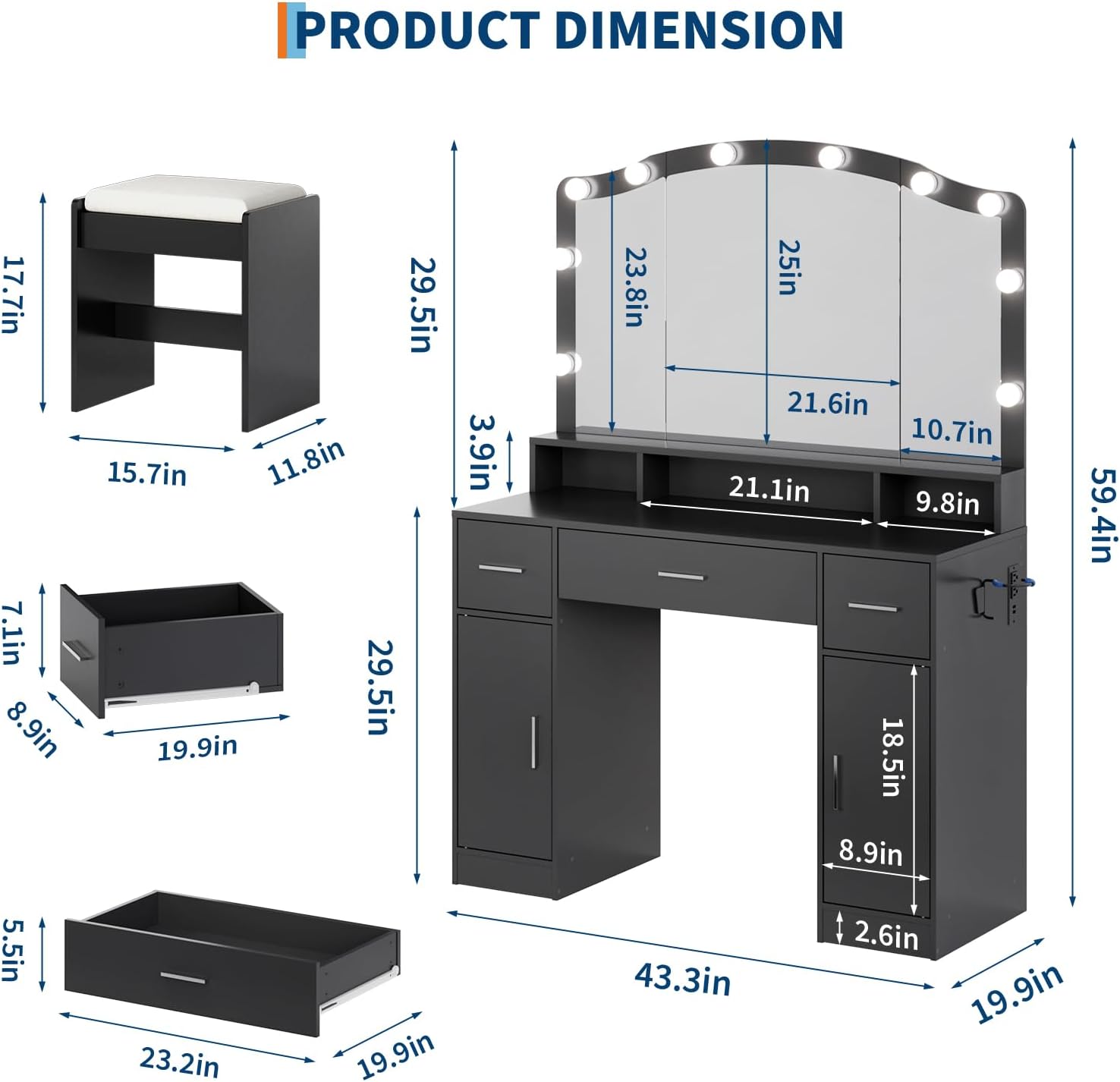
Image 2: Product dimensions for the Garvee Vanity Desk, including the mirror, desk, drawers, and stool.
5. Operating Instructions
5.1 LED Mirror Lights
The vanity mirror features 10 adjustable LED lights with three color modes to suit your lighting needs.
- Power On/Off: Locate the touch sensor on the mirror surface to turn the lights on or off.
- Adjust Color Mode: Tap the touch sensor repeatedly to cycle through the three available color modes (e.g., cool white, warm white, natural daylight).
- Adjust Brightness: Press and hold the touch sensor to adjust the brightness level of the lights. Release when the desired brightness is achieved.

Image 3: Close-up view of the vanity mirror with LED lights, demonstrating the touch screen design for light control.
5.2 Charging Station
The built-in charging station provides convenient power for your electronic devices.
- AC Outlets: Two standard AC outlets are available for powering hair dryers, curling irons, or other small appliances.
- USB Ports: Two USB ports are provided for charging smartphones, tablets, and other USB-powered devices.
- Usage: Plug the vanity desk's main power cord into a wall outlet. Then, connect your devices to the appropriate ports on the charging station.
- Caution: Do not exceed the maximum power rating of the charging station. Avoid using in wet environments.

Image 4: Detailed view of the integrated safety built-in power strip, featuring two AC outlets and two USB ports for charging devices.
5.3 Storage Features
The vanity desk offers ample storage to keep your beauty essentials organized.
- Drawers: Utilize the three spacious drawers for smaller items like makeup, brushes, and accessories.
- Cabinets: The two cabinets provide larger storage space for bottles, hair products, or other bulkier items. Adjustable shelves may be present for customization.
- Hair Dryer Shelf: A dedicated hair dryer shelf is included, which can be positioned freely on the right side for convenient access.

Image 5: Close-up of the hair dryer shelf, designed for flexible positioning on the right side of the vanity.
6. Maintenance
Proper care will ensure the longevity and appearance of your vanity desk.
- Cleaning Surfaces: To clean the desk surface, use a soft, damp cloth. Avoid harsh chemicals, abrasive cleaners, or polishes that may damage the finish.
- Mirror Cleaning: Use a glass cleaner specifically designed for mirrors and a soft, lint-free cloth. Spray cleaner onto the cloth, not directly onto the mirror, to prevent liquid from seeping into the edges.
- Dusting: Regularly dust all surfaces with a dry, soft cloth.
- Spills: Wipe up spills immediately to prevent staining or damage to the wood material.
- Electrical Components: Ensure the charging station and LED lights are unplugged before cleaning. Do not immerse electrical parts in water.
7. Troubleshooting
If you encounter any issues with your Garvee Vanity Desk, refer to the following common solutions:
- Lights Not Working:
- Ensure the vanity is properly plugged into a working power outlet.
- Check if the touch sensor is clean and unobstructed.
- Verify that the power cord is securely connected to the vanity.
- Charging Station Not Functioning:
- Confirm the vanity's main power cord is plugged in.
- Test the outlet with another device to ensure it has power.
- Ensure your device's charging cable is functional.
- Avoid overloading the charging station with too many high-power devices simultaneously.
- Desk Wobbles:
- Ensure the vanity is placed on a completely flat and level surface.
- Check all assembly screws and tighten any that are loose.
If problems persist, please contact Garvee customer support for assistance.
8. Specifications
| Feature | Detail |
|---|---|
| Model Number | SZT-YY-BcWD62 |
| Product Dimensions (L x W x H) | 43.31 x 15.75 x 59.45 inches |
| Item Weight | 108.8 pounds |
| Material | Wood |
| Color | Black |
| LED Lights | 10 adjustable LED lights, 3 color modes |
| Storage | 3 Drawers, 2 Cabinets (with adjustable shelves), Long storage shelf, Hair dryer shelf |
| Charging Station | 2 AC Outlets, 2 USB Ports |
| Assembly Required | Yes |
| Included Accessories | Cushioned Stool, Accessory Kit |

Image 6: Overview of the Garvee Vanity Desk, highlighting key features such as 10 LED lights, wide desktop, 5 storage drawers, ample storage space, charging station, metal handles, smooth guide, and vanity stool.
9. Warranty and Support
For warranty information, please refer to the documentation included with your purchase or contact the retailer. For product support, missing parts, or troubleshooting assistance not covered in this manual, please contact Garvee customer service:
Garvee Customer Service: Visit the Garvee Store on Amazon
Please have your model number (SZT-YY-BcWD62) and purchase date available when contacting support.


