1. Introduction
This manual provides detailed instructions for the installation, operation, and maintenance of your ASUS ROG Thor 1200W Platinum III Power Supply Unit. The ROG Thor 1200W Platinum III PSU is an 80 PLUS Platinum certified, ATX 3.1 compliant power supply featuring GaN MOSFET technology, a GPU-First intelligent voltage stabilizer, a magnetic OLED display, and Turbo Mode for enhanced performance. Please read this manual thoroughly before using the product to ensure proper setup and functionality.

Image 1.1: ASUS ROG Thor 1200W Platinum III Power Supply Unit and its retail box.
2. Setup and Installation
Follow these steps to properly install your power supply unit into your computer system.
2.1 Unpacking
Carefully remove the PSU and all accessories from the packaging. Verify that all components listed in the packing list are present.
2.2 Mounting the PSU
- Ensure your computer case is compatible with ATX power supplies.
- Position the PSU in the designated power supply bay of your computer case.
- Secure the PSU to the case using the provided screws. Ensure the fan orientation is correct for optimal airflow (either fan-up or fan-down, depending on your case design and cooling strategy).
2.3 Connecting Modular Cables
The ROG Thor 1200W Platinum III PSU features a fully modular design. Connect only the cables required for your system components. The etched modular cables are designed for easy management and safety.
- 24-pin ATX Cable: Connect to the motherboard's main power connector.
- 8-pin (4+4) CPU Cables: Connect to the CPU power connectors on the motherboard. Modern motherboards may require one or two 8-pin connectors.
- PCIe 5.0 16-pin (12+4) Cable: Connect directly to compatible PCIe Gen 5.0 graphics cards. For older graphics cards, use the appropriate 8-pin (6+2) PCIe cables.
- SATA Power Cables: Connect to SATA devices such as SSDs, HDDs, and optical drives.
- Molex (Peripheral) Cables: Connect to older peripherals or case fans if needed.
Ensure all connections are firm and properly seated to prevent power delivery issues.

Image 2.1: Native 16-pin PCIe power cable for ATX 3.1 and PCIe Gen 5.1 graphics cards.
3. Operating Instructions
3.1 Initial Power On
After all components are connected, ensure the power switch on the back of the PSU is in the OFF position. Connect the AC power cord to the PSU and a wall outlet. Flip the power switch to the ON position. Your system should now be ready to power on via the case's power button.
3.2 Magnetic OLED Display
The integrated magnetic OLED display provides real-time power draw information. This display can be physically swapped to either side of the unit, allowing for optimal viewing regardless of whether the PSU is installed fan-up or fan-down in your chassis.

Image 3.1: The magnetic OLED display showing real-time power consumption.
3.3 Turbo Mode
The ROG Thor 1200W Platinum III features a Turbo Mode, which, through premium components and a fine-tuned fan curve, supports extended power excursions. This mode is designed to provide stable power delivery even during peak load demands, ensuring unwavering performance for your system.
4. Key Features
The ASUS ROG Thor 1200W Platinum III PSU incorporates several advanced technologies for superior performance and reliability.

Image 4.1: Summary of key features of the ROG Thor 1200W Platinum III PSU.
4.1 GaN MOSFET Technology
The PSU utilizes Gallium Nitride (GaN) MOSFETs, which provide up to 30% more power efficiency compared to standard MOSFETs. This technology also allows for a more organized internal layout, contributing to cooler and more stable operation.

Image 4.2: Illustration of GaN MOSFET technology for improved power efficiency.
4.2 GPU-First Intelligent Voltage Stabilizer
This patented technology enhances voltage delivery to your graphics card by up to 45%. By prioritizing GPU voltage sensing, it ensures smoother gaming experiences and unwavering performance, especially under heavy loads.

Image 4.3: Comparison of GPU voltage stability during heavy load with and without GPU-First sensing.
4.3 Advanced Cooling System
The PSU features ROG heatsinks and a fully aluminum enclosure, which work together to provide superior cooling performance. This design helps maintain optimal system thermals. Additionally, the dual-ball-fan bearings are engineered to last up to twice as long as traditional sleeve bearing designs, ensuring long-term reliability.
4.4 ATX 3.1 and PCIe Gen 5.1 Compatibility
The ROG Thor Platinum III is fully compliant with the ATX 3.1 standard, offering enhanced voltage and current regulation for the latest hardware. It includes a native 16-pin PCIe power cable, making it ready for PCIe Gen 5.1 graphics cards.
4.5 80 PLUS Platinum Certification
This power supply is 80 PLUS Platinum certified, indicating high power efficiency. It achieves this through the use of low-ESR capacitors and other premium components, minimizing energy waste and heat generation.
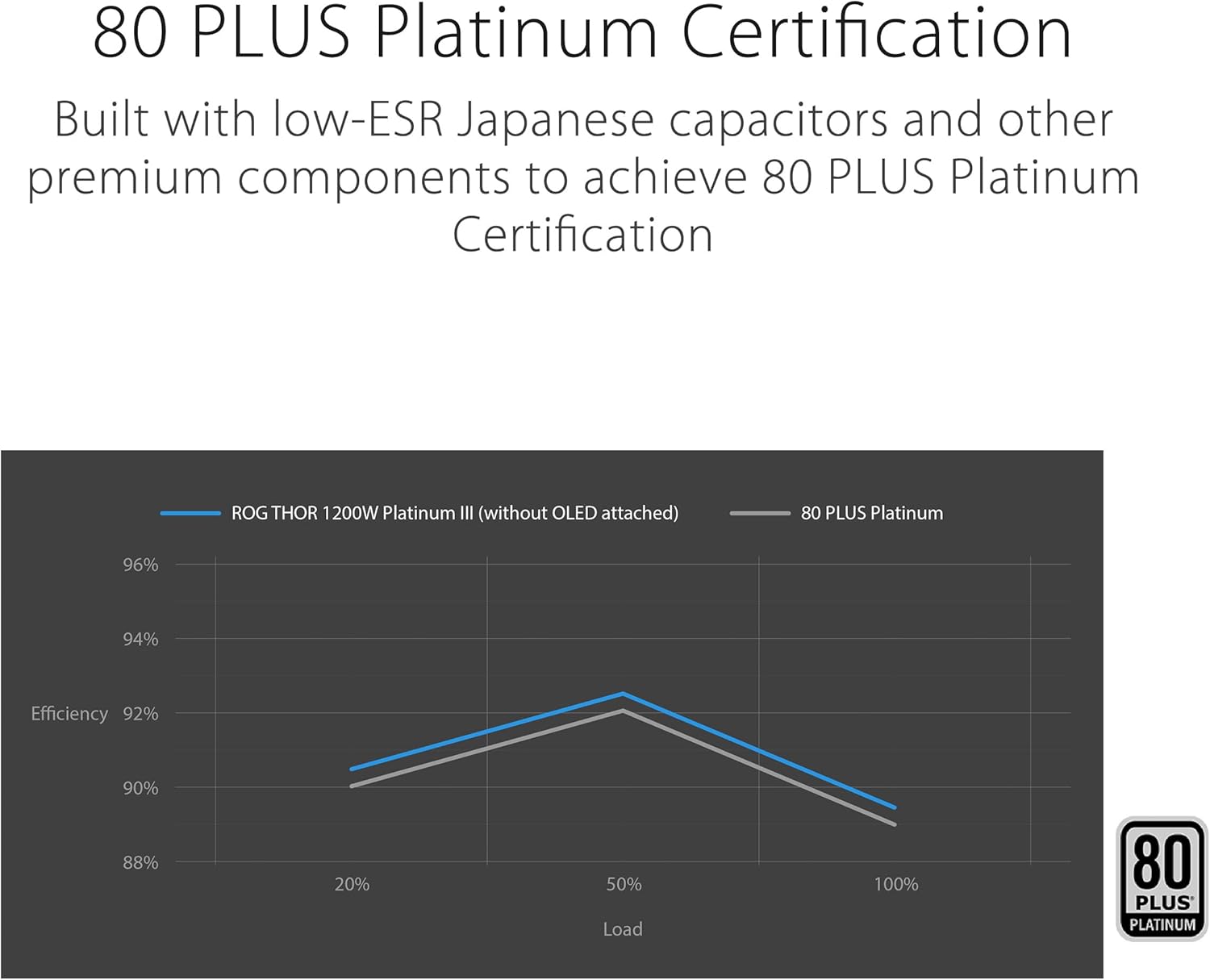
Image 4.4: Power efficiency curve demonstrating 80 PLUS Platinum certification.
5. Specifications
Below are the detailed specifications for the ASUS ROG Thor 1200W Platinum III PSU.
| Feature | Specification |
|---|---|
| Brand | ASUS |
| Series | ROG-THOR-1200P3-GAMING |
| Model Number | ROG-THOR-1200P3-GAMING |
| Item Weight | 5.3 pounds |
| Product Dimensions (LxWxH) | 7.5 x 5.9 x 3.3 inches |
| Color | BLACK |
| Compatible Devices | Personal Computer |
| Connector Type | ATX |
| Output Wattage | 1200 Watts |
| Cooling Method | Air |
| Efficiency Certification | 80 PLUS Platinum |
| ATX Standard | ATX 3.1 |
6. Maintenance
Regular maintenance helps ensure the longevity and optimal performance of your PSU.
6.1 Dust Cleaning
Periodically clean dust from the PSU's fan and vents. Accumulation of dust can impede airflow and reduce cooling efficiency. Use compressed air to gently remove dust. Always ensure the PSU is powered off and unplugged from the wall outlet before cleaning.
6.2 Cable Management Check
Occasionally inspect cable connections to ensure they remain securely seated. Loose connections can lead to system instability or component damage.
7. Troubleshooting
If you encounter issues with your PSU, refer to the following common troubleshooting steps.
7.1 No Power to System
- Verify the AC power cord is securely connected to both the PSU and the wall outlet.
- Ensure the power switch on the back of the PSU is in the ON position.
- Check all modular cable connections, especially the 24-pin ATX and 8-pin CPU power cables, to ensure they are fully seated.
- Test the wall outlet with another device to confirm it is supplying power.
7.2 System Instability or Random Shutdowns
- Ensure your PSU wattage is sufficient for all installed components, especially the graphics card.
- Check for proper ventilation around the PSU and inside the computer case to prevent overheating.
- Verify all power cables to components (motherboard, GPU, drives) are securely connected.
7.3 OLED Display Not Functioning
- Ensure the PSU is receiving power and the system is turned on.
- If the display is magnetic and removable, ensure it is properly attached to the PSU.
- If the issue persists, contact ASUS customer support.
8. Warranty and Support
8.1 Warranty Information
The ASUS ROG Thor 1200W Platinum III PSU is backed by a 10-year warranty, demonstrating ASUS's commitment to quality and reliability. Please retain your proof of purchase for warranty claims.

Image 8.1: The 10-year warranty badge for the ROG Thor PSU.
8.2 Customer Support
For further assistance, technical support, or warranty inquiries, please visit the official ASUS support website or contact your regional ASUS customer service center. You can find contact information and resources at www.asus.com/support/.


