
1. Introduction
Thank you for purchasing the ALIENPRO Star Light 100 LED Strobe Light. This professional-grade lighting fixture is designed to deliver vibrant and dynamic effects for stages, shows, and events. Equipped with 280 RGB 3-in-1 LEDs and 56 high-brightness white LEDs, it allows for spectacular color combinations and impactful strobe effects. Its compact and robust housing is ideal for indoor use, offering multiple operation modes including DMX, automatic, sound-activated, and master-slave. This manual provides essential information for safe operation, setup, and maintenance of your device.
2. Safety Information
- Electrical Hazard: Do not open the device. Refer all servicing to qualified personnel.
- Indoor Use Only: This product has an IP20 rating and is designed for indoor use in dry locations. Do not expose to rain or moisture.
- Power Supply: Ensure the power supply voltage matches the requirements specified on the device label.
- Ventilation: Ensure adequate ventilation around the unit to prevent overheating. Do not block ventilation openings.
- Mounting: Securely mount the fixture using appropriate hardware. Ensure the mounting surface can support the weight of the device.
- Eye Safety: Avoid direct eye exposure to the light source, as it can cause eye damage.
- Temperature: Operate the device within the specified temperature range of -30 °C to 50 °C.
3. Package Contents
Upon unpacking, please ensure all components are present and in good condition:
- ALIENPRO Star Light 100 LED Strobe Light (1 unit)
- Power Cable
- Mounting Bracket (pre-attached)
- User Manual (this document)
4. Product Overview
The ALIENPRO Star Light 100 is a powerful LED strobe light featuring a robust aluminum housing and versatile lighting capabilities.

Figure 4.1: Front view of the ALIENPRO Star Light 100 with LEDs illuminated.

Figure 4.2: Front view of the ALIENPRO Star Light 100 with LEDs off, revealing the individual LED components.
4.1 Key Features
- Total power output of 100W with controllable RGB + White LEDs.
- 280 RGB 5050 LEDs (0.2W each) and 56 white 2835 LEDs (0.5W each).
- Multiple DMX modes: 4, 6, 12, 24, and 30 channels.
- Integrated strobe and sound-activated effects.
- IP20 protection for professional indoor use.
- Operating temperature range: -30 °C to 50 °C.
4.2 Rear Panel Connections and Controls

Figure 4.3: Rear panel of the ALIENPRO Star Light 100.
The rear panel includes the following:
- Digital Display: Shows current mode and DMX address.
- Control Buttons: For navigating menus and setting parameters.
- DMX IN/OUT Ports: 3-pin XLR connectors for DMX control.
- Power Input: IEC power connector for connecting the power cable.
- Cooling Fan/Ventilation: Ensures proper heat dissipation.
5. Setup
5.1 Mounting
The ALIENPRO Star Light 100 comes with an integrated mounting bracket for flexible installation. Ensure the mounting surface is stable and capable of supporting the fixture's weight (approximately 1.02 kg).
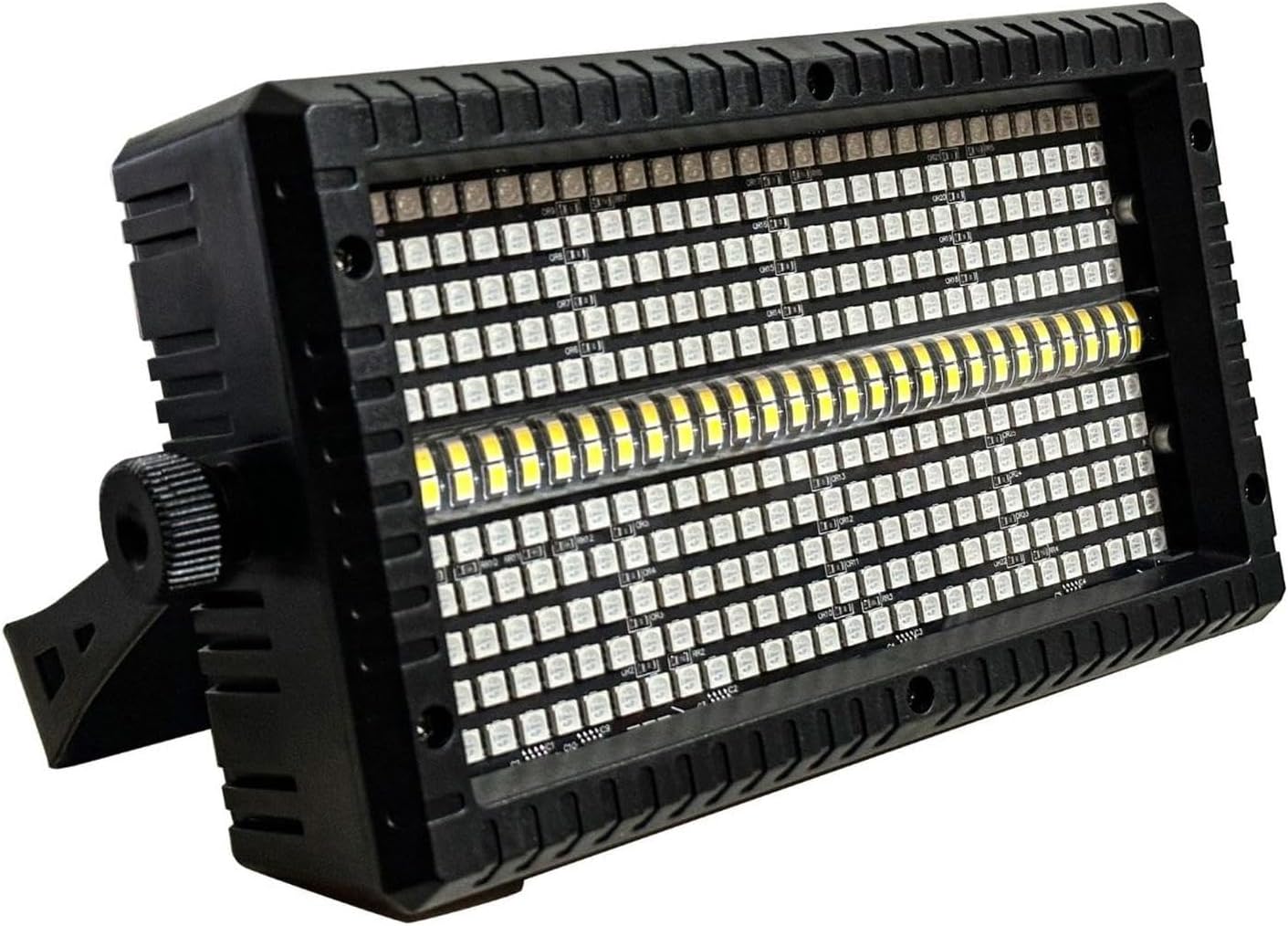
Figure 5.1: Angled view demonstrating the adjustable mounting bracket.

Figure 5.2: Side view of the fixture with the mounting bracket.
- Choose a suitable location for mounting, ensuring it is indoors and away from moisture.
- Use appropriate screws or clamps (not included) to secure the mounting bracket to a truss, ceiling, or wall.
- Adjust the angle of the fixture using the knobs on the sides of the bracket to achieve the desired projection.
5.2 Power Connection
Connect the provided power cable to the IEC power input on the rear panel of the fixture and then to a suitable power outlet. Ensure the power supply matches the fixture's requirements (100-240V, 50/60Hz).
5.3 DMX Connection (Optional)
For DMX control, connect a DMX controller to the DMX IN port using a 3-pin XLR cable. If linking multiple units, connect the DMX OUT of the first fixture to the DMX IN of the next, and so on.
6. Operating Instructions
The ALIENPRO Star Light 100 offers several operating modes, selectable via the digital display and control buttons on the rear panel.
6.1 Control Panel Navigation
Use the buttons next to the digital display to navigate through menus and adjust settings:
- MENU: Accesses the main menu or exits the current setting.
- UP/DOWN: Navigates through menu options or increases/decreases values.
- ENTER: Confirms a selection or enters a submenu.
6.2 Operating Modes
The fixture supports the following modes:
- DMX Mode: Allows external control via a DMX controller.
- Set the DMX address using the control panel.
- Select the desired DMX channel mode (4, 6, 12, 24, or 30 channels).
- Refer to the DMX chart in the Specifications section for channel functions.
- Automatic Mode: The fixture runs pre-programmed light shows.
- Select 'Auto' from the menu.
- Adjust speed or pattern if available.
- Sound-Activated Mode: The fixture reacts to ambient sound.
- Select 'Sound' from the menu.
- Adjust microphone sensitivity if available.
- Master-Slave Mode: One fixture (Master) controls other linked fixtures (Slaves).
- Set the first fixture to 'Master' mode.
- Set subsequent fixtures to 'Slave' mode.
- Connect fixtures via DMX cables (DMX OUT of Master to DMX IN of first Slave, etc.).
7. Maintenance
Regular maintenance ensures optimal performance and extends the lifespan of your ALIENPRO Star Light 100.
- Cleaning: Periodically clean the exterior of the fixture with a soft, dry cloth. Do not use abrasive cleaners or solvents.
- Lens Cleaning: Gently clean the LED lenses with a soft, lint-free cloth and a mild glass cleaner if necessary. Ensure no liquid enters the fixture.
- Ventilation: Ensure ventilation openings are free from dust and debris. Use compressed air to clear any blockages.
- Cable Inspection: Regularly inspect power and DMX cables for any signs of damage. Replace damaged cables immediately.
- Storage: When not in use, store the fixture in a dry, dust-free environment.
8. Troubleshooting
If you encounter issues with your ALIENPRO Star Light 100, refer to the following table for common problems and solutions.
| Problem | Possible Cause | Solution |
|---|---|---|
| Fixture does not power on. | No power supply; faulty cable; internal fault. | Check power cable connection; test power outlet; try a different cable. If problem persists, contact support. |
| No DMX control. | Incorrect DMX address; faulty DMX cable; DMX controller issue; incorrect DMX mode. | Verify DMX address and channel mode; check DMX cable connections; test with another DMX controller; ensure fixture is in DMX mode. |
| Lights flicker or behave erratically. | Loose connection; DMX signal interference; power fluctuations. | Check all cable connections; ensure DMX cables are terminated; use a stable power source. |
| Sound-activated mode not working. | Microphone sensitivity too low; no sound input. | Increase microphone sensitivity via the menu; ensure there is sufficient sound near the fixture. |
| Fixture overheats. | Blocked ventilation; operating in high ambient temperature. | Clear all ventilation openings; ensure adequate airflow around the unit; operate within specified temperature range. |
9. Specifications
| Feature | Detail |
|---|---|
| Model Number | STARLIGHT100 |
| Brand | ALIENPRO |
| Power Consumption | 100W |
| Light Source | 280 x RGB 5050 LEDs (0.2W), 56 x White 2835 LEDs (0.5W) |
| Color | RGB+W (Color-changing) |
| Operating Modes | DMX, Automatic, Sound-Activated, Master-Slave |
| DMX Channels | 4, 6, 12, 24, 30 channels |
| Input Voltage | 100-240V AC, 50/60Hz |
| Protection Rating | IP20 (Indoor Use Only) |
| Operating Temperature | -30 °C to 50 °C |
| Material | Aluminum |
| Dimensions (L x W x H) | 27 cm x 9 cm x 17 cm (10.6 x 3.5 x 6.7 inches) |
| Weight | 1.02 kg (2.25 lbs) |
| Included Components | LED Strobe Light, Power Cable |
10. Warranty and Support
For warranty information or technical support, please refer to the documentation provided with your purchase or contact your ALIENPRO retailer. Keep your proof of purchase for any warranty claims.
