Lepro E1

Lepro E1 Bundle Permanent Outdoor Lights Kit & Power Supply User Manual

Model: E1

Introduction

This manual provides comprehensive instructions for the installation, operation, and maintenance of your Lepro E1 Bundle Permanent Outdoor Lights Kit. Please read this manual thoroughly before use to ensure safe and optimal performance of your lighting system.

Important Safety Information

Package Contents

Product 1: 100ft Permanent Outdoor Lights Kit

Product 2: 29V 48W AC-DC Power Supply and In-line Controller Set

Note: The power adapter and controller included in the original 100ft light kit are compatible with 25ft to 125ft E1 permanent lights. The separate 48W power adapter and in-line controller set can be used with E1 permanent string lights from 25ft to 150ft.

Setup and Installation

  1. Unpack Components: Carefully remove all items from the packaging and verify against the package contents list.
  2. Plan Placement: Determine the desired location for your permanent outdoor lights. Ensure the power source is within reach of the power adapter cable.
  3. Connect Light Strings: Connect the 25FT LED light strings end-to-end. Use the provided extension cables (10FT and 5FT) if additional length is required between sections.
  4. Connect Controller and Power Adapter: Connect the in-line controller to the light string. Then, connect the power adapter to the in-line controller.
  5. Mounting the Lights:
    • Each LED node has 3M tape on the back for initial positioning.
    • For permanent installation, use the provided screws and anchors to secure each LED node firmly to the desired surface.
    • Ensure the lights are mounted approximately 2-4 inches away from the wall for optimal light projection.
  6. Power Connection:
    • If using the 36W power adapter from the 100ft kit, plug it into an outdoor-rated electrical box to protect it from moisture, as it is not waterproof.
    • If using the separate 48W IP67 waterproof power adapter, it can be plugged directly into an outdoor outlet.
  7. Initial Test: Once all connections are made and secured, plug in the power adapter to test the lights.
Lepro E1 Bundle components including light strings, power supply, and controller

Image: Overview of the Lepro E1 Bundle components, showing the LED light strings, the in-line controller, and the power supply unit with its connecting cables.
Detailed view of the IP67 waterproof power supply unit and in-line controller

Image: Close-up of the IP67 waterproof power supply unit and the in-line controller, highlighting their specifications and outdoor rating.

Diagram showing optimal light installation distance from wall

Image: Diagram illustrating the recommended installation distance of 2-4 inches from the wall for the LED light nodes to achieve optimal lighting effects.

Operating Instructions

1. Lepro App Control

The Lepro E1 lights are controlled via the Lepro App, available for download on your smartphone. The app allows for comprehensive customization and control of your lighting system.

  1. Download the App: Search for "Lepro" in your device's app store and install the application.
  2. Connect to Wi-Fi: Ensure your device is connected to a 2.4 GHz Wi-Fi network before integrating with the app.
  3. Pairing: Follow the in-app instructions to pair your Lepro E1 lights with your smartphone.
  4. Control Features:
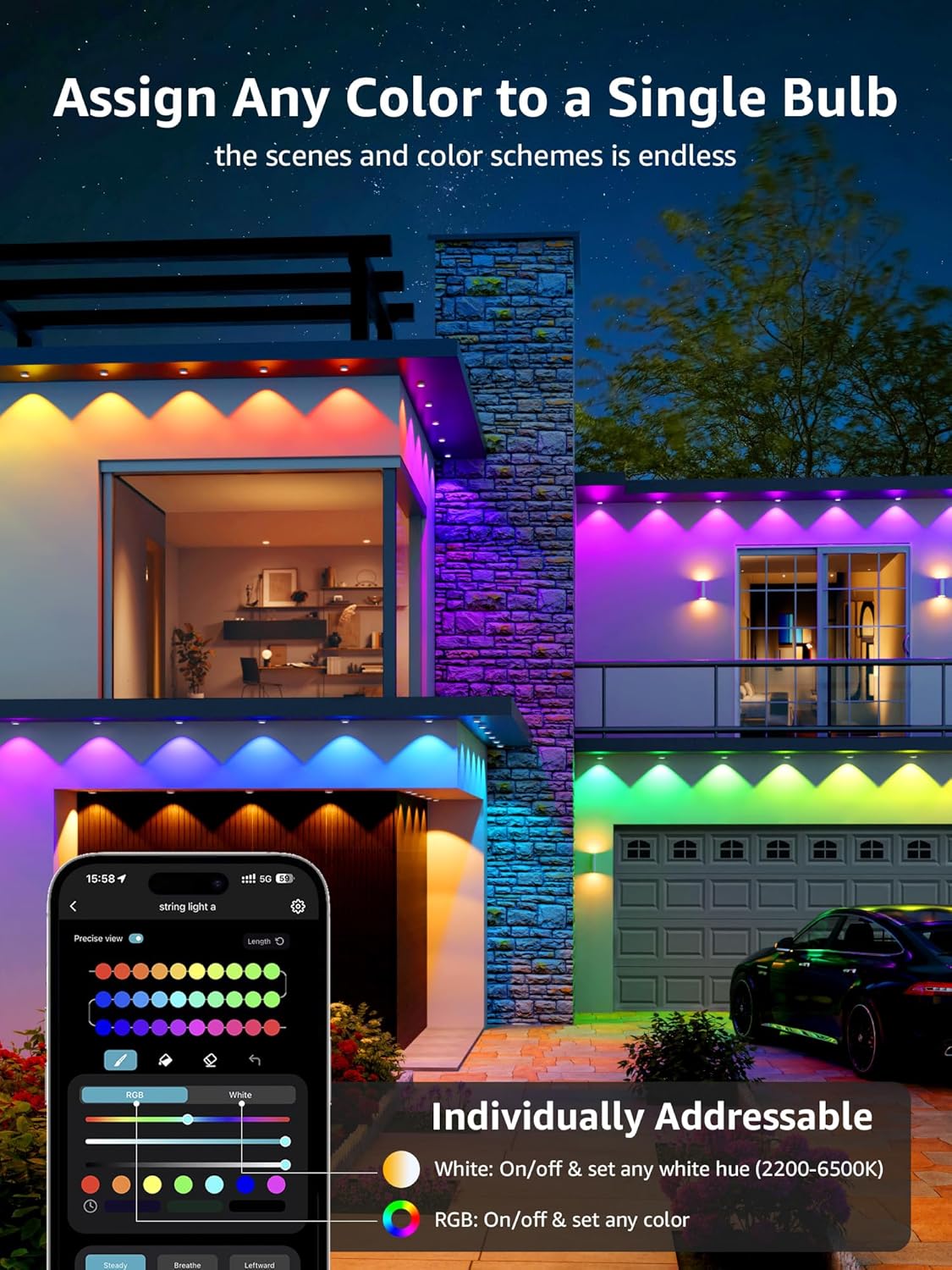
    • Individual Bulb Control: Assign any color to a single bulb. The app provides options for RGB colors and tunable white light (2200K-6500K).
    • Scene and Mood Settings: Tailor different colors, hues, brightness levels, and rhythms to suit various needs and occasions.
    • Lighting Design Assistant: Utilize the AI Lighting Design Assistant features for color psychology, lighting design, and scene creation.
Lepro App interface showing color selection and individual bulb control

Image: Screenshot of the Lepro mobile application interface, demonstrating the ability to select colors and control individual light bulbs for customized lighting effects.

Comparison of warm white and daylight white tunable light settings

Image: Visual comparison showing the difference between warm white (2200K) and daylight white (6500K) light settings, illustrating the tunable white light feature.

LightGPM AI Lighting Design Assistant features

Image: Infographic detailing the LightGPM AI Lighting Design Assistant, explaining features like Color Psychology, Lighting Design, and Scene and Mood customization.

2. Voice Control

The Lepro E1 lights support voice control through integration with Google Assistant and Amazon Alexa.

  1. Integrate with Smart Home System: After connecting your lights to the Lepro App, follow the instructions within the app to link your Lepro account with Google Assistant or Amazon Alexa.
  2. Voice Commands: Once integrated, you can use voice commands to control your lights, such as "Brighten outdoor lights," "Set a party scene," or "Change lights to blue."
Smart App and Voice Control integration with Google Assistant and Alexa

Image: Visual representation of the smart app and voice control capabilities, showing integration with Google Assistant and Alexa, along with Wi-Fi connectivity details.

Outdoor lights illuminating a house with various colors controlled by smartphone app

Image: An example of the Lepro E1 lights installed on a house, displaying a vibrant array of colors, controlled wirelessly via a smartphone application.

Maintenance

Troubleshooting

ProblemPossible CauseSolution
Lights do not turn on.No power, loose connection, faulty adapter.Check if the power adapter is securely plugged in. Verify all cable connections. Test the outlet with another device. Ensure the power adapter is functioning.
Lights flicker or display incorrect colors.Loose connection, app synchronization issue, power fluctuation.Check all physical connections. Restart the Lepro App and re-sync with the lights. Ensure stable power supply.
Cannot connect to the Lepro App.Incorrect Wi-Fi band, pairing mode not active, app glitch.Ensure your phone is connected to a 2.4 GHz Wi-Fi network. Follow the app's pairing instructions carefully. Restart your phone and the app.
Voice control not working.Incorrect integration, device not linked, poor Wi-Fi.Verify that your Lepro account is correctly linked to Google Assistant or Alexa. Check your Wi-Fi connection. Ensure voice commands are clear and correct.

Specifications

Detailed diagram of an individual LED node showing dimensions and components

Image: Detailed diagram of a single LED node, illustrating its dimensions (38mm/1.5in diameter, 22.5mm/0.89in depth) and internal components including Daylight white LED, RGB+IC LED, and Warm white LED.

Warranty and Support

For warranty information, technical support, or customer service inquiries, please refer to the official Lepro website or contact their customer support directly. Keep your purchase receipt for warranty claims.

Visit the official Lepro Store: Lepro Store on Amazon

Related Documents - E1

Preview Lepro E1 Series AI LED Permanent Outdoor Lights User Manual
Comprehensive user manual for Lepro E1 series AI LED permanent outdoor lights, covering setup, app connection, voice control, and troubleshooting.
Preview Lepro AI LED Permanent Outdoor Lights User Manual and Safety Guide
Comprehensive guide for Lepro AI LED permanent outdoor lights, covering installation, app connection, voice control, safety precautions, and technical specifications for models E1-30, E1-60, and E1-90.
Preview Lepro R2 Smart LED Downlight Installation and User Guide
Comprehensive guide for installing and using the Lepro R2 Smart LED Downlight, covering app connection, voice control setup, mounting, and safety information.
Preview Lepro ZB1 AI LED Outdoor String Lights User Manual and Specifications
Comprehensive user manual and technical specifications for the Lepro ZB1 AI LED outdoor string lights, detailing features, installation, and compliance information.
Preview Lepro BR2 Smart LED Bulb Setup and Voice Control Guide
Comprehensive guide to setting up your Lepro BR2 Smart LED Bulb. Learn how to connect via Bluetooth and WiFi, integrate with Amazon Alexa and Google Assistant, and troubleshoot common issues. Includes technical specifications and regulatory compliance information.
Preview Lepro LED Headlamp User Manual and Safety Guide
Comprehensive user manual for the Lepro LED Headlamp (Model 3200008 series), including features, operating instructions, safety precautions, and contact information.