
1. Introduction
Thank you for purchasing the LKHLTBF RG800 MAX GPS Drone. This manual provides essential information for the safe operation, setup, and maintenance of your drone. Please read this manual thoroughly before operating the aircraft to ensure proper use and to prevent damage or injury. Keep this manual for future reference.

Image 1: The LKHLTBF RG800 MAX GPS Drone, showcasing its sleek design and propeller configuration.
2. Safety Information
Operating a drone requires responsibility. Adhere to all local regulations and guidelines for drone flight. Failure to do so may result in legal penalties, property damage, or personal injury.
- Pre-Flight Check: Always inspect the drone, remote control, and battery before each flight. Ensure propellers are securely attached and undamaged.
- Flight Environment: Fly in open areas, away from people, buildings, trees, and power lines. Avoid flying in strong winds, rain, or fog.
- Battery Safety: Use only the provided battery and charger. Do not overcharge or puncture batteries. Discontinue use if batteries show signs of damage or swelling.
- Maintain Line of Sight: Always keep the drone within your visual line of sight during flight.
- Respect Privacy: Be mindful of privacy when using the camera.
- Age Restriction: This product is intended for adult users.
3. Package Contents
Verify that all items are present in the package:
- LKHLTBF RG800 MAX GPS Drone (x1)
- Remote Control with 4.5-inch LCD Screen (x1)
- 7.4V 3800mAh Intelligent Flight Battery (x1)
- USB Charging Cable (x1)
- Spare Propellers (x4)
- Tools (x1 set)
- User Manual (x1)
- App Manual (x1)
- Card Reader (x1)
- 8GB Memory Card (x1)
4. Product Overview
4.1 Drone Components
The RG800 MAX drone features a foldable design for portability, equipped with dual 8K HD cameras and brushless motors for stable flight and high-quality imaging.
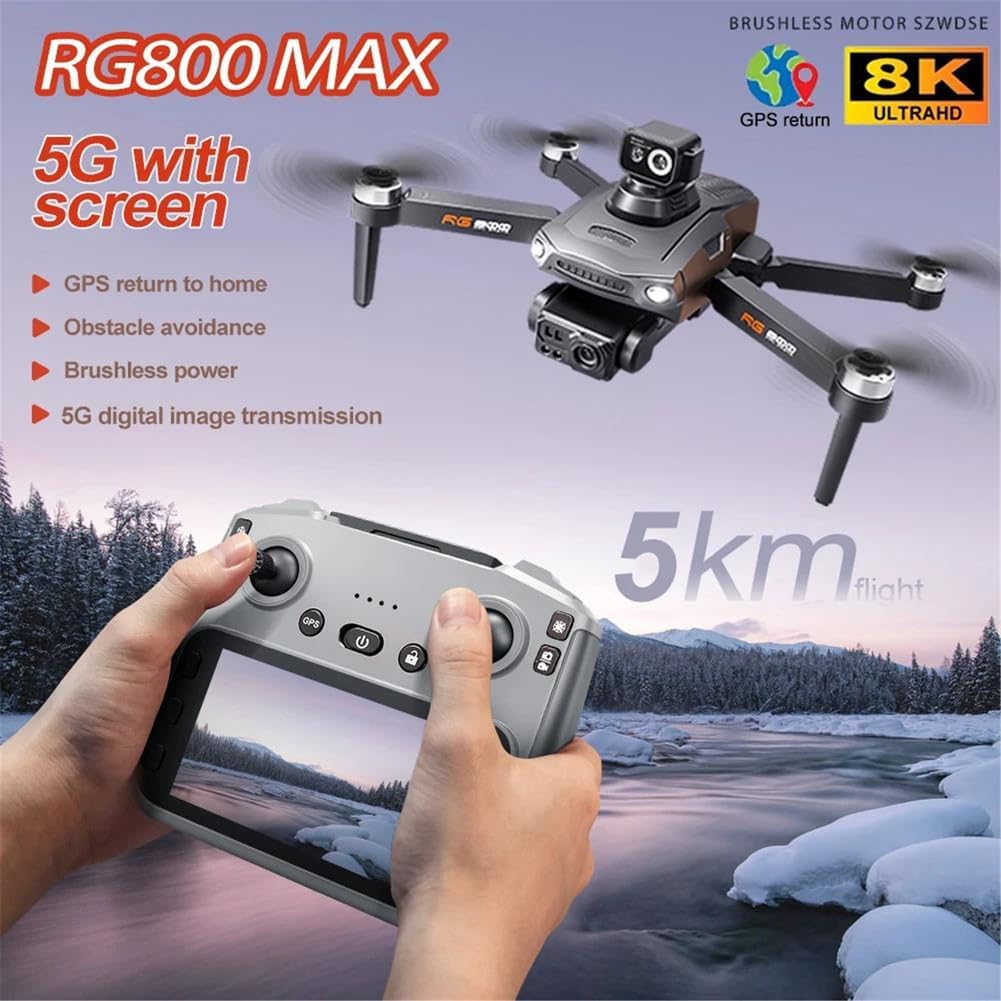
Image 2: The RG800 MAX drone in flight, accompanied by its remote control, highlighting key features like 5km flight range, GPS return, obstacle avoidance, brushless power, and 5G digital image transmission.

Image 3: An overview of the RG800 MAX drone and its remote control, illustrating various functionalities through icons such as 8K dual camera, remote control camera adjustment, GPS return, low battery return, intelligent follow, 5G image transmission, 50x zoom, gesture photography, 3000-meter range, optical flow positioning, 25-minute range, and wind resistance.
4.2 Remote Control Layout
The remote control features a 4.5-inch LCD screen for real-time FPV (First Person View) and dedicated buttons for various flight and camera functions.

Image 8: A detailed diagram of the RG800 MAX drone's remote control, labeling buttons and ports including Speed, Reset, Turn Back, Throttle, GPS switch, LCD screen, Return/Map, Selection keys (Up/Zoom in, Down/Shrink), Fine tuning of servo motor, Geomagnetism, Take photos/videos, Direction lever, Unlock, Power switch, Photograph, Video, Confirm, Charging socket, Memory card slot, and Data cable socket.
5. Setup
5.1 Battery Charging
- Connect the 7.4V 3800mAh intelligent flight battery to the USB charging cable.
- Plug the USB cable into a suitable USB power adapter (not included, 5V/2A recommended).
- The charging indicator on the battery will show its status. Ensure the battery is fully charged before each flight.
- Charge the remote control battery (3.7V 1200mAh) using its dedicated charging port.
5.2 Propeller Installation
Ensure propellers are installed correctly according to their rotation direction (A and B propellers). Use the provided tools for secure attachment.
- Match the propeller type (A or B) with the corresponding motor arm.
- Securely fasten the propellers using the provided screws and screwdriver.
- Check that all propellers are firmly attached and free from damage before flight.
5.3 Memory Card Installation
Insert the provided 8GB memory card into the drone's designated slot for recording photos and videos. Use the card reader to transfer files to a computer.
6. Operating Instructions
6.1 Power On and Pairing
- Place the drone on a flat, open surface.
- Press and hold the power button on the drone until the indicator lights turn on.
- Power on the remote control. The remote and drone will automatically attempt to pair. A successful pairing is indicated by stable lights on the drone and a confirmation on the remote's LCD screen.
6.2 Calibration
Before the first flight and after any significant movement, perform gyroscope and GPS calibration.
- Gyroscope Calibration: Follow the instructions on the remote control's LCD screen or the app to calibrate the gyroscope. This typically involves rotating the drone in specific orientations.
- GPS Calibration: Ensure the drone is in an open outdoor area with a clear view of the sky. Wait for the GPS signal to be acquired (indicated on the remote's screen). Perform the compass calibration as instructed by the app or manual, usually involving horizontal and vertical rotations.
6.3 Takeoff and Landing
- Automatic Takeoff: After successful calibration and GPS lock, press the one-key takeoff button on the remote control. The drone will ascend to a safe altitude and hover.
- Manual Takeoff: Push both control sticks simultaneously to the bottom-outer corners to arm the motors. Slowly push the left stick (throttle) upwards to ascend.
- Automatic Landing: Press the one-key landing button. The drone will descend and land automatically.
- Manual Landing: Slowly pull the left stick (throttle) downwards to descend. Once landed, pull both sticks to the bottom-outer corners to disarm the motors.
6.4 Flight Modes and Features
The RG800 MAX offers several intelligent flight modes for enhanced control and creative possibilities.
- GPS Intelligent Tracking: The drone can automatically follow a designated subject. Activate this mode via the app.
- Image Tracking: Identify a target on the remote's screen or app, and the drone will automatically track its movement.
- 360° Obstacle Avoidance: The drone is equipped with sensors to detect obstacles within approximately 20 meters and automatically adjust its flight path to avoid collisions.
- Optical Flow Hovering: For stable indoor flight or when GPS signal is weak, optical flow sensors assist in maintaining a stable hover.
- Aircraft Search: If the drone is lost, press the GPS signal icon three times consecutively on the remote. The map interface will display the drone's last known distance, latitude, and longitude.
- Return to Home (RTH):
- Smart RTH: Initiated manually via the remote control.
- Low Battery RTH: The drone will automatically return to its takeoff point when the battery is critically low.
- Failsafe RTH: The drone will automatically return if connection with the remote control is lost.

Image 5: The RG800 MAX drone illustrating its four-sided obstacle avoidance capability, with red arrows indicating detection zones.

Image 6: The RG800 MAX drone demonstrating GPS and Optical Flow Relocation Escort features, including low-power return to home, over-the-top return, return home out of control, and one-click return, with a GPS pin icon indicating the home point.
6.5 Camera Operation
The drone is equipped with dual 8K HD cameras for high-resolution photo and video capture.
- Adjustable Camera Angle: The camera angle can be adjusted by 90° directly from the remote control for optimal framing.
- Photo/Video Capture: Use the dedicated buttons on the remote control to take photos or start/stop video recording.
- FPV (First Person View): Real-time video feed is displayed on the remote control's 4.5-inch LCD screen via 5G digital image transmission, providing a clear view up to 5km.
- Sharing: Photos can be shared individually or in batches. Videos can only be shared separately via the app.

Image 4: A close-up view of the drone's 8K ESC camera, highlighting its 90-degree remote-controlled adjustable angle for horizontal, vertical, and overhead shots, along with 50 times digital zoom capability.
7. Maintenance
7.1 Cleaning
- Always power off the drone and remote control before cleaning.
- Use a soft, dry cloth to wipe the drone's body and propellers.
- For stubborn dirt, slightly dampen the cloth with water. Avoid using harsh chemicals or solvents.
- Ensure no moisture enters the drone's electronic components.
7.2 Storage
- Store the drone and its accessories in a cool, dry place, away from direct sunlight and extreme temperatures.
- Remove batteries from the drone and remote control if storing for extended periods.
- Fold the drone arms to its compact size (22 x 10 x 17.5 cm) for easy storage and transport.
7.3 Battery Care
- Do not fully discharge the battery. Charge it to approximately 50-60% for long-term storage.
- Avoid exposing batteries to extreme heat or cold.
- If a battery appears swollen, damaged, or leaks, discontinue use immediately and dispose of it properly.
8. Troubleshooting
| Problem | Possible Cause | Solution |
|---|---|---|
| Drone does not power on | Low battery; Battery not connected properly | Charge the battery; Reconnect the battery securely |
| Remote control does not connect | Low remote battery; Not paired correctly; Interference | Charge remote; Re-attempt pairing process; Move to an area with less interference |
| Unstable flight/Drifting | Gyroscope not calibrated; Propellers damaged or loose; Strong wind | Perform gyroscope calibration; Replace damaged propellers, tighten loose ones; Fly in calm conditions |
| No GPS signal | Flying indoors; Obstruction to sky view; GPS module error | Move to an open outdoor area; Ensure clear sky view; Restart drone and remote |
| Poor image transmission (FPV) | Distance too far; Interference; Weak signal | Fly within recommended range (up to 5km); Avoid areas with strong Wi-Fi or radio interference; Ensure antennas are properly oriented |
9. Specifications
| Feature | Detail |
|---|---|
| Model | RG800 MAX |
| Model Number | SINGLEBATTERY-66500032 |
| Brand | LKHLTBF |
| Camera Resolution | 8K HD Dual Camera |
| Video Capture Format | MP4, AVI |
| Max Flight Range (FPV) | Up to 5 km |
| Drone Battery | 7.4V 3800mAh Intelligent Flight Battery |
| Remote Control Battery | 3.7V 1200mAh |
| Motor Type | Brushless |
| Obstacle Avoidance | 360° Laser (≤ 20m detection) |
| Wind Resistance Level | Level 5 |
| Folded Dimensions | 22 x 10 x 17.5 cm |
| Special Features | GPS Tracking, 8K Camera, 5 km Range, Obstacle Avoidance, Intelligent Flight Modes, Optical Flow Hovering |

Image 7: The RG800 MAX drone highlighting its brushless motor technology and Level 5 wind resistance, indicating enhanced stability and performance.
10. Warranty and Support
For warranty information, technical support, or service inquiries, please refer to the contact information provided with your purchase or visit the official LKHLTBF website. Keep your proof of purchase for warranty claims.