
FINOTI 66500032
FINOTI RG800 Max GPS Drone User Manual
Model: RG800 Max (66500032)
1. Introduction
Thank you for choosing the FINOTI RG800 Max GPS Drone. This professional-grade quadcopter features an 8K HD dual camera, 5KM digital image transmission, GPS intelligent tracking, and 360° obstacle avoidance. Designed for both beginners and experienced pilots, the RG800 Max offers stable flight and high-quality aerial photography capabilities. This manual provides essential information for safe operation, setup, and maintenance of your drone.
Please read this manual thoroughly before operating the drone to ensure proper use and to prevent damage or injury.
2. Safety Information
Important Safety Precautions:
- Keep the drone and its components away from naked flames or direct heat sources.
- Ensure all propellers are securely attached before flight.
- Operate the drone in open areas, away from people, animals, buildings, and power lines.
- Do not fly in strong winds, rain, or other adverse weather conditions.
- Maintain a safe distance from the drone during operation.
- Always monitor battery levels and land the drone safely when the battery is low.
- Children should only operate the drone under direct adult supervision.
- Refer to local regulations and laws regarding drone operation in your area.
3. Package Contents
Verify that all items listed below are included in your package:
- FINOTI RG800 Max Drone (1)
- Remote Control with 4.5-inch LCD Screen (1)
- 7.4V 3800mAh Smart Battery (2 for Dual Battery variant)
- USB Charging Cable (1)
- Spare Fan Blades (Propellers) (4)
- Screwdriver (1)
- User Manual (1)
- APP Manual (1)
- Card Reader (1)
- 8GB Memory Card (1)

Image 1: The FINOTI RG800 Max GPS Drone, showcasing its foldable design and dual camera system. This image provides a general overview of the drone's appearance.
4. Components Overview
4.1 Drone Components
- Foldable Arms: For compact storage and transport.
- Propellers: Generate lift for flight.
- Brushless Motors: Provide powerful and stable flight.
- 8K Dual HD Camera: Captures high-resolution photos and videos. The main camera is adjustable by 90 degrees.
- Obstacle Avoidance Sensors: Detect obstacles in multiple directions (360°) to prevent collisions.
- GPS Module: Enables precise positioning, intelligent flight modes, and return-to-home functions.
- Battery Compartment: Houses the smart flight battery.

Image 2: Detailed view of the drone's 8K ESC camera, highlighting its 90-degree adjustable angle for horizontal, vertical, and overhead shots, along with 50x digital zoom capability.

Image 3: The drone illustrating its four-sided obstacle avoidance system, which helps in detecting and guarding against collisions from various directions during flight.

Image 4: This image emphasizes the drone's brushless motors, providing powerful performance and Level 5 wind resistance for stable flight in various conditions.
4.2 Remote Control Components
- 4.5-inch LCD Screen: Displays real-time FPV (First Person View) and flight data.
- Control Sticks: Left stick for throttle and yaw, right stick for pitch and roll.
- Function Buttons: Dedicated buttons for GPS switch, return/map, photo/video, unlock, power, and more.
- Charging Socket: For recharging the remote control's internal battery.
- Memory Card Slot: For storing flight data or media.
- Data Cable Socket: For connecting to external devices.

Image 5: A comprehensive guide to the remote control, labeling all buttons, joysticks, and ports, including the integrated LCD screen, charging socket, memory card slot, and data cable socket.
5. Setup Guide
5.1 Charging Batteries
- Drone Battery: Insert the 7.4V 3800mAh smart battery into the drone's battery compartment. Connect the USB charging cable to the battery and a suitable USB power adapter (not included). The charging indicator will show the charging status. Charge until fully charged.
- Remote Control Battery: Connect the USB charging cable to the remote control's charging socket and a USB power adapter. The remote control has a 3.7V 1200mAh internal battery. Charge until fully charged.
Note: Always use the provided USB cable for charging. Do not leave batteries unattended while charging.
5.2 Propeller Installation
- Ensure the drone is powered off.
- Match the propellers to their corresponding motor arms (usually marked A and B).
- Attach each propeller firmly to its motor shaft using the provided screwdriver. Ensure they are secure but not overtightened.
- Check that all propellers can rotate freely without obstruction.
5.3 Folding/Unfolding the Drone
- To unfold, gently extend the drone arms outwards until they lock into place.
- To fold, press the release mechanism (if present) or gently fold the arms inwards towards the drone body.
5.4 App Installation (Optional)
For advanced features and easier media sharing, download the official FINOTI drone application from your smartphone's app store. Refer to the dedicated APP Manual for detailed instructions on installation and usage.
6. Operating Instructions
6.1 Pre-Flight Checklist
- Ensure drone and remote control batteries are fully charged.
- Propellers are correctly installed and secure.
- Fly in an open area, free from obstacles and people.
- Check weather conditions; avoid strong winds or rain.
- Power on the drone first, then the remote control.
6.2 Pairing and Calibration
- Power on the drone. Place it on a flat, level surface.
- Power on the remote control. The remote will automatically search for the drone.
- Follow the on-screen prompts on the remote's LCD to complete pairing and compass calibration. This typically involves rotating the drone horizontally and vertically.
- Wait for GPS signal acquisition (indicated on the remote's screen) before attempting flight, especially for outdoor use.
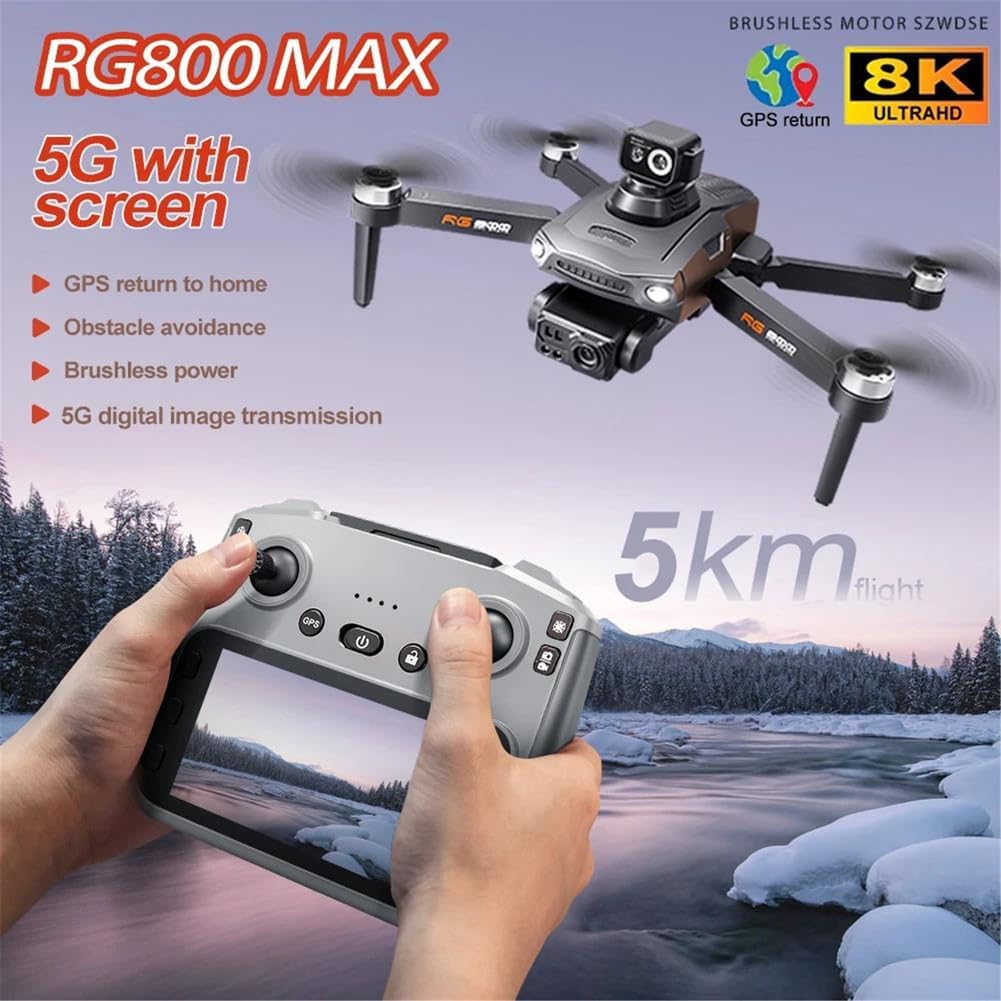
Image 6: The RG800 Max drone in flight, with the remote control displaying its 4.5-inch screen and indicating a 5KM flight range, showcasing the 5G digital image transmission.
6.3 Basic Flight Controls (Refer to Image 5 for button layout)
- Throttle (Left Stick Up/Down): Controls altitude.
- Yaw (Left Stick Left/Right): Rotates the drone horizontally.
- Forward/Backward (Right Stick Up/Down): Controls pitch.
- Left/Right (Right Stick Left/Right): Controls roll.
- One-Key Takeoff/Landing: Press the designated button for automatic takeoff or landing.
- Unlock: Press the unlock button to arm the motors before takeoff.
6.4 Camera Operation
- Take Photos: Press the "Take photos / videos" button once to capture a still image.
- Record Video: Press and hold the "Take photos / videos" button to start recording video. Press again to stop.
- Camera Angle Adjustment: Use the direction lever on the remote control to adjust the 90° angle of the main camera.
- Digital Zoom: Use the "Selection key: Up/Zoom in" and "Selection key: Down/Shrink" buttons to adjust the digital zoom (up to 50x).
6.5 Intelligent Flight Modes
- GPS Intelligent Tracking: Activates GPS-based follow mode. The drone will track the remote control's position.
- Image Tracking: Identify a subject on the FPV screen via the app, and the drone will automatically track its movement.
- 360° Obstacle Avoidance: The drone's sensors actively detect obstacles within approximately 20 meters and adjust its flight path to avoid collisions.
- Return to Home (RTH):
- One-Click Return: Press the "Return/Map" button once to initiate automatic return to the takeoff point.
- Low-Power Return: The drone will automatically return when the battery is critically low.
- Over-the-Top Return: If the drone flies beyond the control range, it will automatically return.
- Return Home Out of Control: Similar to over-the-top return, the drone will return if signal is lost.

Image 7: This image illustrates the drone's GPS and Optical Flow Relocation features, which ensure stable flight and precise return-to-home functions, including low-power return and one-click return.
6.6 Aircraft Search Function
If you lose track of your drone, click the GPS signal icon on the remote control three times consecutively. This will open a map interface on the remote's screen, displaying the last known distance, latitude, and longitude of the aircraft.
6.7 Photo, Music, Video Sharing
Photos can be shared individually or in multiple selections. Videos can only be shared separately one at a time. Refer to the APP Manual for detailed sharing instructions.
7. Maintenance
- Cleaning: Use a soft, dry cloth to clean the drone and remote control. Do not use solvents or harsh chemicals.
- Propeller Inspection: Regularly check propellers for damage (cracks, bends). Replace damaged propellers immediately using the provided spare parts and screwdriver.
- Battery Care: Store batteries in a cool, dry place. Do not overcharge or over-discharge. If storing for extended periods, charge to approximately 50-60%.
- Storage: When not in use, fold the drone arms and store it in a safe place to prevent damage.
8. Troubleshooting
| Problem | Possible Cause | Solution |
|---|---|---|
| Drone does not power on. | Battery not charged or incorrectly inserted. | Ensure battery is fully charged and correctly inserted. |
| Remote control does not connect to drone. | Not paired, or drone/remote too far apart. | Ensure drone is powered on first, then remote. Perform pairing process. Bring closer together. |
| Drone drifts during flight. | Improper calibration, strong wind, or damaged propeller. | Recalibrate the drone. Fly in calm conditions. Check and replace damaged propellers. |
| Poor image/video quality. | Dirty camera lens, insufficient lighting, or unstable flight. | Clean camera lens. Fly in well-lit conditions. Ensure stable flight. |
| GPS signal not acquired. | Flying indoors or in an area with poor satellite reception. | Move to an open outdoor area with clear sky view. Wait for GPS lock. |
9. Specifications
| Feature | Detail |
|---|---|
| Brand | FINOTI |
| Model Name | RG800 Max |
| Item Model Number | 66500032-DUALBATTERY |
| Camera | 8K HD Dual Camera, 90° adjustable angle, 50x digital zoom |
| Image Transmission | 5G Digital, up to 5KM range |
| Obstacle Avoidance | 360° Laser Obstacle Avoidance (≤ 20M) |
| Motors | Brushless Motors |
| Drone Battery | 7.4V 3800mAh Smart Battery |
| Remote Control Battery | 3.7V 1200mAh |
| Folded Dimensions | 22 x 10 x 17.5 cm (approximate) |
| Wind Resistance | Level 5 |
| GPS Features | Intelligent Tracking, Image Tracking, Return to Home, Aircraft Search |
10. Warranty and Support
For warranty information, technical support, or customer service inquiries, please contact FINOTI customer support. Refer to your purchase documentation for specific warranty terms and contact details.
You may also reach out to the manufacturer directly via email: 92991@qq.com.
Please visit the FINOTI store homepage for additional resources and product information.
Ask a question about this manual
Ask about setup, troubleshooting, compatibility, parts, safety, or missing instructions. Manuals+ will review the question and use this page’s manual context to help answer it.