Introduction
This manual provides detailed instructions for the setup, programming, and operation of your TiFFCOFiO TF-261B Digital Outdoor Timer Outlet. This device is designed to automate the control of outdoor electrical appliances, such as lights, with programmable on/off cycles. Please read this manual thoroughly before use to ensure proper function and safety.
Safety Information
- Ensure the timer is securely mounted and protected from direct water spray, although it is designed to be waterproof.
- Do not immerse the timer in water.
- Do not exceed the maximum load capacity of 15A/1875W. Overloading can cause overheating and fire.
- Always plug the timer into a grounded electrical outlet.
- Keep children away from the timer and connected appliances.
- Disconnect power before performing any maintenance or cleaning.
- This product is ETL Listed, indicating compliance with North American safety standards.
Package Contents
- 1 x TiFFCOFiO TF-261B Digital Outdoor Timer Outlet
- 1 x Instruction Manual
Product Overview
Familiarize yourself with the components and controls of your outdoor timer.
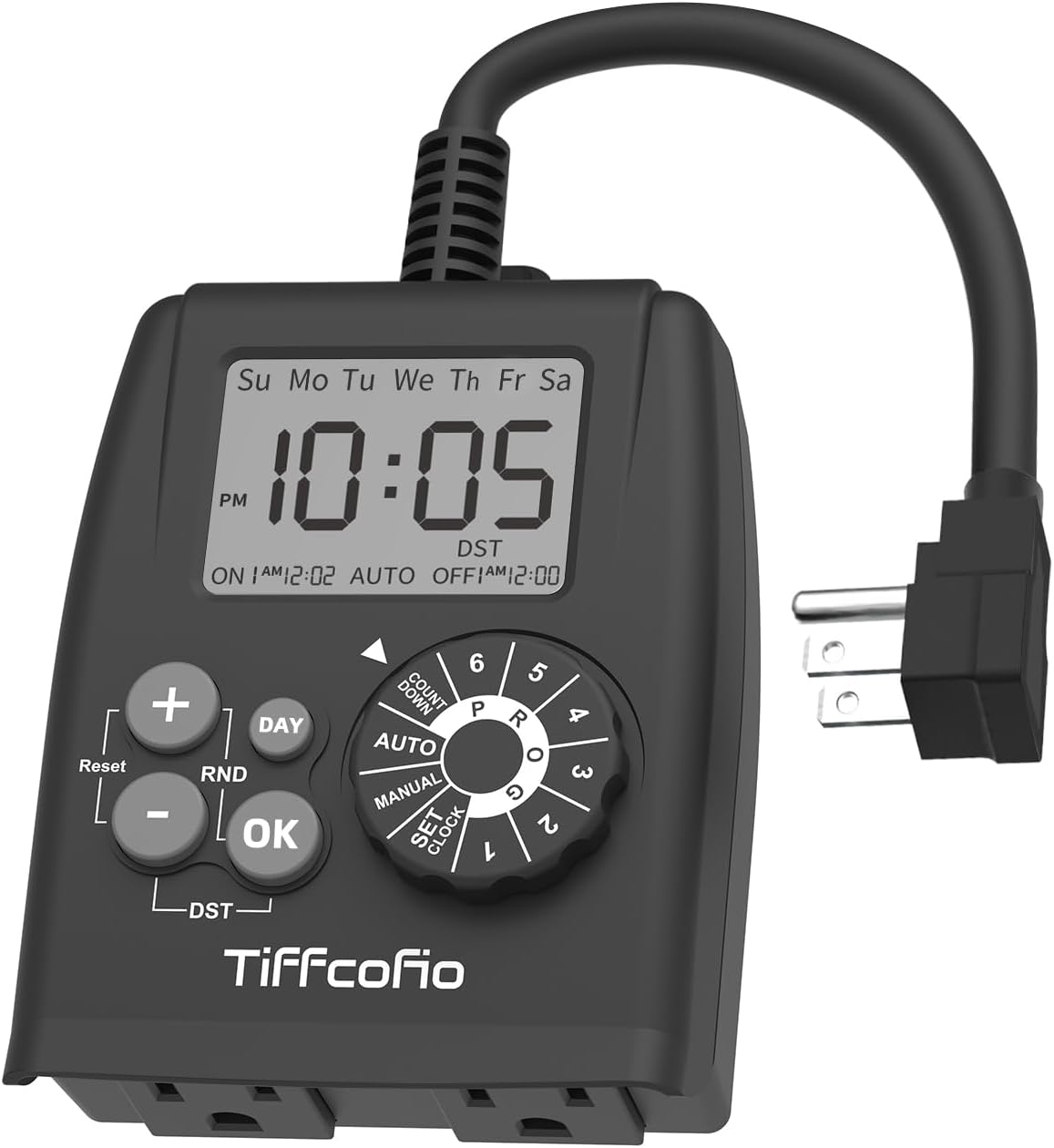
Figure 1: Front view of the TiFFCOFiO TF-261B Digital Outdoor Timer Outlet, showing the display, control buttons, and rotary dial.

Figure 2: Detailed view highlighting the large 2.5" LCD screen, ON/OFF time display, and two grounded outlets.

Figure 3: Close-up of the two grounded outlets and the integrated wall mount hole for secure installation.
Controls and Display:
- LCD Screen: Displays current time, day, program status, and settings.
- Rotary Dial: Used to select modes for setting clock, programs (1-6), countdown, and manual operation.
- '+' Button: Increases values during setting.
- '-' Button: Decreases values during setting.
- 'DAY' Button: Selects days of the week for programming.
- 'RND' Button: Activates/deactivates Random mode.
- 'OK' Button: Confirms settings.
- 'Reset' Button: Resets the timer to factory defaults (requires a pointed object).
- 'DST' Button: Adjusts for Daylight Saving Time.
- Grounded Outlets: Two outlets for connecting devices.
Setup
Initial Power-Up and Battery Installation:
The timer requires 2 AAA batteries (not included) for memory backup and programming without being plugged in. Install batteries into the compartment on the back of the unit.
Setting the Current Time:
- Rotate the dial to the SET CLOCK position.
- The hour display will flash. Use the '+' or '-' buttons to set the current hour (AM/PM). Press OK to confirm.
- The minute display will flash. Use the '+' or '-' buttons to set the current minute. Press OK to confirm.
- The day of the week will flash. Use the DAY button to select the current day. Press OK to confirm.
- Rotate the dial to AUTO to save settings and return to normal operation.
Daylight Saving Time (DST) Adjustment:
To adjust for DST, press and hold the DST button for 3 seconds. The clock will advance or rewind by one hour. Repeat to revert the change.
Programming
The timer allows for up to 6 distinct ON/OFF programs. Each program can be set for specific days of the week.
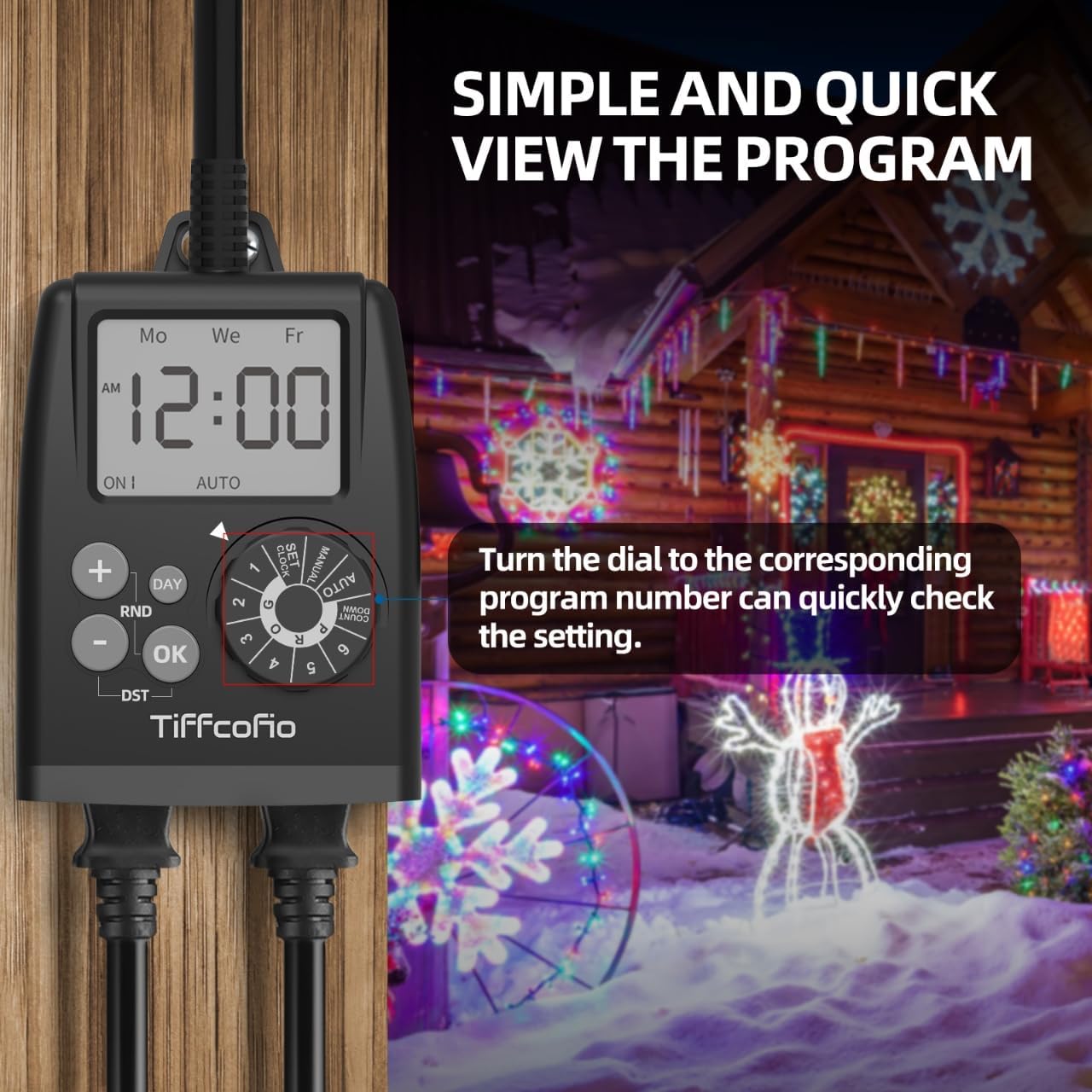
Figure 4: The timer display showing a program review, indicating the ON time and selected days.
Setting an ON/OFF Program (P1-P6):
- Rotate the dial to the desired program number, e.g., P1. The display will show "ON 1".
- The hour display will flash. Use '+' or '-' to set the ON hour. Press OK.
- The minute display will flash. Use '+' or '-' to set the ON minute. Press OK.
- The day(s) of the week will flash. Use the DAY button to select the desired day combination (e.g., Mon-Sun, Mon-Fri, Sat-Sun, individual days). Press OK.
- The display will now show "OFF 1". Repeat steps 2-4 to set the OFF time and day(s) for Program 1.
- To set additional programs (P2-P6), rotate the dial to the next program number and repeat the steps.
- Once all programs are set, rotate the dial to AUTO for the timer to operate according to your schedule.
Countdown Function:
The countdown function allows you to turn the connected device ON or OFF after a specified duration.
- Rotate the dial to COUNTDOWN.
- Use '+' or '-' to set the desired countdown duration (hours and minutes).
- Press OK to start the countdown. The device will turn ON/OFF after the set time.
- To cancel, rotate the dial away from COUNTDOWN.
Manual ON/OFF:
To manually override the programmed schedule and turn the device ON or OFF:
- Rotate the dial to MANUAL.
- Press OK to toggle the power state (ON/OFF).
- To return to programmed operation, rotate the dial back to AUTO.
Operation
Automatic Mode:
Once programs are set, rotate the dial to AUTO. The timer will now automatically turn connected devices ON and OFF according to your programmed schedule.
Quick Program Review:
To quickly review any set program without altering it, simply rotate the dial to the corresponding program number (P1-P6). The display will show the ON/OFF times and selected days for that program. Rotate the dial back to AUTO to resume automatic operation.

Figure 5: The timer in an outdoor application, demonstrating its use for controlling holiday lighting.
Maintenance
- Clean the timer's exterior with a soft, damp cloth. Do not use abrasive cleaners or solvents.
- Ensure the outlets are free from debris and moisture before plugging in devices.
- Periodically check the power cord and plug for any signs of damage.
- Replace AAA batteries annually to ensure program memory retention during power outages or when unplugged.
Troubleshooting
| Problem | Possible Cause | Solution |
|---|---|---|
| Timer display is blank. | No power to the unit. | Ensure the timer is securely plugged into a live grounded outlet. Check the circuit breaker. |
| Connected device does not turn ON/OFF as programmed. |
|
|
| Time is incorrect after a power outage. | AAA backup batteries are dead or not installed. | Install or replace the 2 AAA batteries. Reset the current time. |
| Cannot set programs. | Dial is not in the correct setting mode. | Ensure the dial is set to SET CLOCK or a program number (P1-P6) before attempting to set. |
Specifications
- Model: TF-261B
- Brand: Tiffcofio
- Material: Plastic
- Dimensions: 2"D x 4"W x 3.5"H
- Weight: 0.5 Pounds (approx. 8 ounces)
- Programs: Up to 6 ON/OFF programs
- Electrical Rating: 15A / 1875W
- Outlets: 2 Grounded Outlets
- Backup Battery: 2 x AAA batteries (not included)
- Certifications: ETL Listed

Figure 6: The timer's waterproof design and safety features, including overload/short circuit protection.
Warranty and Support
The TiFFCOFiO TF-261B Digital Outdoor Timer Outlet is ETL Listed, ensuring it meets recognized safety standards. For any questions or assistance, our professional and reliable after-sales service team is available to help you within 6 hours. Please refer to your purchase documentation for specific warranty terms and contact information.


