1. Introduction
Welcome to your new Fastrack StreetStyle 3.0 Digital Watch, Model 38129PP01W. This manual provides essential information for setting up, operating, and maintaining your watch. Please read these instructions carefully to ensure proper use and longevity of your timepiece.
This digital watch features a precise quartz movement, a durable mineral crystal, and is water-resistant up to 30 meters. Key functions include time display, day and date, alarm, split-seconds chronograph, 12/24-hour format, and an EL backlight for visibility in low light conditions.
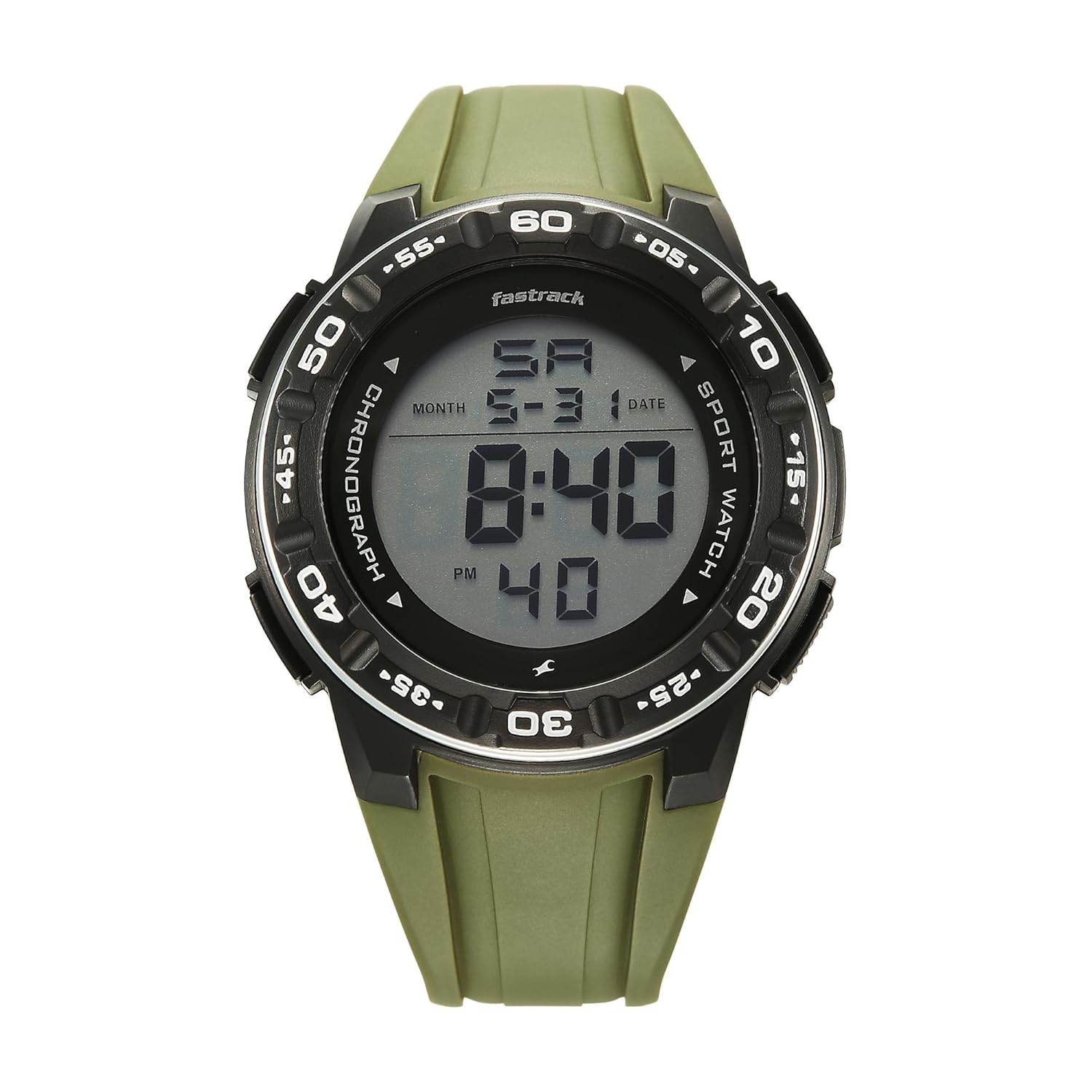
Image 1.1: Front view of the Fastrack StreetStyle 3.0 Digital Watch. This image displays the watch face with the digital time, day, and date visible, along with the surrounding bezel and green strap.
2. Setup
2.1 Initial Activation
Your Fastrack StreetStyle 3.0 Digital Watch comes with batteries pre-installed. Upon first use, the watch should display the time. If the display is blank, check for any protective film on the screen or ensure no buttons are stuck.
2.2 Identifying Buttons
Familiarize yourself with the watch's buttons. Typically, digital watches have buttons for MODE, LIGHT, START/STOP, and RESET/ADJUST. Refer to the image below for general button placement.

Image 2.1: Side view of the watch, highlighting the control buttons. This image shows the right side of the watch case with two prominent buttons, typically used for mode selection and adjustments.
3. Operating Instructions
3.1 Time and Date Setting
- Press the MODE button repeatedly until the time setting mode is activated (usually indicated by flashing digits).
- Use the START/STOP button to increase the flashing digit (hours, minutes, seconds).
- Use the RESET/ADJUST button to move to the next digit or setting (e.g., from hours to minutes).
- Continue adjusting until the correct time and date are set.
- Press the MODE button again to exit the setting mode.
3.2 Alarm Function
- Press the MODE button until the alarm mode is displayed.
- Use the START/STOP and RESET/ADJUST buttons to set the desired alarm time.
- Activate or deactivate the alarm using the designated button (often START/STOP or a separate alarm ON/OFF button).
- Press MODE to return to time display.
3.3 Chronograph (Stopwatch)
- Press the MODE button until the chronograph mode is displayed (usually showing "00:00:00").
- Press the START/STOP button to begin timing.
- Press START/STOP again to pause/stop the timing.
- To record split times, press the RESET/ADJUST button while the chronograph is running. The display will show the split time while the internal timer continues. Press RESET/ADJUST again to return to the running time.
- Press the RESET/ADJUST button when the chronograph is stopped to reset it to zero.
3.4 EL Backlight
To illuminate the display in dark conditions, press the LIGHT button. The backlight will typically stay on for a few seconds.
4. Maintenance
4.1 Cleaning Your Watch
To clean your watch, wipe it gently with a soft, dry cloth. For stubborn dirt, a slightly damp cloth can be used, followed by immediate drying. Avoid using chemical cleaners, solvents, or abrasive materials, as these can damage the watch's finish and strap.
4.2 Water Resistance
Your Fastrack StreetStyle 3.0 watch is water-resistant up to 30 meters (3 ATM). This means it is suitable for everyday use and can withstand splashes, rain, and brief immersion in water. It is not suitable for swimming, diving, or showering with hot water. Do not operate buttons while the watch is wet or submerged.
4.3 Battery Replacement
The watch is powered by a long-lasting battery. When the display becomes dim or stops functioning, it indicates that the battery needs replacement. Battery replacement should be performed by a qualified watch technician to ensure the water resistance seal is maintained.

Image 4.1: Rear view of the watch, showing the stainless steel back case. This area typically houses the battery compartment and is where a technician would access for battery replacement.
5. Troubleshooting
- Watch display is blank: The battery may be depleted. Arrange for battery replacement by a professional.
- Incorrect time displayed: Re-set the time and date following the instructions in Section 3.1. Ensure you are in the correct 12-hour or 24-hour format.
- Buttons are unresponsive: Ensure the watch is not wet. If the issue persists, there might be an internal malfunction. Contact customer support.
- Water inside the watch: Immediately cease use and take the watch to a qualified service center. Water ingress can cause severe damage.
6. Specifications
| Feature | Detail |
|---|---|
| Brand | Fastrack |
| Model Number | 38129PP01W |
| Model Name | StreetStyle 3.0 |
| Display Type | Digital |
| Movement | Quartz |
| Water Resistance | 30 Meters (3 ATM) |
| Special Features | Alarm Chime, Day & Date, Split-seconds Chronograph, 12/24H Format, EL Backlight |
| Case Dimensions | 48 mm (Case Size) |
| Product Dimensions | 5.1 x 48 x 1.8 cm |
| Item Weight | 150 g |
| Strap Material | PU (Polyether) |
| Batteries Included | Yes |

Image 6.1: Watch dimensions illustration. This image shows the watch with an overlay indicating its case size of 48mm, providing a visual reference for its physical dimensions.
7. Warranty and Support
7.1 Warranty Information
Your Fastrack StreetStyle 3.0 Digital Watch comes with a two-year guarantee from the date of purchase. This warranty covers manufacturing defects under normal use. It does not cover damage resulting from improper handling, accidents, unauthorized repairs, or normal wear and tear. Please retain your proof of purchase for warranty claims.
7.2 Customer Support
For any questions, service requests, or warranty claims, please contact Fastrack customer support. Refer to the official Fastrack website or your purchase documentation for specific contact details.


