1. Introduction
This manual provides essential information for the safe and efficient operation, maintenance, and care of your Bikydom M5 Pro Electric Scooter. Please read it thoroughly before your first ride and keep it for future reference. Adhering to these instructions will ensure optimal performance and longevity of your scooter.

Figure 1: Bikydom M5 Pro Electric Scooter with seat and storage box.
2. Safety Guidelines
Your safety is paramount. Always wear a helmet and appropriate protective gear (knee pads, elbow pads, gloves) when riding. Familiarize yourself with local regulations regarding electric scooter use. Avoid riding in adverse weather conditions, on slippery surfaces, or at night without proper lighting. Always perform a pre-ride check of brakes, tires, and battery level.
- Wear Protective Gear: Always use a helmet, knee pads, elbow pads, and gloves.
- Check Local Laws: Adhere to all local traffic laws and regulations for electric scooters.
- Pre-Ride Inspection: Before each ride, check tire pressure, brake function, and battery charge.
- Avoid Hazardous Conditions: Do not ride in heavy rain, snow, ice, or on extremely rough terrain.
- Maintain Visibility: Use headlights and taillights when riding in low-light conditions.
3. Setup and Assembly
The Bikydom M5 Pro Electric Scooter comes 90% pre-assembled. The following steps detail the final assembly process.
3.1 Unboxing and Initial Inspection
Carefully remove the scooter and all components from the packaging. Inspect for any damage during transit. Ensure all accessories, including tools, charger, keys, and manual, are present.
Video 1: M5 Pro Unboxing and Assembly Guide. This video demonstrates the process of unboxing the scooter and assembling its main components, including the handlebars, seat, and storage box.
3.2 Handlebar Installation
- Unfold the main stem of the scooter.
- Attach the handlebars to the top of the stem, ensuring all cables are properly connected and not pinched.
- Secure the handlebars using the provided screws and Allen wrench.
3.3 Seat and Storage Box Installation
- Assemble the seat onto its post, tightening the bolts securely.
- Insert the seat post into the designated slot on the scooter's deck and adjust to your preferred height.
- Attach the storage box to the rear of the scooter, ensuring it is firmly mounted.
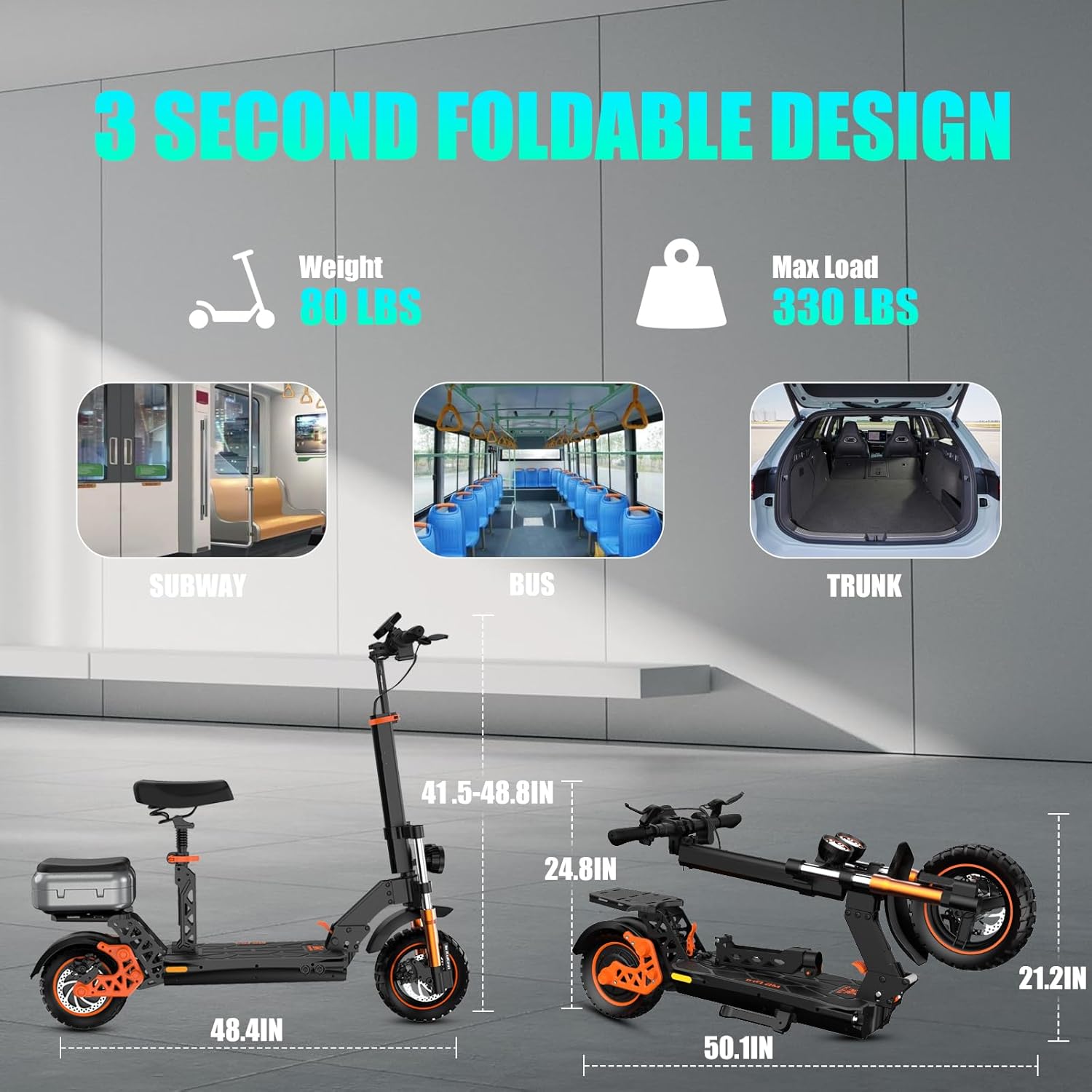
Figure 2: The Bikydom M5 Pro Electric Scooter in both folded and unfolded configurations, highlighting its compact design for transport and storage.
4. Operating Instructions
4.1 Powering On/Off and Display
Insert the key into the ignition and turn it to the 'ON' position. Press and hold the power button on the display for a few seconds to turn on the scooter. The LCD display will show speed, battery level, distance, and other indicators. To power off, press and hold the power button again.

Figure 3: The scooter's smart LCD display, providing real-time information such as speed, battery status, trip distance, light indicators, and cruise control status.
4.2 Speed Modes and Unit Change
The scooter features multiple speed modes (e.g., 10 MPH, 20 MPH, 34 MPH) to suit different riding conditions. You can switch between these modes using the controls on the handlebar. To change the speed unit (e.g., from MPH to KM/H), follow the instructions in the video below.
Video 2: M5 Pro Speed Unit Change Tutorial. This video demonstrates how to change the speed unit settings on the scooter's display.
4.3 Braking System
The scooter is equipped with a dual disc braking system and E-ABS for responsive and stable stopping power. Apply both brake levers simultaneously for optimal braking performance. Avoid sudden, harsh braking, especially at high speeds, to prevent skidding.

Figure 4: Detail of the scooter's powerful dual disc braking system, featuring anti-lock technology for enhanced safety and control.
4.4 Lighting System
Bright LED front headlights and responsive rear brake lights enhance visibility. Ensure lights are functioning correctly before riding in low-light conditions. The scooter also features turn signals for indicating direction.

Figure 5: The scooter's comprehensive lighting system, including a U7 headlight, clear deck lights, and tail lights for 360-degree visibility.
5. Maintenance
Regular maintenance ensures the safety and longevity of your Bikydom M5 Pro Electric Scooter.
- Tire Pressure: Regularly check and maintain the recommended tire pressure for optimal performance and to prevent punctures. The 11-inch off-road fat tires are designed for durability across various surfaces.
- Brake Inspection: Periodically inspect brake pads and discs for wear. Adjust or replace as necessary.
- Battery Care: Charge the 52V 20.8AH lithium battery regularly, even when not in use, to maintain its health. Avoid fully discharging the battery. The battery is UL 2272 certified for safety.
- Cleaning: Clean the scooter with a damp cloth. Avoid using high-pressure water jets directly on electrical components.
- Fastener Checks: Regularly check all screws and bolts for tightness, especially after riding on rough terrain.

Figure 6: The scooter's 52V 20.8AH lithium battery, emphasizing its high quality, safety features (BMS, IPX4 waterproof), and impressive 50-mile maximum range.
6. Troubleshooting
If you encounter issues with your scooter, refer to the following common problems and solutions:
- Scooter Not Turning On: Check if the battery is charged and properly connected. Ensure the key is in the 'ON' position.
- Loss of Power/Reduced Range: This may indicate a low battery charge or a need for battery recalibration. Ensure the charger is working correctly.
- Brakes Not Responsive: Inspect brake cables and pads for wear or damage. Adjust cable tension if necessary.
- Unusual Noises: Check for loose components, especially around the wheels and suspension.
For persistent issues, please contact Bikydom customer support.
7. Specifications
| Feature | Detail |
|---|---|
| Brand | Bikydom |
| Model Name | M5 Pro |
| Motor Power | 1600W |
| Max Speed | 34 MPH |
| Battery | 52V 20.8AH Lithium |
| Max Distance Range | 50 Miles |
| Wheel Size | 11 Inches |
| Wheel Type | Pneumatic |
| Suspension Type | Dual Suspension (Front Hydraulic & Rear Linkage) |
| Brake Style | Dual Disc Brake with E-ABS |
| Weight Limit | 264 Pounds |
| Frame Material | Aluminum |
| Special Features | Adjustable Handlebar Height, Digital Display, Foldable, Non-Slip Deck, Removable Seat, Detachable Storage Box |
| Certifications | UL 2272 |
8. Warranty and Support
8.1 Warranty Information
Bikydom provides a comprehensive warranty for your M5 Pro Electric Scooter:
- 1 Year Warranty: Covers motor, battery, controller, and charger.
- 2 Months Warranty: Covers headlight, taillight, brake light, mechanical brake, electronic brake, and electronic accelerator pedal.
If the product fails or is damaged due to material or workmanship problems under normal use, Bikydom will repair or replace the defective part free of charge.
Exclusions:
- Natural wear, aging, or corrosion.
- Abnormal use, misuse, abuse, or failure to follow instructions.
- Repair, modification, or disassembly by unauthorized personnel.
- Damage caused by force majeure (such as fire, flood, earthquake, etc.).
- Damage caused by using non-original accessories.
8.2 Customer Support
For any assistance, questions, or warranty claims, please contact our dedicated after-sales team:
- Email: service@bikydom.com
- Online Service: Available 24 hours.
Our team is committed to providing prompt solutions, expert guidance, and genuine replacement parts to ensure your riding experience remains seamless and hassle-free.
9. Product Overview Video
Watch this video for a general overview of the Bikydom M5 Pro Electric Scooter and its features.
Video 3: M5 Pro Electric Scooter Adult Overview. This video provides a dynamic overview of the scooter's design, features, and usage in various environments.