
Introduction
Thank you for choosing the KoolMore Reserve Built-in Convection Microwave Oven with Air Fryer. This appliance combines the speed of a microwave with the versatility of convection cooking, air frying, baking, roasting, and broiling. To ensure safe and efficient operation, please read this manual thoroughly before use and retain it for future reference.
Important Safety Information
Always follow basic safety precautions when using electrical appliances to reduce the risk of fire, electric shock, injury to persons, or exposure to excessive microwave energy.
- Read all instructions before using the appliance.
- Do not attempt to operate this oven with the door open as this can result in harmful exposure to microwave energy.
- Do not place any object between the oven front face and the door or allow soil or cleaner residue to accumulate on sealing surfaces.
- Do not operate the oven if it is damaged. It is particularly important that the oven door closes properly and that there is no damage to the: (1) door (bent), (2) hinges and latches (broken or loosened), (3) door seals and sealing surfaces.
- The oven should not be adjusted or repaired by anyone except properly qualified service personnel.
- This appliance must be grounded. Connect only to a properly grounded outlet.
- Ensure proper ventilation around the appliance.
- Do not heat sealed containers, as they may explode.
- Always use oven mitts when handling hot items from the oven.
- Keep children away from the appliance during operation. This appliance includes a Child Safety Lock feature.
Product Overview
The KoolMore Reserve Built-in Convection Microwave Oven features a sleek black stainless-steel exterior with a tempered glass door and a digital touch control panel. It offers a 1.6 cu. ft. capacity, suitable for various cooking needs.
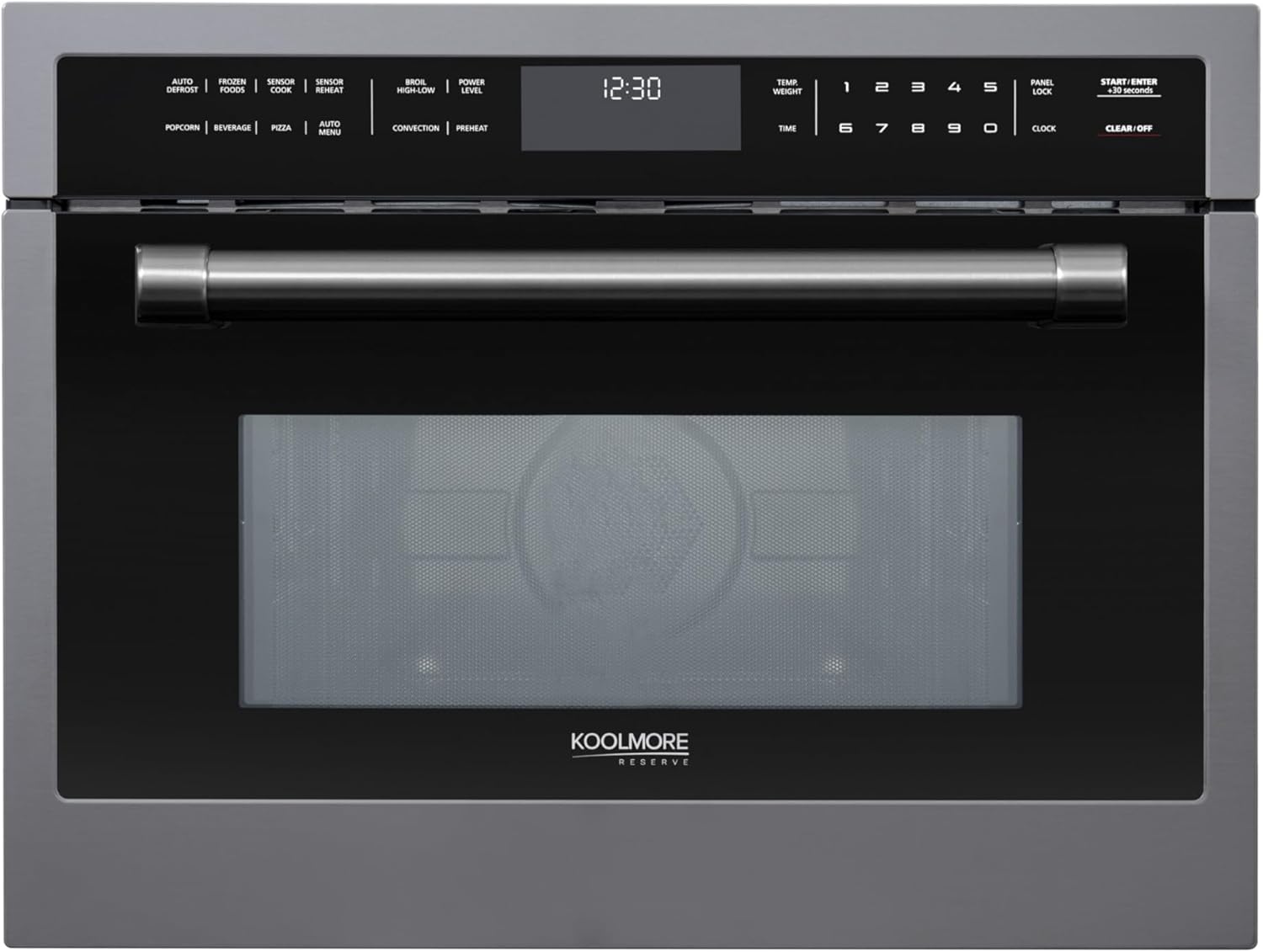
Figure 1: Front view of the KoolMore Reserve Built-in Convection Microwave Oven. The appliance features a black stainless-steel finish, a tempered glass door, and a digital control panel located above the door.
Components Included
- Air Fry Basket
- Microwave Grill Rack
- Turntable

Figure 2: The included accessories: a black air fry basket, a metal microwave grill rack, and a white ceramic turntable. These components are essential for utilizing the various cooking functions of the oven.
Setup and Installation
Proper installation is crucial for the performance and safety of your built-in convection microwave oven. This appliance is designed for built-in installation and requires specific cabinet dimensions and electrical connections.
Dimensions and Cut-Out Requirements
- Product Dimensions (Overall): 22.38"D x 23.5"W x 18.07"H
- Required Cut-Out Space: 22.06" W x 21.63" D x 18.13" H
- Item Weight: 82 pounds

Figure 3: Side view of the oven showing its physical dimensions: approximately 22 inches in height, 23.5 inches in depth, and 18 inches in width. These measurements are critical for proper built-in installation.
Electrical Requirements
This appliance requires a dedicated 20 Amp electrical circuit. Ensure your electrical outlet is compatible with a 20 Amp plug (NEMA 5-20P configuration) and that the circuit breaker can support the wattage (1750 watts). Consult a qualified electrician if you are unsure about your home's electrical capacity or need to install a new outlet.
Installation Steps (Summary)
- Prepare the cabinet opening according to the specified cut-out dimensions.
- Ensure the electrical outlet is correctly installed and meets the 20 Amp requirement.
- Carefully slide the oven into the prepared opening.
- Secure the oven to the cabinet using the provided mounting hardware.
- Plug in the appliance.

Figure 4: The convection microwave oven seamlessly integrated into a kitchen cabinet, demonstrating a typical built-in installation. The control panel is visible above the oven door.
Operating Instructions
Your KoolMore Reserve oven offers a variety of cooking functions. Familiarize yourself with the control panel and its settings for optimal use.

Figure 5: A detailed view of the digital touch control panel. It features buttons for various functions like Popcorn, Beverage, Pizza, Auto Defrost, Sensor Cook, Convection, and numerical input for time and weight.
Control Panel Functions
- Digital Touch Control Panel: Provides access to all cooking functions and settings.
- 17 One-Touch Settings: Includes presets for common items like Popcorn, Beverage, Defrost, Sensor Cook, Bake, and more.
- 10 Adjustable Microwave Power Levels: Allows precise control over microwave intensity, from gentle warming to high-speed cooking.
- Start/Enter +30 Seconds: Initiates cooking or adds 30 seconds to the cooking time.
- Clear/Off: Cancels current operation or clears settings.
- Clock: Sets the time of day.
- Panel Lock (Child Safety Lock): Engages a lock to prevent unintended operation, enhancing safety.
Cooking Modes
This appliance offers multiple cooking modes:
- Microwave: For rapid heating and cooking.
- Convection: Uses a fan to circulate hot air for even baking, roasting, and broiling.
- Air Fryer: Utilizes high-temperature convection for crispy results with less oil.
- Bake/Roast/Broil: Specific functions for traditional oven cooking.
- Defrost: Thaws frozen foods efficiently.
- Sensor Cooking: Smart sensors automatically adjust cooking time and temperature for optimal results, preventing over or under-cooking.

Figure 6: The oven interior showing a pizza being cooked on a rack, illustrating the convection or bake function. The internal heating elements are visible.
Maintenance and Cleaning
Regular cleaning and maintenance will prolong the life of your appliance and ensure optimal performance.
Exterior Cleaning
- Wipe the exterior surfaces with a soft, damp cloth and mild detergent.
- For black stainless-steel, use a non-abrasive cleaner specifically designed for stainless steel to avoid scratching.
- Dry thoroughly with a soft cloth.
Interior Cleaning
- Clean the oven cavity after each use to prevent food buildup.
- Use a damp cloth with mild soap or a microwave-safe cleaner.
- For stubborn stains, place a bowl of water with lemon slices inside and microwave for a few minutes to loosen residue, then wipe clean.
- The turntable and racks can be removed and washed with warm, soapy water.
Door Seal Maintenance
Regularly inspect the door seals for any signs of damage or food residue. Clean the seals with a damp cloth to ensure a proper seal during operation.
Troubleshooting
Before contacting customer support, refer to the following common issues and solutions:
| Problem | Possible Cause | Solution |
|---|---|---|
| Oven does not start | Power cord unplugged; circuit breaker tripped; door not closed properly. | Ensure power cord is securely plugged in. Check circuit breaker and reset if tripped. Close the oven door firmly. |
| Food not heating evenly | Improper stirring/rotation; food quantity too large; incorrect power level. | Stir or rotate food halfway through cooking. Reduce food quantity. Adjust power level as needed. Ensure turntable is rotating freely. |
| Excessive steam or condensation | High moisture content in food; normal during convection cooking. | This is often normal. Ensure proper ventilation in the kitchen. Wipe down interior after use. |
| Control panel unresponsive | Panel Lock engaged; temporary electronic glitch. | Deactivate Child Safety Lock. Unplug the oven for 1 minute, then plug back in to reset. |
Specifications
| Feature | Detail |
|---|---|
| Model Number | KM-CWO24-BSS |
| Capacity | 1.6 Cubic Feet |
| Product Dimensions (D x W x H) | 22.38" x 23.5" x 18.07" |
| Item Weight | 82 Pounds |
| Microwave Wattage | 1000 Watts |
| Convection Wattage | 1700 Watts |
| Installation Type | Built-In |
| Material | Stainless Steel |
| Color | Black Stainless-Steel |
| Special Features | 10 Power Levels, Child Safety Lock, One Touch Function, Sensor Cooking, Air Fryer |
| Certification | UL Certified |
Warranty and Support
Manufacturer's Coverage
This KoolMore product is backed by a 1-year manufacturer's coverage, which provides support for parts and labor should assistance be needed due to manufacturing defects. Please retain your proof of purchase for warranty claims.
Returns Policy
This product is eligible for 30-day easy returns. Refer to your retailer's return policy for specific details and procedures.
Customer Support
For technical assistance, troubleshooting beyond this manual, or warranty inquiries, please contact KoolMore customer support. Contact information can typically be found on the manufacturer's official website or on your product packaging.


