
1. Introduction
This manual provides detailed instructions for the assembly, operation, and maintenance of your YITAHOME L Shaped Desk. Please read this manual thoroughly before assembly and use to ensure proper function and safety. Keep this manual for future reference.
2. Safety Information
Adhere to the following safety guidelines during assembly and use:
- Always assemble the desk according to the instructions provided.
- Do not exceed the maximum weight recommendation of 600 pounds on the desk surface.
- Be cautious when using the monitor stand to avoid tipping or falling.
- Always keep the desk and surrounding area clear of obstructions to prevent accidents.
- Ensure all electrical connections for the power outlets and LED lights are secure and meet local electrical codes.
3. Package Contents
Your YITAHOME L Shaped Desk package includes the following items. Please verify all parts are present before beginning assembly. Note: The desk comes in 2 packages, which might not arrive at the same time.
- 1 x L Shaped Desk (components)
- 1 x Instructions Manual
- 1 x Packet of Fittings (hardware)
4. Product Features
The YITAHOME L Shaped Desk is designed with several features to enhance your workspace:
- Cool LED Light Strips: Integrated RGB LED light strip, controllable via phone app or switch, offering customizable colors and modes including music sync, built-in Mic, and timer functions.
- Convenient Charging Station: Equipped with 2 USB ports, 4 power outlets, and a 6.56ft power cord for charging various electronic devices.
- Integrated Storage: Features two file cabinets with one file drawer (adjustable for letter, A4, legal sizes), two drawers for small office supplies, and four open storage shelves.
- Printer Stand: A dedicated area to accommodate printers, scanners, or fax machines.
- Sturdy & Durable Construction: Constructed from high-grade P2 MDF board with a scratch-resistant finish and a 1.57" x 0.78" heavy-duty metal frame for stability and longevity.
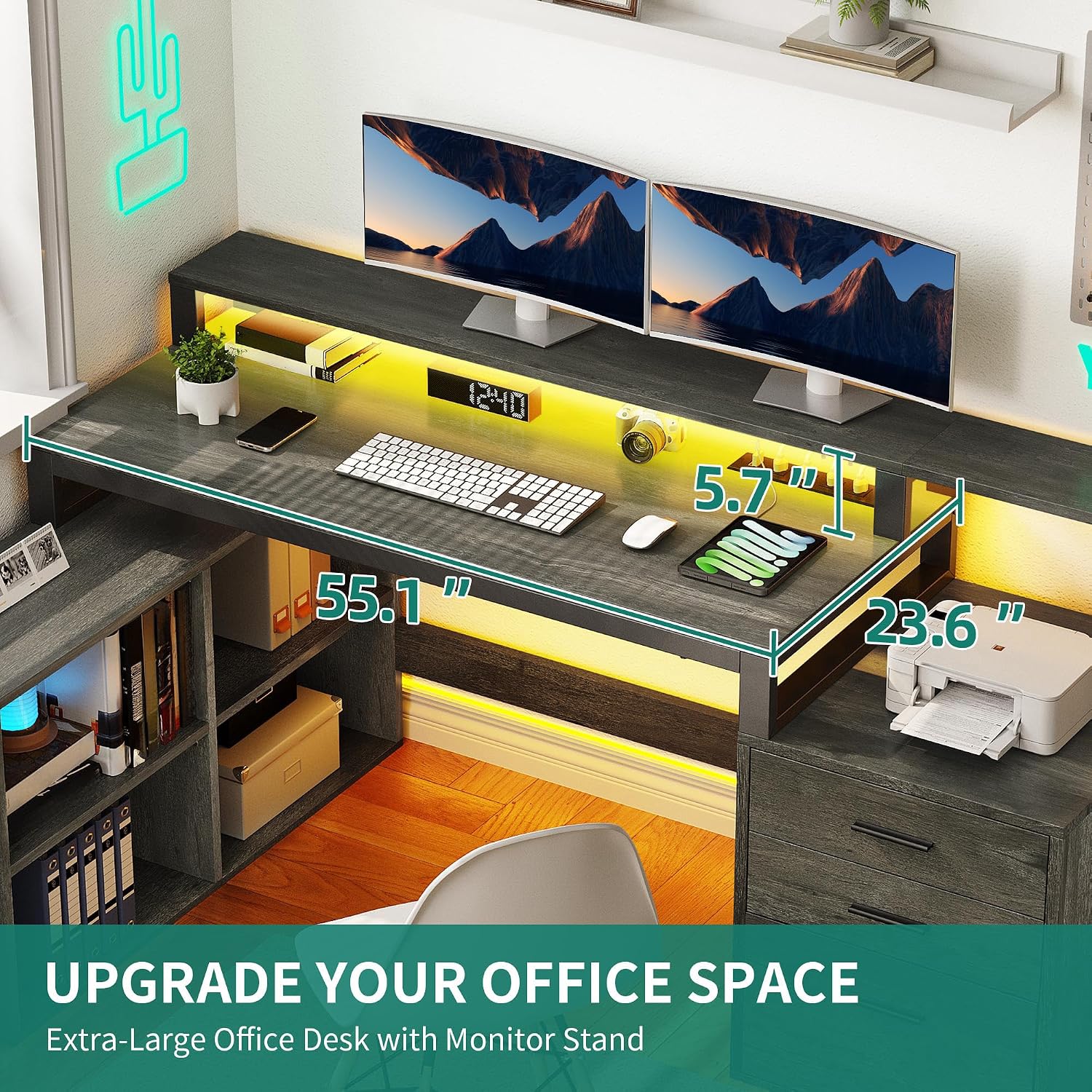
Image: Overview of the L-shaped desk setup, highlighting the monitor stand and LED lighting.
5. Product Dimensions
Refer to the diagram below for detailed product dimensions:

Image: A diagram illustrating the various dimensions of the L-shaped desk, including the main desktop, monitor stand, side shelves, and file cabinet drawers.
- Overall Dimensions (D x W x H): 35.4" x 65.4" x 36"
- Tabletop Thickness: 0.59 Inches
- Minimum Height: 30.2 Inches
- Maximum Height: 36 Inches
- Working Surface Diagonal Length: 84.85 Inches
6. Setup and Assembly
Assembly of the YITAHOME L Shaped Desk is designed to be straightforward. Follow the included instructions manual and utilize the numbered parts for easy identification.
- Unpack all components and verify against the package contents list.
- Identify all numbered parts and hardware.
- Follow the step-by-step assembly instructions provided in the separate manual.
- Ensure all screws and fasteners are tightened securely before use.
- It is recommended that two people assemble this desk for ease and safety.
Video: An overview of the YITAHOME L Shaped Desk, showcasing its features and design. This video provides a visual guide to the product's functionality and aesthetic.
7. Operating Instructions
7.1 LED Light Strips
The integrated RGB LED light strip can be controlled in two ways:
- Light Strip Switch: Use the physical switch located on the desk to cycle through basic colors and modes.
- Phone App: Download the dedicated phone application (refer to the separate LED light manual or packaging for app details) to access advanced customization options, including:
- Custom color selection
- Music sync mode
- Built-in microphone response
- Timer functions for automatic on/off

Image: The L-shaped desk illuminated by multi-color RGB LED light strips, demonstrating control via a mobile application.
7.2 Charging Station
The desk includes a built-in charging station for your electronic devices:
- Connect the desk's 6.56ft power cord to a standard 120V/12A wall outlet.
- Use the 4 AC outlets to power devices such as monitors, laptops, or printers.
- Utilize the 2 USB ports (5V/2A) to charge smaller devices like smartphones and tablets.

Image: A detailed view of the desk's power strip, showing 4 AC outlets and 2 USB ports, with devices connected for charging.
7.3 Storage Options
Organize your workspace using the various storage compartments:
- File Drawer: The bottom drawer in the file cabinet is designed for hanging files (letter, A4, legal sizes). Adjust the hanging bars as needed.
- Utility Drawers: The two upper drawers are suitable for small office supplies, stationery, and personal items.
- Open Shelves: Use the four open shelves for books, binders, decorative items, or additional storage boxes.
- Printer Stand: Place your printer or scanner on the designated stand for easy access.
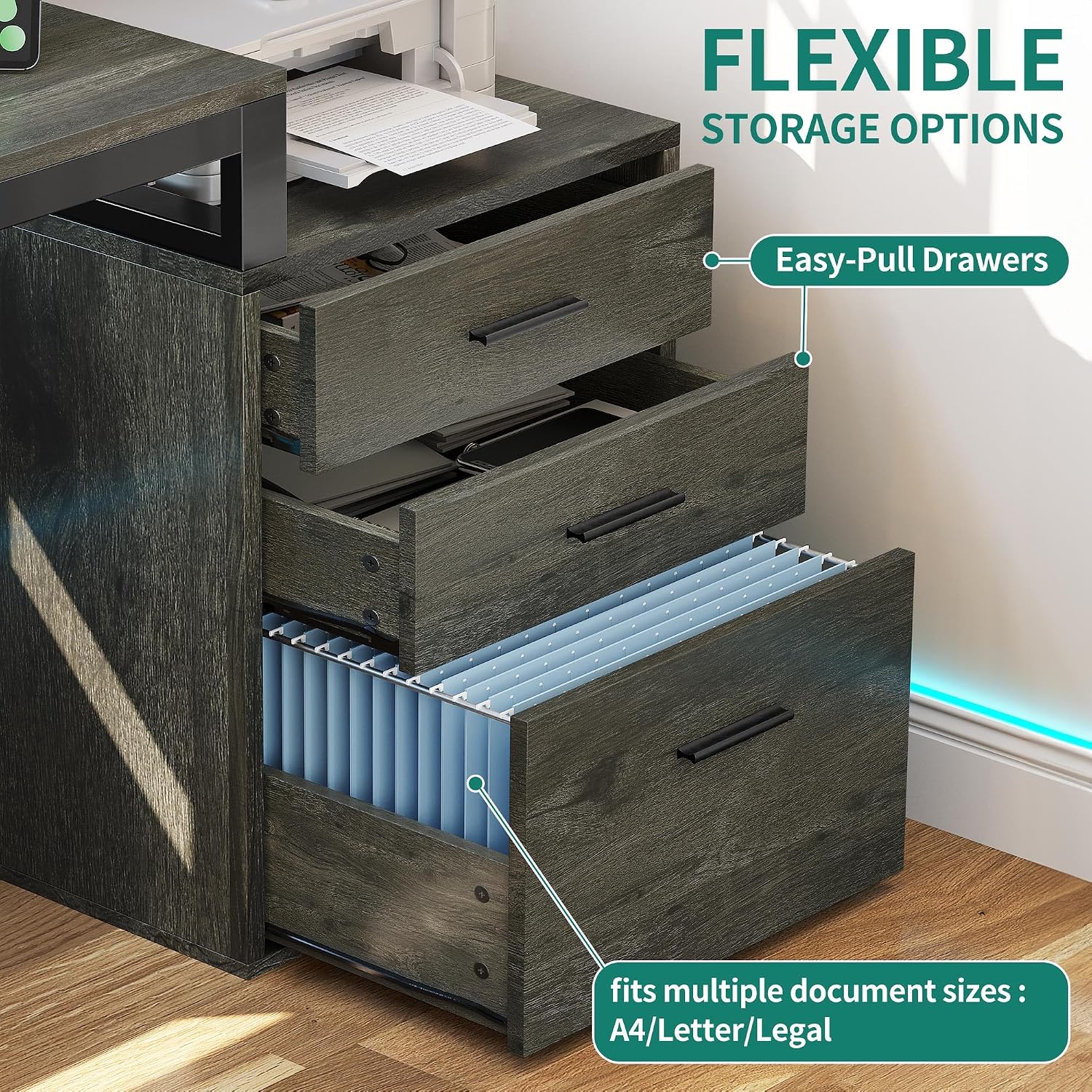
Image: The desk's file cabinet with drawers pulled out, illustrating the easy-pull mechanism and capacity for various document sizes.
8. Maintenance
To ensure the longevity and appearance of your YITAHOME L Shaped Desk, follow these maintenance guidelines:
- Cleaning: Wipe surfaces with a soft, damp cloth. Avoid harsh chemicals or abrasive cleaners that may damage the finish.
- Spills: Clean up spills immediately to prevent staining or damage to the engineered wood.
- Hardware: Periodically check all screws and fasteners to ensure they remain tight. Retighten as necessary.
- Weight Distribution: Distribute weight evenly across the desk surface and shelves to prevent stress on the structure.
- LED Lights: If LED lights malfunction, check connections. Do not attempt to repair electrical components unless qualified.

Image: A composite image detailing the desk's sturdy construction (0.59" tabletop, 1.57" x 0.79" metal frame), smooth drawer slides, sleek metal handles, and the dedicated printer stand area.
9. Troubleshooting
If you encounter issues with your desk, refer to the following common problems and solutions:
| Problem | Possible Cause | Solution |
|---|---|---|
| Desk is wobbly after assembly. | Loose fasteners or uneven floor. | Ensure all screws are fully tightened. Adjust leveling feet if present, or place shims under the desk legs on uneven surfaces. |
| LED lights are not working. | Power connection issue, faulty strip, or app malfunction. | Check if the power cord is securely plugged in. Verify the light strip switch is on. If using the app, ensure Bluetooth connection is active and the app is updated. Contact support if the issue persists. |
| Power outlets/USB ports are not functioning. | Desk power cord not plugged in, or internal wiring issue. | Ensure the desk's main power cord is securely plugged into a live wall outlet. Test with another device. If still not working, contact customer support. |
| Drawers do not slide smoothly. | Misalignment during assembly or obstruction. | Check drawer slides for any obstructions. Ensure drawers are correctly installed on the tracks. Re-check assembly steps for drawer installation. |
If you encounter a problem not listed here, or if the suggested solutions do not resolve the issue, please contact YITAHOME customer support.
10. Specifications
| Feature | Detail |
|---|---|
| Brand | YITAHOME |
| Model Number | MAYIH1G2j9 |
| Shape | L-Shape |
| Desk Design | Computer Desk |
| Product Dimensions (D x W x H) | 35.4" x 65.4" x 36" |
| Color | Grey |
| Style | Modern |
| Base Material | Engineered Wood |
| Top Material Type | Engineered Wood |
| Finish Type | Laminated |
| Special Features | With Power Outlets & USB Outlets & LED Lights & Monitor Stand & File Drawer |
| Recommended Uses | Office, Working, Writing, Gaming |
| Included Components | 1 x Instructions Manual, 1 x L Shaped Desk, 1 x Packet of Fittings |
| Required Assembly | Yes |
| Maximum Weight Recommendation | 600 Pounds |
| Recommended Number of People for Assembly | 2 |
| Number of Drawers | 3 |
| Number of Shelves | 4 (open shelves) |
| Item Weight | 100.53 Pounds |
| Drawer Glide Mechanism | Roller Glide |
11. Warranty and Support
Your YITAHOME L Shaped Desk comes with a Limited Warranty. For specific details regarding warranty coverage, duration, and terms, please refer to the warranty information included with your purchase or visit the official YITAHOME website.
For any questions, assembly assistance, troubleshooting not covered in this manual, or to report missing/damaged parts, please contact YITAHOME customer support. Contact information can typically be found on the product packaging, the YITAHOME website, or through your retailer.
We are committed to providing you with a satisfactory experience with your YITAHOME product.


