
1. Product Overview
The ACEMO T-Series wireless security camera system provides comprehensive surveillance with its 10-inch LCD monitor NVR and two 3-megapixel security cameras. This system is designed for both home and business use, offering clear video monitoring and flexible expansion options.
- High-Resolution Monitoring: Features a 10-inch LCD monitor for easy viewing and two 3-megapixel cameras that capture clear, detailed images of areas like entrances and gardens.
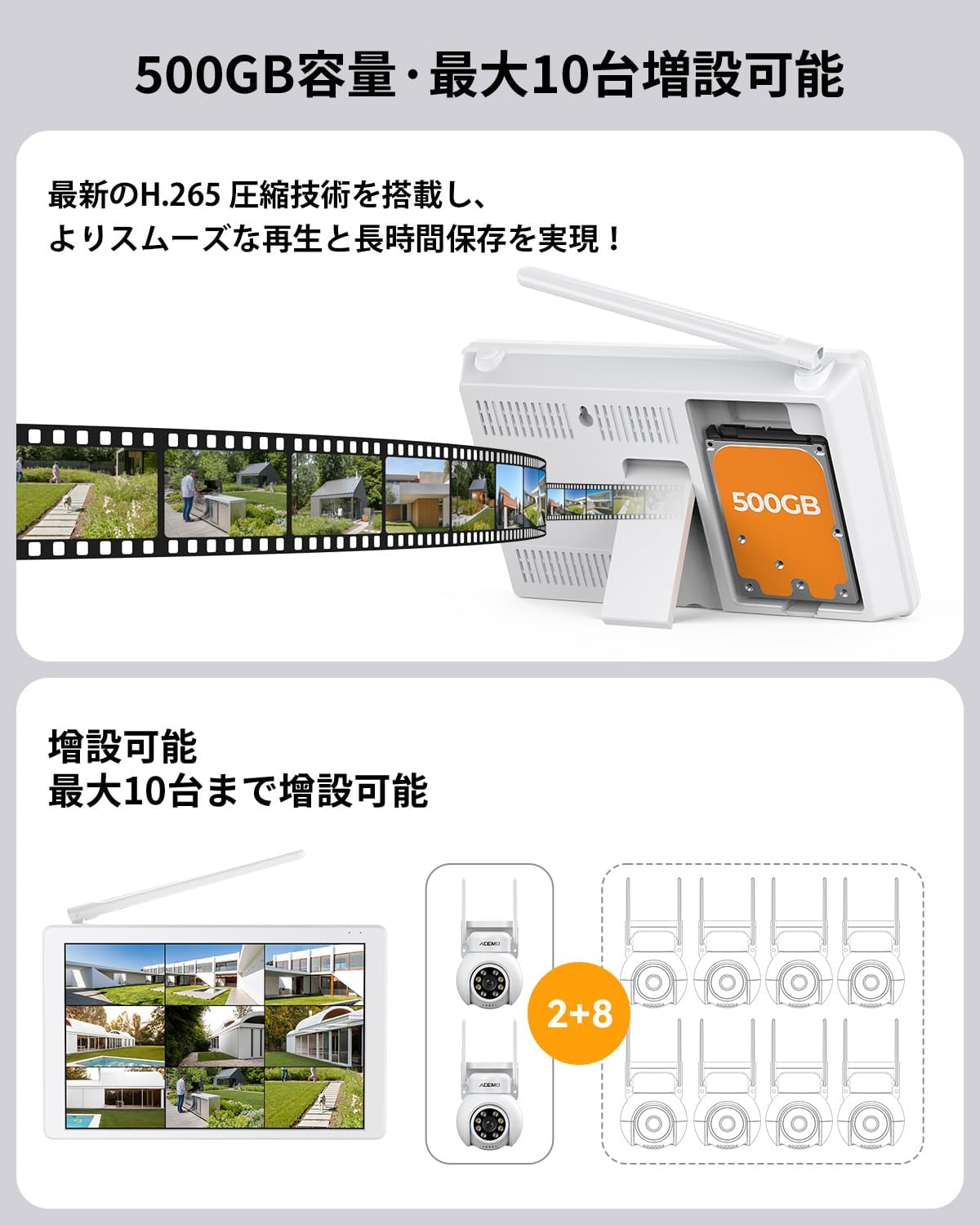
- Expandable System: The network video recorder (NVR) supports up to 10 cameras, making it suitable for monitoring multiple areas in homes, offices, or retail spaces.
- Wireless Connectivity: Designed for easy installation without the need for complex wiring. Cameras automatically pair with the NVR upon power-up, enabling local monitoring and recording even without an internet connection.
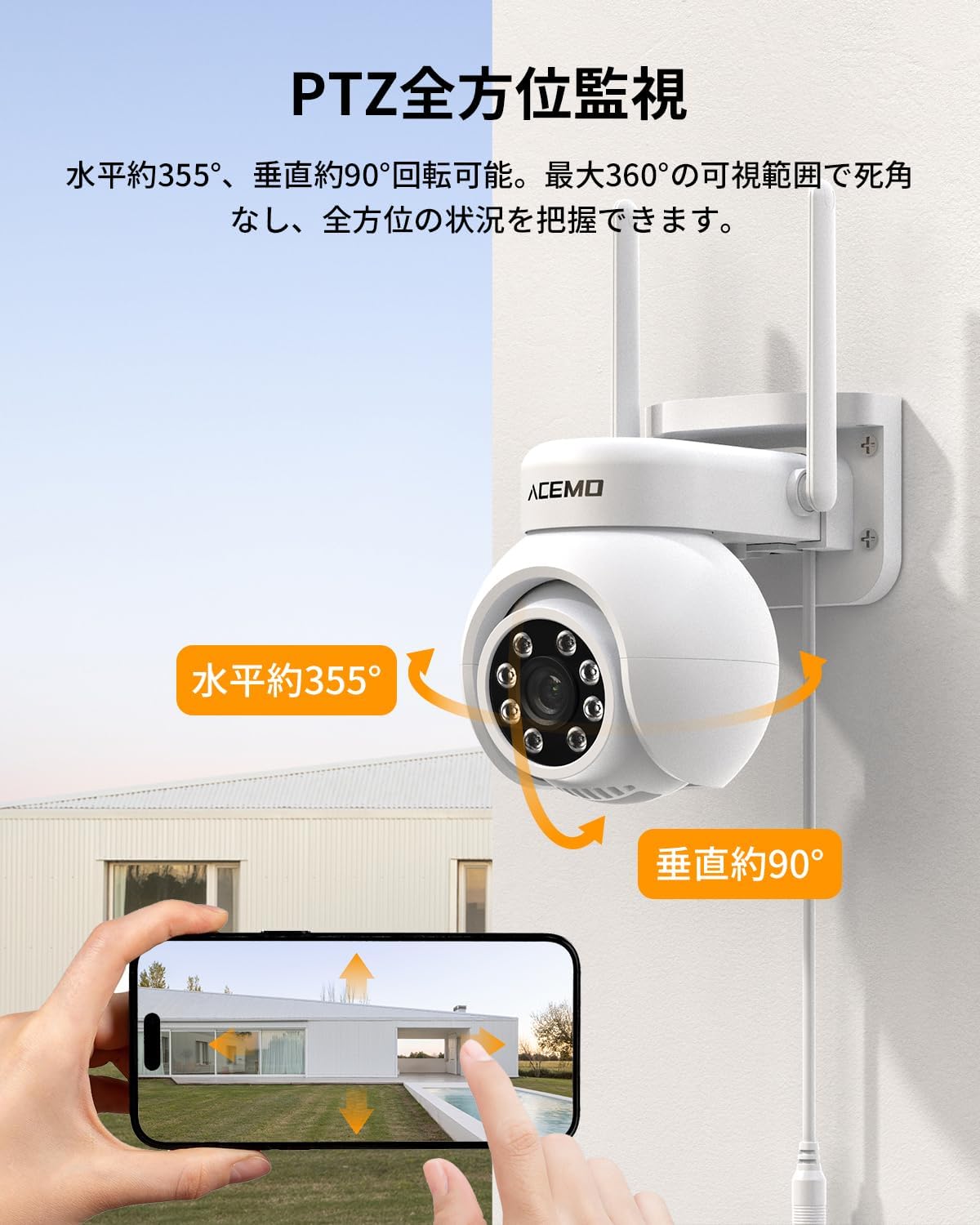
- 360° PTZ Surveillance: Each camera offers Pan-Tilt-Zoom (PTZ) functionality with 355° horizontal and 90° vertical rotation, providing wide-area coverage.
- Advanced Night Vision: Equipped with three night vision modes: standard infrared, full-color, and a smart mode that automatically switches to full-color upon motion detection for clear nighttime visibility.
- Smart Detection & Alarms: Human and motion detection trigger powerful lights and sirens to deter intruders, while instant smartphone notifications keep you informed of any activity.
- Continuous & Smart Recording: Includes a built-in 500GB HDD for 24-hour continuous recording. Supports motion-activated and scheduled recording modes for efficient storage management. Recorded footage can be easily reviewed via the NVR monitor or smartphone app.
- Two-Way Audio & Device Sharing: Cameras feature built-in microphones and speakers for two-way communication via the smartphone app. The system allows multiple users to share camera access.
- Durable & Weatherproof: IP66-rated for waterproof and dustproof performance, ensuring stable operation in outdoor environments, even in rain or splashes.
2. Package Contents
Please verify that all items listed below are included in your package:
- 10-inch Monitor NVR ×1
- 500GB Built-in HDD ×1
- Mouse ×1
- Mounting Screw Set ×2
- Instruction Manual (English) ×1
- Security Camera Body ×2
- Power Adapter (for Monitor) ×1
- Power Adapter (for Camera) ×2

For a visual guide to unboxing, please refer to the video below:
3. Setup Guide
3.1 Camera Installation
The ACEMO T-Series cameras are designed for easy installation. Follow these steps to mount your cameras:
- Choose a suitable location for your camera, ensuring it has a clear view of the area you wish to monitor.
- Use the provided mounting screw set to securely attach the camera to a wall or ceiling.
- Adjust the camera's angle manually to achieve the desired surveillance coverage. The camera can be adjusted 0-360° horizontally and 0-90° vertically.

For detailed camera installation instructions, please watch the following videos:
3.2 System Connection
The system features automatic pairing between the cameras and the NVR. Simply power on both devices to establish a connection.


For a comprehensive setup guide, refer to the video below:
4. Operating Instructions
4.1 PTZ Control and Auto-Tracking
Control the camera's pan and tilt movements directly from your smartphone app. You can also enable auto-tracking to automatically follow detected human or object movement.

4.2 Night Vision Modes
The camera offers three distinct night vision modes to suit various monitoring needs:
- Infrared Night Vision: Provides clear black and white footage in complete darkness.
- Full-Color Night Vision: Captures full-color video even at night, ideal for identifying details.
- Smart Night Vision: Automatically switches from infrared to full-color when motion is detected, ensuring optimal visibility when needed.


See the night vision capabilities in action:
4.3 Smart Detection and Alarms
The system's human and motion detection capabilities provide robust security:
- When motion or a human figure is detected, the camera automatically activates powerful lights and a siren to deter potential intruders.
- Instant notifications are sent to your smartphone app, allowing you to monitor the situation remotely.


4.4 Two-Way Audio Communication
The cameras are equipped with a microphone and speaker, enabling two-way audio communication through the smartphone app. This allows you to speak to visitors or deter intruders remotely.


4.5 Recording Management
The built-in 500GB HDD supports various recording options:
- 24-Hour Continuous Recording: Records continuously for comprehensive coverage.
- Motion-Activated Recording: Records only when motion is detected, saving storage space.
- Scheduled Recording: Set specific times for recording to optimize storage and focus on critical periods.


5. Maintenance
The ACEMO T-Series cameras are built to withstand various weather conditions, requiring minimal maintenance.
- Weather Resistance: The IP66 waterproof and dustproof rating ensures the cameras can operate reliably in rain, snow, and dusty environments.
- Regular Cleaning: Periodically wipe the camera lens with a soft, damp cloth to ensure clear image quality. Avoid using harsh chemicals.
- Firmware Updates: Check the manufacturer's website or app for any available firmware updates to ensure optimal performance and security.

6. Troubleshooting
If you encounter any issues with your ACEMO T-Series security camera system, please refer to the following common troubleshooting tips:
- No Image on Monitor: Ensure all power adapters are securely connected to both the cameras and the NVR. Verify that the monitor's power is on.
- No Remote Access: Confirm that the NVR is connected to your router via a LAN cable and that your router has an active internet connection. Check your smartphone app settings for proper configuration.
- False Alarms: Adjust the motion detection sensitivity settings in the smartphone app to reduce unwanted alerts. You can also define specific detection areas to focus on critical zones.
- Poor Night Vision: Ensure the camera lens is clean and free from obstructions. Check if the night vision mode is set appropriately (IR, full-color, or smart mode).
- Connectivity Issues: If cameras lose connection, try restarting both the cameras and the NVR. Ensure cameras are within the effective wireless range of the NVR.


7. Specifications
| Attribute | Detail |
|---|---|
| Brand | ACEMO |
| Model Number | T-Series |
| Product Dimensions | 9 x 7 x 6 cm |
| Item Weight | 1.9 Kilograms |
| Power Source | Corded Electric |
| Connectivity Technology | Wireless |
| Video Capture Resolution | 1296p (3 Megapixels) |
| Number of Channels | 10 (expandable) |
| Special Features | PTZ Control, App Control, Siren Alarm, Night Vision, Video Recording |
8. Warranty and Support
Your ACEMO T-Series security camera system comes with a 5-year warranty from the date of purchase, ensuring long-term peace of mind. In the event of any issues, our dedicated technical support team is available to provide prompt assistance.
- 5-Year Warranty: Covers manufacturing defects and ensures reliable operation for an extended period.
- Professional Technical Support: Our expert team is ready to assist with any questions regarding setup, operation, or troubleshooting. Please do not hesitate to contact us.
