
1. Introduction
Welcome to the user manual for the Gebildet 16mm Metal Emergency Stop Push Button Switch. This device is designed to provide a quick and reliable method to cut off power in emergency situations, enhancing safety for both personnel and equipment. Please read this manual thoroughly before installation and operation to ensure proper use and safety.
2. Safety Information
2.1 General Safety Precautions
- Always disconnect power before installing, wiring, or servicing the switch. Failure to do so can result in electric shock or injury.
- Ensure all wiring is performed by a qualified professional in accordance with local electrical codes and regulations.
- Do not exceed the specified voltage (250V AC) and current (10A) ratings of the switch.
- This switch is not waterproof. Avoid exposure to water, excessive moisture, or corrosive environments.
- Ensure the switch is easily accessible, clearly visible, and unobstructed in its installed location.
- Regularly inspect the switch for any signs of damage, wear, or loose connections. Replace immediately if any damage is found.
3. Product Overview
3.1 Product Features
- Latching Mechanism: Push the button to lock it in the 'OFF' position; turn clockwise to release and reset.
- Normally Closed (NC) Configuration: The circuit is open (power cut) when the button is pressed and latched.
- Durable Construction: Made with high-quality plastic and metal components for reliability.
- Clear Indication: Red mushroom head with white reset arrows for easy identification and operation.
3.2 Package Contents
- 2 x Gebildet 16mm Emergency Stop Push Button Switch
3.3 Product Diagram

Figure 1: Front view of the emergency stop switch, showing the red mushroom head with white reset arrows. This is the part pressed to activate the emergency stop function.

Figure 2: Rear view of the emergency stop switch, illustrating the terminal connections and the mounting nut. The two red wires are pre-attached to the SPST (Single Pole Single Throw) Normally Closed contacts.
4. Specifications
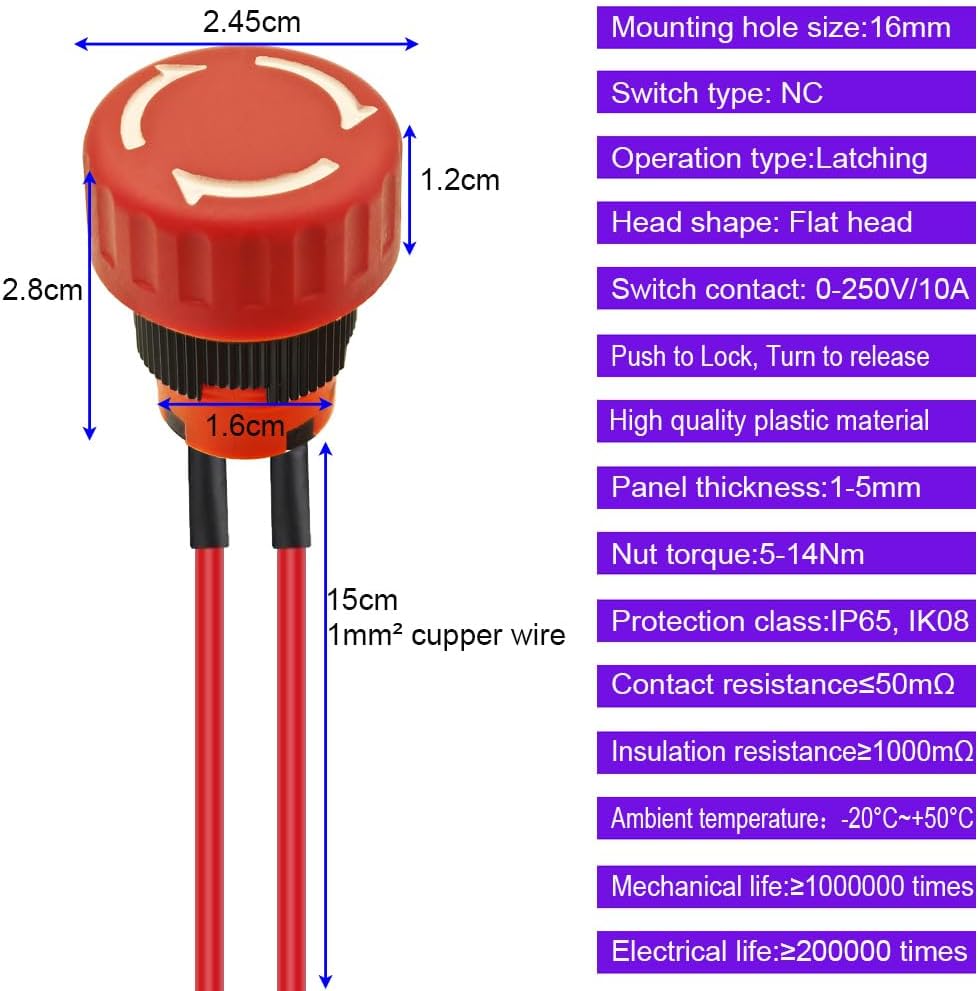
Figure 3: Detailed diagram of the emergency stop switch with key dimensions (e.g., head diameter, mounting hole size) and technical specifications.
| Parameter | Value |
|---|---|
| Model | E1611 |
| Switch Type | Push Button, Latching |
| Contact Configuration | SPST (Single Pole Single Throw), Normally Closed (NC) |
| Operating Voltage | 0-250V AC |
| Rated Current | 10A |
| Mounting Hole Size | 16mm (0.63 inches) |
| Head Diameter | 25mm (1 inch) |
| Panel Thickness | 1-5mm |
| Nut Torque | 5-14 Nm |
| Electrical Life | ≥200,000 cycles |
| Mechanical Life | ≥1,000,000 cycles |
| Protection Class | IP65, IK08 |
| Contact Resistance | ≤50mΩ |
| Insulation Resistance | ≥1000MΩ |
| Ambient Temperature | -20°C ~ +50°C |
5. Setup and Installation
5.1 Tools Required
- Drill with a 16mm (0.63 inch) drill bit
- Wire strippers
- Multimeter (for testing connections)
- Torque wrench (recommended for precise nut tightening)
5.2 Installation Steps
- Power Disconnection: Ensure all power to the circuit where the switch will be installed is completely disconnected and locked out.
- Prepare Mounting Hole: Drill a 16mm (0.63 inch) diameter hole in the desired mounting panel. Verify that the panel thickness is between 1mm and 5mm.
- Insert Switch: Insert the switch body through the mounting hole from the front of the panel.
- Secure Switch: From the rear of the panel, thread and tighten the provided mounting nut onto the switch body. Tighten the nut to a torque of 5-14 Nm to ensure a secure fit without over-tightening.
- Wire Connections: Connect the electrical wires from your circuit to the two pre-attached wires of the switch. This is a Normally Closed (NC) switch. In an NC configuration, the circuit is closed (power flows) when the button is released, and open (power is cut) when the button is pressed and latched. Ensure all connections are secure and properly insulated.
- Verify and Test: Double-check all wiring for correctness and security. Once verified, carefully restore power to the circuit and test the switch functionality according to the operating instructions.
6. Operating Instructions
6.1 Emergency Stop Function
- To Activate: In an emergency situation, firmly press the red mushroom head button. The button will latch in the depressed position, immediately breaking the circuit and cutting power to the connected equipment.
6.2 Resetting the Switch
- To Reset: After the emergency situation has been resolved and it is safe to resume operation, turn the red mushroom head button clockwise (following the arrows indicated on the button face) until it pops out to its original, unlatched position. This action will re-establish the circuit and restore power.
7. Maintenance
- Cleaning: Keep the switch clean and free from dust, dirt, and debris. Use a soft, dry cloth for cleaning. Do not use abrasive cleaners, solvents, or liquids directly on the switch.
- Connection Check: Periodically inspect all wiring connections to ensure they remain secure and free from corrosion.
- Physical Inspection: Regularly check the switch for any signs of physical damage, such as cracks, loose parts, or excessive wear. If any damage is observed, the switch should be replaced immediately.
8. Troubleshooting
8.1 Switch Does Not Cut Power When Pressed
- Wiring: Check all wiring connections for proper contact and ensure they are secure.
- Configuration: Verify that the switch is correctly wired as a Normally Closed (NC) device in your circuit.
- Ratings: Ensure the voltage and current of your circuit do not exceed the switch's specified ratings (250V AC, 10A).
8.2 Switch Does Not Reset
- Rotation: Ensure the button is turned fully clockwise until it audibly clicks and releases to its original position.
- Obstruction: Check for any physical obstruction around the button or mounting area that might prevent it from releasing.
8.3 Intermittent Operation
- Loose Connections: Inspect all wiring connections for looseness or poor contact.
- Internal Damage: If connections are secure, the switch may have internal damage. Replace the switch if intermittent operation persists.
9. Warranty and Support
For warranty information, technical assistance, or any product-related inquiries, please contact Gebildet customer service. You can typically find support contact details through your original point of purchase or by visiting the official Gebildet website.